I've just installed jBPM 4.4 with Eclipse Helios on a CentOS 5.5 virtual machine. For the most part, I followed the instructions in the User Guide - veering off-course only when the instructions didn't exactly match my system, e.g. the screenshots for Windows, etc.
I have not the designer bundled with the jBPM 4.4 distribution with Helios, only with Galileo.
In the User Guide, Section 2.11.3. "Configuring the jBPM runtime", I'm told to select jBPM from the options listed on the left side of the "Preferences" window. Unfortunately, jBPM isn't listed, so I can't specify the proper runtime location. This results in a number of errors (about 1000) in the GPD, and my installation is therefore incomplete, and broken.
The following is a screenshot of the Preferences dialog after installing the jBPM 4 Graphical Editor and Tools feature into a clean eclipse-java-galileo-SR2-linux-gtk.tar.gz installation in Fedora 13 with java-1.6.0-openjdk. I believe the OS and JVM have little relevance here.
http://community.jboss.org/servlet/JiveServlet/downloadImage/2-560996-6396/450-346/eclipse-preferences.png
You don't mention it clearly but I assume you get the thousand errors after importing the examples. The above runtime location has no effect on that. You have to define the jBPM user library and then add it to the classpath of the examples project manually. To do so:
- Right click the examples project.
- Select Build Path --> Add Libraries
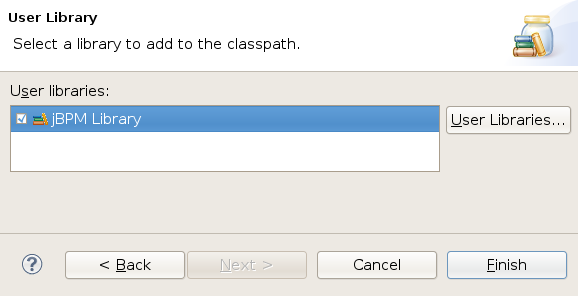
- Select the User Library entry and click Next
- Check the jBPM Libraries box and push Finish
http://community.jboss.org/servlet/JiveServlet/downloadImage/2-560996-6398/450-230/add-library.png
This should take care of the errors. I will add these instructions to the user guide.