The JBoss Tools Source Lookup plugin automatically adds a source attachment when debugging JBoss AS servers.
The plugin has been tested with JBoss AS 7.x and JBoss AS 6.1.
Installing the JBoss Source Lookup plugin
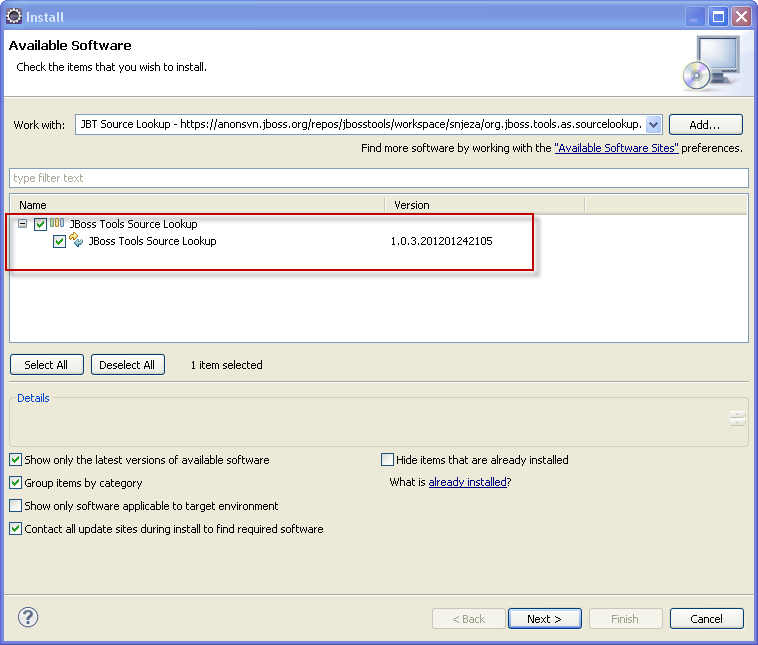
https://anonsvn.jboss.org/repos/jbosstools/workspace/snjeza/org.jboss.tools.as.sourcelookup.updatesite/
https://community.jboss.org/servlet/JiveServlet/downloadImage/38-4482-17822/450-382/lookupblog1.png
Install the JBoss Tools Source Lookup category and restart Eclipse.
Using the JBoss Source Lookup plugin
The use and debugging of this plugin is demonstrated in the following screencast: Debugging JBoss AS server.
The JBoss Source Lookup plugin enhances source attachment in the following way:
- archive file doesn't have to be in the maven classpath
- archive file doesn't have to be included in the classpath (jbossweb-*.jar, for instance). The JBoss Source Lookup plugin will find a class within a JBoss AS distribution and, if it is a Maven artifact, the plugin will attach the corresponding source.
- archive file doesn't have to be in the m2e index (jbossjts-4.16.0.Final.jar, for instance)
You don't have to add any JBoss AS Runtime to the classpath. I have added it in order to ensure the classes within the runtime are included in the Java Search and in order to be easier to add a breakpoint.