Hello Chris,
Thanks a lot for your time. Let me step back and thank you sincerely for the information that you posted at http://community.jboss.org/thread/166755?start=0&tstart=0. Really helped in many ways.
Coming back to this discussion, I made some progress on how to complete a workitem by extending the REST API. To answer your question, yes, the code that I modified, is running in the context of a jbpm engine. Here are my changes to "gwt-console-server\WEB-INF\classes\org\jboss\bpm\console\server\ProcessMgmtFacade.java"
@POST
@Path("definition/{id}/ctr_component_complete")
@Produces("application/json")
public Response ctrComponentComplete(@PathParam("id") String definitionId,
@FormParam("sessionID") String sessionID,
@FormParam("workitemID") String workItemID) {
try {
EntityManagerFactory emf = Persistence
.createEntityManagerFactory("org.jbpm.persistence.jpa");
Environment env = KnowledgeBaseFactory.newEnvironment();
env.set(EnvironmentName.ENTITY_MANAGER_FACTORY, emf);
env.set(EnvironmentName.TRANSACTION_MANAGER,
TransactionManagerServices.getTransactionManager());
UserTransaction ut = (UserTransaction) new InitialContext()
.lookup("java:comp/UserTransaction");
env.set(EnvironmentName.TRANSACTION, ut);
StatefulKnowledgeSession ksession = JPAKnowledgeService
.loadStatefulKnowledgeSession(
new Integer(sessionID).intValue(),
readKnowledgeBase(), null, env);
ksession.getWorkItemManager().completeWorkItem(
new Long(workItemID).longValue(), null);
ksession.dispose();
return createJsonResponse("SUCCESS");
} catch (Throwable t) {
throw new WebApplicationException(t, 500);
}
}
private KnowledgeBase readKnowledgeBase() throws Exception {
KnowledgeBuilder kbuilder = KnowledgeBuilderFactory
.newKnowledgeBuilder();
kbuilder.add(ResourceFactory.newClassPathResource("CTRWorkflow.bpmn"),
ResourceType.BPMN2);
KnowledgeBase kbase = kbuilder.newKnowledgeBase();
kbase.addKnowledgePackages(kbuilder.getKnowledgePackages());
return kbase;
}
As you can see, I am creating a new KnowledgeBase and using the parameters, 'sessionID' and 'workitemID' to accomplish this. Everything seems to be working as per the process design. However, in the jbpm-console web application's 'Process Overview' tab, the process instance is still showing up as 'RUNNING', eventhough I can see from the logs that the process has reached the end state. To confirm that the state is not changing, I clicked on the 'Diagram' button to bring up the process image. The image is coming up but not updating with the latest state.
I have a feeling that this issue may be related to creating a new KnowledgeBase rather than using the existing KnowledgeBase that JBPM engine and the jbpm-console web application share. To mitigate this problem, I tried to get a reference to the KnowledgeBase by trying several alternate approaches. But by these alternate approaches, I am not able to even complete the workitem. Here is one of the approaches that I tried.
private KnowledgeBase readKnowledgeBase() throws Exception {
KnowledgeBase kbase = null;
try {
ResourceChangeScannerConfiguration sconf = ResourceFactory.getResourceChangeScannerService().newResourceChangeScannerConfiguration();
sconf.setProperty( "drools.resource.scanner.interval", "10" );
ResourceFactory.getResourceChangeScannerService().configure( sconf );
ResourceFactory.getResourceChangeScannerService().start();
ResourceFactory.getResourceChangeNotifierService().start();
KnowledgeAgentConfiguration aconf = KnowledgeAgentFactory.newKnowledgeAgentConfiguration();
aconf.setProperty("drools.agent.newInstance", "false");
KnowledgeAgent kagent = KnowledgeAgentFactory.newKnowledgeAgent("Guvnor default", aconf);
kagent.applyChangeSet(ResourceFactory.newClassPathResource("ChangeSet.xml"));
kbase = kagent.getKnowledgeBase();
for (org.drools.definition.process.Process process: kbase.getProcesses()) {
log.debug("Loading process from Guvnor: " + process.getId());
}
} catch (Throwable t) {
if (t instanceof RuntimeException
&& "KnowledgeAgent exception while trying to deserialize".equals(t.getMessage())) {
log.error("Could not connect to guvnor");
if (t.getCause() != null) {
System.out.println(t.getCause().getMessage());
}
}
log.error("Could not load processes from guvnor: " + t.getMessage());
t.printStackTrace();
}
if (kbase == null) {
System.out.println("kbase is NULL");
kbase = KnowledgeBaseFactory.newKnowledgeBase();
}
return kbase;
}
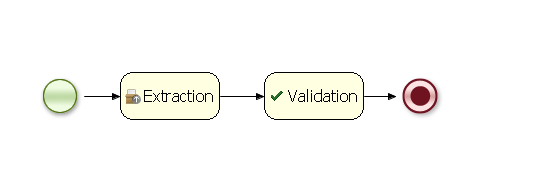
Here is my process image. Note that both the domain specific service tasks, 'Extraction' & 'Validation' operate in asynchronous mode, by EXCLUDING the "manager.completeWorkItem(workItem.getId(), null);" call.
http://community.jboss.org/servlet/JiveServlet/downloadImage/2-631358-17153/450-144/CTRworkflow.png
I really apreciate your time on this and hope this discussion helps few more community members out there.
Thank you.
-Ajay