[jdf-dev] Need help with cheat sheet issues

I am new to cheat sheets. I ran into issues testing quickstart pull 363,
so I decided to take a step back and look at Max's basic
cheatsheet-helloworld example. The source is here:
https://github.com/maxandersen/cheatsheet-helloworld
I imported his quickstart into JDBS 6.0.1 GA, went to Help --> Cheat
Sheets. and opened the cheatsheet-helloworld/cheatsheet.xml file.
The cheatsheet.xml source file contains this XML:
<item
skip="false"
title="Welcome to this project">
<description>
It is important to force this to be run to make the variable
resolved - a simple way to make that happen is to add an required
command as seen below.
</description>
<command
required="true"
returns="currentProject"
serialization="org.jboss.tools.project.examples.cheatsheet.getProjectForCheatsheet"/>
</item>
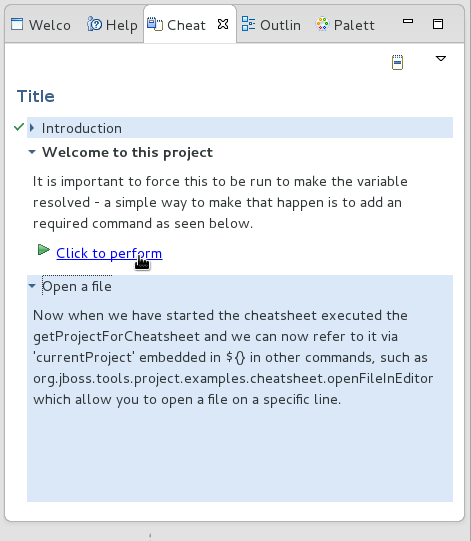
In the cheat sheet in the right pane, I clicked on the "Click to
perform" under the description above:
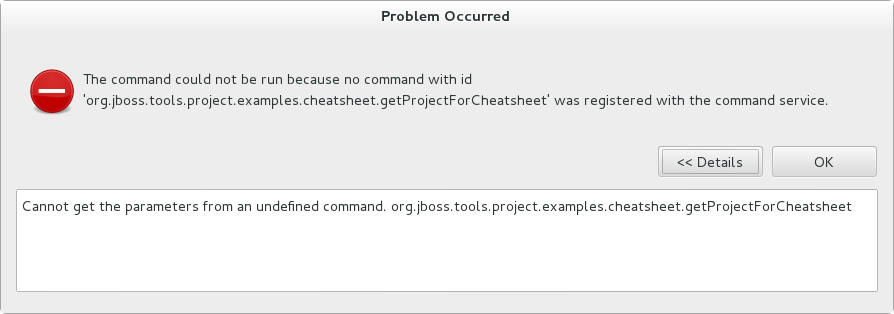
I get this error:
I also don't see any link under the "Open a file" section either. I
believe there should be one based on this command:
<command
required="false"
serialization="org.jboss.tools.project.examples.cheatsheet.openFileInEditor(path=/${currentProject}/cheatsheet.xml,fromLine=27,toLine=29)"/>
Does anyone have any idea what I'm doing wrong?
Thanks,
Sande
Attachments:
- ccbbficg.png (image/png — 26.2 KB)
- bgdibbcd.png (image/png — 40.9 KB)
- attachment.html (text/html — 2.7 KB)