[JBoss JIRA] (JBIDE-21821) org.eclipse.egit.importer.ui 4.0 in JBDS Marketplace Install Breaks Egit in Mars.2
by Nick Boldt (JIRA)
[ https://issues.jboss.org/browse/JBIDE-21821?page=com.atlassian.jira.plugi... ]
Nick Boldt updated JBIDE-21821:
-------------------------------
Summary: org.eclipse.egit.importer.ui 4.0 in JBDS Marketplace Install Breaks Egit in Mars.2 (was: Old org.eclipse.egit.importer.ui in JBDS Marketplace Install Breaks Egit in Mars.2)
> org.eclipse.egit.importer.ui 4.0 in JBDS Marketplace Install Breaks Egit in Mars.2
> ----------------------------------------------------------------------------------
>
> Key: JBIDE-21821
> URL: https://issues.jboss.org/browse/JBIDE-21821
> Project: Tools (JBoss Tools)
> Issue Type: Bug
> Components: build, marketplace
> Reporter: Thomas Mäder
> Assignee: Nick Boldt
> Priority: Blocker
> Fix For: 4.3.1.CR1
>
> Attachments: FrameworkEvent ERROR.txt, jbt-error, jgit40_41_JBDS.installed.txt, jgit40_41_JBT.installed.txt
>
>
> Installing Red Hat JBoss Developer Studio 9.0.0GA into a fresh Eclipse 4.5.2 (for Eclipse Committers) causes Egit to break.
> # Install Eclipse 4.5.2
> # In the Marketplace, search for "jboss developer studio"
> # You get a single result: Red Hat JBoss Developer Studio 9.0.0 GA
> # Install it
> # Restart
> # Observe: the EGit views and preferences are missing
> # Observe: you get messages in the Eclipse error log concerning a dependency version incompatibility
--
This message was sent by Atlassian JIRA
(v6.4.11#64026)
10 years, 3 months
[JBoss JIRA] (JBDS-3600) include AERI in JBDS 10
by Nick Boldt (JIRA)
[ https://issues.jboss.org/browse/JBDS-3600?page=com.atlassian.jira.plugin.... ]
Nick Boldt commented on JBDS-3600:
----------------------------------
OK, so I've learned two things here:
a) org.eclipse.recommenders.stacktraces.rcp.serverUrl should not be used (that was previously recommended in JBDS-3566, via links to documentation on https://wiki.eclipse.org/EPP/Logging#How_can_I_include_AERI_in_my_own_pro... ). If that's no longer true, that wiki should be updated.
b) there is nowhere in JBDS where we use the *org.eclipse.epp.logging.aeri.ide.servers* extension point. All we ever did was to add this feature into our product definition:
{code:title=https://github.com/jbdevstudio/jbdevstudio-product/blob/master/site/com.jboss.devstudio.core.product#L65}
63 <feature id="com.jboss.devstudio.core.capabilities.feature"/>
64+ <!-- JBDS-3566 new for Mars.2 / Neon.M4 -->
65+ <feature id="org.eclipse.epp.logging.aeri.feature"/>
66 </features>
{code}
I can certainly enable the extension point and set up our own JBDS-branded reporting server (red ball for JBDS instead of blue wrench for JBT). Is that something we want to do? I presume that's blocked by https://bugs.eclipse.org/bugs/show_bug.cgi?id=489484
> include AERI in JBDS 10
> -----------------------
>
> Key: JBDS-3600
> URL: https://issues.jboss.org/browse/JBDS-3600
> Project: Developer Studio (JBoss Developer Studio)
> Issue Type: Feature Request
> Components: aeri, build, target-platform
> Affects Versions: 10.0.0.Alpha1
> Reporter: Nick Boldt
> Assignee: Nick Boldt
> Priority: Blocker
> Fix For: 10.0.0.Alpha1
>
> Attachments: aeri-in-jbds10.png, error-prefs-jbds.png, error-prefs-jbt.png, error-reporting.png
>
>
> Include required bundles for AERI in JBDS. Details TBD.
> Maybe need these?
> {code}
> org.eclipse.epp.logging.aeri.feature_1.0.1.v20150913-0716
> org.eclipse.epp.logging.aeri.ide_1.0.1.v20150913-0657.jar
> org.eclipse.epp.logging.aeri.ui_1.0.1.v20150913-0716.jar
> {code}
--
This message was sent by Atlassian JIRA
(v6.4.11#64026)
10 years, 3 months
[JBoss JIRA] (JBDS-3566) include AERI in JBDS 9.1
by Nick Boldt (JIRA)
[ https://issues.jboss.org/browse/JBDS-3566?page=com.atlassian.jira.plugin.... ]
Nick Boldt commented on JBDS-3566:
----------------------------------
"why are you creating your custom devstudio.redhat.com error discovery ?"
Because nothing was working in JBDS, so I went back into this JIRA to see the latest comments from you, Max, about how to set something up:
{quote}This jira is just about adding aeri to JBDS - not about setting up any servers etc.
It would be great if you can test it works so "acceptedProducts" seem to be the right place to change that.
How about downloading https://dev.eclipse.org/recommenders/community/confess/v2/discovery and change that part and let it include com.jbds.* and see if the UI flow actually works ?{quote} -- https://issues.jboss.org/browse/JBDS-3566?focusedCommentId=13156570&page=...
If it's working as expected in both JBDS 9.1 and 10.0, please provide steps to reproduce, because I couldn't get error reporting to fire for any of the errors I generated in either version of JBDS.
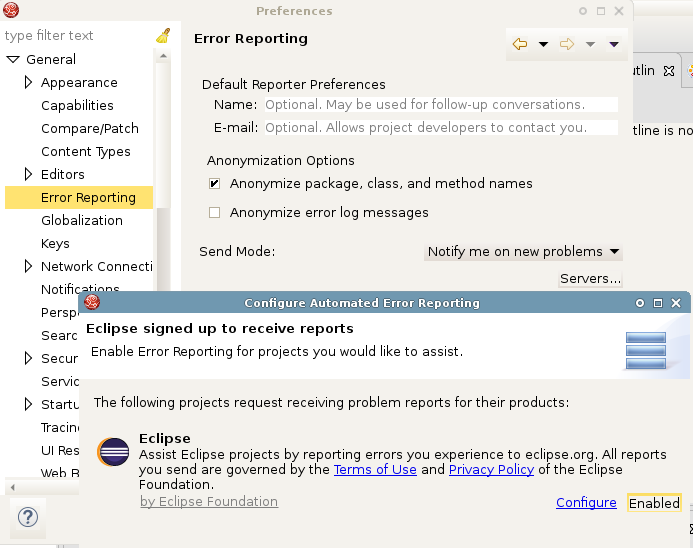
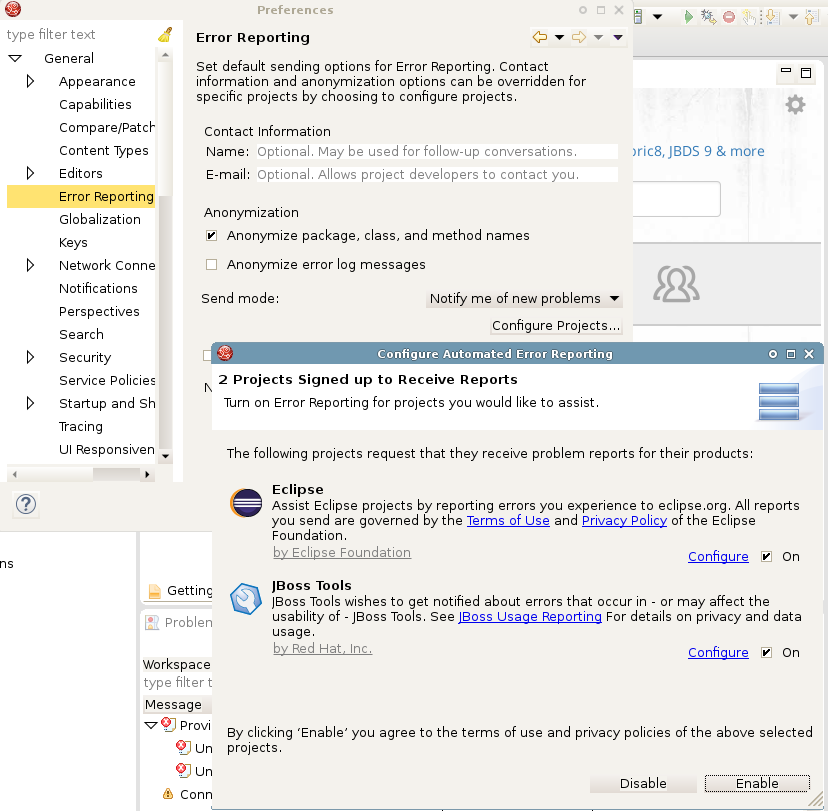
And if you look at my screenshot on JBDS-3600 ( https://issues.jboss.org/secure/attachment/12399019/aeri-in-jbds10.png ) you'll see there's not even a JBoss Tools AERI reporting flavour there. The second reporting server only appears for JBDS 9.1 ( https://issues.jboss.org/secure/attachment/12399018/aeri-in-jbds91.png )
So, OK, maybe this *is* working, as you say... but I can't verify that so I'd love to know what you did to make it magically work OOTB in JBDS 9.1 or 10.0
> include AERI in JBDS 9.1
> ------------------------
>
> Key: JBDS-3566
> URL: https://issues.jboss.org/browse/JBDS-3566
> Project: Developer Studio (JBoss Developer Studio)
> Issue Type: Feature Request
> Components: aeri, build, target-platform
> Affects Versions: 9.1.0.Beta1
> Reporter: Nick Boldt
> Assignee: Nick Boldt
> Priority: Blocker
> Attachments: aeri-in-jbds91.png, error-prefs-jbds.png, error-prefs-jbt.png, error-reporting.png
>
>
> Include required bundles for AERI in JBDS. Details TBD.
> Maybe need these?
> {code}
> org.eclipse.epp.logging.aeri.feature_1.0.1.v20150913-0716
> org.eclipse.epp.logging.aeri.ide_1.0.1.v20150913-0657.jar
> org.eclipse.epp.logging.aeri.ui_1.0.1.v20150913-0716.jar
> {code}
--
This message was sent by Atlassian JIRA
(v6.4.11#64026)
10 years, 3 months
[JBoss JIRA] (JBTIS-571) Error loading file switchyard.xml. Unable to load the generated resource.
by nicolas duminil (JIRA)
[ https://issues.jboss.org/browse/JBTIS-571?page=com.atlassian.jira.plugin.... ]
nicolas duminil commented on JBTIS-571:
---------------------------------------
JBDS 9.0.0.GA as stated. Windows 7 and 10 as stated as well. The Switchyard version comming with JBDS 9.0.0.GA of course. JBTIS and JBDSIS comming with 9.0.0.GA
> Error loading file switchyard.xml. Unable to load the generated resource.
> -------------------------------------------------------------------------
>
> Key: JBTIS-571
> URL: https://issues.jboss.org/browse/JBTIS-571
> Project: JBoss Tools Integration Stack
> Issue Type: Bug
> Components: switchyard
> Reporter: nicolas duminil
> Assignee: Brian Fitzpatrick
> Priority: Blocker
>
> After creating a new switchyard project, next time it starts up JBDS is not able to open its own generated siwtchyard.xml file. The error "Error loading file switchyard.xml. Unable to load the generated resource" is displayed. The only choice is the OK button. Pressing it, the JBDS screen doesn't display but JBDS seems to be started and the LCK file created. The only option the user has is to kill the process.
> Tested on Windows 7 and Windows 10 with Java 8.
--
This message was sent by Atlassian JIRA
(v6.4.11#64026)
10 years, 3 months
[JBoss JIRA] (JBIDE-21858) Opening the OpenShift 3 server adapter wizard is verrrry slow
by Andre Dietisheim (JIRA)
[ https://issues.jboss.org/browse/JBIDE-21858?page=com.atlassian.jira.plugi... ]
Andre Dietisheim commented on JBIDE-21858:
------------------------------------------
[~scabanovich] yes agreed, like you pointed out there are far too many requests to load server data in the current implementation. Many of them are dupllicate and even happen in the UI thread. I'm fixing quite a few of these, trying to rely on the data thats loaded already. I expect this to be fixed once I'm done with JBIDE-21830
> Opening the OpenShift 3 server adapter wizard is verrrry slow
> -------------------------------------------------------------
>
> Key: JBIDE-21858
> URL: https://issues.jboss.org/browse/JBIDE-21858
> Project: Tools (JBoss Tools)
> Issue Type: Bug
> Components: openshift
> Affects Versions: 4.3.1.CR1
> Reporter: Fred Bricon
> Assignee: Andre Dietisheim
> Priority: Critical
> Fix For: 4.3.1.CR1
>
>
> Open the Server Adapter menu from the OpenShift explorer is suuuuper slow. We need to fix it!
--
This message was sent by Atlassian JIRA
(v6.4.11#64026)
10 years, 3 months
[JBoss JIRA] (JBTIS-571) Error loading file switchyard.xml. Unable to load the generated resource.
by Brian Fitzpatrick (JIRA)
[ https://issues.jboss.org/browse/JBTIS-571?page=com.atlassian.jira.plugin.... ]
Brian Fitzpatrick edited comment on JBTIS-571 at 3/14/16 10:56 AM:
-------------------------------------------------------------------
Do you have any additional details you can provide on this? What version of JBDS are you using? What version of SwitchYard tooling? What version of SwitchYard are you configuring the project to use? How did you shut down the tooling? What version of JBTIS or JBDSIS did you install?
was (Author: bfitzpat):
Do you have any additional details you can provide on this? What version of JBDS are you using? What version of SwitchYard tooling? What version of SwitchYard are you configuring the project to use? How did you shut down the tooling?
> Error loading file switchyard.xml. Unable to load the generated resource.
> -------------------------------------------------------------------------
>
> Key: JBTIS-571
> URL: https://issues.jboss.org/browse/JBTIS-571
> Project: JBoss Tools Integration Stack
> Issue Type: Bug
> Components: switchyard
> Reporter: nicolas duminil
> Assignee: Brian Fitzpatrick
> Priority: Blocker
>
> After creating a new switchyard project, next time it starts up JBDS is not able to open its own generated siwtchyard.xml file. The error "Error loading file switchyard.xml. Unable to load the generated resource" is displayed. The only choice is the OK button. Pressing it, the JBDS screen doesn't display but JBDS seems to be started and the LCK file created. The only option the user has is to kill the process.
> Tested on Windows 7 and Windows 10 with Java 8.
--
This message was sent by Atlassian JIRA
(v6.4.11#64026)
10 years, 3 months
[JBoss JIRA] (JBIDE-21864) Server Adapter: publishing is slow compared to "oc rsync" on the cmd line
by Andre Dietisheim (JIRA)
[ https://issues.jboss.org/browse/JBIDE-21864?page=com.atlassian.jira.plugi... ]
Andre Dietisheim edited comment on JBIDE-21864 at 3/14/16 10:54 AM:
--------------------------------------------------------------------
The reasons for this being slow are two-fold:
* we do a 1st rsync server->local and then a subsequent local->server. When getting the files from remote we most likely get a lot of unwanted files like the .git-folder in the 1st iteration (latter ones wont). We do this to avoid permission issues
* we do a local copy before syncing to the server to filter out folders like .git.
The 1st downsync would get boosted if we were using the native rsync exclusion-/inclusion-filters that "oc rsync" now supports.
was (Author: adietish):
The reasons for this being slow are two-fold:
* we do a 1st rsync server->local and then a subsequent local->server. When getting the files from remote we most likely get a lot of unwanted files like the .git-folder in the 1st iteration (latter ones wont). We do this to avoid permission issues
* we do a local copy before syncing to the server to filter out folders like .git.
Both cases would get a boost if we were using the native rsync exclusion-/inclusion-filters that "oc rsync" now supports.
> Server Adapter: publishing is slow compared to "oc rsync" on the cmd line
> -------------------------------------------------------------------------
>
> Key: JBIDE-21864
> URL: https://issues.jboss.org/browse/JBIDE-21864
> Project: Tools (JBoss Tools)
> Issue Type: Enhancement
> Components: openshift
> Affects Versions: 4.3.1.CR1
> Reporter: Andre Dietisheim
> Labels: openshift_v3, server_adapter
> Fix For: 4.4.0.Alpha1
>
>
> Compared with "oc rsync" on the cmd line publishing in the server adapter (which does "oc rsync" behind the scenes) is very slow
--
This message was sent by Atlassian JIRA
(v6.4.11#64026)
10 years, 3 months
[JBoss JIRA] (JBTIS-571) Error loading file switchyard.xml. Unable to load the generated resource.
by Brian Fitzpatrick (JIRA)
[ https://issues.jboss.org/browse/JBTIS-571?page=com.atlassian.jira.plugin.... ]
Brian Fitzpatrick edited comment on JBTIS-571 at 3/14/16 10:54 AM:
-------------------------------------------------------------------
Do you have any additional details you can provide on this? What version of JBDS are you using? What version of SwitchYard tooling? What version of SwitchYard are you configuring the project to use? How did you shut down the tooling?
was (Author: bfitzpat):
Do you have any additional details you can provide on this? What version are you using? What environment (version of Java, OS)? What version of SwitchYard are you configuring the project to use?
> Error loading file switchyard.xml. Unable to load the generated resource.
> -------------------------------------------------------------------------
>
> Key: JBTIS-571
> URL: https://issues.jboss.org/browse/JBTIS-571
> Project: JBoss Tools Integration Stack
> Issue Type: Bug
> Components: switchyard
> Reporter: nicolas duminil
> Assignee: Brian Fitzpatrick
> Priority: Blocker
>
> After creating a new switchyard project, next time it starts up JBDS is not able to open its own generated siwtchyard.xml file. The error "Error loading file switchyard.xml. Unable to load the generated resource" is displayed. The only choice is the OK button. Pressing it, the JBDS screen doesn't display but JBDS seems to be started and the LCK file created. The only option the user has is to kill the process.
> Tested on Windows 7 and Windows 10 with Java 8.
--
This message was sent by Atlassian JIRA
(v6.4.11#64026)
10 years, 3 months