
11:04 a.m.
Run button in toolbar needs to run the newly generated project
--------------------------------------------------------------
Key: JBIDE-10218
URL: https://issues.jboss.org/browse/JBIDE-10218
Project: Tools (JBoss Tools)
Issue Type: Bug
Reporter: Burr Sutter
The Run icon in the Eclipse toolbar is where a new developer (new to JBoss Tools) expects
to go directly after he has generated a new project from either File-New or JBoss Central
by using one of the archetypes or project examples/quickstarts.
This means the generated project needs to be highlighted in the Project Explorer and the
Run button should "just work".
There is also an issue with Run vs Debug - if the server is in "debug mode" then
Run should just assume that is OK and not prompt the user.
Run on Server should be the default so the user can use a single click on OK
--
This message is automatically generated by JIRA.
If you think it was sent incorrectly, please contact your JIRA administrators:
https://issues.jboss.org/secure/ContactAdministrators!default.jspa
For more information on JIRA, see: http://www.atlassian.com/software/jira
11:06 a.m.
[
https://issues.jboss.org/browse/JBIDE-10218?page=com.atlassian.jira.plugi...
]
Burr Sutter updated JBIDE-10218:
--------------------------------
Attachment: Screen Shot 2011-11-22 at 12.02.17 PM.png
Screen Shot 2011-11-22 at 12.02.38 PM.png
Screen Shot 2011-11-22 at 12.02.53 PM.png
Screen Shot 2011-11-22 at 12.03.03 PM.png
Screen Shot 2011-11-22 at 12.03.29 PM.png
Screen Shot 2011-11-22 at 12.03.42 PM.png
Note: the tooltip does not reference the correct project though it does launch the correct
project that is highlighted in the project explorer.
Reproduce:
1- From JBoss Central, select "EE 6 Web Project"
2- Give it a name like "test99"
3- when it is generated and appears in the Project Explorer it is not highlighted
4- Hit the Run button (and notice the tooltip)
Run button in toolbar needs to run the newly generated project
--------------------------------------------------------------
Key: JBIDE-10218
URL: https://issues.jboss.org/browse/JBIDE-10218
Project: Tools (JBoss Tools)
Issue Type: Bug
Reporter: Burr Sutter
Attachments: Screen Shot 2011-11-22 at 12.02.17 PM.png, Screen Shot 2011-11-22 at
12.02.38 PM.png, Screen Shot 2011-11-22 at 12.02.53 PM.png, Screen Shot 2011-11-22 at
12.03.03 PM.png, Screen Shot 2011-11-22 at 12.03.29 PM.png, Screen Shot 2011-11-22 at
12.03.42 PM.png
The Run icon in the Eclipse toolbar is where a new developer (new to JBoss Tools) expects
to go directly after he has generated a new project from either File-New or JBoss Central
by using one of the archetypes or project examples/quickstarts.
This means the generated project needs to be highlighted in the Project Explorer and the
Run button should "just work".
There is also an issue with Run vs Debug - if the server is in "debug mode"
then Run should just assume that is OK and not prompt the user.
Run on Server should be the default so the user can use a single click on OK
--
This message is automatically generated by JIRA.
If you think it was sent incorrectly, please contact your JIRA administrators:
https://issues.jboss.org/secure/ContactAdministrators!default.jspa
For more information on JIRA, see: http://www.atlassian.com/software/jira
9:08 a.m.
[
https://issues.jboss.org/browse/JBIDE-10218?page=com.atlassian.jira.plugi...
]
Max Rydahl Andersen commented on JBIDE-10218:
---------------------------------------------
You cut out all of the screenshot so I can't actually see what the selection or
current editor is showing ?
For me it always shows something contextual to what is currently selected.
Could you please make the screenshot and show the full IDE so the current selection is
visible ?
"There is also an issue with Run vs Debug - if the server is in "debug
mode" then Run should just assume that is OK and not prompt the user."
I don't understand the logic behind this - Run is different than Debug and if you
don't want to get asked marked the checkbox saying "remember this choice".
"Run on Server should be the default so the user can use a single click on OK"
That assumes your app is a "run on server" element - but if your selection is a
junit test, a main class or you want to run maven build before running then Run On Server
does not make sense as automated selection. Thus there is this extra question on first
launch.
Any subsequent launch should launch the project.
note you can go into preferences and enable "Launch the previously launched
application" in case of no launch found at first and see if that gets a better
behavior for you ? (its under Run/Debug/Launching in the preferences)
Run button in toolbar needs to run the newly generated project
--------------------------------------------------------------
Key: JBIDE-10218
URL: https://issues.jboss.org/browse/JBIDE-10218
Project: Tools (JBoss Tools)
Issue Type: Bug
Reporter: Burr Sutter
Attachments: Screen Shot 2011-11-22 at 12.02.17 PM.png, Screen Shot 2011-11-22 at
12.02.38 PM.png, Screen Shot 2011-11-22 at 12.02.53 PM.png, Screen Shot 2011-11-22 at
12.03.03 PM.png, Screen Shot 2011-11-22 at 12.03.29 PM.png, Screen Shot 2011-11-22 at
12.03.42 PM.png
The Run icon in the Eclipse toolbar is where a new developer (new to JBoss Tools) expects
to go directly after he has generated a new project from either File-New or JBoss Central
by using one of the archetypes or project examples/quickstarts.
This means the generated project needs to be highlighted in the Project Explorer and the
Run button should "just work".
There is also an issue with Run vs Debug - if the server is in "debug mode"
then Run should just assume that is OK and not prompt the user.
Run on Server should be the default so the user can use a single click on OK
--
This message is automatically generated by JIRA.
If you think it was sent incorrectly, please contact your JIRA administrators:
https://issues.jboss.org/secure/ContactAdministrators!default.jspa
For more information on JIRA, see: http://www.atlassian.com/software/jira
4:33 a.m.
[
https://issues.jboss.org/browse/JBIDE-10218?page=com.atlassian.jira.plugi...
]
Max Rydahl Andersen updated JBIDE-10218:
----------------------------------------
Fix Version/s: 3.3.0.Beta1
Component/s: common/jst/core
central
Run button in toolbar needs to run the newly generated project
--------------------------------------------------------------
Key: JBIDE-10218
URL: https://issues.jboss.org/browse/JBIDE-10218
Project: Tools (JBoss Tools)
Issue Type: Bug
Components: central, common/jst/core
Reporter: Burr Sutter
Fix For: 3.3.0.Beta1
Attachments: Screen Shot 2011-11-22 at 12.02.17 PM.png, Screen Shot 2011-11-22 at
12.02.38 PM.png, Screen Shot 2011-11-22 at 12.02.53 PM.png, Screen Shot 2011-11-22 at
12.03.03 PM.png, Screen Shot 2011-11-22 at 12.03.29 PM.png, Screen Shot 2011-11-22 at
12.03.42 PM.png
The Run icon in the Eclipse toolbar is where a new developer (new to JBoss Tools) expects
to go directly after he has generated a new project from either File-New or JBoss Central
by using one of the archetypes or project examples/quickstarts.
This means the generated project needs to be highlighted in the Project Explorer and the
Run button should "just work".
There is also an issue with Run vs Debug - if the server is in "debug mode"
then Run should just assume that is OK and not prompt the user.
Run on Server should be the default so the user can use a single click on OK
--
This message is automatically generated by JIRA.
If you think it was sent incorrectly, please contact your JIRA administrators:
https://issues.jboss.org/secure/ContactAdministrators!default.jspa
For more information on JIRA, see: http://www.atlassian.com/software/jira
4:33 a.m.
[
https://issues.jboss.org/browse/JBIDE-10218?page=com.atlassian.jira.plugi...
]
Max Rydahl Andersen commented on JBIDE-10218:
---------------------------------------------
not sure what we can do here - the run button works as expected - it shows what launches
are possible for the current selection.
Run button in toolbar needs to run the newly generated project
--------------------------------------------------------------
Key: JBIDE-10218
URL: https://issues.jboss.org/browse/JBIDE-10218
Project: Tools (JBoss Tools)
Issue Type: Bug
Components: central, common/jst/core
Reporter: Burr Sutter
Fix For: 3.3.0.Beta1
Attachments: Screen Shot 2011-11-22 at 12.02.17 PM.png, Screen Shot 2011-11-22 at
12.02.38 PM.png, Screen Shot 2011-11-22 at 12.02.53 PM.png, Screen Shot 2011-11-22 at
12.03.03 PM.png, Screen Shot 2011-11-22 at 12.03.29 PM.png, Screen Shot 2011-11-22 at
12.03.42 PM.png
The Run icon in the Eclipse toolbar is where a new developer (new to JBoss Tools) expects
to go directly after he has generated a new project from either File-New or JBoss Central
by using one of the archetypes or project examples/quickstarts.
This means the generated project needs to be highlighted in the Project Explorer and the
Run button should "just work".
There is also an issue with Run vs Debug - if the server is in "debug mode"
then Run should just assume that is OK and not prompt the user.
Run on Server should be the default so the user can use a single click on OK
--
This message is automatically generated by JIRA.
If you think it was sent incorrectly, please contact your JIRA administrators:
https://issues.jboss.org/secure/ContactAdministrators!default.jspa
For more information on JIRA, see: http://www.atlassian.com/software/jira
3:24 p.m.
[
https://issues.jboss.org/browse/JBIDE-10218?page=com.atlassian.jira.plugi...
]
Burr Sutter commented on JBIDE-10218:
-------------------------------------
See recording of "steps to reproduce" using nightly build.
http://www.screencast.com/users/BurrSutter/folders/JBDS%20Feedback/media/...
Run button in toolbar needs to run the newly generated project
--------------------------------------------------------------
Key: JBIDE-10218
URL: https://issues.jboss.org/browse/JBIDE-10218
Project: Tools (JBoss Tools)
Issue Type: Bug
Components: central, common/jst/core
Reporter: Burr Sutter
Fix For: 3.3.0.Beta1
Attachments: Screen Shot 2011-11-22 at 12.02.17 PM.png, Screen Shot 2011-11-22 at
12.02.38 PM.png, Screen Shot 2011-11-22 at 12.02.53 PM.png, Screen Shot 2011-11-22 at
12.03.03 PM.png, Screen Shot 2011-11-22 at 12.03.29 PM.png, Screen Shot 2011-11-22 at
12.03.42 PM.png
The Run icon in the Eclipse toolbar is where a new developer (new to JBoss Tools) expects
to go directly after he has generated a new project from either File-New or JBoss Central
by using one of the archetypes or project examples/quickstarts.
This means the generated project needs to be highlighted in the Project Explorer and the
Run button should "just work".
There is also an issue with Run vs Debug - if the server is in "debug mode"
then Run should just assume that is OK and not prompt the user.
Run on Server should be the default so the user can use a single click on OK
--
This message is automatically generated by JIRA.
If you think it was sent incorrectly, please contact your JIRA administrators:
https://issues.jboss.org/secure/ContactAdministrators!default.jspa
For more information on JIRA, see: http://www.atlassian.com/software/jira
5:04 p.m.
[
https://issues.jboss.org/browse/JBIDE-10218?page=com.atlassian.jira.plugi...
]
Max Rydahl Andersen commented on JBIDE-10218:
---------------------------------------------
the current selection here is the JBoss Central editor so it is launching the last
launched configuration.
If you select the actual project it would launch the best match for that project.
if the selection is on the project (make sure its dark blue and not grey) does the run
button work as you want it ?
btw. your screencast is for some reason not playing well - I have to skip through
manually, it doesnt play. could you post in .flv/flash format or are you using something
windows/avi specific?
Run button in toolbar needs to run the newly generated project
--------------------------------------------------------------
Key: JBIDE-10218
URL: https://issues.jboss.org/browse/JBIDE-10218
Project: Tools (JBoss Tools)
Issue Type: Bug
Components: central, common/jst/core
Reporter: Burr Sutter
Fix For: 3.3.0.Beta1
Attachments: Screen Shot 2011-11-22 at 12.02.17 PM.png, Screen Shot 2011-11-22 at
12.02.38 PM.png, Screen Shot 2011-11-22 at 12.02.53 PM.png, Screen Shot 2011-11-22 at
12.03.03 PM.png, Screen Shot 2011-11-22 at 12.03.29 PM.png, Screen Shot 2011-11-22 at
12.03.42 PM.png
The Run icon in the Eclipse toolbar is where a new developer (new to JBoss Tools) expects
to go directly after he has generated a new project from either File-New or JBoss Central
by using one of the archetypes or project examples/quickstarts.
This means the generated project needs to be highlighted in the Project Explorer and the
Run button should "just work".
There is also an issue with Run vs Debug - if the server is in "debug mode"
then Run should just assume that is OK and not prompt the user.
Run on Server should be the default so the user can use a single click on OK
--
This message is automatically generated by JIRA.
If you think it was sent incorrectly, please contact your JIRA administrators:
https://issues.jboss.org/secure/ContactAdministrators!default.jspa
For more information on JIRA, see: http://www.atlassian.com/software/jira
9:15 a.m.
[
https://issues.jboss.org/browse/JBIDE-10218?page=com.atlassian.jira.plugi...
]
Snjezana Peco commented on JBIDE-10218:
---------------------------------------
We could add the following features:
1) We could add the select-projects element to the project examples xml file. If a project
example creator adds that element as follows:
<select-projects>${project[1]}, ${project[2]}</select-project>
the Project examples engine would check if the Package Explorer view (and, maybe, the
Project Explorer view) is visible/open. If so, it would select the mentioned projects.
If the selectProjects element doesn't exist, the Project Examples engine would try to
select project[0].
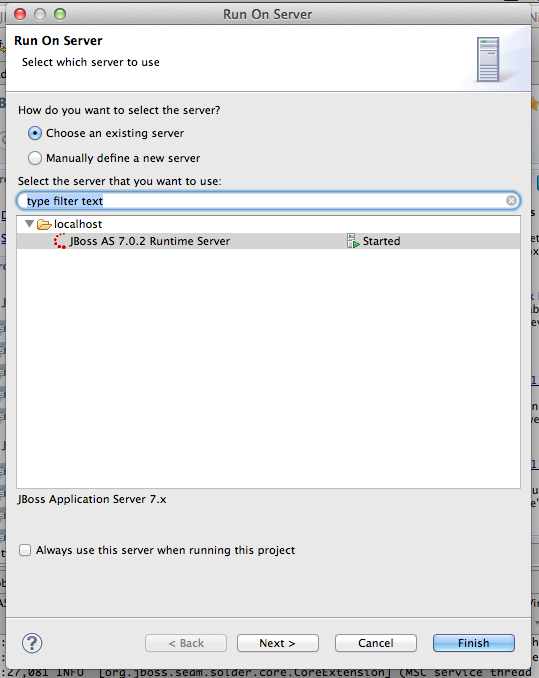
For those projects that have a runtime/server fix, it is also possible to check the
"Always use this server when running this project" preference
(https://issues.jboss.org/secure/attachment/12349250/Screen+Shot+2011-11-2...
screenshot).
That would enable the user to start a project using the Run/Debug icon without showing the
Run On server wizard.
2) As to the deploying a datasource, JBoss AS > 5.x/6.x recognizes a datasource added
to the application.xml file. I think, this way I have created all the project examples
targeted to JBoss AS 5.x/JBoss AS 6.x (EAP 5.x), but it isn't possible to do that for
the project examples targeted to the JBoss AS 4.
It is, however, possible to add the make-deployables element to the project examples xml
file. This property would contain resources as, for instance, the following one:
<make-deployables >${project[0]}-ear/resources/photolbum-ds.xml</make-deployables
>
The Project Examples would deploy this resource to the server after successful importing a
project example and assigning server/runtime to the project example.
3) We could also suppress starting a project example if all requirements are not
satisfied. Users would be able to change this behavior using the Project Examples
preference
Run button in toolbar needs to run the newly generated project
--------------------------------------------------------------
Key: JBIDE-10218
URL: https://issues.jboss.org/browse/JBIDE-10218
Project: Tools (JBoss Tools)
Issue Type: Bug
Components: central, common/jst/core
Reporter: Burr Sutter
Fix For: 3.3.0.Beta1
Attachments: Screen Shot 2011-11-22 at 12.02.17 PM.png, Screen Shot 2011-11-22 at
12.02.38 PM.png, Screen Shot 2011-11-22 at 12.02.53 PM.png, Screen Shot 2011-11-22 at
12.03.03 PM.png, Screen Shot 2011-11-22 at 12.03.29 PM.png, Screen Shot 2011-11-22 at
12.03.42 PM.png
The Run icon in the Eclipse toolbar is where a new developer (new to JBoss Tools) expects
to go directly after he has generated a new project from either File-New or JBoss Central
by using one of the archetypes or project examples/quickstarts.
This means the generated project needs to be highlighted in the Project Explorer and the
Run button should "just work".
There is also an issue with Run vs Debug - if the server is in "debug mode"
then Run should just assume that is OK and not prompt the user.
Run on Server should be the default so the user can use a single click on OK
--
This message is automatically generated by JIRA.
If you think it was sent incorrectly, please contact your JIRA administrators:
https://issues.jboss.org/secure/ContactAdministrators!default.jspa
For more information on JIRA, see: http://www.atlassian.com/software/jira
12:11 p.m.
[
https://issues.jboss.org/browse/JBIDE-10218?page=com.atlassian.jira.plugi...
]
Burr Sutter updated JBIDE-10218:
--------------------------------
Priority: Critical (was: Major)
Run button in toolbar needs to run the newly generated project
--------------------------------------------------------------
Key: JBIDE-10218
URL: https://issues.jboss.org/browse/JBIDE-10218
Project: Tools (JBoss Tools)
Issue Type: Bug
Components: central, common/jst/core
Reporter: Burr Sutter
Priority: Critical
Fix For: 3.3.0.Beta1
Attachments: Screen Shot 2011-11-22 at 12.02.17 PM.png, Screen Shot 2011-11-22 at
12.02.38 PM.png, Screen Shot 2011-11-22 at 12.02.53 PM.png, Screen Shot 2011-11-22 at
12.03.03 PM.png, Screen Shot 2011-11-22 at 12.03.29 PM.png, Screen Shot 2011-11-22 at
12.03.42 PM.png
The Run icon in the Eclipse toolbar is where a new developer (new to JBoss Tools) expects
to go directly after he has generated a new project from either File-New or JBoss Central
by using one of the archetypes or project examples/quickstarts.
This means the generated project needs to be highlighted in the Project Explorer and the
Run button should "just work".
There is also an issue with Run vs Debug - if the server is in "debug mode"
then Run should just assume that is OK and not prompt the user.
Run on Server should be the default so the user can use a single click on OK
--
This message is automatically generated by JIRA.
If you think it was sent incorrectly, please contact your JIRA administrators:
https://issues.jboss.org/secure/ContactAdministrators!default.jspa
For more information on JIRA, see: http://www.atlassian.com/software/jira
12:11 p.m.
[
https://issues.jboss.org/browse/JBIDE-10218?page=com.atlassian.jira.plugi...
]
Burr Sutter commented on JBIDE-10218:
-------------------------------------
I have found two other instances where the Run button fails to operate as expected (by the
end-user).
Steps to reproduce:
1- use Java EE Web Project from JBoss Central (note: AS7.1CR1b was added in previous
session and my workspace is empty - no projects) and I have DevStudio prompt for my
workspace setting.
2- name it "myjavaeeproject" with a package
"com.whatever.myjavaeeproject"
3- click the green "Run" button in the toolbar
directly after an eclipse restart - you get "Server Error - the selection did not
contain any resources that can run on a server", once you have OK'd that dialog
and click the green "Run" button again, you get Select Configuration with
"embedded1329392939292920" as the option. What is that?
Screenshots of both provided with JBDS5 M5 on Mac OSX 64bit - via Universal Installer
The next "gotcha":
1-Drill down into Member.java in the model package - double-click to open the file in the
editor
2-click the green "Run" button in the toolbar, it runs the .java file with the
following error
HTTP Status 404 - see screenshot
Run button in toolbar needs to run the newly generated project
--------------------------------------------------------------
Key: JBIDE-10218
URL: https://issues.jboss.org/browse/JBIDE-10218
Project: Tools (JBoss Tools)
Issue Type: Bug
Components: central, common/jst/core
Reporter: Burr Sutter
Fix For: 3.3.0.Beta1
Attachments: Screen Shot 2011-11-22 at 12.02.17 PM.png, Screen Shot 2011-11-22 at
12.02.38 PM.png, Screen Shot 2011-11-22 at 12.02.53 PM.png, Screen Shot 2011-11-22 at
12.03.03 PM.png, Screen Shot 2011-11-22 at 12.03.29 PM.png, Screen Shot 2011-11-22 at
12.03.42 PM.png
The Run icon in the Eclipse toolbar is where a new developer (new to JBoss Tools) expects
to go directly after he has generated a new project from either File-New or JBoss Central
by using one of the archetypes or project examples/quickstarts.
This means the generated project needs to be highlighted in the Project Explorer and the
Run button should "just work".
There is also an issue with Run vs Debug - if the server is in "debug mode"
then Run should just assume that is OK and not prompt the user.
Run on Server should be the default so the user can use a single click on OK
--
This message is automatically generated by JIRA.
If you think it was sent incorrectly, please contact your JIRA administrators:
https://issues.jboss.org/secure/ContactAdministrators!default.jspa
For more information on JIRA, see: http://www.atlassian.com/software/jira
12:13 p.m.
[
https://issues.jboss.org/browse/JBIDE-10218?page=com.atlassian.jira.plugi...
]
Burr Sutter updated JBIDE-10218:
--------------------------------
Attachment: Screen Shot 2012-01-25 at 1.06.40 PM.png
Screen Shot 2012-01-25 at 1.05.10 PM.png
Screen Shot 2012-01-25 at 1.11.47 PM.png
Run button in toolbar needs to run the newly generated project
--------------------------------------------------------------
Key: JBIDE-10218
URL: https://issues.jboss.org/browse/JBIDE-10218
Project: Tools (JBoss Tools)
Issue Type: Bug
Components: central, common/jst/core
Reporter: Burr Sutter
Priority: Critical
Fix For: 3.3.0.Beta1
Attachments: Screen Shot 2011-11-22 at 12.02.17 PM.png, Screen Shot 2011-11-22 at
12.02.38 PM.png, Screen Shot 2011-11-22 at 12.02.53 PM.png, Screen Shot 2011-11-22 at
12.03.03 PM.png, Screen Shot 2011-11-22 at 12.03.29 PM.png, Screen Shot 2011-11-22 at
12.03.42 PM.png, Screen Shot 2012-01-25 at 1.05.10 PM.png, Screen Shot 2012-01-25 at
1.06.40 PM.png, Screen Shot 2012-01-25 at 1.11.47 PM.png
The Run icon in the Eclipse toolbar is where a new developer (new to JBoss Tools) expects
to go directly after he has generated a new project from either File-New or JBoss Central
by using one of the archetypes or project examples/quickstarts.
This means the generated project needs to be highlighted in the Project Explorer and the
Run button should "just work".
There is also an issue with Run vs Debug - if the server is in "debug mode"
then Run should just assume that is OK and not prompt the user.
Run on Server should be the default so the user can use a single click on OK
--
This message is automatically generated by JIRA.
If you think it was sent incorrectly, please contact your JIRA administrators:
https://issues.jboss.org/secure/ContactAdministrators!default.jspa
For more information on JIRA, see: http://www.atlassian.com/software/jira
6:34 a.m.
[
https://issues.jboss.org/browse/JBIDE-10218?page=com.atlassian.jira.plugi...
]
Max Rydahl Andersen updated JBIDE-10218:
----------------------------------------
Assignee: Rob Stryker
Run button in toolbar needs to run the newly generated project
--------------------------------------------------------------
Key: JBIDE-10218
URL: https://issues.jboss.org/browse/JBIDE-10218
Project: Tools (JBoss Tools)
Issue Type: Bug
Components: central, common/jst/core
Reporter: Burr Sutter
Assignee: Rob Stryker
Priority: Critical
Fix For: 3.3.0.Beta1
Attachments: Screen Shot 2011-11-22 at 12.02.17 PM.png, Screen Shot 2011-11-22 at
12.02.38 PM.png, Screen Shot 2011-11-22 at 12.02.53 PM.png, Screen Shot 2011-11-22 at
12.03.03 PM.png, Screen Shot 2011-11-22 at 12.03.29 PM.png, Screen Shot 2011-11-22 at
12.03.42 PM.png, Screen Shot 2012-01-25 at 1.05.10 PM.png, Screen Shot 2012-01-25 at
1.06.40 PM.png, Screen Shot 2012-01-25 at 1.11.47 PM.png
The Run icon in the Eclipse toolbar is where a new developer (new to JBoss Tools) expects
to go directly after he has generated a new project from either File-New or JBoss Central
by using one of the archetypes or project examples/quickstarts.
This means the generated project needs to be highlighted in the Project Explorer and the
Run button should "just work".
There is also an issue with Run vs Debug - if the server is in "debug mode"
then Run should just assume that is OK and not prompt the user.
Run on Server should be the default so the user can use a single click on OK
--
This message is automatically generated by JIRA.
If you think it was sent incorrectly, please contact your JIRA administrators:
https://issues.jboss.org/secure/ContactAdministrators!default.jspa
For more information on JIRA, see: http://www.atlassian.com/software/jira
6:34 a.m.
[
https://issues.jboss.org/browse/JBIDE-10218?page=com.atlassian.jira.plugi...
]
Max Rydahl Andersen commented on JBIDE-10218:
---------------------------------------------
Rob - could you take a lok why Burr is getting this weird errors/messages ?
if not sign back to me. thanks.
Run button in toolbar needs to run the newly generated project
--------------------------------------------------------------
Key: JBIDE-10218
URL: https://issues.jboss.org/browse/JBIDE-10218
Project: Tools (JBoss Tools)
Issue Type: Bug
Components: central, common/jst/core
Reporter: Burr Sutter
Assignee: Rob Stryker
Priority: Critical
Fix For: 3.3.0.Beta1
Attachments: Screen Shot 2011-11-22 at 12.02.17 PM.png, Screen Shot 2011-11-22 at
12.02.38 PM.png, Screen Shot 2011-11-22 at 12.02.53 PM.png, Screen Shot 2011-11-22 at
12.03.03 PM.png, Screen Shot 2011-11-22 at 12.03.29 PM.png, Screen Shot 2011-11-22 at
12.03.42 PM.png, Screen Shot 2012-01-25 at 1.05.10 PM.png, Screen Shot 2012-01-25 at
1.06.40 PM.png, Screen Shot 2012-01-25 at 1.11.47 PM.png
The Run icon in the Eclipse toolbar is where a new developer (new to JBoss Tools) expects
to go directly after he has generated a new project from either File-New or JBoss Central
by using one of the archetypes or project examples/quickstarts.
This means the generated project needs to be highlighted in the Project Explorer and the
Run button should "just work".
There is also an issue with Run vs Debug - if the server is in "debug mode"
then Run should just assume that is OK and not prompt the user.
Run on Server should be the default so the user can use a single click on OK
--
This message is automatically generated by JIRA.
If you think it was sent incorrectly, please contact your JIRA administrators:
https://issues.jboss.org/secure/ContactAdministrators!default.jspa
For more information on JIRA, see: http://www.atlassian.com/software/jira
6:36 a.m.
[
https://issues.jboss.org/browse/JBIDE-10218?page=com.atlassian.jira.plugi...
]
Max Rydahl Andersen updated JBIDE-10218:
----------------------------------------
Component/s: JBossAS/Servers
(was: common/jst/core)
(was: central)
Run button in toolbar needs to run the newly generated project
--------------------------------------------------------------
Key: JBIDE-10218
URL: https://issues.jboss.org/browse/JBIDE-10218
Project: Tools (JBoss Tools)
Issue Type: Bug
Components: JBossAS/Servers
Reporter: Burr Sutter
Assignee: Rob Stryker
Priority: Critical
Fix For: 3.3.0.Beta1
Attachments: Screen Shot 2011-11-22 at 12.02.17 PM.png, Screen Shot 2011-11-22 at
12.02.38 PM.png, Screen Shot 2011-11-22 at 12.02.53 PM.png, Screen Shot 2011-11-22 at
12.03.03 PM.png, Screen Shot 2011-11-22 at 12.03.29 PM.png, Screen Shot 2011-11-22 at
12.03.42 PM.png, Screen Shot 2012-01-25 at 1.05.10 PM.png, Screen Shot 2012-01-25 at
1.06.40 PM.png, Screen Shot 2012-01-25 at 1.11.47 PM.png
The Run icon in the Eclipse toolbar is where a new developer (new to JBoss Tools) expects
to go directly after he has generated a new project from either File-New or JBoss Central
by using one of the archetypes or project examples/quickstarts.
This means the generated project needs to be highlighted in the Project Explorer and the
Run button should "just work".
There is also an issue with Run vs Debug - if the server is in "debug mode"
then Run should just assume that is OK and not prompt the user.
Run on Server should be the default so the user can use a single click on OK
--
This message is automatically generated by JIRA.
If you think it was sent incorrectly, please contact your JIRA administrators:
https://issues.jboss.org/secure/ContactAdministrators!default.jspa
For more information on JIRA, see: http://www.atlassian.com/software/jira
1:38 a.m.
[
https://issues.jboss.org/browse/JBIDE-10218?page=com.atlassian.jira.plugi...
]
Rob Stryker commented on JBIDE-10218:
-------------------------------------
Also for the record I was unable to replicate this "embedded" thing. No idea
what that is and I have never ever seen it before.
Run button in toolbar needs to run the newly generated project
--------------------------------------------------------------
Key: JBIDE-10218
URL: https://issues.jboss.org/browse/JBIDE-10218
Project: Tools (JBoss Tools)
Issue Type: Bug
Components: JBossAS/Servers
Reporter: Burr Sutter
Assignee: Max Rydahl Andersen
Priority: Critical
Fix For: 3.3.0.Beta1
Attachments: Screen Shot 2011-11-22 at 12.02.17 PM.png, Screen Shot 2011-11-22 at
12.02.38 PM.png, Screen Shot 2011-11-22 at 12.02.53 PM.png, Screen Shot 2011-11-22 at
12.03.03 PM.png, Screen Shot 2011-11-22 at 12.03.29 PM.png, Screen Shot 2011-11-22 at
12.03.42 PM.png, Screen Shot 2012-01-25 at 1.05.10 PM.png, Screen Shot 2012-01-25 at
1.06.40 PM.png, Screen Shot 2012-01-25 at 1.11.47 PM.png
The Run icon in the Eclipse toolbar is where a new developer (new to JBoss Tools) expects
to go directly after he has generated a new project from either File-New or JBoss Central
by using one of the archetypes or project examples/quickstarts.
This means the generated project needs to be highlighted in the Project Explorer and the
Run button should "just work".
There is also an issue with Run vs Debug - if the server is in "debug mode"
then Run should just assume that is OK and not prompt the user.
Run on Server should be the default so the user can use a single click on OK
--
This message is automatically generated by JIRA.
If you think it was sent incorrectly, please contact your JIRA administrators:
https://issues.jboss.org/secure/ContactAdministrators!default.jspa
For more information on JIRA, see: http://www.atlassian.com/software/jira
5:18 a.m.
[
https://issues.jboss.org/browse/JBIDE-10218?page=com.atlassian.jira.plugi...
]
Max Rydahl Andersen updated JBIDE-10218:
----------------------------------------
Fix Version/s: 3.3.0.CR1
(was: 3.3.0.Beta1)
Run button in toolbar needs to run the newly generated project
--------------------------------------------------------------
Key: JBIDE-10218
URL: https://issues.jboss.org/browse/JBIDE-10218
Project: Tools (JBoss Tools)
Issue Type: Bug
Components: JBossAS/Servers
Reporter: Burr Sutter
Assignee: Max Rydahl Andersen
Priority: Critical
Fix For: 3.3.0.CR1
Attachments: Screen Shot 2011-11-22 at 12.02.17 PM.png, Screen Shot 2011-11-22 at
12.02.38 PM.png, Screen Shot 2011-11-22 at 12.02.53 PM.png, Screen Shot 2011-11-22 at
12.03.03 PM.png, Screen Shot 2011-11-22 at 12.03.29 PM.png, Screen Shot 2011-11-22 at
12.03.42 PM.png, Screen Shot 2012-01-25 at 1.05.10 PM.png, Screen Shot 2012-01-25 at
1.06.40 PM.png, Screen Shot 2012-01-25 at 1.11.47 PM.png
The Run icon in the Eclipse toolbar is where a new developer (new to JBoss Tools) expects
to go directly after he has generated a new project from either File-New or JBoss Central
by using one of the archetypes or project examples/quickstarts.
This means the generated project needs to be highlighted in the Project Explorer and the
Run button should "just work".
There is also an issue with Run vs Debug - if the server is in "debug mode"
then Run should just assume that is OK and not prompt the user.
Run on Server should be the default so the user can use a single click on OK
--
This message is automatically generated by JIRA.
If you think it was sent incorrectly, please contact your JIRA administrators:
https://issues.jboss.org/secure/ContactAdministrators!default.jspa
For more information on JIRA, see: http://www.atlassian.com/software/jira
8:47 a.m.
[
https://issues.jboss.org/browse/JBIDE-10218?page=com.atlassian.jira.plugi...
]
Burr Sutter commented on JBIDE-10218:
-------------------------------------
Another example of Run not working.
1) Import the jboss-as-helloworld quickstart (listed on JBoss Central as HelloWorld)
2) Open the HelloService.java in the editor
3) Hit the green run button
4) It does deploy jboss-as-helloworld but loads the internal browser with
http://localhost:8080/jboss-as-helloworld/WEB-INF/classes/org/jboss/as/qu...
Run button in toolbar needs to run the newly generated project
--------------------------------------------------------------
Key: JBIDE-10218
URL: https://issues.jboss.org/browse/JBIDE-10218
Project: Tools (JBoss Tools)
Issue Type: Bug
Components: JBossAS/Servers
Reporter: Burr Sutter
Assignee: Max Rydahl Andersen
Priority: Critical
Fix For: 3.3.0.Beta3
Attachments: Screen Shot 2011-11-22 at 12.02.17 PM.png, Screen Shot 2011-11-22 at
12.02.38 PM.png, Screen Shot 2011-11-22 at 12.02.53 PM.png, Screen Shot 2011-11-22 at
12.03.03 PM.png, Screen Shot 2011-11-22 at 12.03.29 PM.png, Screen Shot 2011-11-22 at
12.03.42 PM.png, Screen Shot 2012-01-25 at 1.05.10 PM.png, Screen Shot 2012-01-25 at
1.06.40 PM.png, Screen Shot 2012-01-25 at 1.11.47 PM.png
The Run icon in the Eclipse toolbar is where a new developer (new to JBoss Tools) expects
to go directly after he has generated a new project from either File-New or JBoss Central
by using one of the archetypes or project examples/quickstarts.
This means the generated project needs to be highlighted in the Project Explorer and the
Run button should "just work".
There is also an issue with Run vs Debug - if the server is in "debug mode"
then Run should just assume that is OK and not prompt the user.
Run on Server should be the default so the user can use a single click on OK
--
This message is automatically generated by JIRA.
If you think it was sent incorrectly, please contact your JIRA administrators:
https://issues.jboss.org/secure/ContactAdministrators!default.jspa
For more information on JIRA, see: http://www.atlassian.com/software/jira
5:41 a.m.
[
https://issues.jboss.org/browse/JBIDE-10218?page=com.atlassian.jira.plugi...
]
Max Rydahl Andersen resolved JBIDE-10218.
-----------------------------------------
Resolution: Won't Fix
Run button in toolbar needs to run the newly generated project
--------------------------------------------------------------
Key: JBIDE-10218
URL: https://issues.jboss.org/browse/JBIDE-10218
Project: Tools (JBoss Tools)
Issue Type: Bug
Components: JBossAS/Servers
Reporter: Burr Sutter
Assignee: Max Rydahl Andersen
Priority: Critical
Fix For: 3.3.0.Beta3
Attachments: Screen Shot 2011-11-22 at 12.02.17 PM.png, Screen Shot 2011-11-22 at
12.02.38 PM.png, Screen Shot 2011-11-22 at 12.02.53 PM.png, Screen Shot 2011-11-22 at
12.03.03 PM.png, Screen Shot 2011-11-22 at 12.03.29 PM.png, Screen Shot 2011-11-22 at
12.03.42 PM.png, Screen Shot 2012-01-25 at 1.05.10 PM.png, Screen Shot 2012-01-25 at
1.06.40 PM.png, Screen Shot 2012-01-25 at 1.11.47 PM.png
The Run icon in the Eclipse toolbar is where a new developer (new to JBoss Tools) expects
to go directly after he has generated a new project from either File-New or JBoss Central
by using one of the archetypes or project examples/quickstarts.
This means the generated project needs to be highlighted in the Project Explorer and the
Run button should "just work".
There is also an issue with Run vs Debug - if the server is in "debug mode"
then Run should just assume that is OK and not prompt the user.
Run on Server should be the default so the user can use a single click on OK
--
This message is automatically generated by JIRA.
If you think it was sent incorrectly, please contact your JIRA administrators:
https://issues.jboss.org/secure/ContactAdministrators!default.jspa
For more information on JIRA, see: http://www.atlassian.com/software/jira
5:41 a.m.
[
https://issues.jboss.org/browse/JBIDE-10218?page=com.atlassian.jira.plugi...
]
Max Rydahl Andersen commented on JBIDE-10218:
---------------------------------------------
closing this "multi-issue" as won't fix.
Not because we don't want to fix things but because the only real sensible and
reproducible issue found in here was about running .java files - that is fixed via
https://issues.jboss.org/browse/JBIDE-11414
Remaining issues I see are:
* Run as doesn't work when nothing is selected - that is expected. What is run as
supposed to run if nothing selected ? Can't just select randomly from possible many
things that can be run.
* Run as result in "embedded*" error. We have not been able to reproduce nor
locate this one. This is most likely an error but we have not found a way to reproduce it.
If find one please open a new specific one.
Run button in toolbar needs to run the newly generated project
--------------------------------------------------------------
Key: JBIDE-10218
URL: https://issues.jboss.org/browse/JBIDE-10218
Project: Tools (JBoss Tools)
Issue Type: Bug
Components: JBossAS/Servers
Reporter: Burr Sutter
Assignee: Max Rydahl Andersen
Priority: Critical
Fix For: 3.3.0.Beta3
Attachments: Screen Shot 2011-11-22 at 12.02.17 PM.png, Screen Shot 2011-11-22 at
12.02.38 PM.png, Screen Shot 2011-11-22 at 12.02.53 PM.png, Screen Shot 2011-11-22 at
12.03.03 PM.png, Screen Shot 2011-11-22 at 12.03.29 PM.png, Screen Shot 2011-11-22 at
12.03.42 PM.png, Screen Shot 2012-01-25 at 1.05.10 PM.png, Screen Shot 2012-01-25 at
1.06.40 PM.png, Screen Shot 2012-01-25 at 1.11.47 PM.png
The Run icon in the Eclipse toolbar is where a new developer (new to JBoss Tools) expects
to go directly after he has generated a new project from either File-New or JBoss Central
by using one of the archetypes or project examples/quickstarts.
This means the generated project needs to be highlighted in the Project Explorer and the
Run button should "just work".
There is also an issue with Run vs Debug - if the server is in "debug mode"
then Run should just assume that is OK and not prompt the user.
Run on Server should be the default so the user can use a single click on OK
--
This message is automatically generated by JIRA.
If you think it was sent incorrectly, please contact your JIRA administrators:
https://issues.jboss.org/secure/ContactAdministrators!default.jspa
For more information on JIRA, see: http://www.atlassian.com/software/jira
6:01 a.m.
[
https://issues.jboss.org/browse/JBIDE-10218?page=com.atlassian.jira.plugi...
]
Martin Malina closed JBIDE-10218.
---------------------------------
Run button in toolbar needs to run the newly generated project
--------------------------------------------------------------
Key: JBIDE-10218
URL: https://issues.jboss.org/browse/JBIDE-10218
Project: Tools (JBoss Tools)
Issue Type: Bug
Components: JBossAS/Servers
Reporter: Burr Sutter
Assignee: Max Rydahl Andersen
Priority: Critical
Fix For: 3.3.0.Beta3
Attachments: Screen Shot 2011-11-22 at 12.02.17 PM.png, Screen Shot 2011-11-22 at
12.02.38 PM.png, Screen Shot 2011-11-22 at 12.02.53 PM.png, Screen Shot 2011-11-22 at
12.03.03 PM.png, Screen Shot 2011-11-22 at 12.03.29 PM.png, Screen Shot 2011-11-22 at
12.03.42 PM.png, Screen Shot 2012-01-25 at 1.05.10 PM.png, Screen Shot 2012-01-25 at
1.06.40 PM.png, Screen Shot 2012-01-25 at 1.11.47 PM.png
The Run icon in the Eclipse toolbar is where a new developer (new to JBoss Tools) expects
to go directly after he has generated a new project from either File-New or JBoss Central
by using one of the archetypes or project examples/quickstarts.
This means the generated project needs to be highlighted in the Project Explorer and the
Run button should "just work".
There is also an issue with Run vs Debug - if the server is in "debug mode"
then Run should just assume that is OK and not prompt the user.
Run on Server should be the default so the user can use a single click on OK
--
This message is automatically generated by JIRA.
If you think it was sent incorrectly, please contact your JIRA administrators:
https://issues.jboss.org/secure/ContactAdministrators!default.jspa
For more information on JIRA, see: http://www.atlassian.com/software/jira
5072
days inactive
5246
days old
jbosstools-issues@lists.jboss.org
19 comments
10 participants
participants (10)
-
 Burr Sutter (Commented) (JIRA)
 -
Burr Sutter (Created) (JIRA)
-
Burr Sutter (JIRA)
-
Burr Sutter (Updated) (JIRA)
-
Martin Malina (JIRA)
-
Max Rydahl Andersen (Commented) (JIRA)
-
Max Rydahl Andersen (JIRA)
-
Max Rydahl Andersen (Updated) (JIRA)
-
Rob Stryker (JIRA)
-
Snjezana Peco (JIRA)