[JBoss JIRA] (JBIDE-23039) Need an interactive terminal that fits specific requirements
by Alexey Kazakov (JIRA)
[ https://issues.jboss.org/browse/JBIDE-23039?page=com.atlassian.jira.plugi... ]
Alexey Kazakov commented on JBIDE-23039:
----------------------------------------
So I think we need to create separate issues for remaining problems (like that problem with funny text input on Mac) and resolve this one.
> Need an interactive terminal that fits specific requirements
> ------------------------------------------------------------
>
> Key: JBIDE-23039
> URL: https://issues.jboss.org/browse/JBIDE-23039
> Project: Tools (JBoss Tools)
> Issue Type: Feature Request
> Components: server
> Affects Versions: 4.4.1.AM2
> Reporter: Rob Stryker
> Assignee: Rob Stryker
> Fix For: 4.4.2.AM1
>
> Attachments: vagranttty.png
>
>
> CDK Tools requires a terminal that allows interactivity of i/o. The full set of requirements is a bit difficult to find a solution for.
> 1) I must be able to get a Process or IProcess object when a command is run
> 2) I must be able to get an event or know when the process terminates
> 3) The terminal or console must be interactive and allow user input when prompted.
> 4) It must behave as in 3) for 'vagrant' commands and any and all associated plugins.
> These three requirements thus far seem impossible to solve. Solutions that have been attempted are:
> 1) Creating a java Process by myself via Runtime.exec. The interactive prompts never arrive and there is no API for Process to know when it is waiting for input.
> 2) Using the external-tools launch configuration. When running a command like mvn, the console that pops up seems to allow input from the user, and functions as expected. However, when running a command such as vagrant, such prompts are not provided. In our usecase, the following behavior is observed:
> a) During vagrant-registration prompts, the console indicates it is not a TTY terminal and cannot allow input
> b) During a landrush prompt for superuser status, no prompt is made, no TTY message is listed, and the process appears to have frozen
> 3) Launching / Opening a tm.terminal view. This solution fails requirements 1 and 2. We are not able to get a Process or an IProcess when a command is launched in a proper interactive terminal. This means we can have no way to know when the process has completed.
> Other options have been explored but ended up at dead ends and not worth mentioning. The real question is why interactive behavior is visible when using external-tools launch config for maven, but is not visible when running vagrant.
> Is this a function of the way the vagrant commands display or prompt for input? Why does vagrant-registration require a TTY terminal, but maven does not? Is this something that can be fixed upstream?
> No other obvious solutions have presented themselves in the past year.
--
This message was sent by Atlassian JIRA
(v6.4.11#64026)
9 years, 11 months
[JBoss JIRA] (JBIDE-22818) vagrant service-manager call experiences timeout after output
by Rob Stryker (JIRA)
[ https://issues.jboss.org/browse/JBIDE-22818?page=com.atlassian.jira.plugi... ]
Rob Stryker resolved JBIDE-22818.
---------------------------------
Fix Version/s: 4.4.2.AM1
(was: 4.4.x)
Resolution: Done
Duplicate of JBIDE-23178
> vagrant service-manager call experiences timeout after output
> --------------------------------------------------------------
>
> Key: JBIDE-22818
> URL: https://issues.jboss.org/browse/JBIDE-22818
> Project: Tools (JBoss Tools)
> Issue Type: Bug
> Components: cdk
> Affects Versions: 4.4.1.AM2
> Reporter: Rob Stryker
> Assignee: Rob Stryker
> Fix For: 4.4.2.AM1
>
>
> {noformat}
> !ENTRY org.jboss.tools.openshift.cdk.server 4 0 2016-07-21 09:48:26.869
> !MESSAGE Unable to successfully complete a call to vagrant service-manager.
> !STACK 0
> java.util.concurrent.TimeoutException: Process output:
> ^[[0m # docker env:^[[0m # Set the following environment variables to enable access to the # docker daemon running inside of the vagrant virtual machine: export DOCKER_HOST=tcp://10.1.2.2:2376 export DOCKER_CERT_PATH='C:\Pedro\Software\Openshift_RHCDK_suite10\cdk\components\rhel\rhel-ose\.vagrant\machines\default\virtualbox\docker\' export DOCKER_TLS_VERIFY=1 export DOCKER_API_VERSION=1.21 ^[[0m^[[0m ^[[0m # openshift env:^[[0m ^[[0m# You can access the OpenShift console on: https://10.1.2.2:8443/console # To use OpenShift CLI, run: oc login https://10.1.2.2:8443 export OPENSHIFT_URL=https://10.1.2.2:8443 export OPENSHIFT_WEB_CONSOLE=https://10.1.2.2:8443/console export DOCKER_REGISTRY=hub.openshift.rhel-cdk.10.1.2.2.xip.io^[[0m ^[[0m # run following command to configure your shell: # eval "$(VAGRANT_NO_COLOR=1 vagrant service-manager env | tr -d '\r')"^[[0m
> at org.jboss.tools.openshift.cdk.server.core.internal.adapter.controllers.VagrantLaunchUtility.call(VagrantLaunchUtility.java:186)
> at org.jboss.tools.openshift.cdk.server.core.internal.adapter.controllers.VagrantLaunchUtility.call(VagrantLaunchUtility.java:153)
> at org.jboss.tools.openshift.cdk.server.core.internal.listeners.ServiceManagerEnvironment.loadServiceManagerEnvironment(ServiceManagerEnvironment.java:108)
> at org.jboss.tools.openshift.cdk.server.core.internal.listeners.ServiceManagerEnvironment.loadServiceManagerEnvironment(ServiceManagerEnvironment.java:85)
> at org.jboss.tools.openshift.cdk.server.core.internal.listeners.ServiceManagerEnvironment.getOrLoadServiceManagerEnvironment(ServiceManagerEnvironment.java:67)
> at org.jboss.tools.openshift.cdk.server.core.internal.listeners.ServiceManagerEnvironment.getOrLoadServiceManagerEnvironment(ServiceManagerEnvironment.java:59)
> at org.jboss.tools.openshift.cdk.server.core.internal.adapter.VagrantPoller.checkOpenShiftHealth(VagrantPoller.java:185)
> at org.jboss.tools.openshift.cdk.server.core.internal.adapter.VagrantPoller.onePing(VagrantPoller.java:174)
> at org.jboss.tools.openshift.cdk.server.core.internal.adapter.VagrantPoller.onePingSafe(VagrantPoller.java:154)
> at org.jboss.tools.openshift.cdk.server.core.internal.adapter.VagrantPoller.getCurrentStateSynchronous(VagrantPoller.java:133)
> at org.jboss.tools.openshift.cdk.server.core.internal.adapter.controllers.CDKLaunchController.handleProcessTerminated(CDKLaunchController.java:250)
> at org.jboss.tools.openshift.cdk.server.core.internal.adapter.controllers.CDKLaunchController.access$2(CDKLaunchController.java:242)
> at org.jboss.tools.openshift.cdk.server.core.internal.adapter.controllers.CDKLaunchController$2.run(CDKLaunchController.java:235)
> !ENTRY org.jboss.tools.openshift.cdk.server 4 0 2016-07-21 09:49:07.139
> !MESSAGE Unable to successfully complete a call to vagrant service-manager.
> !STACK 0
> java.util.concurrent.TimeoutException: Process output:
> ^[[0m # docker env:^[[0m # Set the following environment variables to enable access to the # docker daemon running inside of the vagrant virtual machine: export DOCKER_HOST=tcp://10.1.2.2:2376 export DOCKER_CERT_PATH='C:\Pedro\Software\Openshift_RHCDK_suite10\cdk\components\rhel\rhel-ose\.vagrant\machines\default\virtualbox\docker\' export DOCKER_TLS_VERIFY=1 export DOCKER_API_VERSION=1.21 ^[[0m^[[0m ^[[0m # openshift env:^[[0m ^[[0m# You can access the OpenShift console on: https://10.1.2.2:8443/console # To use OpenShift CLI, run: oc login https://10.1.2.2:8443 export OPENSHIFT_URL=https://10.1.2.2:8443 export OPENSHIFT_WEB_CONSOLE=https://10.1.2.2:8443/console export DOCKER_REGISTRY=hub.openshift.rhel-cdk.10.1.2.2.xip.io^[[0m ^[[0m # run following command to configure your shell: # eval "$(VAGRANT_NO_COLOR=1 vagrant service-manager env | tr -d '\r')"^[[0m
> at org.jboss.tools.openshift.cdk.server.core.internal.adapter.controllers.VagrantLaunchUtility.call(VagrantLaunchUtility.java:186)
> at org.jboss.tools.openshift.cdk.server.core.internal.adapter.controllers.VagrantLaunchUtility.call(VagrantLaunchUtility.java:153)
> at org.jboss.tools.openshift.cdk.server.core.internal.listeners.ServiceManagerEnvironment.loadServiceManagerEnvironment(ServiceManagerEnvironment.java:108)
> at org.jboss.tools.openshift.cdk.server.core.internal.listeners.ServiceManagerEnvironment.loadServiceManagerEnvironment(ServiceManagerEnvironment.java:85)
> at org.jboss.tools.openshift.cdk.server.core.internal.listeners.ServiceManagerEnvironment.getOrLoadServiceManagerEnvironment(ServiceManagerEnvironment.java:67)
> at org.jboss.tools.openshift.cdk.server.core.internal.listeners.ServiceManagerEnvironment.getOrLoadServiceManagerEnvironment(ServiceManagerEnvironment.java:59)
> at org.jboss.tools.openshift.cdk.server.core.internal.listeners.ConfigureDependentFrameworksListener.configureFrameworks(ConfigureDependentFrameworksListener.java:53)
> at org.jboss.tools.openshift.cdk.server.core.internal.listeners.ConfigureDependentFrameworksListener$1.run(ConfigureDependentFrameworksListener.java:43)
> at org.eclipse.core.internal.jobs.Worker.run(Worker.java:55)
> {noformat}
--
This message was sent by Atlassian JIRA
(v6.4.11#64026)
9 years, 11 months
[JBoss JIRA] (JBIDE-23039) Need an interactive terminal that fits specific requirements
by Rob Stryker (JIRA)
[ https://issues.jboss.org/browse/JBIDE-23039?page=com.atlassian.jira.plugi... ]
Rob Stryker commented on JBIDE-23039:
-------------------------------------
After a last bug involving the console view stealing input from the process streams, this is fixed, tested, and committed in master.
> Need an interactive terminal that fits specific requirements
> ------------------------------------------------------------
>
> Key: JBIDE-23039
> URL: https://issues.jboss.org/browse/JBIDE-23039
> Project: Tools (JBoss Tools)
> Issue Type: Feature Request
> Components: server
> Affects Versions: 4.4.1.AM2
> Reporter: Rob Stryker
> Assignee: Rob Stryker
> Fix For: 4.4.2.AM1
>
> Attachments: vagranttty.png
>
>
> CDK Tools requires a terminal that allows interactivity of i/o. The full set of requirements is a bit difficult to find a solution for.
> 1) I must be able to get a Process or IProcess object when a command is run
> 2) I must be able to get an event or know when the process terminates
> 3) The terminal or console must be interactive and allow user input when prompted.
> 4) It must behave as in 3) for 'vagrant' commands and any and all associated plugins.
> These three requirements thus far seem impossible to solve. Solutions that have been attempted are:
> 1) Creating a java Process by myself via Runtime.exec. The interactive prompts never arrive and there is no API for Process to know when it is waiting for input.
> 2) Using the external-tools launch configuration. When running a command like mvn, the console that pops up seems to allow input from the user, and functions as expected. However, when running a command such as vagrant, such prompts are not provided. In our usecase, the following behavior is observed:
> a) During vagrant-registration prompts, the console indicates it is not a TTY terminal and cannot allow input
> b) During a landrush prompt for superuser status, no prompt is made, no TTY message is listed, and the process appears to have frozen
> 3) Launching / Opening a tm.terminal view. This solution fails requirements 1 and 2. We are not able to get a Process or an IProcess when a command is launched in a proper interactive terminal. This means we can have no way to know when the process has completed.
> Other options have been explored but ended up at dead ends and not worth mentioning. The real question is why interactive behavior is visible when using external-tools launch config for maven, but is not visible when running vagrant.
> Is this a function of the way the vagrant commands display or prompt for input? Why does vagrant-registration require a TTY terminal, but maven does not? Is this something that can be fixed upstream?
> No other obvious solutions have presented themselves in the past year.
--
This message was sent by Atlassian JIRA
(v6.4.11#64026)
9 years, 11 months
[JBoss JIRA] (JBIDE-22999) Red Hat Central Rebranding
by Fred Bricon (JIRA)
[ https://issues.jboss.org/browse/JBIDE-22999?page=com.atlassian.jira.plugi... ]
Fred Bricon commented on JBIDE-22999:
-------------------------------------
+1, it's much better
> Red Hat Central Rebranding
> --------------------------
>
> Key: JBIDE-22999
> URL: https://issues.jboss.org/browse/JBIDE-22999
> Project: Tools (JBoss Tools)
> Issue Type: Enhancement
> Components: central
> Affects Versions: 4.4.1.AM2
> Reporter: Marián Labuda
> Assignee: James Cobb
> Fix For: 4.4.x
>
> Attachments: central-rhd-icon.png, fullIDE.png, tools_rebrand.png, tools_rebrand_r1v2.png, tools_rebrand_r1v3.png, tools_rebrand_r2v1.png
>
>
> Quoting [~james.cobb], from JBIDE-22382
> {quote}
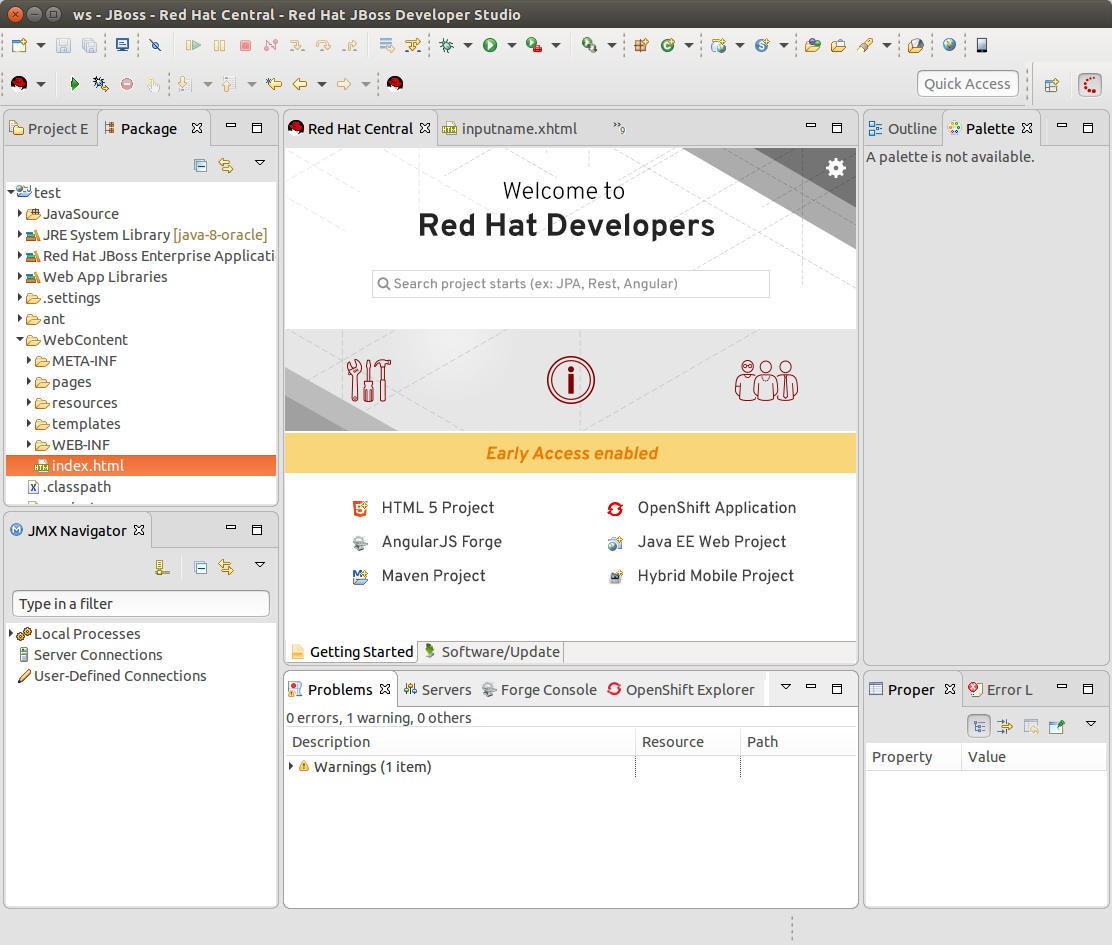
> I've pulled in the branding fro RHD into this IDE panel.
> 1. I've opted to use colors verses an grey monotones
> 2. I've used Red Hat icons from the icon set
> Thoughts?
> {quote}
> !tools_rebrand.png!
--
This message was sent by Atlassian JIRA
(v6.4.11#64026)
9 years, 11 months
[JBoss JIRA] (JBIDE-22999) Red Hat Central Rebranding
by Fred Bricon (JIRA)
[ https://issues.jboss.org/browse/JBIDE-22999?page=com.atlassian.jira.plugi... ]
Fred Bricon edited comment on JBIDE-22999 at 9/21/16 11:56 AM:
---------------------------------------------------------------
I've worked up another light version. I've incorporated red into the icons and used a larger range between white and the darkest "light" grey.
!tools_rebrand_r2v1.png!
[~mlabuda]
was (Author: james.cobb):
I've worked up another light version. I've incorporated red into the icons and used a larger range between white and the darkest "light" grey.
!tools_rebrand_r1v2.png!
[~mlabuda]
> Red Hat Central Rebranding
> --------------------------
>
> Key: JBIDE-22999
> URL: https://issues.jboss.org/browse/JBIDE-22999
> Project: Tools (JBoss Tools)
> Issue Type: Enhancement
> Components: central
> Affects Versions: 4.4.1.AM2
> Reporter: Marián Labuda
> Assignee: James Cobb
> Fix For: 4.4.x
>
> Attachments: central-rhd-icon.png, fullIDE.png, tools_rebrand.png, tools_rebrand_r1v2.png, tools_rebrand_r1v3.png, tools_rebrand_r2v1.png
>
>
> Quoting [~james.cobb], from JBIDE-22382
> {quote}
> I've pulled in the branding fro RHD into this IDE panel.
> 1. I've opted to use colors verses an grey monotones
> 2. I've used Red Hat icons from the icon set
> Thoughts?
> {quote}
> !tools_rebrand.png!
--
This message was sent by Atlassian JIRA
(v6.4.11#64026)
9 years, 11 months
[JBoss JIRA] (JBIDE-22999) Red Hat Central Rebranding
by Fred Bricon (JIRA)
[ https://issues.jboss.org/browse/JBIDE-22999?page=com.atlassian.jira.plugi... ]
Fred Bricon edited comment on JBIDE-22999 at 9/21/16 11:55 AM:
---------------------------------------------------------------
I've worked up another light version. I've incorporated red into the icons and used a larger range between white and the darkest "light" grey.
!tools_rebrand_r1v2.png!
[~mlabuda]
was (Author: james.cobb):
I've worked up another light version. I've incorporated red into the icons and used a larger range between white and the darkest "light" grey.
https://issues.jboss.org/secure/attachment/12409839/tools_rebrand_r2v1.png
[~mlabuda]
> Red Hat Central Rebranding
> --------------------------
>
> Key: JBIDE-22999
> URL: https://issues.jboss.org/browse/JBIDE-22999
> Project: Tools (JBoss Tools)
> Issue Type: Enhancement
> Components: central
> Affects Versions: 4.4.1.AM2
> Reporter: Marián Labuda
> Assignee: James Cobb
> Fix For: 4.4.x
>
> Attachments: central-rhd-icon.png, fullIDE.png, tools_rebrand.png, tools_rebrand_r1v2.png, tools_rebrand_r1v3.png, tools_rebrand_r2v1.png
>
>
> Quoting [~james.cobb], from JBIDE-22382
> {quote}
> I've pulled in the branding fro RHD into this IDE panel.
> 1. I've opted to use colors verses an grey monotones
> 2. I've used Red Hat icons from the icon set
> Thoughts?
> {quote}
> !tools_rebrand.png!
--
This message was sent by Atlassian JIRA
(v6.4.11#64026)
9 years, 11 months
[JBoss JIRA] (JBIDE-22999) Red Hat Central Rebranding
by Marián Labuda (JIRA)
[ https://issues.jboss.org/browse/JBIDE-22999?page=com.atlassian.jira.plugi... ]
Marián Labuda commented on JBIDE-22999:
---------------------------------------
I like the r2v1 version too, it looks really nice. It's not too plain anymore but it still has simplicity and lightness.
> Red Hat Central Rebranding
> --------------------------
>
> Key: JBIDE-22999
> URL: https://issues.jboss.org/browse/JBIDE-22999
> Project: Tools (JBoss Tools)
> Issue Type: Enhancement
> Components: central
> Affects Versions: 4.4.1.AM2
> Reporter: Marián Labuda
> Assignee: James Cobb
> Fix For: 4.4.x
>
> Attachments: central-rhd-icon.png, fullIDE.png, tools_rebrand.png, tools_rebrand_r1v2.png, tools_rebrand_r1v3.png, tools_rebrand_r2v1.png
>
>
> Quoting [~james.cobb], from JBIDE-22382
> {quote}
> I've pulled in the branding fro RHD into this IDE panel.
> 1. I've opted to use colors verses an grey monotones
> 2. I've used Red Hat icons from the icon set
> Thoughts?
> {quote}
> !tools_rebrand.png!
--
This message was sent by Atlassian JIRA
(v6.4.11#64026)
9 years, 11 months