[JBoss JIRA] (JBIDE-23164) Cannot install Devstudio 10.1.0.GA into Eclipse Neon.1 RC3 (remediation required)
by Nick Boldt (JIRA)
[ https://issues.jboss.org/browse/JBIDE-23164?page=com.atlassian.jira.plugi... ]
Nick Boldt updated JBIDE-23164:
-------------------------------
Description:
Steps to repro:
1. Download eclipse-jee-neon-1-RC3-linux-gtk-x86_64.tar.gz, unpack and run
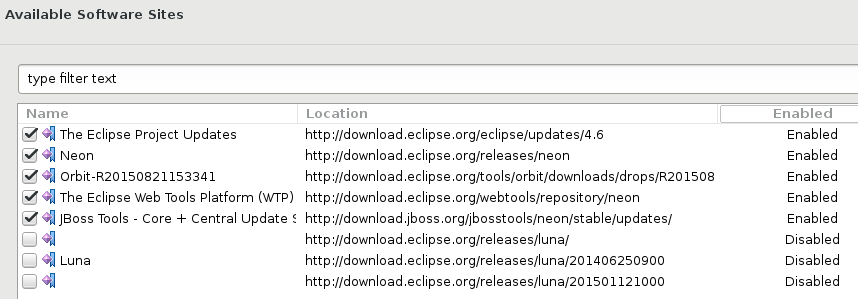
2. Window > Preferences > Install/Update > Available Software Sites > disable the Luna sites, as they're hella slow.
[^jbt4.4.1_on_neon.1.RC3_disabled_sites.png]
3. Help > Eclipse Marketplace... > Search for "jboss" and install Red Hat JBoss Developer Studio 10.1.0.GA
4. Remediation needed:
{code}
{code}
was:
When I try to install JBoss Tools 4.4.1.Final [1] Abridged category into eclipse-java-neon-1-RC2-macosx-cocoa-x86_64.tar.gz , I am shown a remediation screen.
!neon-1-remediation.png!
If I choose Update my installation, it offers to install what I want, but uninstall Eclipse XML Editors and Tools.
This is the original error message (third option):
{code}
Your original request has been modified.
"Code Recommenders Snipmatch" will be ignored because a newer version is already installed.
Cannot complete the install because of a conflicting dependency.
Software being installed: JBoss WebServices Tools 1.9.1.v20160608-0648 (org.jboss.tools.ws.feature.feature.group 1.9.1.v20160608-0648)
Software currently installed: Eclipse XML Editors and Tools 3.9.0.v201608061824 (org.eclipse.wst.xml_ui.feature.feature.group 3.9.0.v201608061824)
Only one of the following can be installed at once:
Eclipse XML Editors and Tools 3.8.0.v201605120129 (org.eclipse.wst.xml_ui.feature.feature.jar 3.8.0.v201605120129)
Eclipse XML Editors and Tools 3.9.0.v201608061824 (org.eclipse.wst.xml_ui.feature.feature.jar 3.9.0.v201608061824)
Cannot satisfy dependency:
From: Eclipse Web Developer Tools 3.8.0.v201606030549 (org.eclipse.wst.web_ui.feature.feature.group 3.8.0.v201606030549)
To: org.eclipse.wst.xml_ui.feature.feature.group [3.8.0.v201605120129]
Cannot satisfy dependency:
From: Eclipse XML Editors and Tools 3.8.0.v201605120129 (org.eclipse.wst.xml_ui.feature.feature.group 3.8.0.v201605120129)
To: org.eclipse.wst.xml_ui.feature.feature.jar [3.8.0.v201605120129]
Cannot satisfy dependency:
From: Eclipse XML Editors and Tools 3.9.0.v201608061824 (org.eclipse.wst.xml_ui.feature.feature.group 3.9.0.v201608061824)
To: org.eclipse.wst.xml_ui.feature.feature.jar [3.9.0.v201608061824]
Cannot satisfy dependency:
From: JBoss WebServices Tools 1.9.1.v20160608-0648 (org.jboss.tools.ws.feature.feature.group 1.9.1.v20160608-0648)
To: org.eclipse.wst.web_ui.feature.feature.group [3.3.2,4.0.0)
{code}
[1] http://download.jboss.org/jbosstools/neon/staging/updates/
> Cannot install Devstudio 10.1.0.GA into Eclipse Neon.1 RC3 (remediation required)
> ---------------------------------------------------------------------------------
>
> Key: JBIDE-23164
> URL: https://issues.jboss.org/browse/JBIDE-23164
> Project: Tools (JBoss Tools)
> Issue Type: Bug
> Components: target-platform, updatesite, upstream, webservices
> Affects Versions: 4.4.1.Final
> Reporter: Martin Malina
> Assignee: Mickael Istria
>
> Steps to repro:
> 1. Download eclipse-jee-neon-1-RC3-linux-gtk-x86_64.tar.gz, unpack and run
> 2. Window > Preferences > Install/Update > Available Software Sites > disable the Luna sites, as they're hella slow.
> [^jbt4.4.1_on_neon.1.RC3_disabled_sites.png]
> 3. Help > Eclipse Marketplace... > Search for "jboss" and install Red Hat JBoss Developer Studio 10.1.0.GA
> 4. Remediation needed:
> {code}
> {code}
--
This message was sent by Atlassian JIRA
(v6.4.11#64026)
9 years, 11 months
[JBoss JIRA] (JBIDE-23164) Cannot install Devstudio 10.1.0.GA into Eclipse Neon.1 RC3 (remediation required)
by Nick Boldt (JIRA)
[ https://issues.jboss.org/browse/JBIDE-23164?page=com.atlassian.jira.plugi... ]
Nick Boldt updated JBIDE-23164:
-------------------------------
Description:
Steps to repro:
1. Download eclipse-jee-neon-1-RC3-linux-gtk-x86_64.tar.gz, unpack and run
2. Window > Preferences > Install/Update > Available Software Sites > disable the Luna sites, as they're hella slow.
[^https://issues.jboss.org/secure/attachment/12409563/12409563_jbt4.4.1_on_neon.1.RC3_disabled_sites.png]
3. Help > Eclipse Marketplace... > Search for "jboss" and install Red Hat JBoss Developer Studio 10.1.0.GA
4. Remediation needed:
{code}
{code}
was:
Steps to repro:
1. Download eclipse-jee-neon-1-RC3-linux-gtk-x86_64.tar.gz, unpack and run
2. Window > Preferences > Install/Update > Available Software Sites > disable the Luna sites, as they're hella slow.
[^jbt4.4.1_on_neon.1.RC3_disabled_sites.png]
3. Help > Eclipse Marketplace... > Search for "jboss" and install Red Hat JBoss Developer Studio 10.1.0.GA
4. Remediation needed:
{code}
{code}
> Cannot install Devstudio 10.1.0.GA into Eclipse Neon.1 RC3 (remediation required)
> ---------------------------------------------------------------------------------
>
> Key: JBIDE-23164
> URL: https://issues.jboss.org/browse/JBIDE-23164
> Project: Tools (JBoss Tools)
> Issue Type: Bug
> Components: target-platform, updatesite, upstream, webservices
> Affects Versions: 4.4.1.Final
> Reporter: Martin Malina
> Assignee: Mickael Istria
>
> Steps to repro:
> 1. Download eclipse-jee-neon-1-RC3-linux-gtk-x86_64.tar.gz, unpack and run
> 2. Window > Preferences > Install/Update > Available Software Sites > disable the Luna sites, as they're hella slow.
> [^https://issues.jboss.org/secure/attachment/12409563/12409563_jbt4.4.1_on_neon.1.RC3_disabled_sites.png]
> 3. Help > Eclipse Marketplace... > Search for "jboss" and install Red Hat JBoss Developer Studio 10.1.0.GA
> 4. Remediation needed:
> {code}
> {code}
--
This message was sent by Atlassian JIRA
(v6.4.11#64026)
9 years, 11 months
[JBoss JIRA] (JBIDE-23164) Cannot install Devstudio 10.1.0.GA into Eclipse Neon.1 RC3 (remediation required)
by Nick Boldt (JIRA)
[ https://issues.jboss.org/browse/JBIDE-23164?page=com.atlassian.jira.plugi... ]
Nick Boldt updated JBIDE-23164:
-------------------------------
Description:
Steps to repro:
1. Download eclipse-jee-neon-1-RC3-linux-gtk-x86_64.tar.gz, unpack and run
2. Window > Preferences > Install/Update > Available Software Sites > disable the Luna sites, as they're hella slow.
https://issues.jboss.org/secure/attachment/12409563/12409563_jbt4.4.1_on_...
3. Help > Eclipse Marketplace... > Search for "jboss" and install Red Hat JBoss Developer Studio 10.1.0.GA
4. Remediation needed:
{code}
{code}
was:
Steps to repro:
1. Download eclipse-jee-neon-1-RC3-linux-gtk-x86_64.tar.gz, unpack and run
2. Window > Preferences > Install/Update > Available Software Sites > disable the Luna sites, as they're hella slow.
[^https://issues.jboss.org/secure/attachment/12409563/12409563_jbt4.4.1_on_neon.1.RC3_disabled_sites.png]
3. Help > Eclipse Marketplace... > Search for "jboss" and install Red Hat JBoss Developer Studio 10.1.0.GA
4. Remediation needed:
{code}
{code}
> Cannot install Devstudio 10.1.0.GA into Eclipse Neon.1 RC3 (remediation required)
> ---------------------------------------------------------------------------------
>
> Key: JBIDE-23164
> URL: https://issues.jboss.org/browse/JBIDE-23164
> Project: Tools (JBoss Tools)
> Issue Type: Bug
> Components: target-platform, updatesite, upstream, webservices
> Affects Versions: 4.4.1.Final
> Reporter: Martin Malina
> Assignee: Mickael Istria
>
> Steps to repro:
> 1. Download eclipse-jee-neon-1-RC3-linux-gtk-x86_64.tar.gz, unpack and run
> 2. Window > Preferences > Install/Update > Available Software Sites > disable the Luna sites, as they're hella slow.
> https://issues.jboss.org/secure/attachment/12409563/12409563_jbt4.4.1_on_...
> 3. Help > Eclipse Marketplace... > Search for "jboss" and install Red Hat JBoss Developer Studio 10.1.0.GA
> 4. Remediation needed:
> {code}
> {code}
--
This message was sent by Atlassian JIRA
(v6.4.11#64026)
9 years, 11 months
[JBoss JIRA] (JBIDE-23164) Cannot install Devstudio 10.1.0.GA into Eclipse Neon.1 RC3 (remediation required)
by Nick Boldt (JIRA)
Nick Boldt created JBIDE-23164:
----------------------------------
Summary: Cannot install Devstudio 10.1.0.GA into Eclipse Neon.1 RC3 (remediation required)
Key: JBIDE-23164
URL: https://issues.jboss.org/browse/JBIDE-23164
Project: Tools (JBoss Tools)
Issue Type: Bug
Components: target-platform, updatesite, upstream, webservices
Affects Versions: 4.4.1.Final
Reporter: Martin Malina
Assignee: Mickael Istria
When I try to install JBoss Tools 4.4.1.Final [1] Abridged category into eclipse-java-neon-1-RC2-macosx-cocoa-x86_64.tar.gz , I am shown a remediation screen.
!neon-1-remediation.png!
If I choose Update my installation, it offers to install what I want, but uninstall Eclipse XML Editors and Tools.
This is the original error message (third option):
{code}
Your original request has been modified.
"Code Recommenders Snipmatch" will be ignored because a newer version is already installed.
Cannot complete the install because of a conflicting dependency.
Software being installed: JBoss WebServices Tools 1.9.1.v20160608-0648 (org.jboss.tools.ws.feature.feature.group 1.9.1.v20160608-0648)
Software currently installed: Eclipse XML Editors and Tools 3.9.0.v201608061824 (org.eclipse.wst.xml_ui.feature.feature.group 3.9.0.v201608061824)
Only one of the following can be installed at once:
Eclipse XML Editors and Tools 3.8.0.v201605120129 (org.eclipse.wst.xml_ui.feature.feature.jar 3.8.0.v201605120129)
Eclipse XML Editors and Tools 3.9.0.v201608061824 (org.eclipse.wst.xml_ui.feature.feature.jar 3.9.0.v201608061824)
Cannot satisfy dependency:
From: Eclipse Web Developer Tools 3.8.0.v201606030549 (org.eclipse.wst.web_ui.feature.feature.group 3.8.0.v201606030549)
To: org.eclipse.wst.xml_ui.feature.feature.group [3.8.0.v201605120129]
Cannot satisfy dependency:
From: Eclipse XML Editors and Tools 3.8.0.v201605120129 (org.eclipse.wst.xml_ui.feature.feature.group 3.8.0.v201605120129)
To: org.eclipse.wst.xml_ui.feature.feature.jar [3.8.0.v201605120129]
Cannot satisfy dependency:
From: Eclipse XML Editors and Tools 3.9.0.v201608061824 (org.eclipse.wst.xml_ui.feature.feature.group 3.9.0.v201608061824)
To: org.eclipse.wst.xml_ui.feature.feature.jar [3.9.0.v201608061824]
Cannot satisfy dependency:
From: JBoss WebServices Tools 1.9.1.v20160608-0648 (org.jboss.tools.ws.feature.feature.group 1.9.1.v20160608-0648)
To: org.eclipse.wst.web_ui.feature.feature.group [3.3.2,4.0.0)
{code}
[1] http://download.jboss.org/jbosstools/neon/staging/updates/
--
This message was sent by Atlassian JIRA
(v6.4.11#64026)
9 years, 11 months
[JBoss JIRA] (JBIDE-22878) EAR deployed from DevStudio to EAP contains errorneously named ejbs
by Rob Stryker (JIRA)
[ https://issues.jboss.org/browse/JBIDE-22878?page=com.atlassian.jira.plugi... ]
Rob Stryker commented on JBIDE-22878:
-------------------------------------
[~mmalina] are you able to replicate this?
> EAR deployed from DevStudio to EAP contains errorneously named ejbs
> -------------------------------------------------------------------
>
> Key: JBIDE-22878
> URL: https://issues.jboss.org/browse/JBIDE-22878
> Project: Tools (JBoss Tools)
> Issue Type: Bug
> Components: server
> Affects Versions: 4.2.3.Final, 4.4.0.Final
> Environment: I've observed this problem on a Win7 64 bit machine with Oracle JRE 1.8.0_102 64 bit. It was present in both JBoss Developer Studio 8.1.0.GA and 10.0.0.GA when used in conjunction with embedded Maven installation and JBoss EAP 6.4 target runtime.
> Reporter: Mikhail Kalkov
> Assignee: Rob Stryker
> Fix For: 4.4.2.AM1
>
> Attachments: JBIDE-22878-deployment-assembly.png, screendump.png, test-ear.ear, test-projects.zip
>
>
> I've created a maven-based EAR project that contains serveral ejb modules some of which come from workspace whereas others are downloaded from binary artifact repository. All modules have bundleFileName specified as module-name.jar in order to override the default module-name-version.jar.
> When I right-click on an EAR project and choose Export..., a correct EAR file is built, which looks exactly the same as when I build it from command line. However, when I add this project to an EAP 6.4 server, and check "Deploy projects as compressed archives" option, an EAR with erroneously named ejbs is deployed. the bundleFileName option is namely ignored for EJBs that come from binary artifact repository. See attached screenshot.
> This problem makes it extremely difficult to debug issues that arise only with zipped ear deployments. The only workaround is to comment out bundleFileName lines in test-ear pom.xml as well as possibly fix filenames in persistence.xml, and remember to revert these changes before committing!
--
This message was sent by Atlassian JIRA
(v6.4.11#64026)
9 years, 11 months
[JBoss JIRA] (JBIDE-23143) Cannot install JBoss Tools 4.4.1.Final into Eclipse Neon.1 RC2
by Nick Boldt (JIRA)
[ https://issues.jboss.org/browse/JBIDE-23143?page=com.atlassian.jira.plugi... ]
Nick Boldt edited comment on JBIDE-23143 at 9/14/16 12:51 PM:
--------------------------------------------------------------
So, the problem here is a too-restrictive range on org.eclipse.recommenders.snipmatch and .rcp plugins...
{code:title=org.eclipse.recommenders.snipmatch_2.4.0.v20160607-1609.jar/META-INF/MANIFEST.MF}
Require-Bundle:
org.eclipse.recommenders.coordinates;bundle-version="[2.4.0,2.4.1)",
org.eclipse.recommenders.utils;bundle-version="[2.4.0,2.4.1)"
{code}
or
{code:title=org.eclipse.recommenders.snipmatch.rcp_2.4.0.v20160607-1609.jar/META-INF/MANIFEST.MF}
Require-Bundle:
org.eclipse.recommenders.coordinates;bundle-version="[2.4.0,2.4.1)",
org.eclipse.recommenders.coordinates.rcp;bundle-version="[2.4.0,2.4.1)",
org.eclipse.recommenders.injection;bundle-version="[2.4.0,2.4.1)",
org.eclipse.recommenders.jdt;bundle-version="[2.4.0,2.4.1)",
org.eclipse.recommenders.models.rcp;bundle-version="[2.4.0,2.4.1)",
org.eclipse.recommenders.rcp;bundle-version="[2.4.0,2.4.1)",
org.eclipse.recommenders.snipmatch;bundle-version="[2.4.0,2.4.1)",
org.eclipse.recommenders.utils;bundle-version="[2.4.0,2.4.1)",
org.eclipse.recommenders.utils.rcp;bundle-version="[2.4.0,2.4.1)"{code}
... or else it's that we bundle an old version of snipmatch in our target platform:
https://github.com/jbosstools/jbosstools-target-platforms/blob/4.60.x/jbo...
https://github.com/jbosstools/jbosstools-target-platforms/blob/4.60.x/jbd...
was (Author: nickboldt):
So, the problem here is a too-restrictive range on org.eclipse.recommenders.snipmatch and .rcp plugins, or perhaps we have an old version of snipmatch in the JBT site?
{code:title=org.eclipse.recommenders.snipmatch_2.4.0.v20160607-1609.jar/META-INF/MANIFEST.MF}
Require-Bundle:
org.eclipse.recommenders.coordinates;bundle-version="[2.4.0,2.4.1)",
org.eclipse.recommenders.utils;bundle-version="[2.4.0,2.4.1)"
{code}
or
{code:title=org.eclipse.recommenders.snipmatch.rcp_2.4.0.v20160607-1609.jar/META-INF/MANIFEST.MF}
Require-Bundle:
org.eclipse.recommenders.coordinates;bundle-version="[2.4.0,2.4.1)",
org.eclipse.recommenders.coordinates.rcp;bundle-version="[2.4.0,2.4.1)",
org.eclipse.recommenders.injection;bundle-version="[2.4.0,2.4.1)",
org.eclipse.recommenders.jdt;bundle-version="[2.4.0,2.4.1)",
org.eclipse.recommenders.models.rcp;bundle-version="[2.4.0,2.4.1)",
org.eclipse.recommenders.rcp;bundle-version="[2.4.0,2.4.1)",
org.eclipse.recommenders.snipmatch;bundle-version="[2.4.0,2.4.1)",
org.eclipse.recommenders.utils;bundle-version="[2.4.0,2.4.1)",
org.eclipse.recommenders.utils.rcp;bundle-version="[2.4.0,2.4.1)"{code}
> Cannot install JBoss Tools 4.4.1.Final into Eclipse Neon.1 RC2
> --------------------------------------------------------------
>
> Key: JBIDE-23143
> URL: https://issues.jboss.org/browse/JBIDE-23143
> Project: Tools (JBoss Tools)
> Issue Type: Bug
> Components: target-platform, updatesite, upstream, webservices
> Affects Versions: 4.4.1.Final
> Reporter: Martin Malina
> Assignee: Mickael Istria
> Attachments: jbt4.4.1_on_neon.1.RC3.png, jbt4.4.1_on_neon.1.RC3_disabled_sites.png, jbt4.4.1_on_neon.1.RC3_remediation_needed.png, jbt4.4.1_on_neon.1.RC3_remediation_opt2.png, neon-1-byoe.png, neon-1-remediation.png, update-sites-enabled.png
>
>
> When I try to install JBoss Tools 4.4.1.Final [1] Abridged category into eclipse-java-neon-1-RC2-macosx-cocoa-x86_64.tar.gz , I am shown a remediation screen.
> !neon-1-remediation.png!
> If I choose Update my installation, it offers to install what I want, but uninstall Eclipse XML Editors and Tools.
> This is the original error message (third option):
> {code}
> Your original request has been modified.
> "Code Recommenders Snipmatch" will be ignored because a newer version is already installed.
> Cannot complete the install because of a conflicting dependency.
> Software being installed: JBoss WebServices Tools 1.9.1.v20160608-0648 (org.jboss.tools.ws.feature.feature.group 1.9.1.v20160608-0648)
> Software currently installed: Eclipse XML Editors and Tools 3.9.0.v201608061824 (org.eclipse.wst.xml_ui.feature.feature.group 3.9.0.v201608061824)
> Only one of the following can be installed at once:
> Eclipse XML Editors and Tools 3.8.0.v201605120129 (org.eclipse.wst.xml_ui.feature.feature.jar 3.8.0.v201605120129)
> Eclipse XML Editors and Tools 3.9.0.v201608061824 (org.eclipse.wst.xml_ui.feature.feature.jar 3.9.0.v201608061824)
> Cannot satisfy dependency:
> From: Eclipse Web Developer Tools 3.8.0.v201606030549 (org.eclipse.wst.web_ui.feature.feature.group 3.8.0.v201606030549)
> To: org.eclipse.wst.xml_ui.feature.feature.group [3.8.0.v201605120129]
> Cannot satisfy dependency:
> From: Eclipse XML Editors and Tools 3.8.0.v201605120129 (org.eclipse.wst.xml_ui.feature.feature.group 3.8.0.v201605120129)
> To: org.eclipse.wst.xml_ui.feature.feature.jar [3.8.0.v201605120129]
> Cannot satisfy dependency:
> From: Eclipse XML Editors and Tools 3.9.0.v201608061824 (org.eclipse.wst.xml_ui.feature.feature.group 3.9.0.v201608061824)
> To: org.eclipse.wst.xml_ui.feature.feature.jar [3.9.0.v201608061824]
> Cannot satisfy dependency:
> From: JBoss WebServices Tools 1.9.1.v20160608-0648 (org.jboss.tools.ws.feature.feature.group 1.9.1.v20160608-0648)
> To: org.eclipse.wst.web_ui.feature.feature.group [3.3.2,4.0.0)
> {code}
> [1] http://download.jboss.org/jbosstools/neon/staging/updates/
--
This message was sent by Atlassian JIRA
(v6.4.11#64026)
9 years, 11 months
[JBoss JIRA] (JBIDE-23143) Cannot install JBoss Tools 4.4.1.Final into Eclipse Neon.1 RC2
by Nick Boldt (JIRA)
[ https://issues.jboss.org/browse/JBIDE-23143?page=com.atlassian.jira.plugi... ]
Nick Boldt commented on JBIDE-23143:
------------------------------------
So, the problem here is a too-restrictive range on org.eclipse.recommenders.snipmatch and .rcp plugins, or perhaps we have an old version of snipmatch in the JBT site?
{code:title=org.eclipse.recommenders.snipmatch_2.4.0.v20160607-1609.jar/META-INF/MANIFEST.MF}
Require-Bundle:
org.eclipse.recommenders.coordinates;bundle-version="[2.4.0,2.4.1)",
org.eclipse.recommenders.utils;bundle-version="[2.4.0,2.4.1)"
{code}
or
}
{code:title=org.eclipse.recommenders.snipmatch.rcp_2.4.0.v20160607-1609.jar/META-INF/MANIFEST.MF}
Require-Bundle:
org.eclipse.recommenders.coordinates;bundle-version="[2.4.0,2.4.1)",
org.eclipse.recommenders.coordinates.rcp;bundle-version="[2.4.0,2.4.1)",
org.eclipse.recommenders.injection;bundle-version="[2.4.0,2.4.1)",
org.eclipse.recommenders.jdt;bundle-version="[2.4.0,2.4.1)",
org.eclipse.recommenders.models.rcp;bundle-version="[2.4.0,2.4.1)",
org.eclipse.recommenders.rcp;bundle-version="[2.4.0,2.4.1)",
org.eclipse.recommenders.snipmatch;bundle-version="[2.4.0,2.4.1)",
org.eclipse.recommenders.utils;bundle-version="[2.4.0,2.4.1)",
org.eclipse.recommenders.utils.rcp;bundle-version="[2.4.0,2.4.1)"{code}
> Cannot install JBoss Tools 4.4.1.Final into Eclipse Neon.1 RC2
> --------------------------------------------------------------
>
> Key: JBIDE-23143
> URL: https://issues.jboss.org/browse/JBIDE-23143
> Project: Tools (JBoss Tools)
> Issue Type: Bug
> Components: target-platform, updatesite, upstream, webservices
> Affects Versions: 4.4.1.Final
> Reporter: Martin Malina
> Assignee: Mickael Istria
> Attachments: jbt4.4.1_on_neon.1.RC3.png, jbt4.4.1_on_neon.1.RC3_disabled_sites.png, jbt4.4.1_on_neon.1.RC3_remediation_needed.png, jbt4.4.1_on_neon.1.RC3_remediation_opt2.png, neon-1-byoe.png, neon-1-remediation.png, update-sites-enabled.png
>
>
> When I try to install JBoss Tools 4.4.1.Final [1] Abridged category into eclipse-java-neon-1-RC2-macosx-cocoa-x86_64.tar.gz , I am shown a remediation screen.
> !neon-1-remediation.png!
> If I choose Update my installation, it offers to install what I want, but uninstall Eclipse XML Editors and Tools.
> This is the original error message (third option):
> {code}
> Your original request has been modified.
> "Code Recommenders Snipmatch" will be ignored because a newer version is already installed.
> Cannot complete the install because of a conflicting dependency.
> Software being installed: JBoss WebServices Tools 1.9.1.v20160608-0648 (org.jboss.tools.ws.feature.feature.group 1.9.1.v20160608-0648)
> Software currently installed: Eclipse XML Editors and Tools 3.9.0.v201608061824 (org.eclipse.wst.xml_ui.feature.feature.group 3.9.0.v201608061824)
> Only one of the following can be installed at once:
> Eclipse XML Editors and Tools 3.8.0.v201605120129 (org.eclipse.wst.xml_ui.feature.feature.jar 3.8.0.v201605120129)
> Eclipse XML Editors and Tools 3.9.0.v201608061824 (org.eclipse.wst.xml_ui.feature.feature.jar 3.9.0.v201608061824)
> Cannot satisfy dependency:
> From: Eclipse Web Developer Tools 3.8.0.v201606030549 (org.eclipse.wst.web_ui.feature.feature.group 3.8.0.v201606030549)
> To: org.eclipse.wst.xml_ui.feature.feature.group [3.8.0.v201605120129]
> Cannot satisfy dependency:
> From: Eclipse XML Editors and Tools 3.8.0.v201605120129 (org.eclipse.wst.xml_ui.feature.feature.group 3.8.0.v201605120129)
> To: org.eclipse.wst.xml_ui.feature.feature.jar [3.8.0.v201605120129]
> Cannot satisfy dependency:
> From: Eclipse XML Editors and Tools 3.9.0.v201608061824 (org.eclipse.wst.xml_ui.feature.feature.group 3.9.0.v201608061824)
> To: org.eclipse.wst.xml_ui.feature.feature.jar [3.9.0.v201608061824]
> Cannot satisfy dependency:
> From: JBoss WebServices Tools 1.9.1.v20160608-0648 (org.jboss.tools.ws.feature.feature.group 1.9.1.v20160608-0648)
> To: org.eclipse.wst.web_ui.feature.feature.group [3.3.2,4.0.0)
> {code}
> [1] http://download.jboss.org/jbosstools/neon/staging/updates/
--
This message was sent by Atlassian JIRA
(v6.4.11#64026)
9 years, 11 months
[JBoss JIRA] (JBIDE-23143) Cannot install JBoss Tools 4.4.1.Final into Eclipse Neon.1 RC2
by Nick Boldt (JIRA)
[ https://issues.jboss.org/browse/JBIDE-23143?page=com.atlassian.jira.plugi... ]
Nick Boldt edited comment on JBIDE-23143 at 9/14/16 12:48 PM:
--------------------------------------------------------------
So, the problem here is a too-restrictive range on org.eclipse.recommenders.snipmatch and .rcp plugins, or perhaps we have an old version of snipmatch in the JBT site?
{code:title=org.eclipse.recommenders.snipmatch_2.4.0.v20160607-1609.jar/META-INF/MANIFEST.MF}
Require-Bundle:
org.eclipse.recommenders.coordinates;bundle-version="[2.4.0,2.4.1)",
org.eclipse.recommenders.utils;bundle-version="[2.4.0,2.4.1)"
{code}
or
{code:title=org.eclipse.recommenders.snipmatch.rcp_2.4.0.v20160607-1609.jar/META-INF/MANIFEST.MF}
Require-Bundle:
org.eclipse.recommenders.coordinates;bundle-version="[2.4.0,2.4.1)",
org.eclipse.recommenders.coordinates.rcp;bundle-version="[2.4.0,2.4.1)",
org.eclipse.recommenders.injection;bundle-version="[2.4.0,2.4.1)",
org.eclipse.recommenders.jdt;bundle-version="[2.4.0,2.4.1)",
org.eclipse.recommenders.models.rcp;bundle-version="[2.4.0,2.4.1)",
org.eclipse.recommenders.rcp;bundle-version="[2.4.0,2.4.1)",
org.eclipse.recommenders.snipmatch;bundle-version="[2.4.0,2.4.1)",
org.eclipse.recommenders.utils;bundle-version="[2.4.0,2.4.1)",
org.eclipse.recommenders.utils.rcp;bundle-version="[2.4.0,2.4.1)"{code}
was (Author: nickboldt):
So, the problem here is a too-restrictive range on org.eclipse.recommenders.snipmatch and .rcp plugins, or perhaps we have an old version of snipmatch in the JBT site?
{code:title=org.eclipse.recommenders.snipmatch_2.4.0.v20160607-1609.jar/META-INF/MANIFEST.MF}
Require-Bundle:
org.eclipse.recommenders.coordinates;bundle-version="[2.4.0,2.4.1)",
org.eclipse.recommenders.utils;bundle-version="[2.4.0,2.4.1)"
{code}
or
}
{code:title=org.eclipse.recommenders.snipmatch.rcp_2.4.0.v20160607-1609.jar/META-INF/MANIFEST.MF}
Require-Bundle:
org.eclipse.recommenders.coordinates;bundle-version="[2.4.0,2.4.1)",
org.eclipse.recommenders.coordinates.rcp;bundle-version="[2.4.0,2.4.1)",
org.eclipse.recommenders.injection;bundle-version="[2.4.0,2.4.1)",
org.eclipse.recommenders.jdt;bundle-version="[2.4.0,2.4.1)",
org.eclipse.recommenders.models.rcp;bundle-version="[2.4.0,2.4.1)",
org.eclipse.recommenders.rcp;bundle-version="[2.4.0,2.4.1)",
org.eclipse.recommenders.snipmatch;bundle-version="[2.4.0,2.4.1)",
org.eclipse.recommenders.utils;bundle-version="[2.4.0,2.4.1)",
org.eclipse.recommenders.utils.rcp;bundle-version="[2.4.0,2.4.1)"{code}
> Cannot install JBoss Tools 4.4.1.Final into Eclipse Neon.1 RC2
> --------------------------------------------------------------
>
> Key: JBIDE-23143
> URL: https://issues.jboss.org/browse/JBIDE-23143
> Project: Tools (JBoss Tools)
> Issue Type: Bug
> Components: target-platform, updatesite, upstream, webservices
> Affects Versions: 4.4.1.Final
> Reporter: Martin Malina
> Assignee: Mickael Istria
> Attachments: jbt4.4.1_on_neon.1.RC3.png, jbt4.4.1_on_neon.1.RC3_disabled_sites.png, jbt4.4.1_on_neon.1.RC3_remediation_needed.png, jbt4.4.1_on_neon.1.RC3_remediation_opt2.png, neon-1-byoe.png, neon-1-remediation.png, update-sites-enabled.png
>
>
> When I try to install JBoss Tools 4.4.1.Final [1] Abridged category into eclipse-java-neon-1-RC2-macosx-cocoa-x86_64.tar.gz , I am shown a remediation screen.
> !neon-1-remediation.png!
> If I choose Update my installation, it offers to install what I want, but uninstall Eclipse XML Editors and Tools.
> This is the original error message (third option):
> {code}
> Your original request has been modified.
> "Code Recommenders Snipmatch" will be ignored because a newer version is already installed.
> Cannot complete the install because of a conflicting dependency.
> Software being installed: JBoss WebServices Tools 1.9.1.v20160608-0648 (org.jboss.tools.ws.feature.feature.group 1.9.1.v20160608-0648)
> Software currently installed: Eclipse XML Editors and Tools 3.9.0.v201608061824 (org.eclipse.wst.xml_ui.feature.feature.group 3.9.0.v201608061824)
> Only one of the following can be installed at once:
> Eclipse XML Editors and Tools 3.8.0.v201605120129 (org.eclipse.wst.xml_ui.feature.feature.jar 3.8.0.v201605120129)
> Eclipse XML Editors and Tools 3.9.0.v201608061824 (org.eclipse.wst.xml_ui.feature.feature.jar 3.9.0.v201608061824)
> Cannot satisfy dependency:
> From: Eclipse Web Developer Tools 3.8.0.v201606030549 (org.eclipse.wst.web_ui.feature.feature.group 3.8.0.v201606030549)
> To: org.eclipse.wst.xml_ui.feature.feature.group [3.8.0.v201605120129]
> Cannot satisfy dependency:
> From: Eclipse XML Editors and Tools 3.8.0.v201605120129 (org.eclipse.wst.xml_ui.feature.feature.group 3.8.0.v201605120129)
> To: org.eclipse.wst.xml_ui.feature.feature.jar [3.8.0.v201605120129]
> Cannot satisfy dependency:
> From: Eclipse XML Editors and Tools 3.9.0.v201608061824 (org.eclipse.wst.xml_ui.feature.feature.group 3.9.0.v201608061824)
> To: org.eclipse.wst.xml_ui.feature.feature.jar [3.9.0.v201608061824]
> Cannot satisfy dependency:
> From: JBoss WebServices Tools 1.9.1.v20160608-0648 (org.jboss.tools.ws.feature.feature.group 1.9.1.v20160608-0648)
> To: org.eclipse.wst.web_ui.feature.feature.group [3.3.2,4.0.0)
> {code}
> [1] http://download.jboss.org/jbosstools/neon/staging/updates/
--
This message was sent by Atlassian JIRA
(v6.4.11#64026)
9 years, 11 months