[aeri] Create multiple JIRAs from one search query
- First Post
- Replies
- Stats
-
Go to
- ----- 2026 -----
- April
- March
- February
- January
- ----- 2025 -----
- December
- November
- October
- September
- August
- July
- June
- May
- April
- March
- February
- January
- ----- 2024 -----
- December
- November
- October
- September
- August
- July
- June
- May
- April
- March
- February
- January
- ----- 2023 -----
- December
- November
- October
- September
- August
- July
- June
- May
- April
- March
- February
- January
- ----- 2022 -----
- December
- November
- October
- September
- August
- July
- June
- May
- April
- March
- February
- January
- ----- 2021 -----
- December
- November
- October
- September
- August
- July
- June
- May
- April
- March
- February
- January
- ----- 2020 -----
- December
- November
- October
- September
- August
- July
- June
- May
- April
- March
- February
- January
- ----- 2019 -----
- December
- November
- October
- September
- August
- July
- June
- May
- April
- March
- February
- January
- ----- 2018 -----
- December
- November
- October
- September
- August
- July
- June
- May
- April
- March
- February
- January
- ----- 2017 -----
- December
- November
- October
- September
- August
- July
- June
- May
- April
- March
- February
- January
- ----- 2016 -----
- December
- November
- October
- September
- August
- July
- June
- May
- April
- March
- February
- January
- ----- 2015 -----
- December
- November
- October
- September
- August
- July
- June
- May
- April
- March
- February
- January
- ----- 2014 -----
- December
- November
- October
- September
- August
- July
- June
- May
- April
- March
- February
- January
- ----- 2013 -----
- December
- November
- October
- September
- August
- July
- June
- May
- April
- March
- February
- January
- ----- 2012 -----
- December
- November
- October
- September
- August
- July
- June
- May
- April
- March
- February
- January
- ----- 2011 -----
- December
- November
- October
- September
- August
- July
- June
- May
- April
- March
- February
- January
- ----- 2010 -----
- December
- November
- October
- September
- August
- July
- June
- May
- April
- March
- February
- January
- ----- 2009 -----
- December
- November
- October
- September
- August
- July
- June
- May
- April
- March
- February
- January
- ----- 2008 -----
- December
- November
- October
- September
- August
- July
- June
- May
- April
- March
- February
- January
- ----- 2007 -----
- December
- November
- October
- September
- August
- July
- June
- May
- April
- March
- February
- January
- ----- 2006 -----
- December
- November
- October
- September
- August
- July

Greetings JBosstools-Dev
I just noticed that today a few people created many bug reports “one-by-one”. This may be
on purpose but if not, here is how you can create a set of JIRAs in one click:
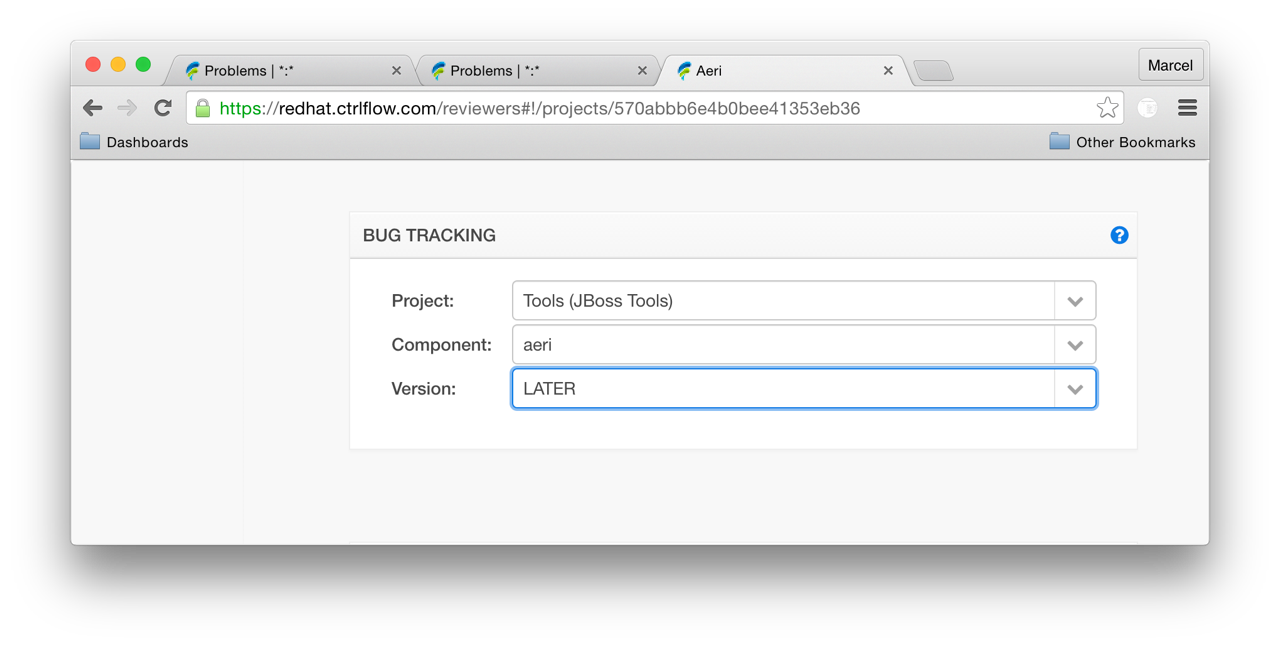
1. Make sure that your project has a default JIRA project, component and version. If not
set, go to projects > your project > bug tracking and select the values for your
project.
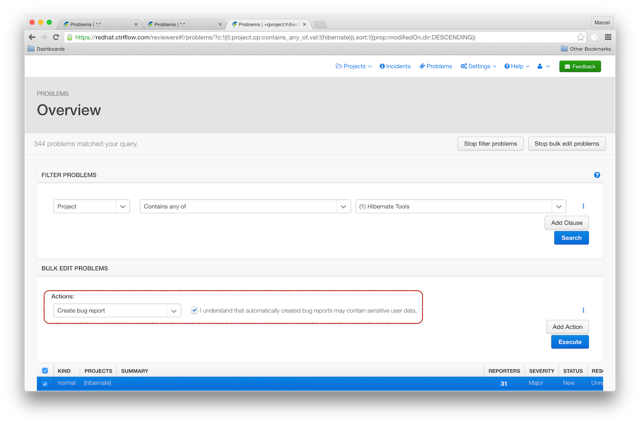
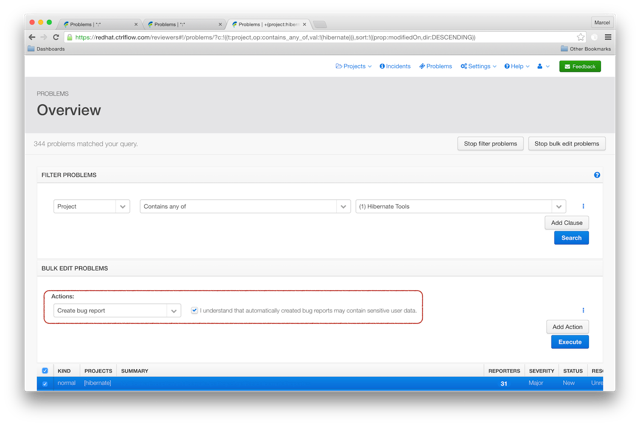
2. Go to the problems page, filter all problems belonging to your project, and select the
bulk edit action “create bug report”. Finally select all problems you’d like to create a
JIRA for and press “Execute”.
That’s all. Now, you can make the final adjustments in JIRA as needed (set the target
version, assign the bug report to s/o etc.)
HTH,
Marcel
Attachments:
- ScreenShot2016-08-08at20.46.52.png (image/png — 75.7 KB)
- ScreenShot2016-08-08at20.54.51.png (image/png — 198.3 KB)
- attachment.html (text/html — 2.1 KB)


Thanks Marcel. This is helpful!
On 08/08/2016 12:01 PM, Marcel Bruch wrote:
Greetings JBosstools-Dev
I just noticed that today a few people created many bug reports
“one-by-one”. This may be on purpose but if not, here is how you can
create a set of JIRAs in one click:
1. Make sure that your project has a default JIRA project, component
and version. If not set, go to projects > your project > bug tracking
and select the values for your project.
2. Go to the problems page, filter all problems belonging to your
project, and select the bulk edit action “create bug report”. Finally
select all problems you’d like to create a JIRA for and press “Execute”.
That’s all. Now, you can make the final adjustments in JIRA as needed
(set the target version, assign the bug report to s/o etc.)
HTH,
Marcel
_______________________________________________
jbosstools-dev mailing list
jbosstools-dev(a)lists.jboss.org
https://lists.jboss.org/mailman/listinfo/jbosstools-dev
3531
days inactive
3531
days old
jbosstools-dev@lists.jboss.org
1 comments
2 participants
tags (0)
participants (2)
-
 Alexey Kazakov
 -
 Marcel Bruch