[JBoss Tools] - Current text selection does not resolve to a file (html-css-relations)
by nimo stephan
nimo stephan [http://community.jboss.org/people/nimo22] created the discussion
"Current text selection does not resolve to a file (html-css-relations)"
To view the discussion, visit: http://community.jboss.org/message/582996#582996
--------------------------------------------------------------
Eclipse build-in WebToolsPlattform (WTP) provides useful things like clicking a class in a html-document and jumping to that corresponding css-class:
for example:
this is in index.html:
<html>
<head>
<link rel="stylesheet" href="style.css" type="text/css"/>
</head>
<body>
<div class="test_class">
hello
</div>
</body>
</html>
this is in style.css:
.test_class{
font-size: 12px;
}
Now, when I hover the word "test-class" in the html-editor, a link appears and I can click it - eclipse opens the "style.css" and jumps automatically to the class .test_class. This works wonderful.
But when using jsf-project with rf-tools this does not work anymore. When clicking a class, then a red text at the left down side appears with the message:
*Current text selection does not resolve to a file*
I found out, that the file in my static-web-project .project-folder called "*org.eclipse.wst.common.component"* is responsible for that:
+This is the content of my static web project (where html-jumping to css works):+
+
+
<?xml version="1.0" encoding="UTF-8"?>
<project-modules id="moduleCoreId" project-version="1.5.0">
<wb-module deploy-name="my_website">
<wb-resource deploy-path="/" source-path="/WebContent"/>
<property name="context-root" value="my_website"/>
</wb-module>
</project-modules>
+This is the content of my JSF-project (where html-jumping to css DOES NOT work):+
+
+
<?xml version="1.0" encoding="UTF-8"?>
<project-modules id="moduleCoreId" project-version="1.5.0">
<wb-module deploy-name="my_jsf_website">
<wb-resource deploy-path="/WEB-INF/classes" source-path="/src/main/java"/>
<wb-resource deploy-path="/WEB-INF/classes" source-path="/src/main/resources"/>
<wb-resource deploy-path="/" source-path="/src/main/webapp"/>
<property name="context-root" value="my_jsf_website"/>
<property name="java-output-path" value="/MES/target/classes"/>
</wb-module>
</project-modules>
The /src/main/webapp of my JSF-Project has indeed the web content (such as html, css,..). However, the html-jumping to css does not work.
Why is the jumping works in a static html-project (with no jsf)?
Why is the jumping does *not* work in a jsf-project?
How can I fix it?
--------------------------------------------------------------
Reply to this message by going to Community
[http://community.jboss.org/message/582996#582996]
Start a new discussion in JBoss Tools at Community
[http://community.jboss.org/choose-container!input.jspa?contentType=1&cont...]
15 years, 2 months
[jBPM] - JobExecutor becomes broken and cannot recover (JBPM3.2.2)
by Petr Sochurek
Petr Sochurek [http://community.jboss.org/people/soft] created the discussion
"JobExecutor becomes broken and cannot recover (JBPM3.2.2)"
To view the discussion, visit: http://community.jboss.org/message/577160#577160
--------------------------------------------------------------
Problem: JobExecutor thread becomes broken due to unknown transactional problem. As a reason no tasks are executed and only JBoss restart helps.
Configuration and environment
- components stack: JBOSS 4.2.3, JBOSS TS 4.2.3, JBPM 3.2.2, Hibernate 3.2.4.sp1.cp04
- database server: MySQL 5.1.47
- distributed transaction only within the one database server
- operated on several Linux environments
The problem occurs irregurarly (once per several days and only on some environments). When it happens following errors are logged by JBPMExecutor thread:
2010-12-15 15:53:20,566 WARN com.arjuna.ats.arjuna.logging.arjLoggerI18N com.arjuna.ats.arjuna.logging.arjLoggerI18N [com.arjuna.ats.arjuna.coordinator.TwoPhaseCoordinator_2
TwoPhaseCoordinator.beforeCompletion - failed for nulljava.lang.NullPointerExceptionat org.hibernate.connection.DatasourceConnectionProvider.closeConnection(DatasourceConnectionProvider.java:74)at org.hibernate.jdbc.ConnectionManager.closeConnection(ConnectionManager.java:451)at org.hibernate.jdbc.ConnectionManager.aggressiveRelease(ConnectionManager.java:406)at org.hibernate.jdbc.ConnectionManager.afterStatement(ConnectionManager.java:281)at org.hibernate.jdbc.ConnectionManager.flushEnding(ConnectionManager.java:480)at org.hibernate.event.def.AbstractFlushingEventListener.performExecutions(AbstractFlushingEventListener.java:305)at org.hibernate.event.def.DefaultFlushEventListener.onFlush(DefaultFlushEventListener.java:27)at org.hibernate.impl.SessionImpl.flush(SessionImpl.java:1000)at org.hibernate.impl.SessionImpl.managedFlush(SessionImpl.java:338)at org.hibernate.transaction.CacheSynchronization.beforeCompletion(CacheSynchronization.java:59)at com.arjuna.ats.internal.jta.resources.arjunacore.SynchronizationImple.beforeCompletion(SynchronizationImple.java:114)at com.arjuna.ats.arjuna.coordinator.TwoPhaseCoordinator.beforeCompletion(TwoPhaseCoordinator.java:247)at com.arjuna.ats.arjuna.coordinator.TwoPhaseCoordinator.end(TwoPhaseCoordinator.java:86)at com.arjuna.ats.arjuna.AtomicAction.commit(AtomicAction.java:177)at com.arjuna.ats.internal.jta.transaction.arjunacore.TransactionImple.commitAndDisassociate(TransactionImple.java:1389)at com.arjuna.ats.internal.jta.transaction.arjunacore.BaseTransaction.commit(BaseTransaction.java:135)at com.arjuna.ats.jbossatx.BaseTransactionManagerDelegate.commit(BaseTransactionManagerDelegate.java:87)at org.jboss.tm.usertx.client.ServerVMClientUserTransaction.commit(ServerVMClientUserTransaction.java:140)at org.jbpm.persistence.jta.JtaDbPersistenceService.endJtaTransaction(JtaDbPersistenceService.java:80)at org.jbpm.persistence.jta.JtaDbPersistenceService.close(JtaDbPersistenceService.java:41)at org.jbpm.svc.Services.close(Services.java:225)at org.jbpm.JbpmContext.close(JbpmContext.java:139)at org.jbpm.job.executor.JobExecutorThread.acquireJobs(JobExecutorThread.java:144)at org.jbpm.job.executor.JobExecutorThread.run(JobExecutorThread.java:58)2010-12-15 15:53:20,566 WARN com.arjuna.ats.arjuna.logging.arjLoggerI18N com.arjuna.ats.arjuna.logging.arjLoggerI18N com.arjuna.ats.arjuna.coordinator.CheckedAction_2 com.arjuna.ats.arjuna.coordinator.CheckedAction_2 - CheckedAction::check - atomic action
a471f1f:c46e:4d08ce0f:c5a aborting with 1 threads active!2010-12-15 15:53:20,582 ERROR org.jbpm.svc.Services org.jbpm.svc.Services problem closing service 'persistence'org.jbpm.JbpmException: couldn't commit JTA transactionat org.jbpm.persistence.jta.JtaDbPersistenceService.endJtaTransaction(JtaDbPersistenceService.java:82)at org.jbpm.persistence.jta.JtaDbPersistenceService.close(JtaDbPersistenceService.java:41)at org.jbpm.svc.Services.close(Services.java:225)at org.jbpm.JbpmContext.close(JbpmContext.java:139)at org.jbpm.job.executor.JobExecutorThread.acquireJobs(JobExecutorThread.java:144)at org.jbpm.job.executor.JobExecutorThread.run(JobExecutorThread.java:58)Caused by: java.lang.NullPointerExceptionat com.arjuna.ats.arjuna.coordinator.TwoPhaseCoordinator.beforeCompletion(TwoPhaseCoordinator.java:235)at com.arjuna.ats.arjuna.coordinator.TwoPhaseCoordinator.end(TwoPhaseCoordinator.java:86)at com.arjuna.ats.arjuna.AtomicAction.commit(AtomicAction.java:177)at com.arjuna.ats.internal.jta.transaction.arjunacore.TransactionImple.commitAndDisassociate(TransactionImple.java:1389)at com.arjuna.ats.internal.jta.transaction.arjunacore.BaseTransaction.commit(BaseTransaction.java:135)at com.arjuna.ats.jbossatx.BaseTransactionManagerDelegate.commit(BaseTransactionManagerDelegate.java:87)at org.jboss.tm.usertx.client.ServerVMClientUserTransaction.commit(ServerVMClientUserTransaction.java:140)at org.jbpm.persistence.jta.JtaDbPersistenceService.endJtaTransaction(JtaDbPersistenceService.java:80)... 5 more2010-12-15 15:53:20,589 ERROR org.jbpm.job.executor.JobExecutorThread org.jbpm.job.executor.JobExecutorThread exception in job executor thread. waiting 5000 millisecondsorg.jbpm.JbpmException: problem closing services {persistence=org.jbpm.JbpmException: couldn't commit JTA transaction}at org.jbpm.svc.Services.close(Services.java:245)at org.jbpm.JbpmContext.close(JbpmContext.java:139)at org.jbpm.job.executor.JobExecutorThread.acquireJobs(JobExecutorThread.java:144)at org.jbpm.job.executor.JobExecutorThread.run(JobExecutorThread.java:58)Caused by: org.jbpm.JbpmException: couldn't commit JTA transactionat org.jbpm.persistence.jta.JtaDbPersistenceService.endJtaTransaction(JtaDbPersistenceService.java:82)at org.jbpm.persistence.jta.JtaDbPersistenceService.close(JtaDbPersistenceService.java:41)at org.jbpm.svc.Services.close(Services.java:225)... 3 moreCaused by: java.lang.NullPointerExceptionat com.arjuna.ats.arjuna.coordinator.TwoPhaseCoordinator.beforeCompletion(TwoPhaseCoordinator.java:235)at com.arjuna.ats.arjuna.coordinator.TwoPhaseCoordinator.end(TwoPhaseCoordinator.java:86)at com.arjuna.ats.arjuna.AtomicAction.commit(AtomicAction.java:177)at com.arjuna.ats.internal.jta.transaction.arjunacore.TransactionImple.commitAndDisassociate(TransactionImple.java:1389)at com.arjuna.ats.internal.jta.transaction.arjunacore.BaseTransaction.commit(BaseTransaction.java:135)at com.arjuna.ats.jbossatx.BaseTransactionManagerDelegate.commit(BaseTransactionManagerDelegate.java:87)at org.jboss.tm.usertx.client.ServerVMClientUserTransaction.commit(ServerVMClientUserTransaction.java:140)at org.jbpm.persistence.jta.JtaDbPersistenceService.endJtaTransaction(JtaDbPersistenceService.java:80)
... 5 more
>From now all the successive iterations of JobExecutor always end up with following error (and the waiting time doubles after error):
2010-12-15 15:53:23,524 ERROR org.jbpm.job.executor.JobExecutorThread org.jbpm.job.executor.JobExecutorThread exception in job executor thread. waiting 10000 milliseconds
org.jbpm.JbpmException: couldn't start JTA transaction
at org.jbpm.persistence.jta.JtaDbPersistenceService.beginJtaTransaction(JtaDbPersistenceService.java:55)
at org.jbpm.persistence.jta.JtaDbPersistenceService.(JtaDbPersistenceService.java:28)
at org.jbpm.persistence.jta.JtaDbPersistenceServiceFactory.openService(JtaDbPersistenceServiceFactory.java:17)
at org.jbpm.svc.Services.getService(Services.java:144)
at org.jbpm.svc.Services.getPersistenceService(Services.java:183)
at org.jbpm.JbpmContext.getPersistenceService(JbpmContext.java:628)
at org.jbpm.JbpmContext.getJobSession(JbpmContext.java:561)
at org.jbpm.job.executor.JobExecutorThread.acquireJobs(JobExecutorThread.java:112)
at org.jbpm.job.executor.JobExecutorThread.run(JobExecutorThread.java:58)
Caused by: javax.transaction.NotSupportedException
at com.arjuna.ats.internal.jta.transaction.arjunacore.BaseTransaction.begin(BaseTransaction.java:79)
at com.arjuna.ats.jbossatx.BaseTransactionManagerDelegate.begin(BaseTransactionManagerDelegate.java:77)
at org.jboss.tm.usertx.client.ServerVMClientUserTransaction.begin(ServerVMClientUserTransaction.java:124)
at org.jbpm.persistence.jta.JtaDbPersistenceService.beginJtaTransaction(JtaDbPersistenceService.java:53)
... 8 more
I suppose that the root cause is some database connection problem or network problem (maybe firewall). The problem occurs irregurarly only on production environments and I wasn't able to find out what it coudl be.
Anyway, I would expect that regardless of such low-level errors, the JBPM (or Hibernate, Arjuna or anything else inside) should be able to fully recover.
Locally I can reproduce problem by locking Mysql database tables using scenario:
1) deployed testing jbpm process whose transitions are changed automatically every minute
2) locked mysql database tables using "FLUSH TABLES WITH READ LOCK \G;" command
3) wait 1 hour
4) unlock database tables using "UNLOCK TABLES;" command
5) now errors (see above) appear in the log
Can you please give me any advice how to ensure that JBPM recovers correctly?
Maybe I omited some important configuration in Hibernate/Arjuna/JBPM, Jboss (the JBPM datasource is configured correctly now).
I cannot belive that the JBOSS restart is sufficent solution.
Thanks a lot.
Petr
--------------------------------------------------------------
Reply to this message by going to Community
[http://community.jboss.org/message/577160#577160]
Start a new discussion in jBPM at Community
[http://community.jboss.org/choose-container!input.jspa?contentType=1&cont...]
15 years, 2 months
[JBoss Tools] - Create GWT Projects with JBoss Tools and Eclipse WTP
by Andre Dietisheim
Andre Dietisheim [http://community.jboss.org/people/adietish] modified the document:
"Create GWT Projects with JBoss Tools and Eclipse WTP"
To view the document, visit: http://community.jboss.org/docs/DOC-15794
--------------------------------------------------------------
h1. http:// http://Use Eclipse WTP, get there with the standard
If you want to create GWT applications you unfortunately cannot do it the WTP way and create a so called dynamic web project. The Google plugins implement their own set of views, wizards, launchers and mostly duplicate what's already present and defacto standard in WTP. The consequence is that you'd have to deal with workarounds if you want to get functionalities (run/deploy on JBoss etc.) Google does not offer.
We therefore developed an experimental integration plugin for GWT that allows you to create GWT projects in the way most Eclipse users are used to: by creating Dynamic Web Projects.
h1. Preface
Eclipse offers nice tools to create web applications. The base framework's what we call the Eclipse Web Tools Platform (WTP). Eclipse WTP delivers a standard for most aspects involved when you create web applications.
The google web toolkit, GWT, is a nice framework to develop web applications. Google delivers a plugin for Eclipse and developing with GWT is a very pleasant experience. The GWT plugin uses an embedded jetty to run the application that you develop. Google unfortunately did not base its work on Eclipse WTP and does not comply to the Eclipse project structure for web application. So if you want to use JBoss instead of jetty, the approach to take is not as handy and intuitive as it could be. Furthermore there's no way to use and integrate into plugins that other solution providers offer. You mostly have to proceed by workarounds to get what Google does not offer.
We developed a set of (experimental) plugins that create GWT projects by extending Eclipse WTP. Our plugins implement well known usage patterns and integrate well with all Eclipse components that use the common standard for web projects. The most obvious benefit is that deploying to JEE application servers (and JBoss partcullarly) is as easy as it is with any other web project.
h1. Solution
Install and use the JBoss GWT Integration. You'll then be able to create GWT projects the WTP way and fully enjoy it's full-blow features and standardized usage patterns.
This How-To shows you all the steps to install the plugins and how to create a dynamic web project that's GWT enabled.
h2. Install JBoss GWT Integration
Add the Google Eclipse Plugins update site:
> http://dl.google.com/eclipse/plugin/3.6/ http://dl.google.com/eclipse/plugin/3.6/
Add the JBoss Tools update site:
> http://download.jboss.org/jbosstools/updates/nightly/trunk/ http://download.jboss.org/jbosstools/updates/nightly/trunk/
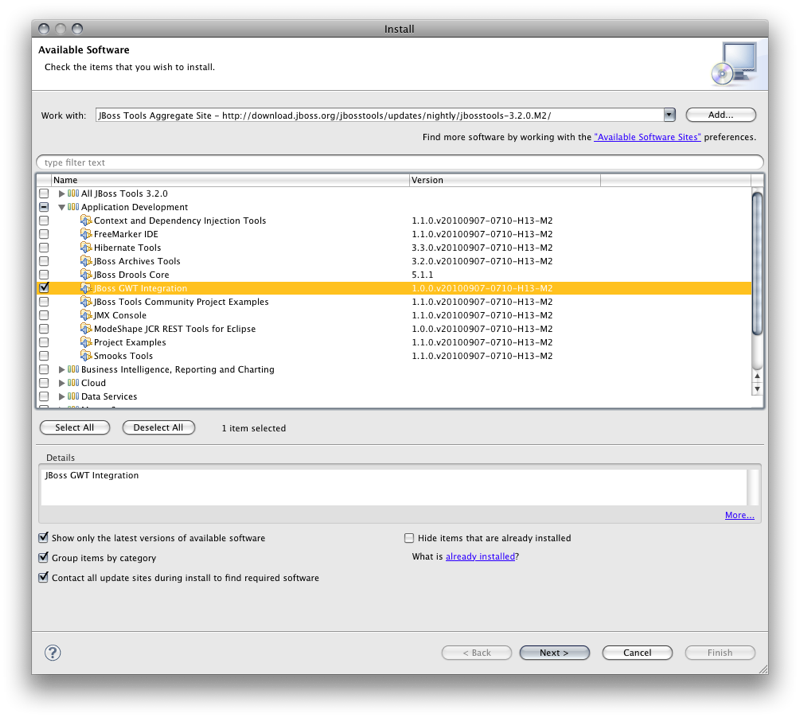
And Install the JBoss GWT Integration
http://community.jboss.org/servlet/JiveServlet/showImage/6254/Picture+4.png http://community.jboss.org/servlet/JiveServlet/downloadImage/6254/Picture...
h2. Create a Dynamic Web Application Project
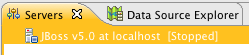
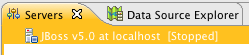
Make sure you have a JEE server (JBoss application server for instance) in your Eclipse environment. If not, download and declare it to your Eclipse IDE:
http://community.jboss.org/servlet/JiveServlet/showImage/6260/Picture+12.png http://community.jboss.org/servlet/JiveServlet/downloadImage/6260/Picture...
http://community.jboss.org/servlet/JiveServlet/showImage/6259/Picture+11.png http://community.jboss.org/servlet/JiveServlet/downloadImage/6259/Picture...
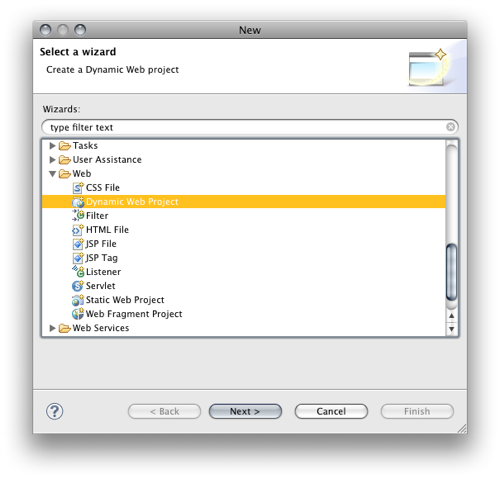
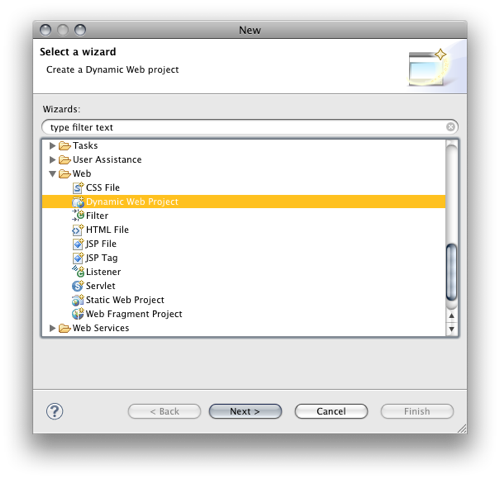
You're now ready to create a *Dynamic Web Project*.
http://community.jboss.org/servlet/JiveServlet/showImage/6256/Picture+5.png http://community.jboss.org/servlet/JiveServlet/downloadImage/6256/Picture...
The wizard picks your server (runtime) and allows you to configure the various characteristic of your web project.
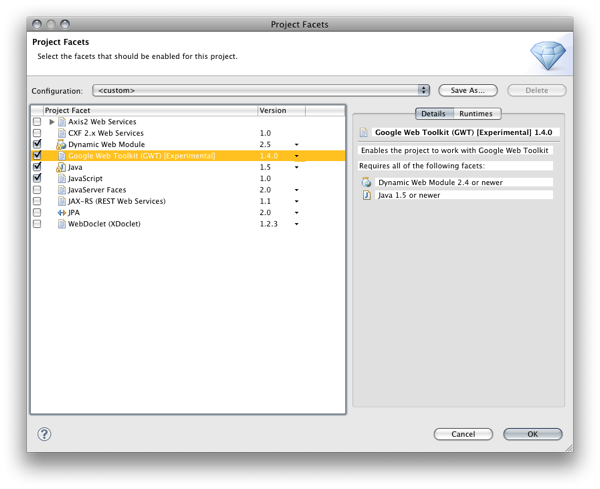
The *configuration* group allows you to pick the different facets of your project. We provide a *Google Web Toolkit* facet that will configure the GWT related characteristics.
Hit *Modify...*
http://community.jboss.org/servlet/JiveServlet/showImage/102-15794-17-626... http://community.jboss.org/servlet/JiveServlet/downloadImage/102-15794-17...
and select the *Google Web Toolkit* facet.
http://community.jboss.org/servlet/JiveServlet/showImage/6262/Picture+14.png http://community.jboss.org/servlet/JiveServlet/downloadImage/6262/Picture...
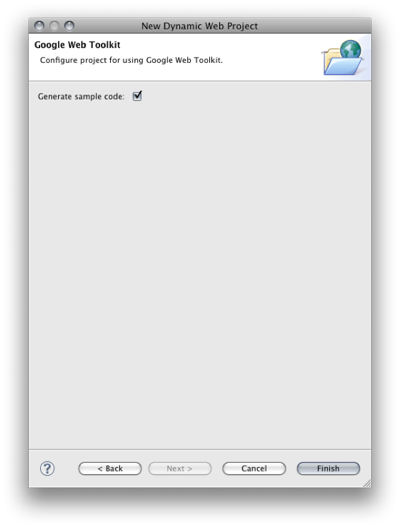
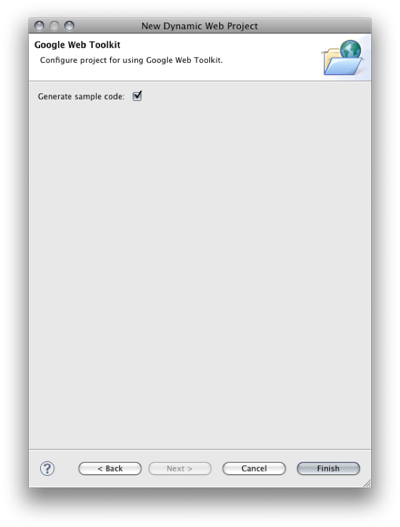
A few wizard steps further, you may choose to get some GWT *sample code*.
http://community.jboss.org/servlet/JiveServlet/showImage/6411/generate-sa... http://community.jboss.org/servlet/JiveServlet/downloadImage/6411/generat...
You get the Hello World sample that you get when you use the Google Wizard. We just put it to the *WebContent* folder you configured in your Dynamic Web Project wizard (WTP default opposed to what Google does in their plugin). The sample's a fully working GWT application that allows you to get a first impression of what developing with GWT looks like.
h1. Cross compile to Javascript
GWT is about programming in Java and getting javascript for the browser. GWT achieves this with a cross-compiler that creates the javascript for you.
In order to get the project up and running you now need to cross compile the sample's client java code to javascript. Our project has the *GWT nature* and therefore offers the Google compiler in the context menu.
http://community.jboss.org/servlet/JiveServlet/showImage/102-15794-17-627... http://community.jboss.org/servlet/JiveServlet/downloadImage/102-15794-17...
h1. Deploy to JBoss
We are now ready to deploy our application. We strictly use the standard Eclipse *WTP* infrastructure in our setup, So you may deploy your GWT application in the same manner you usually deploy and run classic web applications with Eclipse WTP. You have to add the application to a server that's registered in the WTP *servers view*. We deploy our application to our JBoss application server by selecting it in the and choosing *Add and Remove...*
http://community.jboss.org/servlet/JiveServlet/showImage/102-15794-17-626... http://community.jboss.org/servlet/JiveServlet/downloadImage/102-15794-17...
You can now add the GWT application to your server. WTP will make sure that it gets deployed and the deployed artifacts are in sync with your workspace (even when you change code, resources, configurations, etc.)
http://community.jboss.org/servlet/JiveServlet/showImage/102-15794-17-626... http://community.jboss.org/servlet/JiveServlet/downloadImage/102-15794-17...
h1. Run your application and launch your browser
You may now run your application. We completely comply to the views and steps Eclipse WTP offers to web developers. So there's no custom way to start a server in our setup. We select our JBoss instance in the *Servers view* and *start* it.
http://community.jboss.org/servlet/JiveServlet/showImage/102-15794-17-626... http://community.jboss.org/servlet/JiveServlet/downloadImage/102-15794-17...
You can now point your browser to the address and port that your JBoss server's bound to.
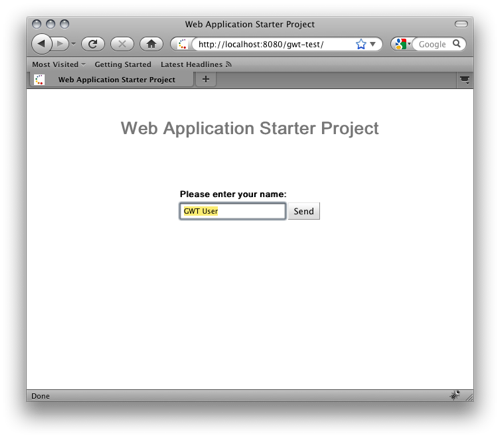
http://community.jboss.org/servlet/JiveServlet/showImage/6271/Picture+2.png http://community.jboss.org/servlet/JiveServlet/downloadImage/6271/Picture...
h2. Speed up my development cycle!
The approach we've choosen so far uses an extra cross compile step to deploy the application after each change. That's very reliable but it gets tedious at development time. Google delivers a so called hosted/development mode. Its major benefit is that you dont need to cross compile on each change but you can change and test on the fly. This magic is achieved with a browser plugin and a google runtime that interprets your java code at runtime. Changing, testing, changing, testing etc. gets much faster and pleasant, the cross-compilation step's not needed any more.
h2. Launch GWT Codeserver
If you launch your application as Google Web Application, you'll be able to code and test on the fly. The GWT browser plugin will communicate with the GWT code server and execute your changes on the fly.
http://community.jboss.org/servlet/JiveServlet/showImage/102-15794-17-646... http://community.jboss.org/servlet/JiveServlet/downloadImage/102-15794-17...
You need to tell the browser plugin where your code server may be reached. You do that by using an *additional url parameter*. Your browser URL now reads as follows:
> http://localhost:8080/gwt-test/?gwt.codesvr=127.0.0.1:9997 http://localhost:8080/gwt-test/?gwt.codesvr=127.0.0.1:9997
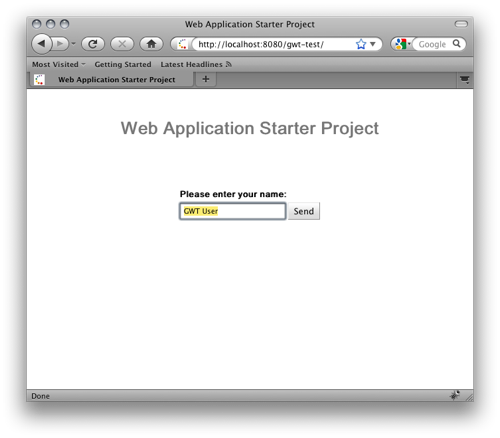
Point your browser to this URL and you'll get the same page as before, nothing spectacular so far.
Now get back to your client code and change the button label, to see if changes are picked on the fly now.
http://community.jboss.org/servlet/JiveServlet/showImage/102-15794-17-640... http://community.jboss.org/servlet/JiveServlet/downloadImage/102-15794-17...
Do not cross-compile, get back to your browser and reload. What you see reflects the changes in your code. You don't need to cross compile to develop your app!
http://community.jboss.org/servlet/JiveServlet/showImage/102-15794-17-640... http://community.jboss.org/servlet/JiveServlet/downloadImage/102-15794-17...
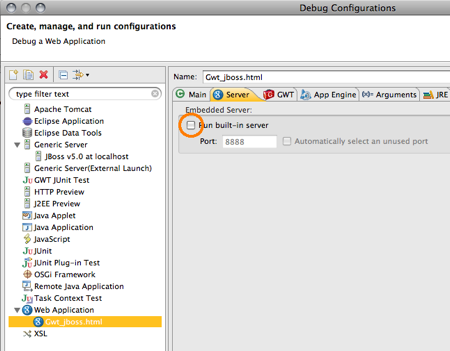
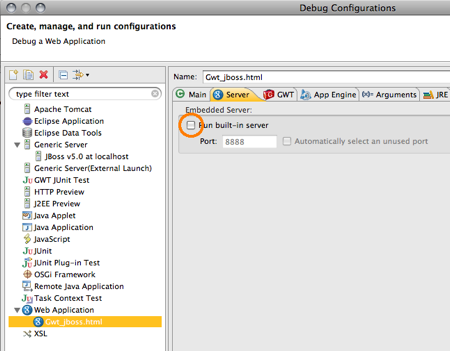
To be picky on the issue you could now go to the launch configuration and disable the jetty google usually uses to serve your GWT application:
http://community.jboss.org/servlet/JiveServlet/showImage/6413/disable-bui... http://community.jboss.org/servlet/JiveServlet/downloadImage/6413/disable...
--------------------------------------------------------------
Comment by going to Community
[http://community.jboss.org/docs/DOC-15794]
Create a new document in JBoss Tools at Community
[http://community.jboss.org/choose-container!input.jspa?contentType=102&co...]
15 years, 2 months
[jBPM] - WebDav error when adding files to Guvnor from Eclipse
by J W
J W [http://community.jboss.org/people/jmwest532] created the discussion
"WebDav error when adding files to Guvnor from Eclipse"
To view the discussion, visit: http://community.jboss.org/message/582907#582907
--------------------------------------------------------------
Hi all,
Using Eclipse to integrate with Guvnor, and at "Select Folder" dialog screen (trying to select defaultPackage), I am getting an Eclipse error dialog screen with the message:
*+Guvnor Repository Error+*
*+Reason:+*
*+WebDav error: Internal Server Error (500)+*
Guvnor's WebDav implementation seems to be working fine, since using a browser to the url: http://localhost:8080/drools-guvnor/org.drools.guvnor.Guvnor/webdav/ http://localhost:8080/drools-guvnor/org.drools.guvnor.Guvnor/webdav/ rendered:
*+Contents of this Folder:+*
*+packages+*
*+snapshots+*
This seems alright, since I can browse inside using for example the url: http://localhost:8080/drools-guvnor/org.drools.guvnor.Guvnor/webdav/packages http://localhost:8080/drools-guvnor/org.drools.guvnor.Guvnor/webdav/packages
Looking inside the jboss' logs, I found the following exception:
2011-01-25 13:03:42,308 DEBUG [com.arjuna.ats.arjuna.logging.arjLogger] StatusModule: first pass2011-01-25 13:03:42,308 DEBUG [com.arjuna.ats.txoj.logging.txojLoggerI18N] [com.arjuna.ats.internal.txoj.recovery.TORecoveryModule_3] - TORecoveryModule - first pass
2011-01-25 13:03:42,308 DEBUG [com.arjuna.ats.jta.logging.loggerI18N] [com.arjuna.ats.internal.jta.recovery.info.firstpass] Local XARecoveryModule - first pass
2011-01-25 13:03:49,667 ERROR [org.apache.catalina.core.ContainerBase.[jboss.web].[localhost].[/drools-guvnor].[WebdavServlet]] Servlet.service() for servlet WebdavServlet threw exception
java.lang.ArrayIndexOutOfBoundsException: 0
at org.drools.guvnor.server.files.RepositoryServlet.unpack(RepositoryServlet.java:167)
at org.drools.guvnor.server.files.RepositoryServlet.allowUser(RepositoryServlet.java:126)
at org.drools.guvnor.server.files.WebdavServlet.service(WebdavServlet.java:74)
at javax.servlet.http.HttpServlet.service(HttpServlet.java:803)
at org.apache.catalina.core.ApplicationFilterChain.internalDoFilter(ApplicationFilterChain.java:290)
at org.apache.catalina.core.ApplicationFilterChain.doFilter(ApplicationFilterChain.java:206)
at org.jboss.seam.web.ContextFilter$1.process(ContextFilter.java:42)
at org.jboss.seam.servlet.ContextualHttpServletRequest.run(ContextualHttpServletRequest.java:53)
at org.jboss.seam.web.ContextFilter.doFilter(ContextFilter.java:37)
at org.apache.catalina.core.ApplicationFilterChain.internalDoFilter(ApplicationFilterChain.java:235)
at org.apache.catalina.core.ApplicationFilterChain.doFilter(ApplicationFilterChain.java:206)
at org.jboss.web.tomcat.filters.ReplyHeaderFilter.doFilter(ReplyHeaderFilter.java:96)
at org.apache.catalina.core.ApplicationFilterChain.internalDoFilter(ApplicationFilterChain.java:235)
at org.apache.catalina.core.ApplicationFilterChain.doFilter(ApplicationFilterChain.java:206)
at org.apache.catalina.core.StandardWrapperValve.invoke(StandardWrapperValve.java:230)
at org.apache.catalina.core.StandardContextValve.invoke(StandardContextValve.java:175)
at org.jboss.web.tomcat.security.SecurityAssociationValve.invoke(SecurityAssociationValve.java:182)
at org.jboss.web.tomcat.security.JaccContextValve.invoke(JaccContextValve.java:84)
at org.apache.catalina.core.StandardHostValve.invoke(StandardHostValve.java:127)
at org.apache.catalina.valves.ErrorReportValve.invoke(ErrorReportValve.java:102)
at org.jboss.web.tomcat.service.jca.CachedConnectionValve.invoke(CachedConnectionValve.java:157)
at org.apache.catalina.core.StandardEngineValve.invoke(StandardEngineValve.java:109)
at org.apache.catalina.connector.CoyoteAdapter.service(CoyoteAdapter.java:262)
at org.apache.coyote.http11.Http11Processor.process(Http11Processor.java:844)
at org.apache.coyote.http11.Http11Protocol$Http11ConnectionHandler.process(Http11Protocol.java:583)
at org.apache.tomcat.util.net.JIoEndpoint$Worker.run(JIoEndpoint.java:446)
at java.lang.Thread.run(Thread.java:662)
2011-01-25 13:03:52,331 DEBUG [com.arjuna.ats.arjuna.logging.arjLogger] Periodic recovery - second pass <Tue, 25 Jan 2011 13:03:52>
*Have you come across with this problem? Any workaround?*
I am using the environment set up by jbpm-installer (SNAPSHOT 66), and
+java version "1.6.0_23"++Java(TM) SE Runtime Environment (build 1.6.0_23-b05)+
+Java HotSpot(TM) 64-Bit Server VM (build 19.0-b09, mixed mode)+
--------------------------------------------------------------
Reply to this message by going to Community
[http://community.jboss.org/message/582907#582907]
Start a new discussion in jBPM at Community
[http://community.jboss.org/choose-container!input.jspa?contentType=1&cont...]
15 years, 2 months