
[jBPM] - jBPM3 References
by Administrator Administrator
Administrator Administrator [http://community.jboss.org/people/admin] modified the document:
"jBPM3 References"
To view the document, visit: http://community.jboss.org/docs/DOC-11170
--------------------------------------------------------------
This page lists the jBPM references. If you're using jBPM, please add your company's name, optionally the logo (max 200 pixels wide and 100 pixels high) and a short description (2-3 lines) in what kind of application you're using it.
In the Use Case field, describe your company briefly and also include for what purpose you use jBPM. If you omit why you use jBPM, your entry will be removed.
|| Company Name || Company Logo || Use Case ||
| *Atos Origin (http://www.atosorigin.com)* | http://community.jboss.org/servlet/JiveServlet/download/11170-76-5370/ato... (http://community.jboss.org/servlet/JiveServlet/download/11170-76-5370/ato...) | Atos Origin is a System Integrator mainly based in Europe and IT partner of the Olympic Games. Atos Origin Netherlands uses jBPM in the Open Chain solution which provides an integration platform to communicate with third parties, such as the Dutch tax authority and healthcare organizations. Atos Origin employees Jos Dirksen and Tijs Rademakers are authors of the Manning book Open Source ESBs in Action (http://www.manning.com/rademakers), which includes a chapter about using jBPM with Mule. |
| *British Telecom (http://www.bt.com/)* | http://community.jboss.org/servlet/JiveServlet/download/11170-76-5375/bt.jpg (http://community.jboss.org/servlet/JiveServlet/download/11170-76-5375/bt.jpg) | More info can be found in this TechRepublic article (http://whitepapers.techrepublic.com.com/whitepaper.aspx?&compid=7855&doci...) |
| *Alfresco (http://www.alfresco.com/)* | http://community.jboss.org/servlet/JiveServlet/download/11170-76-5372/alf... (http://community.jboss.org/servlet/JiveServlet/download/11170-76-5372/alf...) | Alfresco uses jBPM jPDL to add workflow capabilities to their Enterprise Content Management (ECM) system. For more info, check this demo, section workflow (http://www.alfresco.com/products/ecm/tour/tour.html) or the workflow administration docs (http://wiki.alfresco.com/wiki/WorkflowAdministration). |
| *BPS (http://www.bpsinc.com)* | http://www.bpsinc.com/wp-content/themes/bps/images/logo.png (http://www.bpsinc.com/wp-content/themes/bps/images/logo.png) | Quoting reply of Gavin Terril on Ronald's blog post (http://planetjbpm.wordpress.com/2008/10/02/other-products-using-jbpm/): "You are right. jBPM is a great embedded workflow product, and I think there are a lot of companies and vendors out there using it.We certainly do! It powers our Enterprise Risk Management products. I can’t imagine anyone writing their own workflow engine when such great libraries such as jBPM are available." |
| *ESN (http://www.esn.de)* | http://community.jboss.org/servlet/JiveServlet/downloadImage/102-11170-76... (http://community.jboss.org/servlet/JiveServlet/showImage/102-11170-76-211...) | As a well established solution provider for Energy and Water Suppliers as well as for huge Real Estate Managers the major focus of the ESN Group lies on delivering consulting, professional services und software solutions for integrated, human centric Business Process Management in the target markets. jBPM works as a part of the new Product line opusP (http://www.opusp.de/opusp). |
| *RealDolmen (http://www.realdolmen.be/)* | http://community.jboss.org/servlet/JiveServlet/download/11170-76-6067/rea... (http://community.jboss.org/servlet/JiveServlet/download/11170-76-6067/rea...) | RealDolmen is a general software service provider in the Belgian market. As a spin off from a jBPM project they're doing, Joram Barrez (http://www.jorambarrez.be/) published a great talk about "The Full Stack" (http://www.jorambarrez.be/blog/2008/04/03/some-real-life-jbpm-action/). It's a combination of jBPM and SeeWhy to build a full BPM stack. As part of that talk, Joram unveiled some awsome jBPM performance numbers (http://processdevelopments.blogspot.com/2008/04/awsome-jbpm-performance-n...). |
| *Hudson (https://hudson.dev.java.net/)* | http://community.jboss.org/servlet/JiveServlet/download/11170-76-6095/hud... (http://community.jboss.org/servlet/JiveServlet/download/11170-76-6095/hud...) | Hudson monitors executions of repeated jobs, such as building a software project or jobs run by cron. There is a Hudson plugin that integrates JBoss JBPM with Hudson. (http://hudson.gotdns.com/wiki/display/HUDSON/JBPM+Plugin) It lets you define your own build, test and release workflows in a graphical designer, and execute them inside Hudson. |
| *Cadtel (http://www.cadtel.com/cadteltransition/)* | http://community.jboss.org/servlet/JiveServlet/download/11170-76-5378/cad... (http://community.jboss.org/servlet/JiveServlet/download/11170-76-5378/cad...) | Cadtel used jBPM to integrate service delivery systems with communications providers back office systems and to automate network allocation and subscriber provisioning processes. More information in this press release (http://customers.press.redhat.com/2008/02/08/jboss-soa-platform-automates...) |
| *TeamWork (http://www.twproject.com/)* | http://community.jboss.org/servlet/JiveServlet/download/11170-76-6068/tea... (http://community.jboss.org/servlet/JiveServlet/download/11170-76-6068/tea...) | Web based project management software Teamwork is a proven, reliable and friendly web based software solution for managing work and communication in any field. In this blog post (http://twproject.blogspot.com/2008/10/teamwork-development-version-now.html), they explain: "Teamwork development version now includes Business Process integration. This is a really cool feature, ... The underlying technology is our implementation of Hibernate + JBPM, which gives the full generality and power of a proven business process framework." |
| *Met@logo (http://www.metalogo.org)* | http://community.jboss.org/servlet/JiveServlet/download/11170-76-5365/met... (http://community.jboss.org/servlet/JiveServlet/download/11170-76-5365/met...) | Met@logo is an eGovernment suite. The project was a collaboration between 14 partners of 10 different countries. More information can be found in this Met@logo case study (http://www.jboss.com/pdf/innovation/metalogo.pdf). |
| *Camunda (http://www.camunda.com)* | http://community.jboss.org/servlet/JiveServlet/download/11170-76-5366/cam... (http://community.jboss.org/servlet/JiveServlet/download/11170-76-5366/cam...) | Camunda is a consulting company with specialisation in BPM. They have build their own Swing based GUI (http://www.camunda.com/content/view/36/73/) on top of jBPM jPDL. |
| *SpecSavers (http://www.specsavers.co.uk/)* | http://community.jboss.org/servlet/JiveServlet/download/11170-76-5373/spe... (http://community.jboss.org/servlet/JiveServlet/download/11170-76-5373/spe...) | More info can be found in this ComputerWorld press release (http://www.computerworlduk.com/management/it-business/supplier-relations/...) |
| *SeeWhy Software (http://www.seewhy.com/)* | http://community.jboss.org/servlet/JiveServlet/download/11170-76-5364/see... (http://community.jboss.org/servlet/JiveServlet/download/11170-76-5364/see...) | SeeWhy provides a real time business intelligence platform for real time monitoring, alerting and actions in SOA environments. An advanced JBoss SOA partner, SeeWhy is the Business Activity Monitoring (BAM) component for the JBoss SOA platform, and for jBPM. +SeeWhy for jBPM+ is a plug and play BAM product for jBPM which will be available in the fall of 2008. for more information on BAM and jBPM please visit the SeeWhy site (http://www.seewhy.com/jboss). More information can be found here www.SeeWhy.com (http://www.seewhy.com/) |
| *Metawidget (http://metawidget.org)* | http://community.jboss.org/servlet/JiveServlet/download/11170-76-5368/met... (http://community.jboss.org/servlet/JiveServlet/download/11170-76-5368/met...) | Metawidget is a 'smart User Interface widget' that populates itself, at runtime, with UI components to match back-end business objects. Its jBPM support includes inspecting Seam pageflow files to discover business object actions (http://metawidget.sourceforge.net/doc/reference/en/html/ch01s04.html#sect...). |
| *Nuxeo (http://www.nuxeo.com/)* | http://community.jboss.org/servlet/JiveServlet/download/11170-76-5374/nux... (http://community.jboss.org/servlet/JiveServlet/download/11170-76-5374/nux...) | Nuxeo is an Enterprise Content Management (ECM) system that leverages jBPM for adding workflow capabilities to the product. For more information, read the case study (http://community.jboss.org/nuxeo.pdf). |
| *SNS Bank (http://www.snsbank.nl/)* | http://community.jboss.org/servlet/JiveServlet/download/11170-76-5376/sns... (http://community.jboss.org/servlet/JiveServlet/download/11170-76-5376/sns...) | SNS Bank is an innovative, transparent and accessible retail bank in The Netherlands. The organization offers private customers a complete set of products with regards to mortgages, savings, investments, payments, loans and insurances. "In the future, SNS Bank is looking to deploy a full service-oriented architecture (SOA) environment and plans to use JBoss jBPM, Red Hat's workflow framework for business process management, to extend the benefits of open source and Java." For more information, read "SNS Bank Selects JBoss Application Server for Transaction and Payments Processing System" (http://www.pr-inside.com/sns-bank-selects-jboss-application-server-r25899...). |
| *Press Release 365 (http://www.pressrelease365.com/)* | http://community.jboss.org/servlet/JiveServlet/download/11170-76-5371/pre... (http://community.jboss.org/servlet/JiveServlet/download/11170-76-5371/pre...) | Press Release 365 uses jBPM to manage workflow capabilities within their online press release distribution platform. Press releases are submitted through a set of wizard-like screens, then routed to back-office managers in the various international publishing departments. |
| *Daisy (http://cocoondev.org/daisy)* | http://community.jboss.org/servlet/JiveServlet/download/11170-76-5382/dai... (http://community.jboss.org/servlet/JiveServlet/download/11170-76-5382/dai...) | Daisy is a content management system that offers rich out-of-the-box functionality combined with solid foundations for extensibility and integration. It uses jBPM (http://cocoondev.org/daisydocs-2_0/g1/350-cd.html) for its workflow capabilities. |
| *Enomalism (http://enomalism.com/)* | http://community.jboss.org/servlet/JiveServlet/download/11170-76-5384/eno... (http://community.jboss.org/servlet/JiveServlet/download/11170-76-5384/eno...) | Enomalism is an open source web-based virtual infrastructure platform. Designed to answer the complexity of managing globally disperse virtual server environments. Enomalism helps to automate the transition to a cloud computing environment by reducing an IT organizations overall workload. Source: Virtualisation.com (http://virtualization.com/news/2008/03/21/enomalism-2.0-available-for-dow...) |
| *Manaty (http://www.manaty.fr/)* | http://www.manaty.fr/images/manaty_small.gif (http://www.manaty.fr/images/manaty_small.gif) | Manaty is a freelance company in China,France,Morroco and US. We use JBPM for the provisionning worklow of our Telecom MVNO solution. Manaty (fr) (http://www.manaty.fr/) |
| EmDev (http://www.emdev.ru) | http://community.jboss.org/servlet/JiveServlet/downloadImage/102-11170-76... (http://community.jboss.org/servlet/JiveServlet/showImage/102-11170-76-102...) | jBPM is playing key-role in our EmForge (http://ww.emforge.org/project/EmForge) project: Open-Source, Workflow-Based integrated solution for managing software development process |
| *Shatel* (http://www.shatel.ir) | http://community.jboss.org/servlet/JiveServlet/downloadImage/102-11170-76... (http://community.jboss.org/servlet/JiveServlet/showImage/102-11170-76-112...) | Shatel, a major broadband service provider in Iran deployed JBPM as part of its service oriented BSS/OSS solution.
For more information please visit: www.shatel.ir (http://www.shatel.ir) |
| Openbravo (http://www.openbravo.com/) | http://community.jboss.org/servlet/JiveServlet/downloadImage/102-11170-76... (http://community.jboss.org/servlet/JiveServlet/showImage/102-11170-76-162...) | We use jBPM first to enhance Openbravo platform so it is possible to define Openbravo business processes through jBPM. It aims as well to embed jBPM web console into Openbravo ERP user interface so it is possible for Openbravo users to interact with runtime tasks generated by jBPM process executions and administer/monitor runtime instances. Secondly to refactor most of Openbravo business processes so they are by default implemented by jBPM definition and this way make it easier for consultants to adapt business logic to specific customer requirement. Source: Openbravo jBPM integration wiki (http://wiki.openbravo.com/wiki/Projects/jBPM_Integration/Functional_Docum...) |
| *Rudder Technologies* (http://www.rudder-tech.com) | http://www.rudder-tech.com/content/public/images/logo-rudder.jpg (http://www.rudder-tech.com/content/public/images/logo-rudder.jpg) | Rudder Technologies is an international company that offers in SaaS Model a Business Platform to help Institutional Agencies, of private or public character, develop tourism destinations.
Rudder uses jBPM as a core element of its business platform, allowing the orchestration of all the tools and the automation of processes involved in online booking, tourist inventory management, tourist information content management, tourist demand and offer surveys management, emailing edition/control control, press clipping processes, etc. |
--------------------------------------------------------------
Comment by going to Community
[http://community.jboss.org/docs/DOC-11170]
Create a new document in jBPM at Community
[http://community.jboss.org/choose-container!input.jspa?contentType=102&co...]


15 years, 2 months
- 1
- 0
[jBPM] - Adding a Database Axis
by Administrator Administrator
Administrator Administrator [http://community.jboss.org/people/admin] modified the document:
"Adding a Database Axis"
To view the document, visit: http://community.jboss.org/docs/DOC-12931
--------------------------------------------------------------
***
#Specify_Connection_Properties Specify Connection Properties
***
#Provide_Data_Source Provide Data Source
***
#Create_Maven_Profile Create Maven Profile
***
#Fill_in_Connection_Parameters Fill in Connection Parameters
***
#Specify_Connection_Properties_For_Update Specify Connection Properties For Update
***
#List_Database_as_Installation_Choice List Database as Installation Choice
***
#Set_Up_DBMS Set Up DBMS
***
#Run_Test_Suite Run Test Suite
***
#Add_Database_Axis_To_Hudson_Jobs Add Database Axis To Hudson Jobs
h3. Specify Connection Properties
Let's add a PostgreSQL axis.
jBPM3 already generates the DDL scripts for many databases. Edit http://anonsvn.jboss.org/repos/jbpm/jbpm3/trunk/modules/core/src/main/res... hibernate.properties.postgresql.xml
<!-- hibernate dialect -->
<property name="hibernate.dialect">org.hibernate.dialect.PostgreSQLDialect</property>
<!-- JDBC connection properties (begin) -->
<property name="hibernate.connection.driver_class">org.postgresql.Driver</property>
<property name="hibernate.connection.url">${jdbc.postgresql.url}</property>
<property name="hibernate.connection.username">${jdbc.postgresql.username}</property>
<property name="hibernate.connection.password">${jdbc.postgresql.password}</property>
<!-- JDBC connection properties (end) -->
h3. Provide Data Source
Create jbpm-postgresql-ds.xml in http://anonsvn.jboss.org/repos/jbpm/jbpm3/trunk/modules/jpdl/core/src/mai... modules/core/src/main/resources. Use http://community.jboss.org/docs/DOC-9328 ConfigDataSources as a reference.
<xa-datasource>
<jndi-name>JbpmDS</jndi-name>
<xa-datasource-class>org.postgresql.xa.PGXADataSource</xa-datasource-class>
<xa-datasource-property name="ServerName">${jdbc.postgresql.server}</xa-datasource-property>
<xa-datasource-property name="PortNumber">${jdbc.postgresql.port}</xa-datasource-property>
<xa-datasource-property name="DatabaseName">${jdbc.postgresql.database}</xa-datasource-property>
<user-name>${jdbc.postgresql.username}</user-name>
<password>${jdbc.postgresql.password}</password>
<!-- disable transaction interleaving -->
<track-connection-by-tx />
<!-- corresponding type-mapping in conf/standardjbosscmp-jdbc.xml -->
<metadata>
<type-mapping>PostgreSQL 8.0</type-mapping>
</metadata>
</xa-datasource>
h3. Create Maven Profile
In the root POM add a profile that contains the dependency on the JDBC driver
<dependencyManagement>
<dependencies>
<dependency>
<groupId>postgresql</groupId>
<artifactId>postgresql</artifactId>
<version>${postgresql.version}</version>
</dependency>
</dependencies>
</dependencyManagement>
<profiles>
<profile>
<id>postgresql</id>
<activation>
<property>
<name>database</name>
<value>postgresql</value>
</property>
</activation>
<dependencies>
<dependency>
<groupId>postgresql</groupId>
<artifactId>postgresql</artifactId>
<scope>test</scope>
</dependency>
</dependencies>
</profile>
</profiles>
h3. Fill in Connection Parameters
Specify the connection property values that correspond to the target environment in the following locations.
|| Environment || File || Location ||
| jBPM Dev | profiles.xml | ${basedir} |
| Local Dev *** | settings.xml | ${user.home}/.m2 |
| Local QA | profiles.xml.local.qa | ${basedir}/hudson |
| Red Hat QA | profiles.xml.redhat.qa | ${basedir}/hudson |
*** Useful if you have multiple jBPM branches checked out
For a local PostgreSQL installation the property values would look like this:
<properties>
<jdbc.postgresql.server>localhost</jdbc.postgresql.server>
<jdbc.postgresql.port>5432</jdbc.postgresql.port>
<jdbc.postgresql.database>jbpmtest</jdbc.postgresql.database>
<jdbc.postgresql.url>jdbc:postgresql://${jdbc.postgresql.server}:${jdbc.postgresql.port}/${jdbc.postgresql.database}</jdbc.postgresql.url>
<jdbc.postgresql.username>jbpmtest</jdbc.postgresql.username>
<jdbc.postgresql.password></jdbc.postgresql.password>
</properties>
h3. Specify Connection Properties For Update
Generating the DB schema update script requires access to an alternate database hosting the schema from a previous version. Create postgresql.properties in http://anonsvn.jboss.org/repos/jbpm/jbpm3/trunk/modules/jpdl/db/src/main/... modules/db/src/main/resources.
hibernate.dialect=org.hibernate.dialect.PostgreSQLDialect
#
# This uses the jbpm322 database schema as reference for the SchemaUpdate task
#
hibernate.connection.driver_class=org.postgresql.Driver
hibernate.connection.url=jdbc:postgresql://${jdbc.postgresql.server}:${jdbc.postgresql.port}/jbpm322
hibernate.connection.username=${jdbc.postgresql.username}
hibernate.connection.password=${jdbc.postgresql.password}
http://anonsvn.jboss.org/repos/jbpm/jbpm3/trunk/modules/db/scripts/antrun... antrun-jbpmschema.xml
<target name="update-schema" depends="setup-schema" description="Generate jBPM Database Update Scripts">
<jbpmschema output="${scriptsdir}/jbpm.jpdl.postgresql.update322.sql" config="hibernate.cfg.postgresql.xml" properties="postgresql.properties" action="update" delimiter=";"/>
</target>
h3. List Database as Installation Choice
http://anonsvn.jboss.org/repos/jbpm/jbpm3/trunk/modules/distribution/src/... install-definition.xml
<conditions>
<condition type="variable" id="isPostgreSQL">
<name>dbSelection</name>
<value>postgresql</value>
</condition>
</conditions>
<packs>
<!--
********************************
* JBoss Integration *
********************************
-->
<pack name="jBPM3 JBoss Integration" required="no" preselected="yes">
<!-- Database configs to docs/examples/jbpm -->
<fileset dir="@{deploy.artifacts.dir}/resources/jbpm-jpdl-config" targetdir="${jbossInstallPath}/docs/examples/jbpm" override="true">
<include name="hibernate.cfg.postgresql.xml"/>
<include name="jbpm-postgresql-ds.xml"/>
</fileset>
<!-- Database PostgreSQL -->
<file src="@{deploy.artifacts.dir}/resources/jbpm-jpdl-config/jbpm-postgresql-ds.xml" targetdir="${jbossInstallPath}/server/${jbossTargetServer}/deploy/jbpm" condition="isPostgreSQL"/>
<singlefile src="@{deploy.artifacts.dir}/resources/jbpm-jpdl-config/hibernate.cfg.postgresql.xml" condition="isPostgreSQL"
target="${jbossInstallPath}/server/${jbossTargetServer}/deploy/jbpm/jbpm-service.sar/hibernate.cfg.xml" />
<fileset dir="@{deploy.artifacts.dir}/lib" targetdir="${jbossInstallPath}/server/${jbossTargetServer}/deploy/jbpm/jbpm-service.sar" override="true" condition="isPostgreSQL">
<include name="postgresql.jar" />
</fileset>
</pack>
</packs>
http://anonsvn.jboss.org/repos/jbpm/jbpm3/trunk/modules/distribution/src/... user-input-spec.xml
<panel order="2">
<createForPack name="jBPM3 JBoss Integration" />
<field type="radio" variable="dbSelection">
<spec>
<choice txt="PostgreSQL" value="postgresql"/>
</spec>
</field>
</panel>
http://anonsvn.jboss.org/repos/jbpm/jbpm3/trunk/modules/distribution/scri... antrun-installer.xml
<target name="configure" depends="init">
<property name="postgresql.cfg.xml" value="${deploy.artifacts.resources}/jbpm-jpdl-config/hibernate.cfg.postgresql.xml"/>
<macro-disable file="${postgresql.cfg.xml}" section="JDBC connection properties"/>
<macro-disable file="${postgresql.cfg.xml}" section="Automatic schema creation"/>
<macro-enable file="${postgresql.cfg.xml}" section="DataSource properties"/>
<macro-enable file="${postgresql.cfg.xml}" section="JTA transaction properties"/>
</target>
h3. Set Up DBMS
See http://community.jboss.org/docs/DOC-13270 Install PostgreSQL on Fedora
h3. Run Test Suite
Finally you should be able to run the jBPM3 tests against PostgreSQL using the *-Ddatabase* option
[tdiesler@tddell core]$ mvn -Ddatabase=postgresql -Dtest=EndTasksDbTest test
[INFO] Scanning for projects...
[INFO] ------------------------------------------------------------------------
[INFO] Building JBoss jBPM - jPDL Core
[INFO] task-segment: [test]
[INFO] ------------------------------------------------------------------------
[INFO] [antrun:run {execution: default}]
[INFO] Executing tasks
check-database:
[echo] Concat hibernate.cfg.xml using hibernate.properties.postgresql.xml
-------------------------------------------------------
T E S T S
-------------------------------------------------------
Running org.jbpm.taskmgmt.exe.EndTasksDbTest
Tests run: 4, Failures: 0, Errors: 0, Skipped: 0, Time elapsed: 25.799 sec
Results :
Tests run: 4, Failures: 0, Errors: 0, Skipped: 0
h3. Add Database Axis To Hudson Jobs
When the Maven build is setup to use the database for testing, you simple need to add the axis to the Hudson config.
<axis>
<name>database</name>
<values>
<string>hsqldb</string>
<string>mysql</string>
<string>postgresql</string>
</values>
</axis>
This can also be done from the web interface.
Good Luck
--------------------------------------------------------------
Comment by going to Community
[http://community.jboss.org/docs/DOC-12931]
Create a new document in jBPM at Community
[http://community.jboss.org/choose-container!input.jspa?contentType=102&co...]
15 years, 2 months
- 1
- 0
[jBPM] - JBPM Upgrade in JBoss Portal
by Administrator Administrator
Administrator Administrator [http://community.jboss.org/people/admin] modified the document:
"JBPM Upgrade in JBoss Portal "
To view the document, visit: http://community.jboss.org/docs/DOC-14691
--------------------------------------------------------------
JBoss Portal in the last 2.7.2 community version uses JBPM 3.2. It could be useful update it to a newest version, mainly to get more bug fixing. This is tested using JBPM 3.3.1.GA. Here the steps:
1) modify the file inside the jboss portal sar: conf/hibernate/workflow/hibernate.cfg.xml:
instead of:
<mapping resource="org/jbpm/identity/User.hbm.xml"/>
<mapping resource="org/jbpm/identity/Group.hbm.xml"/>
<mapping resource="org/jbpm/identity/Membership.hbm.xml"/>
put:
<mapping resource="hibernate.identity.hbm.xml"/>
add this row as hibernate property. JBPM need the jndi path of the UserTransaction interface:
<property name="jta.UserTransaction">UserTransaction</property>
add in the end of the mappings:
<mapping resource="org/jbpm/job/CleanUpProcessJob.hbm.xml"/>
It is a feature from the 3.2.6 jbpm version. It executes a clean of the datas
2) Download JBPM 3.3.1.GA installer from:
http://sourceforge.net/projects/jbpm/files/f%29%20jBPM%20jPDL%203/jbpm-jp... http://sourceforge.net/projects/jbpm/files/f%29%20jBPM%20jPDL%203/jbpm-jp...
and install it through the command:
java -jar jbpm-installer-3.3.1.GA.jar
During the installation you have to choose a your folder and the path of a clean jboss 4.x version binary in your local environment.
It can be downloaded from:
http://sourceforge.net/projects/jboss/files/JBoss/JBoss-4.2.3.GA http://sourceforge.net/projects/jboss/files/JBoss/JBoss-4.2.3.GA
and uncompessed in some target folder
3) After the installation in your target folder take the following libraries:
jbpm-jpdl.jar
jbpm-identity.jar
and copy them to the 'lib' directory inside the jboss portal sar, rewriting the current jars
--------------------------------------------------------------
Comment by going to Community
[http://community.jboss.org/docs/DOC-14691]
Create a new document in jBPM at Community
[http://community.jboss.org/choose-container!input.jspa?contentType=102&co...]
15 years, 2 months
- 1
- 0
[jBPM] - SOA-P
by Administrator Administrator
Administrator Administrator [http://community.jboss.org/people/admin] modified the document:
"SOA-P"
To view the document, visit: http://community.jboss.org/docs/DOC-13301
--------------------------------------------------------------
h2. SOA-P Overview
* Service Oriented Architecture Platform
* Enterprise supported version of jboss.org projects ESB, jBPM, Drools, Application Server, Seam, Hibernate, and Apache jUDDI
* http://www.jboss.com/products/platforms/soa http://www.jboss.com/products/platforms/soa
* http://www.jboss.com/products/platforms/soa/components http://www.jboss.com/products/platforms/soa/components
h2. SOA-P versions
* 5.0 (anticipated 1Q 2010)
* 4.3 (current)
* 4.2 (old)
h2. SOA-P Examples / Tutorials
* 4.3* http://community.jboss.org/docs/DOC-14353 SOA-P 4.3 Workshop Tutorial
* http://community.jboss.org/docs/DOC-13380 Configuration with JBDS 2.0
* http://community.jboss.org/docs/DOC-13352 Simple web service proxy
* http://community.jboss.org/docs/DOC-13379 XSLTs on the bus
* http://community.jboss.org/docs/DOC-13539 View jUDDI registry contents with UDDI Browser
* http://community.jboss.org/docs/DOC-14311 Configure MRG-M (AMQP) as JMS listener/gateway
* http://community.jboss.org/docs/DOC-14765 Creating custom GUIs and Task Lists for jBPM
h2. Related Links
* http://jboss.org/community/docs/DOC-12833 SOA-P 5 Initial Architecture Overview
* http://jboss.org/community/docs/DOC-10360 SOA-P 4.3 Performance Tuning
* http://jboss.org/community/docs/DOC-10343 JBoss ESB Wiki
--------------------------------------------------------------
Comment by going to Community
[http://community.jboss.org/docs/DOC-13301]
Create a new document in jBPM at Community
[http://community.jboss.org/choose-container!input.jspa?contentType=102&co...]
15 years, 2 months
- 1
- 0
[jBPM] - jBPM 4 QA
by Administrator Administrator
Administrator Administrator [http://community.jboss.org/people/admin] modified the document:
"jBPM 4 QA"
To view the document, visit: http://community.jboss.org/docs/DOC-13251
--------------------------------------------------------------
The jBPM 4 QA can only be accessed from inside the VPN.
http://hudson.qa.jboss.com/hudson/view/JBPM4/ http://hudson.qa.jboss.com/hudson/view/JBPM4/
h1. Introduction
The hudson jobs are configured to just run a script which is in our svn in the qa subdirectory. For example the jbpm4-db hudson job is configured to execute the following shell commands:
*cd jbpm4
. qa/hudson-jbpm4-db.sh
*
That way the whole QA driver scripts is in our svn.
All the scripts make a distinction between configurable properties and derived properties. Configurable properties can be overwritten by providing a *${user.home}/.jbpm4/build.properties*
The jdbc properties for continuous integration testing are located in *qa/jdbc/${database}.properties*
The os specific script files should be called from the jbpm4 root directory.
h1. Parser compatibility testing
Every jPDL process in the test suite is tested against every version of the jPDL parser unless explicitely marked as explicit. So unless a jpdl process in the test suite contains attribute *jpdlparser="4.0"*, then the process will be tested with all parsers. E.g.
*<process name="SomeProcess" jpdlparser="4.6">*
To make the testsuite run use a specific parser, use property *jpdlparser* like this
*mvn -Djpdlparser=4.8 clean install*
See also JpdlParser and qa\hudson-jbpm4-parsers.sh
h1. Manual testing
For manual testing, the hudson driver scripts can be leveraged directly or executed step by step on the command line. As mentioned above, the qa/hudson* testsuite driver scripts should be called from the jbpm 4 root directory.
h1. Debugging on JBoss
* qa\debug.jboss.setup.bat
* qa\debug.enterprise.setup.bat
h1. QA Lab Database Cleaning
Used Squirel v3.0.2 ( http://www.squirrelsql.org/%29, http://www.squirrelsql.org/), 'drop table' script
h4. MySQL
SET FOREIGN_KEY_CHECKS=0;
drop table a;
drop table b;
SET FOREIGN_KEY_CHECKS=1;
h4. Postgres
DROP TABLE a CASCADE;
DROP TABLE b CASCADE;
h4. Oracle
Connecting to the Oracle DB on the qa lab takes several minutes. It is easier to use the SqlDeveloper tool from Oracle itself ( http://www.oracle.com/technology/products/database/sql_developer/index.ht...: http://www.oracle.com/technology/products/database/sql_developer/index.html):
DROP TABLE a CASCADE constraints;
DROP TABLE b CASCADE constraints;
If in the future this work is needed again, it may be better to create a script for it ... so keep your unit tests clean ;-)
--------------------------------------------------------------
Comment by going to Community
[http://community.jboss.org/docs/DOC-13251]
Create a new document in jBPM at Community
[http://community.jboss.org/choose-container!input.jspa?contentType=102&co...]
15 years, 2 months
- 1
- 0
[jBPM] - jBPM3 Target Databases
by Administrator Administrator
Administrator Administrator [http://community.jboss.org/people/admin] modified the document:
"jBPM3 Target Databases"
To view the document, visit: http://community.jboss.org/docs/DOC-12860
--------------------------------------------------------------
This matrix below shows the databases under http://hudson.qa.jboss.com/hudson/view/JBPM3/ Continuous Integration as of each release. Versions in bold were made for the JBoss http://www.jboss.com/products/platforms/soa/ SOA Platform.
Please monitor http://jira.jboss.org/jira/browse/JBPM-1356 JBPM-1356 for progress on coverage for other databases. If you plan to extend the matrix, follow the procedure for http://community.jboss.org/docs/DOC-12931 Adding a Database Axis.
|| jbpm || soa-p || db2 || hsqldb || mssql || mysql || oracle || postgresql || sybase ||
| 3.2.7 | 4.3.0 CP02 | X | X | | X | X | X | X |
| 3.2.6 | | | X | | X | | X | X |
| 3.2.5 SP5 | 4.3.0 CP01, 4.2.0 CP04 | | X | | X | | X | X |
| 3.2.5 | | | X | | X | | | X |
| 3.2.4 | | | X | | X | | | X |
| 3.2.3 | | | X | | | | | |
Additional database information
* http://community.jboss.org/docs/DOC-12936 jBPM 3.2.x on Sybase ASE 15
--------------------------------------------------------------
Comment by going to Community
[http://community.jboss.org/docs/DOC-12860]
Create a new document in jBPM at Community
[http://community.jboss.org/choose-container!input.jspa?contentType=102&co...]
15 years, 2 months
- 1
- 0
[jBPM] - BPM Console - Reporting
by Administrator Administrator
Administrator Administrator [http://community.jboss.org/people/admin] modified the document:
"BPM Console - Reporting"
To view the document, visit: http://community.jboss.org/docs/DOC-13191
--------------------------------------------------------------
h1. Project information
* Source repository: https://svn.jboss.org/repos/jbpm/projects/report-server/trunk https://svn.jboss.org/repos/jbpm/projects/report-server/trunk
Anonymous access: http://anonsvn.jboss.org/repos/jbpm/projects/report-server/trunk/ http://anonsvn.jboss.org/repos/jbpm/projects/report-server/trunk/
* Forum: http://www.jboss.com/index.html?module=bb&op=viewforum&f=219 jBPM Developer Forum , JBoss GWT Developer (http://www.jboss.com/index.html?module=bb&op=viewforum&f=295)
* BIRT Homepage: http://www.eclipse.org/birt http://www.eclipse.org/birt
* BIRT version: The report server depends on *BIRT 2.2.2*
h3. Overview
The report server is a small integration layer for the BIRT runtime. The project is used to embed BIRT reports in the jBPM GWT console, but could used with other projects as well.
*http://community.jboss.org/servlet/JiveServlet/showImage/102-13191-15-1099/rendering.jpg http://community.jboss.org/servlet/JiveServlet/downloadImage/102-13191-15...
h2. Dependency on the BIRT ReportEngine
The report server is actually just a thin integration layer. It depends on the BIRT ReportEngine, which has to be installed along with the server. The report engine can either be picked from the BIRT website or retrieved as a maven artifact from the JBoss repository:
<dependency>
<groupId>org.eclipse.birt</groupId>
<artifactId>report-engine</artifactId>
<type>zip</type>
<version>2.2.2</version>
</dependency>
h2. *JBoss AS integration*
The main server module (report-server.war) can just be dropped into the AS deploy folder. Report templates, the ReportEngine and other resources go into the BIRT working directory (refered to as $WORK_DIR):
$JBOSS_HOME/server/<config>/data/birt
h3. Working directory layout and contents
$WORK_DIR/
|_ ReportEngine/ (the BIRT report engine)
|_ output/ (report results, *.html, *.pdf)
|_ *.rptdesign (report templates)
> *NOTE:* Since jBPM 3.3.1.GA the report server, including templates and the report engine is setup through the jBPM installer. In previous version you may need to do that manually.
h2. Rendering reports
The report server offers access to reports through HTTP. The default web context is '/report-server/' and reports can be retrieved using the '/view/<report_template_name>.rptdesign' resource, i.e:
GET http://localhost:8080/report-server/rs/view/process_activity.rptdesign
h3. Passing report parameters
The '/view' resource accepts an arbitrary list of url encoded HTTP GET parameters, which will be passed to the BIRT runtime upon report generation:
GET /report-server/rs/view/definition_report.rptdesign&name=MySampleProcess
> *NOTE:* A complete list of available resources and options can be seen at* /report-server/index.html*
h2. Developing report templates
Report templates are developed and customized using the BIRT designer (eclipse tool). For further information see http://www.eclipse.org/birt BIRT webpage.
Here are some quickstart links:
* *http://www.eclipse.org/birt/phoenix/intro/ BIRT introduction*
* *http://download.eclipse.org/birt/downloads/examples/reports/2.1/tutorial/tutorial.html Tutorial (Flash movie)*
* *http://www.eclipse.org/birt/phoenix/build/ Installation of the BIRT tools*
h3. Customizing the default reports
The default report templates that are used with the GWT console reside with the GWT console server module. If you want to extend or customize the default reports that ship with jBPM you could as well retrieve them from the JBoss maven repository:
<dependency>
<groupId>org.jbpm.jbpm3</groupId>
<artifactId>gwt-console-server</artifactId>
<classifier>report</classifier>
<version>1.0.0-SNAPSHOT</version>
<type>zip</type>
</dependency>
h2. *FAQ*
h4. How do I change the datasource configuration?
If your report design contains a JDBC data source defined with both JDBC Driver URL and JNDI name, then JNDI service will be used first and JDBC driver will be used as fallback. The username and password properties, if specified, are used in both cases. When you need to ensure that JNDI service is really used, increase logging level of BIRT engine; in case of JDBC fallback you will see JNDI lookup errors in the logs.
(Taken from http://wiki.eclipse.org/index.php/BIRT/FAQ/Data_Access#Q:_What_data_sourc... BIRT FAQ)
h4. How to replace the default report templates?
>
> # hbraun:https://www.jboss.org/community/docs/DOC-13191
> [11:23am] # hbraun:you need to install the report server
> [11:23am] # hbraun:it's a war
> [11:23am] # hbraun:and put the birt runtime under server/default/data/birt
> [11:23am] # hbraun:WORK_DIR/
> [11:23am] # hbraun:|_ ReportEngine/ (the BIRT report engine)
> [11:23am] # hbraun:|_ output/ (report results, *.html, *.pdf)
> [11:23am] # hbraun:|_ *.rptdesign (report templates)
> [11:24am] # hbraun:whereas WORK_DIR is server/default/data/birt
> [11:24am] # hbraun:once you've created your own report templates, either stick to the naming convention or configure it in Application.html
> [11:25am] # hbraun:<!-- BPM console configuration -->
> [11:25am] # hbraun: <script type="text/javascript">
> [11:25am] # hbraun: var consoleConfig = {
> [11:25am] # hbraun: consoleServerUrl: "http://localhost:8080/gwt-console-server",
> [11:25am] # hbraun: reportServerUrl: "http://localhost:8080/report-server",
> [11:25am] # hbraun: overviewReportFile:"process_activity.rptdesign",
> [11:25am] # hbraun: definitionReportFile:"definition_report.rptdesign",
> [11:25am] # hbraun: instanceReportFile:"instance_report.rptdesign"
> [11:25am] # hbraun: };
> [11:25am] # hbraun: </script>
> [11:25am] # hbraun:See? It contains the report template file names
> [11:26am] # krisv:cool, that was the info I was looking for, thx, I'll give it a try and let you know
> [11:26am] # hbraun:you can start with the templates and the report server alone
> [11:26am] # hbraun:check the index.html it contains the resources Url's to render reports
> [11:27am] # hbraun:i.e.
> [11:27am] # hbraun:<tr>
> [11:27am] # hbraun: <td>GET</td>
> [11:27am] # hbraun: <td>/rs/report/view/{reportName}</td>
> [11:27am] # hbraun: <td>View a HTML report from template 'reportName' </td>
> [11:27am] # hbraun: <td>text/html</td>
> [11:27am] # hbraun:</tr>
> [11:28am] # hbraun:once that is running succcessfully you can move on to the console
> [11:28am] # hbraun:it basically just pulls that resources into an iframe
> [11:29am] # hbraun:based on the configured template names
>
--------------------------------------------------------------
Comment by going to Community
[http://community.jboss.org/docs/DOC-13191]
Create a new document in jBPM at Community
[http://community.jboss.org/choose-container!input.jspa?contentType=102&co...]

15 years, 2 months
- 1
- 0
[jBPM] - jBPM 4 Release Procedure
by Administrator Administrator
Administrator Administrator [http://community.jboss.org/people/admin] modified the document:
"jBPM 4 Release Procedure"
To view the document, visit: http://community.jboss.org/docs/DOC-13360
--------------------------------------------------------------
h1. Preparations on trunk
----
* Verify addition of version axis to hudson job jbpm4-upgrade
* Verify all jbpm4 hudson jobs run ok
* Update release notes: Add release notes to the modules/distro/src/main/resources/readme.html for both JIRA projects
* https://jira.jboss.org/jira/browse/JBPM https://jira.jboss.org/jira/browse/JBPM
* https://jira.jboss.org/jira/browse/GPD (https://jira.jboss.org/jira/browse/GPD)
* Synchronize with team on date-time for creating release branch
* Verify that GPD and Console released they're versions
* Verify all jira issues are resolved
* Verify example image files
* Verify version related stuff
h1. Work on the release branch and tagging
----
h3. Create release branch
This should be done after codefreeze.
svn -m "creating release branch for jbpm-4.2"
copy https://svn.jboss.org/repos/jbpm/jbpm4/trunk
https://svn.jboss.org/repos/jbpm/jbpm4/branches/jbpm-4.2
2. Optionally you can switch your local working copy to that branch withsvn switch https://svn.jboss.org/repos/jbpm/jbpm4/branches/jbpm-4.2 https://svn.jboss.org/repos/jbpm/jbpm4/branches/jbpm-4.2
3. On the release branch, update <version>4-SNAPSHOT</version> in all pom.xml files to the exact version like <version>4.0.Alpha2</version> or <version>4.3</version> and commit. Make sure that you don't accidently mess with the referenced versions of the designer, console or parser. Double check that *public static final String JBPM_LIBRARY_VERSION = "4.2-SNAPSHOT";* in ProcessEngineImpl is updated to represent the correct library version.
4. Verify that GPD and Console point to the right version in the root pom.xml
h3. Switch CI to the branch
For all hudson jbpm4 jobs (except for jbpm4-base) http://hudson.qa.jboss.com/hudson/view/JBPM4/ http://hudson.qa.jboss.com/hudson/view/JBPM4/ switch the svn url to the branch.
h3. Build the distribution
Before building the distribution, check the configuration of your local jboss maven repo. The property *jboss.maven.repository* is referenced from the root level pom:
<distributionManagement>
<repository>
<id>repository.jboss.org</id>
<name>JBoss Maven Repository</name>
<url>file://${jboss.maven.repository}</url>
</repository>
To customize the value on your machine, create a ${user.home}/.m2/settings.xml like this
<settings xmlns="http://maven.apache.org/POM/4.0.0"
xmlns:xsi="http://www.w3.org/2001/XMLSchema-instance"
xsi:schemaLocation="http://maven.apache.org/POM/4.0.0
http://maven.apache.org/xsd/settings-1.0.0.xsd">
<profiles>
<profile>
<id>publish</id>
<activation>
<activeByDefault>true</activeByDefault>
</activation>
<properties>
<jboss.maven.repository>c/MyLocalRepo</jboss.maven.repository>
</properties>
</profile>
</profiles>
</settings>
Then build the distribution like this.
mvn -Pdistro,docs clean deploy
That will create the distribution file in modules/distro/target and it will create publishable artifacts in your local jboss maven repository. Then also deploy the test-upgrade module like this
cd modules/test-upgrade
mvn -DskipTests clean deploy
h3. Manual testing
The purpose of manual testing is by using only a distribution in ways that our users use it as well.
If you use the *qa/demo.setup.jboss.bat* or *qa/demo.setup.tomcat.bat* script, it automates most of the tedious work below: builds the distro (*but does not deploy*), installs jboss, installs jbpm into jboss, starts jboss, creates the db schema, deploys the examples, installs eclipse and starts eclipse. If you use this script, you still need to build the distro as shown above up to the *deploy*. The test demo setup only does a distro build with *install*
* Install the distribution
* Install jBPM using the installer
* Start JBoss AS
* Start eclipse
* Install designer plugin from the distribution
* Import the examples
* Define the jBPM Libraries
* Add the jPDL xsd to the catalog
* Run all the examples (right click on the src root, run as JUnit test)
* Deploy the examples with the ant script
*Scenarios*
The following scenarios should be build manually and are ideal excercises to blog about.
*Manual test 1: Task forms
*
* Create and deploy a minimal process with a task form
* Start the task forms example and run through the complete execution with the console.
*Manual test 2: Timer*
* Create and deploy a minimal process with a timer or a task reminder
* Run this on jboss and tomcat
*Manual test 3: Enterprise*
* Create and deploy a minimal ejb app using jBPM
* Run this on jboss
* Validates different forms of classloading * Deploy a user code class on the jboss-wide classpath (in the lib directory)
* Deploy a user code class in the enterprise application or ejb that calls jBPM
* Deploy a user code class inside of the business archive
* Validates different forms of transactions* Make sure you invoke jBPM without a JTA transaction
* Make sure you invoke jBPM with an existing JTA transaction
* Make sure you validate proper rollback behaviour
*Manual test 4: Reporting*
* Create a couple of executions and look at the reports
h3. Create the tag
Once the QA runs successfully, a tag must be created for the release and the branch can be deleted.
h1. Uploads
----
h3. Upload distribution to sourceforge
* Create release http://sourceforge.net/projects/jbpm http://sourceforge.net/projects/jbpm
* Upload using sftp
* See http://sourceforge.net/apps/trac/sourceforge/wiki/Release%20files%20for%2... http://sourceforge.net/apps/trac/sourceforge/wiki/Release%20files%20for%2...
* See http://apps.sourceforge.net/trac/sitedocs/wiki/File%20management%20service http://apps.sourceforge.net/trac/sitedocs/wiki/File%20management%20service
h3. Upload the maven artifacts to the public
Make sure that the build producing the maven repository artifacts activated the distro profile. As that profile includes the generation of the source jars.
The artifacts from your local jboss maven repository then need to be committed with svn to
https://svn.jboss.org/repos/repository.jboss.org/maven2/org/jbpm/jbpm4
h3. Update documentation
* Upload full doc contents of the doc directory in the installed distribution
* to ftp.jboss.com directory v4
* *Don't forget to update/upload the XSD !*
h1. Postprocessing
----
h3. Make noise
* Send note to the core
* Blog about it
h3. Release the release in JIRA
* https://jira.jboss.org/jira/secure/project/ManageVersions.jspa?pid=10052 https://jira.jboss.org/jira/secure/project/ManageVersions.jspa?pid=10052
h3. Update version references in codebase
* search and replace 4.x-SNAPSHOT
* search namespace http://jbpm.org/4.x/jpdl http://jbpm.org/4.x/jpdl and update where necessary. note that some tests actually need to run against a specific jpdl parser version so the namespace declaration might be intended!
* create new schema file in modules/api/src/main/resources/jpdl-4.x.xsd + update JpdlParser to work with new schema file
* update JpdlParser version references
* if you don't do it straight away, make jira issue for this so that it is not forgotten
h3. Update hudson jobs
Add the new version to following job configurations:
* http://hudson.qa.jboss.com/hudson/view/JBPM4/job/jbpm4-parsers/ http://hudson.qa.jboss.com/hudson/view/JBPM4/job/jbpm4-parsers/
* http://hudson.qa.jboss.com/hudson/view/JBPM4/job/jbpm4-upgrade/ http://hudson.qa.jboss.com/hudson/view/JBPM4/job/jbpm4-upgrade/
--------------------------------------------------------------
Create a new document in jBPM at Community
[http://community.jboss.org/choose-container!input.jspa?contentType=102&co...]
15 years, 2 months
- 1
- 0
[jBPM] - SOA-P Creating Custom GUIs for jBPM
by Administrator Administrator
Administrator Administrator [http://community.jboss.org/people/admin] modified the document:
"SOA-P Creating Custom GUIs for jBPM"
To view the document, visit: http://community.jboss.org/docs/DOC-14765
--------------------------------------------------------------
jBPM is a BPM capability included with SOA Platform. At its core, it is a simple Java API wrapping Hibernate. It can be used to orchestrate ESB services, orchestrate Java actions, create user tasks, submit user tasks, and a host of other activities.
One common question is how users can create GUIs to interact with the jBPM processes. There are several ways to do this. Developers could utilize Seam which has built in annotations for interacting with jBPM. Developers could create a custom web application (JSP, Servlet, Spring, Struts, Seam, etc.) that uses the jBPM Java API directly. Developers could modify an existing Java client of any type to add interaction with the jBPM processes via the jBPM Java APIs.
In this wiki, we will see how to create a very simple web based GUI that interacts with jBPM. This GUI will be a single, simple JSP file in a WAR. The JSP file will provide the capability to:
1.) Create process definitions
2.) Delete process definitions
3.) Create process instances
4.) Signal process instances
5.) Show tasks for a given user
6.) Submit tasks
7.) Add new variables when submitting a task
8.) List variables associated with a process
If a single JSP file has all this functionality, it must be huge right? Actually, it's less than 200 total lines of code (including all the HTML, comments, and whitespace). I would not recommend writing a single JSP with everything in it (GUI, buisiness logic, control logic, etc.). I only did it this way for sake of simplicity for this example.
First, note the attached jBPMProject.war. This can be directly deployed to SOA-P 4.3 or 5.0 in the "deploy" directory of your server configuration and accessed via " http://localhost:8080/jBPMProject http://localhost:8080/jBPMProject".
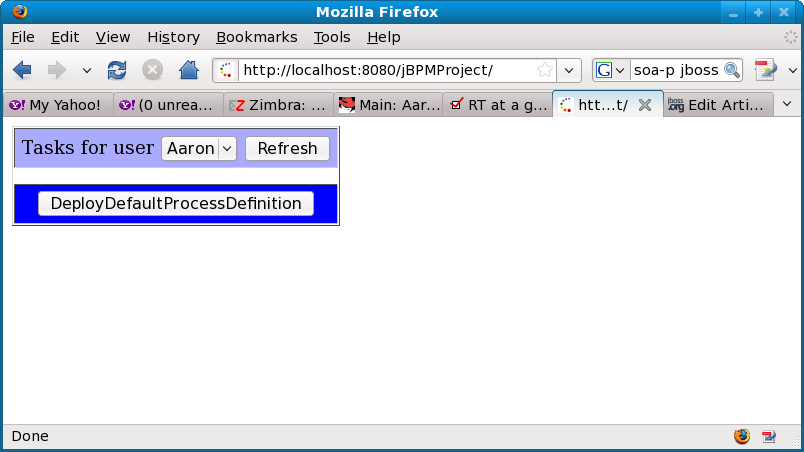
You should see a screen like this below. If you have other processes already deployed with jBPM, you will see them as well and can interact with them also. So on this screen, click "DeployDefaultProcessDefinition" to deploy an example jBPM process.
http://community.jboss.org/servlet/JiveServlet/showImage/102-14765-3-2063... http://community.jboss.org/servlet/JiveServlet/downloadImage/102-14765-3-...
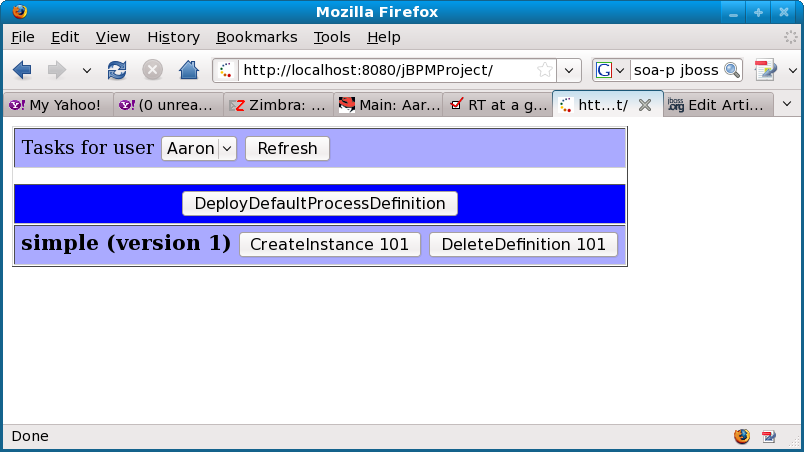
Now we should see the process definition deployed below. Click the "CreateInstance 101" button to create an instance of this process.
http://community.jboss.org/servlet/JiveServlet/showImage/102-14765-3-2064... http://community.jboss.org/servlet/JiveServlet/downloadImage/102-14765-3-...
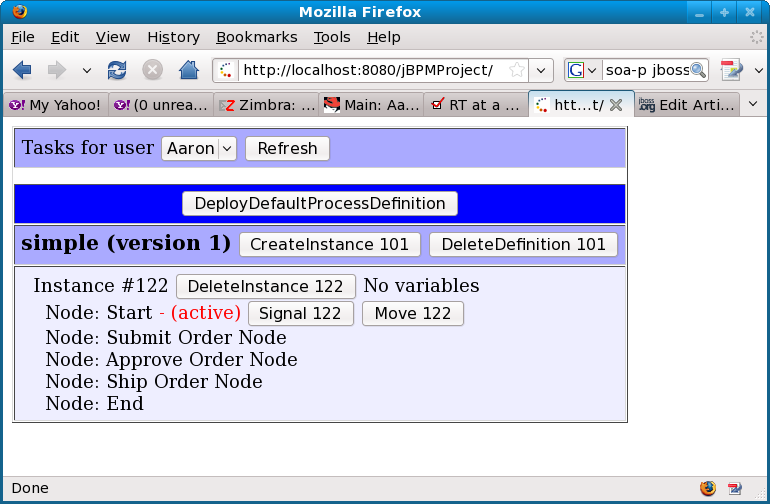
Now we see the instance we created and that it has 5 nodes: Start, three tasks, and End. Also note that there are currently no tasks assigned to "Aaron" as shown at the top of the screen. Now, we will click the "Signal 122" button to move this process to the "Submit Order Node".
http://community.jboss.org/servlet/JiveServlet/showImage/102-14765-3-2065... http://community.jboss.org/servlet/JiveServlet/downloadImage/102-14765-3-...
Now we are in the "Submit Order Node", and we see that there is now a task for Aaron. The text box below the task is a list of comma separated properties that can be associated with the process as part of submitting the task. The JSP error handling is not very robust, so make sure you have at least one variable defined, then click the "SubmitTask 149" button to submit Aaron's task.
http://community.jboss.org/servlet/JiveServlet/showImage/102-14765-3-2066... http://community.jboss.org/servlet/JiveServlet/downloadImage/102-14765-3-...
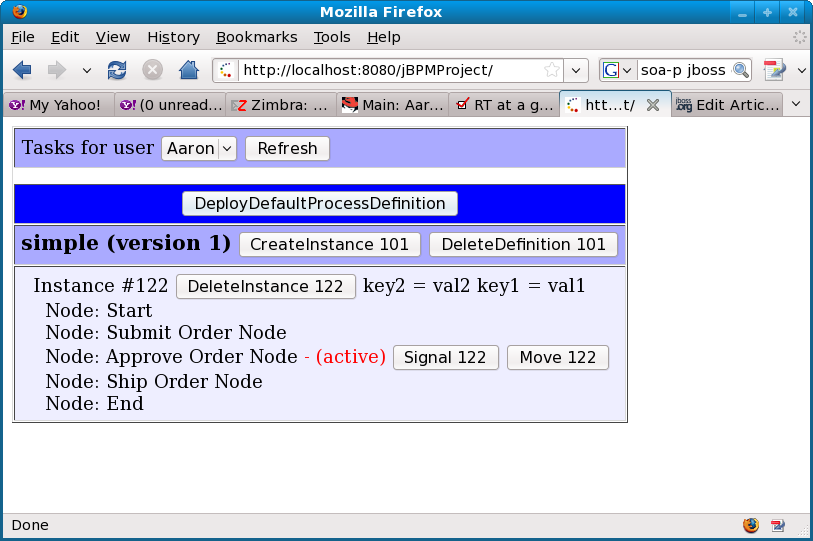
Note that the process has moved to the next task which is "Approve Order Node". Also note that there are no more tasks assigned to Aaron. So who is the "Approve Order Node" task assigned to? Well, if you click the "Aaron" dropdown, you'll see there is also a "Bob" user - so select him.
http://community.jboss.org/servlet/JiveServlet/showImage/102-14765-3-2067... http://community.jboss.org/servlet/JiveServlet/downloadImage/102-14765-3-...
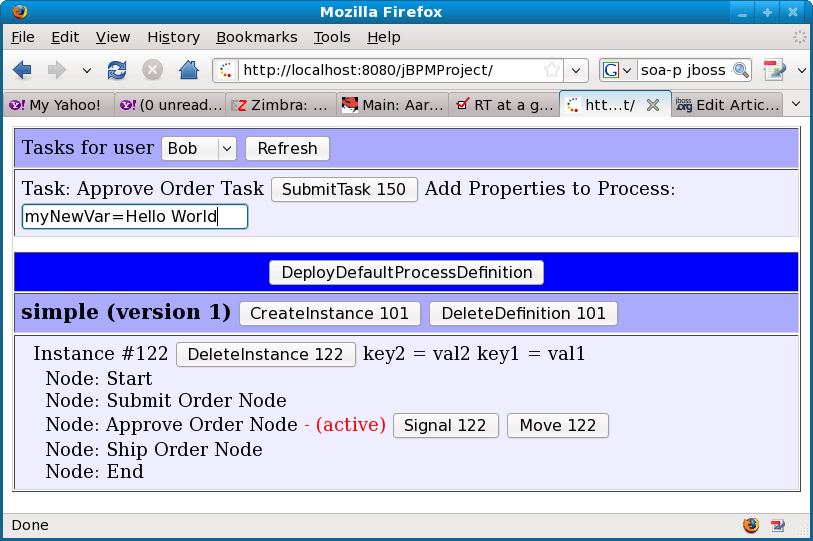
Sure enough, the "Approve Order Task" is assigned to Bob. You can add new variable (see Hello World below) and submit this task as well.
http://community.jboss.org/servlet/JiveServlet/showImage/102-14765-3-2069... http://community.jboss.org/servlet/JiveServlet/downloadImage/102-14765-3-...
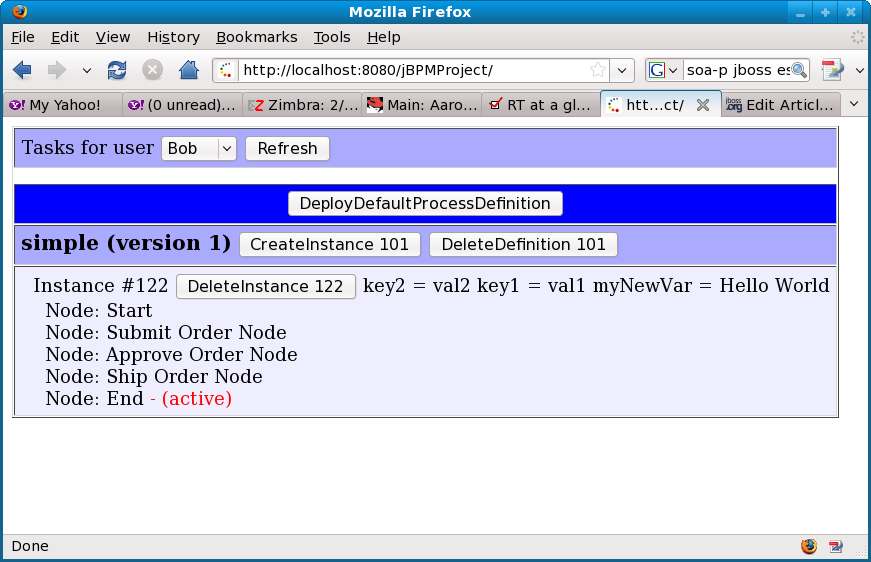
Now we are in the last node of the process, and it is also a task node assigned to Bob. Note that on the process instance, there are three variables currently associated with it - the two default ones and the new Hello World variable that we added. Now, click "SubmitTask 151" to finish the last task of this process.
http://community.jboss.org/servlet/JiveServlet/showImage/102-14765-3-2070... http://community.jboss.org/servlet/JiveServlet/downloadImage/102-14765-3-...
Now we see that there are no more tasks and the process is in the end state.
http://community.jboss.org/servlet/JiveServlet/showImage/102-14765-3-2071... http://community.jboss.org/servlet/JiveServlet/downloadImage/102-14765-3-...
Congratulations on using an ~200 line JSP to create process definitions, proces instances, search tasks, submit tasks, add variables, and signal processes!
Next we'll show the content of the JSP file that is embedded in the attached WAR. Note that the JSP has basically three sections.
The first section is a set of helper functions to deploy process definitions, signal processes, get user tasks, etc. These are functions that would likely be reused in any GUI - and note how simple they are. Note that the deploy process definition actually reads the process definition from an XML file also in the WAR. Alternatively, this process definition could be deployed: 1.) From JBDS, 2.) From Ant, 3.) From the jBPM admin console.
The second section is the controller logic that makes sure that when the user clicks something on the GUI, it does what the user wanted it to do.
The third section is what actually renders the GUI that we have seen above.
> <%@ page language="java" contentType="text/html; charset=UTF-8"
> pageEncoding="UTF-8" import="java.util.*,org.jbpm.graph.exe.*,org.jbpm.graph.def.*,org.jbpm.*,org.jbpm.db.*,org.jbpm.taskmgmt.exe.*"%>
> <%!
>
> //////////////////////////////////////////////////////////////////////
> //
> // Section 1: Helper functions
> //
> //////////////////////////////////////////////////////////////////////
>
> public void deployDefaultProcessDefinition(JbpmContext context) {
>
> //You probably would never deploy processes this way, instead would deploy them from JBoss
> //Developer Studio or Ant. However, this mechanism allows this JSP to create
> //process definitions if none have been deployed.
> context.deployProcessDefinition(ProcessDefinition.parseXmlInputStream(
> this.getClass().getResourceAsStream("/processDefinition.xml")));
> }
>
> public static List<ProcessDefinition> GetProcessDefinitions(JbpmContext context) {
> GraphSession session = context.getGraphSession();
> return session.findAllProcessDefinitions();
> }
>
> public static void DeleteProcessDefinition(JbpmContext context, long definitionId) {
> GraphSession session = context.getGraphSession();
> session.deleteProcessDefinition(definitionId);
> }
>
> public static List<ProcessInstance> GetProcessInstances(JbpmContext context, long definitionId) {
> GraphSession session = context.getGraphSession();
> return session.findProcessInstances(definitionId);
> }
>
> public static void CreateProcessInstance(JbpmContext context, long definitionId) {
> GraphSession session = context.getGraphSession();
> ProcessInstance process = session.getProcessDefinition(definitionId).createProcessInstance();
> context.save(process);
> }
>
> public static void DeleteProcessInstance(JbpmContext context, long instanceId) {
> GraphSession session = context.getGraphSession();
> session.deleteProcessInstance(instanceId);
> }
>
> public static List<TaskInstance> GetUserTasks(JbpmContext context, String user) {
> return (List<TaskInstance>)context.getTaskList(user);
> }
>
> public static void SubmitTask(JbpmContext context, long taskId, String properties) {
> Map<String,String> propMap = new TreeMap<String,String>();
> String[] propArray = properties.split(",");
> for(String prop : propArray) {
> String[] propPieces = prop.split("=");
> propMap.put(propPieces[0].trim(), propPieces[1].trim());
> }
>
> TaskInstance task = context.getTaskInstance(taskId);
> task.start();
> task.addVariables(propMap);
> task.end();
> }
>
> public static void SignalToken(JbpmContext context, long tokenId) {
> Token token = context.getTokenForUpdate(tokenId);
> token.signal();
> }
> public static void MoveToken(JbpmContext context, long tokenId) {
> Token token = context.getTokenForUpdate(tokenId);
> //Should call signal, but can't do this because some processes
> //require real data to be there...
> //token.signal();
>
> //Instead, we'll find all the nodes and move to the next or end the process.
> //This is not reality, but for demonstration
> Node currentNode = token.getNode();
> ProcessInstance processInstance = token.getProcessInstance();
> List<Node> nodes = processInstance.getProcessDefinition().getNodes();
> for(int i=0; i<nodes.size(); i++) {
>
> //If we found the current node and there are more available...
> if(nodes.get(i).getId() == currentNode.getId() && (i+1) < nodes.size()) {
> token.setNode(nodes.get(i+1));
> continue;
> }
> }
> }
> %>
> <%
>
> //////////////////////////////////////////////////////////////////////
> //
> // Section 2: Controller logic
> //
> //////////////////////////////////////////////////////////////////////
>
> JbpmContext context = JbpmConfiguration.getInstance().createJbpmContext();
> String action = request.getParameter("action");
> if(action != null) {
> if(action.startsWith("CreateInstance")) {
> long definitionId = Long.parseLong(action.split(" ")[1]);
> CreateProcessInstance(context, definitionId);
> }
> else if(action.startsWith("DeleteInstance")) {
> long definitionId = Long.parseLong(action.split(" ")[1]);
> DeleteProcessInstance(context, definitionId);
> }
> else if(action.startsWith("Signal")) {
> long definitionId = Long.parseLong(action.split(" ")[1]);
> SignalToken(context, definitionId);
> }
> else if(action.startsWith("Move")) {
> long definitionId = Long.parseLong(action.split(" ")[1]);
> MoveToken(context, definitionId);
> }
> else if(action.startsWith("DeleteDefinition")) {
> long definitionId = Long.parseLong(action.split(" ")[1]);
> DeleteProcessDefinition(context, definitionId);
> }
> else if(action.startsWith("DeployDefaultProcessDefinition")) {
> deployDefaultProcessDefinition(context);
> }
> else if(action.startsWith("SubmitTask")) {
> SubmitTask(context, Long.parseLong(action.split(" ")[1]), request.getParameter("properties"));
> }
> }
>
> //////////////////////////////////////////////////////////////////////
> //
> // Section 3: Rendering the GUI
> //
> //////////////////////////////////////////////////////////////////////
>
> %>
> <html>
> <body>
> <form method="POST">
> <table border="1" cellpadding="5" cellspacing="1">
> <tr bgcolor="#aaaaff"><td>Tasks for user
> <select name="username" onchange="form.submit()">
> <option value="Aaron" <%=("Aaron".equals(request.getParameter("username"))?"SELECTED=\"SELECTED\"":"")%>>Aaron</option>
> <option value="Bob" <%=("Bob".equals(request.getParameter("username"))?"SELECTED=\"SELECTED\"":"")%>>Bob</option>
> </select>
> <input type="submit" value="Refresh"/></td></tr>
>
> <%
> for(TaskInstance task : GetUserTasks(context, request.getParameter("username"))) {
> %>
> <tr bgcolor="#eeeeff"><td>Task: <%=task.getName()%>
> <input type="submit" name="action" value="SubmitTask <%=task.getId()%>"/>
> Add Properties to Process: <input type="text" name="properties" value="key1=val1, key2=val2"/>
> </td></tr>
> <% } %>
>
> <tr><td></td></tr>
> <tr bgcolor="#0000ff"><td align="center">
> <input type="submit" name="action" value="DeployDefaultProcessDefinition"/>
> </td></tr>
> <%
> List<ProcessDefinition> processDefinitions = GetProcessDefinitions(context);
>
> for(ProcessDefinition definition : processDefinitions) {
> out.println("<tr bgcolor=\"#aaaaff\"><td nowrap><b><font size=\"+1\">");
> out.println(definition.getName());
> out.println("(version " + definition.getVersion() + ")</font></b>");
> out.println("<input type=\"submit\" name=\"action\" value=\"CreateInstance " + definition.getId() + "\"/>");
> out.println("<input type=\"submit\" name=\"action\" value=\"DeleteDefinition " + definition.getId() + "\"/>");
> out.println("</td></tr>");
>
> for(ProcessInstance instance : GetProcessInstances(context, definition.getId())) {
> out.println("<tr bgcolor=\"#eeeeff\"><td>");
> out.println(" Instance #" + instance.getId() + " <input type=\"submit\" name=\"action\" value=\"DeleteInstance " + instance.getId() + "\"/>");
> Map<?,?> variables = instance.getContextInstance().getVariables();
> if(variables != null && variables.entrySet() != null) {
> for(Map.Entry<?,?> e : variables.entrySet()) {
> out.println(e.getKey() +" = " + e.getValue());
> }} else {
> out.println("No variables");
> }
> List<Node> nodes = instance.getProcessDefinition().getNodes();
>
> Token token = (Token)instance.findAllTokens().get(0);
> Node currentNode = token.getNode();
> for(Node node : nodes) {
> out.println("<br> Node: " + node.getName());
>
> if(node.getId() == currentNode.getId()) {
> out.println("<font color=\"red\"> - (active)</font>");
>
> //If not the last node
> if(node.getId() != nodes.get(nodes.size()-1).getId()) {
> out.println(" <input type=\"submit\" name=\"action\" value=\"Signal " + token.getId() + "\"/>");
> out.println(" <input type=\"submit\" name=\"action\" value=\"Move " + token.getId() + "\"/>");
> }
> }
> }
> out.println("</td></tr>");
> }
> }
>
> context.close();
> %>
> </table>
> </form>
> </body>
> </html>
Note that the template for almost everything done with jBPM looks like this:
> JbpmContext context = JbpmConfiguration.getInstance().createJbpmContext();
> GraphSession session = context.getGraphSession();
>
> //Get process defintion, processes, tasks, signal, submit, etc.
>
> context.close();
I hope this has been helpful in showing how you can utilize the jBPM APIs to very easily interact with jBPM processes. If you are using JBoss Seam or ESB in the SOA Platform, there is other integration that is out of the box. But anytime you want to interact directly with jBPM via the APIs to create task inboxes, integrate with existing GUIs, or anything like that, it should be as simple as a few lines of code.
--------------------------------------------------------------
Comment by going to Community
[http://community.jboss.org/docs/DOC-14765]
Create a new document in jBPM at Community
[http://community.jboss.org/choose-container!input.jspa?contentType=102&co...]








15 years, 2 months
- 1
- 0
[jBPM] - jBPM3 Data Model
by Administrator Administrator
Administrator Administrator [http://community.jboss.org/people/admin] modified the document:
"jBPM3 Data Model"
To view the document, visit: http://community.jboss.org/docs/DOC-11086
--------------------------------------------------------------
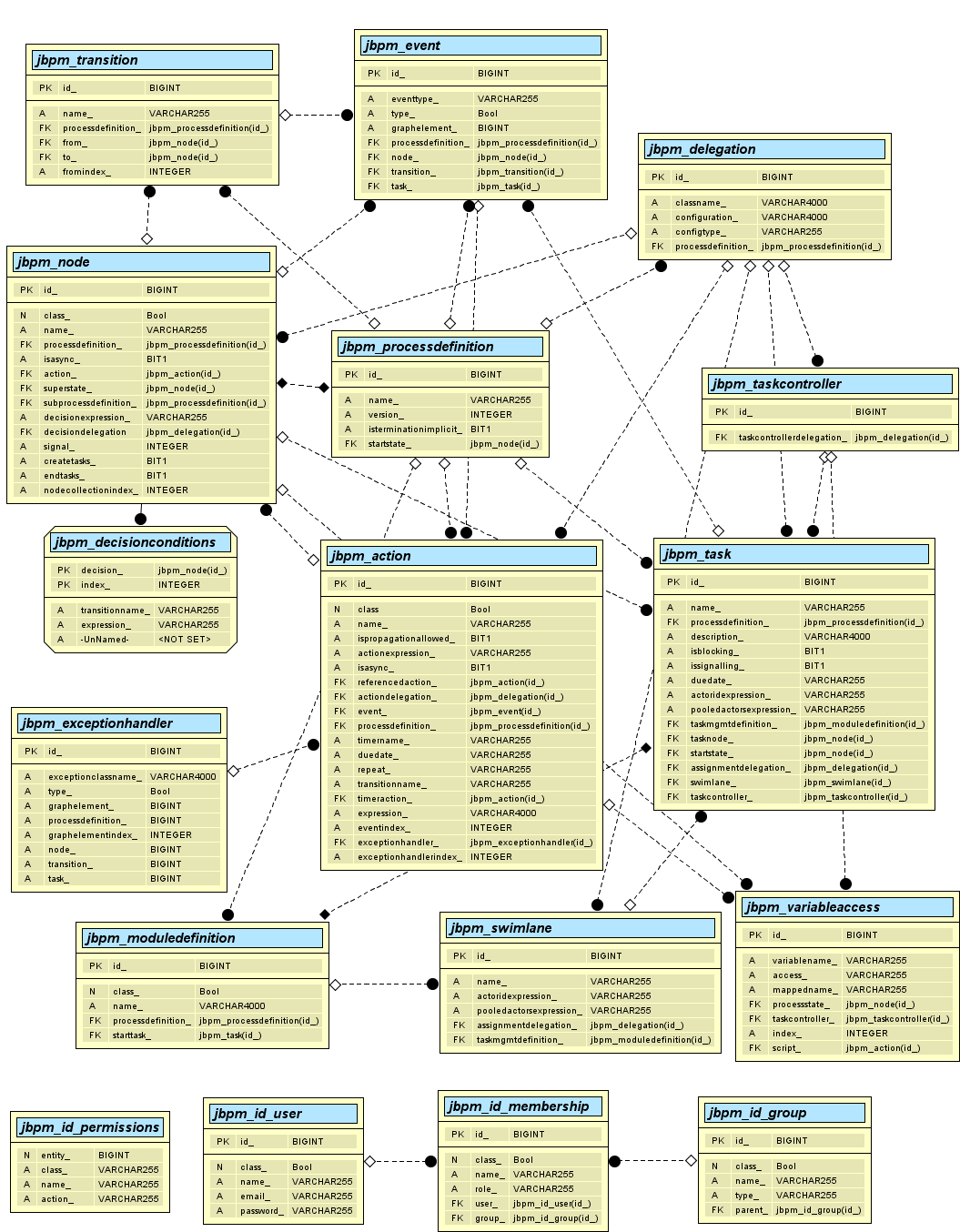
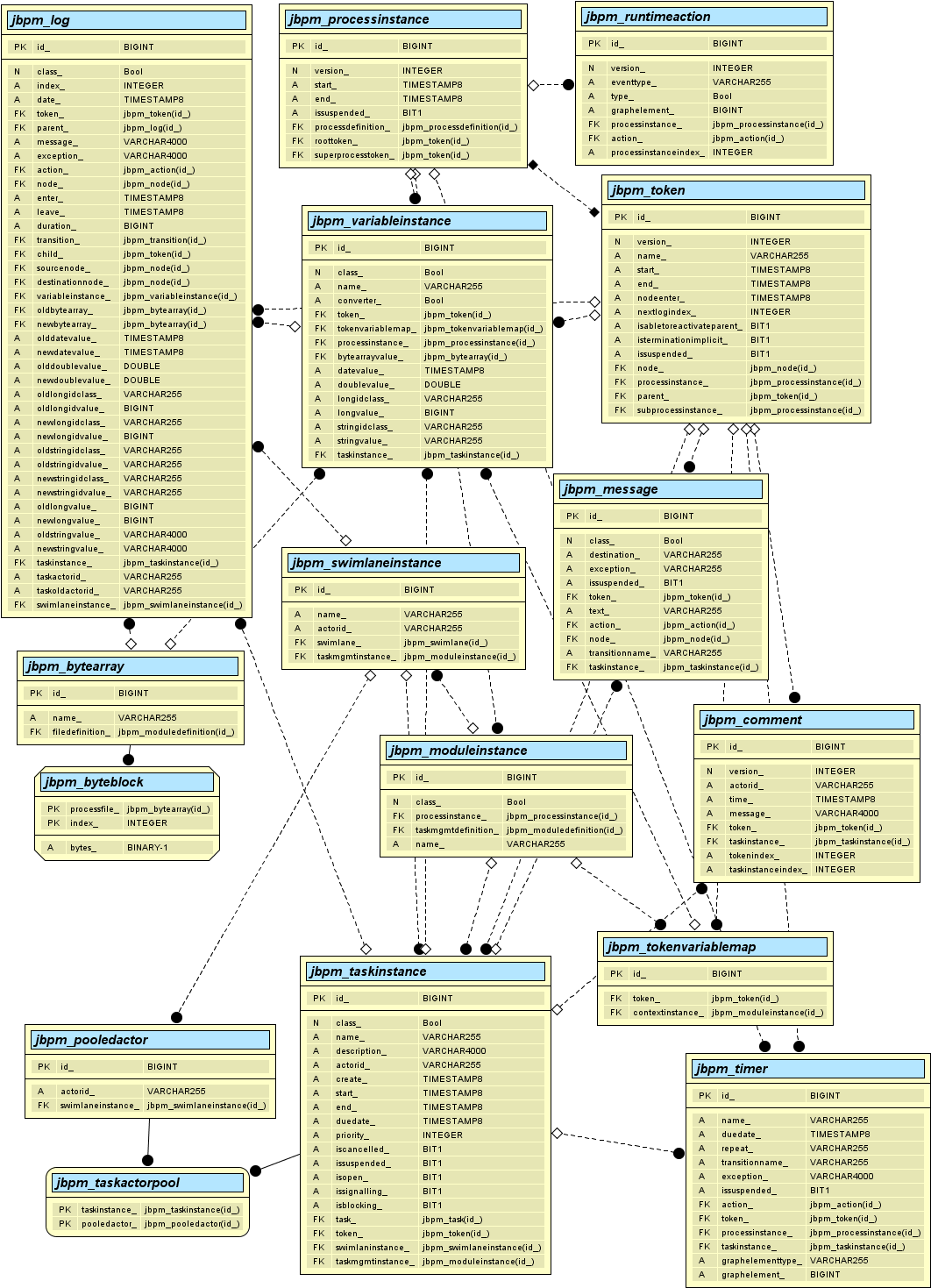
This article shows the data models for the definition and execution sides of jBPM. They are separated into two parts in this wiki to simplify the explanation.
h3. Definition Data Model
http://community.jboss.org/servlet/JiveServlet/showImage/102-11086-15-996... http://community.jboss.org/servlet/JiveServlet/downloadImage/102-11086-15...
*JBPM_PROCESSDEFINITION* - Stores general information about the process definition.
Foreign Key
* Node table - Start-state node in the process
*JBPM_NODE* - Stores definition information about a node in a process definition.
Foreign Keys
* Process Definition table - The process definition that the node belongs to
* Process Definition table - Specify that this node calls a sub process. The sub process would complete execution before the parent process leaves this node
* Action table - Specify an action class to be executed for the node
* Node table - Specify that this node belongs to a superstate. Multiple nodes can belong to a superstate
* Delegation table - Specify that a decision has been delegated to a class
*JBPM_TRANSITION* - Stores definition information about a transition in a process definition.
Foreign Keys
* Process Definition table - Specify the definition that the transition belongs to
* Node table - Specify the node that starts the transition
* Node table - Specify the node that the transition ends on
*JBPM_ACTION* - Stores definition information about an action in a process definition.
Foreign Keys
* Process Definition table - Specify the definition that the action belongs to
* Event table - Specify the event that triggers the action
* Delegation table - Specify the action is delegated to
* ExceptionHandler table - Specify the exception handler class for this action
* Action table - Specify the action is referenced by another action and
* Action table - Specify if there is a timer action
*JBPM_DELEGATION* - Stores definition information about Java business classes that are specified in the process definition.
Foreign key
* Process Definition table - Specify the process definition that the delegation belongs to.
*JBPM_EVENT* - Stores definition information about an event that triggers an action in the process definition.
Foreign Keys
* Process Definition table - Specify the process definition that the event belongs to
* Node table - Specify the event belongs to a node
* Transition table - Specify the event belongs to a transition
* Task table - Specify the event belongs to a task
*JBPM_EXCEPTIONHANDLER* - Stores definition information about an exception handler for an action.
*JBPM_DECISIONCONDITIONS* - Stores definition information about conditions specified in the process definition.
*JBPM_TASK* - Stores definition information about tasks defined in the process definition.
Foreign Keys
* Process Definition table - Specify the process definition the task belongs to
* Module Definition table - Specify the TaskMgmtDefintion to be used for this task.
* Node table - Specify the node the task belongs to
* Node table - Specify that this task belongs to the start-state of a process
* Delegation table - Specify the delegation of the task to a class
* Swimlane table - Specify the swimlane that the task uses for assignment
* Task Controller table - Specify the task assignment is delegated to a class
*JBPM_TASKCONTROLLER* - Stores information that refers a task to a delegation class.
Foreign key
* Delegation table - Specify the class that is the controller for the task.
*JBPM_VARIABLEACCESS* - Stores information about the access levels for each variable associated to a particular node or task
Foreign keys
* Node table - Specify the node that the variables belong to
* Task Controller table - Specify the task that the variables belong to
* Action table - Specify the action that the variables belong to
*JBPM_SWIMLANE* - Stores information about the swimlanes defined in the process definition.
Foreign Keys
* Delegation table - Specify the class that determines assignment for this swimlane
* Module Definition table - All of the swimlanes for a process definition belong to a TaskMgmtDefintion. This is specified in the Module Definition table.
*JBPM_MODULEDEFINITION* - Stores information about modules used in the process definition
Foreign Keys
* Process Definition table - Specify the process definition this module is used in
* Task table - Specify the task this module is used in
*JBPM_ID_USER* - Stores information about users in jBPM
*JBPM_ID_GROUP* - Stores information about groups that users can belong to.
Foreign Key
* ID Group - Parent/Child relationship between groups.
*JBPM_ID_MEMBERSHIP* - Cross reference table storing information about role and which groups a user belongs to.
Foreign Keys
* ID Users table - Specify the user that belongs to the membership.
* ID Group table - Specify the group the membership belongs to.
*JBPM_ID_PERMISSIONS* - Defines permissions for a user
h3. Execution Data Model
http://community.jboss.org/servlet/JiveServlet/download/11086-15-5189/JBo... JBossjBPMExecutionDataModel.png http://community.jboss.org/servlet/JiveServlet/showImage/102-11086-15-996... http://community.jboss.org/servlet/JiveServlet/downloadImage/102-11086-15...
JBoss jBPM Execution Data Model.png JBoss jBPM Execution Data Model.png
*JBPM_PROCESSINSTANCE* - Stores runtime information about an instance of a process.
Foreign keys
* Process Definition table - the process definition to be followed for this process instance execution
* Token table - the root token that follows where the process execution is currently
* Token table - the super process token (if this process instance was called from another process instance)
*JBPM_TOKEN* - Stores information about the token representing execution location in the process instance
Foreign keys
* Process Instance table - the process instance this token belongs to.
* Process Instance table - the sub process instance that the token belongs to.
* Node table - the node that the token points to as the current location of execution.
* Token table - parent/child relationship between tokens for a fork or sub process.
*JBPM_MESSAGE* - Stores messages to create asynchronous processing of nodes.
Foreign keys
* Token table - token the message belongs to
* Action table - action the message belongs to
* Node table - node the message belongs to
* Task Instance table - task instance the message belongs to
*JBPM_TASKINSTANCE* - Stores runtime information about an instance of a task
Foreign keys
* Task table - the task that defines the instance
* Token table - the token the task belongs to
* Swimlane Instance table - the swimlane instance used to determine who works this task instance
* Module Instance table - the instance of the module to manage the task
*JBPM_SWIMLANEINSTANCE* - Stores runtime information about an instance of a swimlane
Foreign keys
* Swimlane table - the swimlane that defines the instance
* Module Instance table - the instance of the module to manage the task
*JBPM_POOLEDACTOR* - Stores a list of actors for a swimlane instance
Foreign Key
* Swimlane Instance table - the swimlane instance the actor belongs to
*JBPM_TASKACTORPOOL* - Cross reference table between Pooled Actor and Task Instance
Foreign Keys
* Pooled Actor - Actors for a swimlane instance
* Task Instance - Task the pooled actor belongs to
*JBPM_COMMENT* - Stores a comment message related to a token or task instance
Foreign Keys
* Token table - the token the comment belongs to.
* Task Instance table - the task instance the comment belongs to.
*JBPM_TOKENVARIABLEMAP* - Cross reference table between token and module instances for context
Foreign Keys
* Token table - the token representing the process execution
* Module Instance table - the context module instance for the token
*JBPM_MODULEINSTANCE* - Stores runtime information about an instance of a module
Foreign Keys
* Process Instance table - the process instance the module instance belongs to
* Module Definition table - the module definition that defines the module instance
*JBPM_RUNTIMEACTION* - Stores information about actions that are created at runtime
Foreign Keys
* Process Instance table - the process instance the action belongs to
* Action table - the action definition that defines the action instance
*JBPM_TIMER* - Stores information about instances of timers that are running
Foreign Keys
* Action table - The action that the timer belongs to
* Token table - the token that the timer belongs to
* Process Instance table - the process instance the timer belongs to
* Task Instance table - the task instance the timer belongs to
*JBPM_VARIABLEINSTANCE* - Stores information about process variable instances
Foreign Keys
* Token table - the token that the variables belong to
* Token Variable Map table - mapping to the module instance for the token
* Process Instance table - the process instance the variables belong to
* Byte Array table - the byte array stored for a serialized object process variable instance
* Task Instance table - the task instance the variables belong to
*JBPM_LOG* - Stores process logs created by jBPM or application code during process execution. Unlike shown in the image, column CLASS_ is not a Boolean but a character that refers to the class that created the log (see ProcessLog.hbm.xml and discriminator-value in descendant Hibernate files such as TaskAssignLog.hbm.xml)
Foreign Keys
* Token table - the token that the logs belong to
* Token table - the child token that the logs belong to
* Log table - parent/child relationship between logs
* Transition table - the transition the logs belong to
* Node table - the source node the logs belong to
* Node table - the destination node the logs belong to
* Variable Instance table - the variable instance that is referred to in the log
* Byte Array table - the old value of the byte array
* Byte Array table - the new value of the byte array
* Task Instance table - The task instance that is referred to in the log
* Swimlane Instance table - the swimlane instance that is referred to in the log
*JBPM_BYTEARRAY* - Specifies the file definition module for a serialized process instance variable
Foreign Key
* Module Definition table - Specify the file definition module
*JBPM_BYTEBLOCK* - Stores the serialized process instance variable
Foreign Key
* Byte Array table - The byte array that the byte block belongs to
--------------------------------------------------------------
Comment by going to Community
[http://community.jboss.org/docs/DOC-11086]
Create a new document in jBPM at Community
[http://community.jboss.org/choose-container!input.jspa?contentType=102&co...]



15 years, 2 months
- 1
- 0