[JBoss Tools] - Create GWT Projects with JBoss Tools and Eclipse WTP
by Andre Dietisheim
Andre Dietisheim [http://community.jboss.org/people/adietish] modified the document:
"Create GWT Projects with JBoss Tools and Eclipse WTP"
To view the document, visit: http://community.jboss.org/docs/DOC-15794
--------------------------------------------------------------
h1. Use Eclipse WTP, get there with the standard
If you want to create GWT applications you unfortunately cannot do it the WTP way and create a so called dynamic web project. The Google plugins implement their own set of views, wizards, launchers and mostly duplicate what's already present and defacto standard in WTP. The consequence is that you'd have to deal with workarounds if you want to get functionalities (run/deploy on JBoss etc.) Google does not offer.
We therefore developed an experimental integration plugin for GWT that allows you to create GWT projects in the way most Eclipse users are used to: by creating Dynamic Web Projects.
h1. Preface
Eclipse offers nice tools to create web applications. The base framework's what we call the Eclipse Web Tools Platform (WTP). Eclipse WTP delivers a standard for most aspects involved when you create web applications.
The google web toolkit, GWT, is a nice framework to develop web applications. Google delivers a plugin for Eclipse and developing with GWT is a very pleasant experience. The GWT plugin uses an embedded jetty to run the application that you develop. Google unfortunately did not base its work on Eclipse WTP and does not comply to the Eclipse project structure for web application. So if you want to use JBoss instead of jetty, the approach to take is not as handy and intuitive as it could be. Furthermore there's no way to use and integrate into plugins that other solution providers offer. You mostly have to proceed by workarounds to get what Google does not offer.
We developed a set of (experimental) plugins that create GWT projects by extending Eclipse WTP. Our plugins implement well known usage patterns and integrate well with all Eclipse components that use the common standard for web projects. The most obvious benefit is that deploying to JEE application servers (and JBoss partcullarly) is as easy as it is with any other web project.
h1. Solution
Install and use the JBoss GWT Integration. You'll then be able to create GWT projects the WTP way and fully enjoy it's full-blow features and standardized usage patterns.
This How-To shows you all the steps to install the plugins and how to create a dynamic web project that's GWT enabled.
h2. Install JBoss GWT Integration
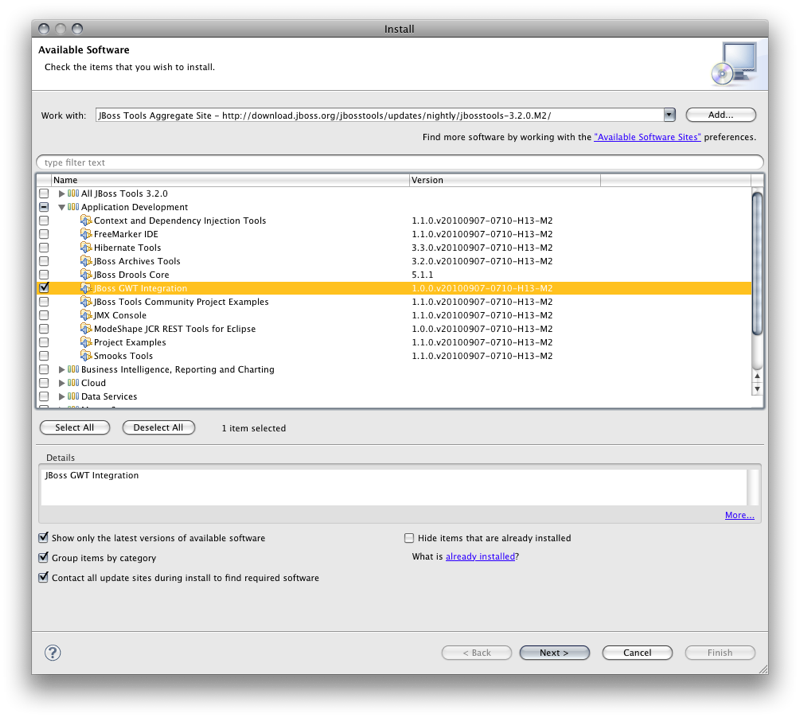
Add the JBoss Tools 3.2.x update site:
> http://download.jboss.org/jbosstools/updates/nightly/trunk/ http://download.jboss.org/jbosstools/updates/nightly/trunk/ http://download.jboss.org/jbosstools/updates/nightly/3.2_stable_branch/ http://download.jboss.org/jbosstools/updates/nightly/3.2_stable_branch/
And Install the JBoss GWT Integration
http://community.jboss.org/servlet/JiveServlet/showImage/6254/Picture+4.png http://community.jboss.org/servlet/JiveServlet/downloadImage/6254/Picture...
h2. Create a Dynamic Web Application Project
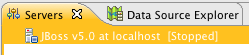
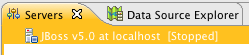
Make sure you have a JEE server (JBoss application server for instance) in your Eclipse environment. If not, download and declare it to your Eclipse IDE:
http://community.jboss.org/servlet/JiveServlet/showImage/6260/Picture+12.png http://community.jboss.org/servlet/JiveServlet/downloadImage/6260/Picture...
http://community.jboss.org/servlet/JiveServlet/showImage/6259/Picture+11.png http://community.jboss.org/servlet/JiveServlet/downloadImage/6259/Picture...
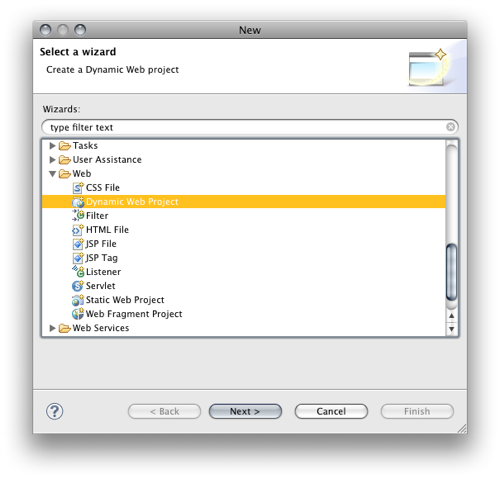
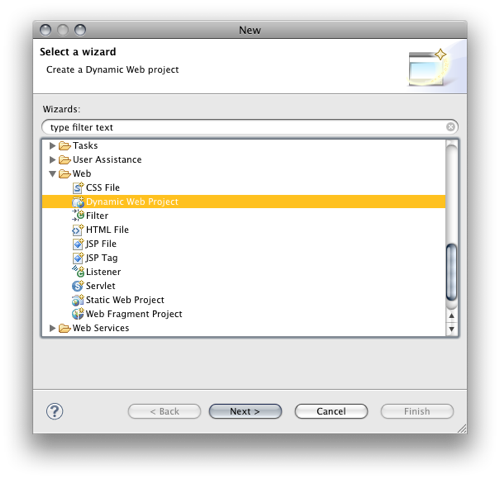
You're now ready to create a *Dynamic Web Project*.
http://community.jboss.org/servlet/JiveServlet/showImage/6256/Picture+5.png http://community.jboss.org/servlet/JiveServlet/downloadImage/6256/Picture...
The wizard picks your server (runtime) and allows you to configure the various characteristic of your web project.
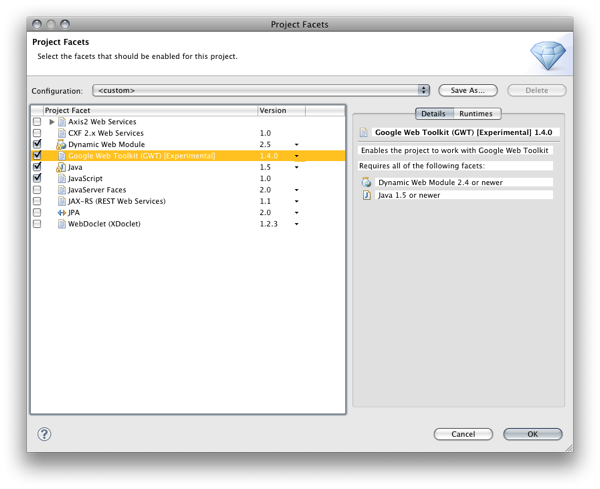
The *configuration* group allows you to pick the different facets of your project. We provide a *Google Web Toolkit* facet that will configure the GWT related characteristics.
Hit *Modify...*
http://community.jboss.org/servlet/JiveServlet/showImage/102-15794-20-626... http://community.jboss.org/servlet/JiveServlet/downloadImage/102-15794-20...
and select the *Google Web Toolkit* facet.
http://community.jboss.org/servlet/JiveServlet/showImage/6262/Picture+14.png http://community.jboss.org/servlet/JiveServlet/downloadImage/6262/Picture...
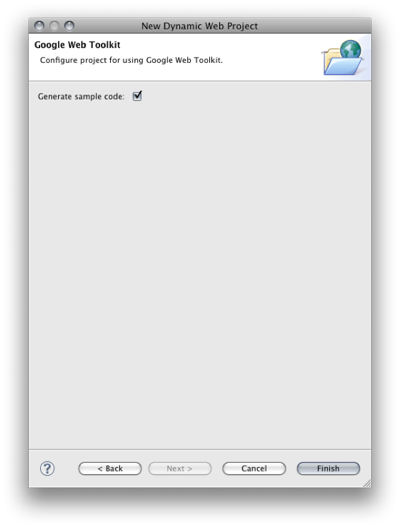
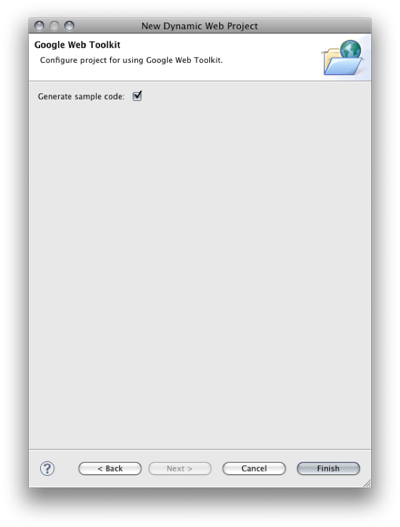
A few wizard steps further, you may choose to get some GWT *sample code*.
http://community.jboss.org/servlet/JiveServlet/showImage/6411/generate-sa... http://community.jboss.org/servlet/JiveServlet/downloadImage/6411/generat...
You get the Hello World sample that you get when you use the Google Wizard. We just put it to the *WebContent* folder you configured in your Dynamic Web Project wizard (WTP default opposed to what Google does in their plugin). The sample's a fully working GWT application that allows you to get a first impression of what developing with GWT looks like.
h1. Cross compile to Javascript
GWT is about programming in Java and getting javascript for the browser. GWT achieves this with a cross-compiler that creates the javascript for you.
In order to get the project up and running you now need to cross compile the sample's client java code to javascript. Our project has the *GWT nature* and therefore offers the Google compiler in the context menu.
http://community.jboss.org/servlet/JiveServlet/showImage/102-15794-20-627... http://community.jboss.org/servlet/JiveServlet/downloadImage/102-15794-20...
h1. Deploy to JBoss
We are now ready to deploy our application. We strictly use the standard Eclipse *WTP* infrastructure in our setup, So you may deploy your GWT application in the same manner you usually deploy and run classic web applications with Eclipse WTP. You have to add the application to a server that's registered in the WTP *servers view*. We deploy our application to our JBoss application server by selecting it in the and choosing *Add and Remove...*
http://community.jboss.org/servlet/JiveServlet/showImage/102-15794-20-626... http://community.jboss.org/servlet/JiveServlet/downloadImage/102-15794-20...
You can now add the GWT application to your server. WTP will make sure that it gets deployed and the deployed artifacts are in sync with your workspace (even when you change code, resources, configurations, etc.)
http://community.jboss.org/servlet/JiveServlet/showImage/102-15794-20-626... http://community.jboss.org/servlet/JiveServlet/downloadImage/102-15794-20...
h1. Run your application and launch your browser
You may now run your application. We completely comply to the views and steps Eclipse WTP offers to web developers. So there's no custom way to start a server in our setup. We select our JBoss instance in the *Servers view* and *start* it.
http://community.jboss.org/servlet/JiveServlet/showImage/102-15794-20-626... http://community.jboss.org/servlet/JiveServlet/downloadImage/102-15794-20...
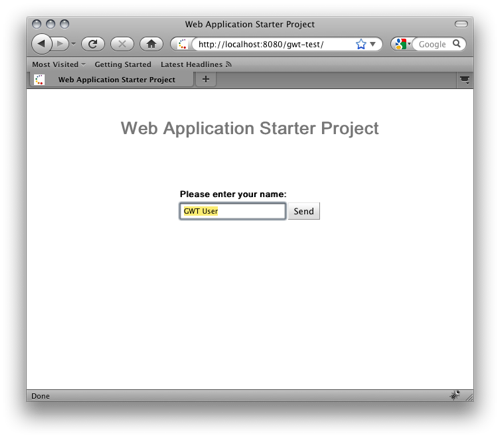
You can now point your browser to the address and port that your JBoss server's bound to.
http://community.jboss.org/servlet/JiveServlet/showImage/6271/Picture+2.png http://community.jboss.org/servlet/JiveServlet/downloadImage/6271/Picture...
h2. Speed up my development cycle!
The approach we've choosen so far uses an extra cross compile step to deploy the application after each change. That's very reliable but it gets tedious at development time. Google delivers a so called hosted/development mode. Its major benefit is that you dont need to cross compile on each change but you can change and test on the fly. This magic is achieved with a browser plugin and a google runtime that interprets your java code at runtime. Changing, testing, changing, testing etc. gets much faster and pleasant, the cross-compilation step's not needed any more.
h2. Launch GWT Codeserver
If you launch your application as Google Web Application, you'll be able to code and test on the fly. The GWT browser plugin will communicate with the GWT code server and execute your changes on the fly.
http://community.jboss.org/servlet/JiveServlet/showImage/102-15794-20-646... http://community.jboss.org/servlet/JiveServlet/downloadImage/102-15794-20...
You need to tell the browser plugin where your code server may be reached. You do that by using an *additional url parameter*. Your browser URL now reads as follows:
> http://localhost:8080/gwt-test/?gwt.codesvr=127.0.0.1:9997 http://localhost:8080/gwt-test/?gwt.codesvr=127.0.0.1:9997
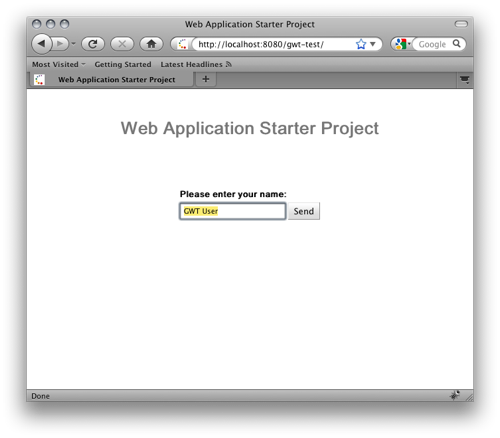
Point your browser to this URL and you'll get the same page as before, nothing spectacular so far.
Now get back to your client code and change the button label, to see if changes are picked on the fly now.
http://community.jboss.org/servlet/JiveServlet/showImage/102-15794-20-640... http://community.jboss.org/servlet/JiveServlet/downloadImage/102-15794-20...
Do not cross-compile, get back to your browser and reload. What you see reflects the changes in your code. You don't need to cross compile to develop your app!
http://community.jboss.org/servlet/JiveServlet/showImage/102-15794-20-640... http://community.jboss.org/servlet/JiveServlet/downloadImage/102-15794-20...
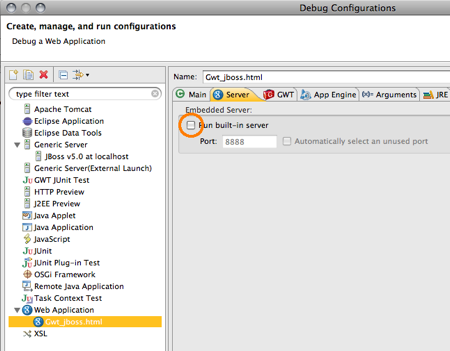
To be picky on the issue you could now go to the launch configuration and disable the jetty google usually uses to serve your GWT application:
http://community.jboss.org/servlet/JiveServlet/showImage/6413/disable-bui... http://community.jboss.org/servlet/JiveServlet/downloadImage/6413/disable...
--------------------------------------------------------------
Comment by going to Community
[http://community.jboss.org/docs/DOC-15794]
Create a new document in JBoss Tools at Community
[http://community.jboss.org/choose-container!input.jspa?contentType=102&co...]
15 years, 2 months
[EJB3] - ERROR [STDERR] java.lang.NullPointerException - can't solve
by stefano bertozzi
stefano bertozzi [http://community.jboss.org/people/bertoz84] created the discussion
"ERROR [STDERR] java.lang.NullPointerException - can't solve"
To view the discussion, visit: http://community.jboss.org/message/600753#600753
--------------------------------------------------------------
Hi all, i really need help to overcome this error.
I'm going to paste the interesting parts of my code:
*TEST BEAN ( we are inside a method called by the java test client ):*
* .*
* .*
* .
*
try {
System.out.println("lowering the amount of the selected book");
Book abook = (Book) bookop.findByISBN(80002).get(0); // Book is an entity bean --- bookop is the istance of a session bean that performs // operations on Book
*bookop.updateMin*(abook.getISBN(), 2); // tot - 2
// OPERATION updateMin *DONE* SUCCESSFULLY
} catch (Exception e) {
e.printStackTrace();
}
Users an_user = (Users) user.findByUser("mouse").get(0); // Users is an entity bean --- user is the istance of a session bean that performs // operations on Users
*cart.checkoutCart*(an_user); // cart is the istance of a session statefull bean that performs classic operations like in a web site ( bookshop )
// to see what this method go down
-end
*CART BEAN ( the called method ):*
*
*
public void *checkoutCart*(Users customer) {
for (int i = 0; i < books.size(); i++) // where books is: private List<CartBook> books , a simple class made up of a Book and the quantity // to purchase of that book
{
Book abook = books.get(i).getBook();
Integer quantity = books.get(i).getQuantity();
try {
System.out.println("lowering the amount of the selected book");
*DBOperation.updateMin*(abook.getISBN(), quantity); // DBOperation is the same as bookop seen before
// ERROR [STDERR] java.lang.NullPointerException
} catch (Exception e) {
e.printStackTrace();
}
}
}
-end
so basically the code is the same; the difference is that going through the cart bean i can lower the quantity of a list of books ( that are the books that a customer puts in his cart: when he performs a checkout operation the method updateMin lowers the amount of every books purchased in the store ) instead of only one.
the problem is that through the cart i get always the ERROR [STDERR] java.lang.NullPointerException in the *DBOperation.updateMin* methods that is exactly the same of *bookop.updateMin*.
Every cicle of the for( ) command i get this error.
I can assure that my list is not empty and abook & quantity are not null.
I really don't get the problem!
Thank you in advance!!
--------------------------------------------------------------
Reply to this message by going to Community
[http://community.jboss.org/message/600753#600753]
Start a new discussion in EJB3 at Community
[http://community.jboss.org/choose-container!input.jspa?contentType=1&cont...]
15 years, 2 months
[JBoss Messaging] - Re: How to send Message to a WebSphere QUEUE througth a jms ds configured in JBoss AS 5.1
by angifred
angifred [http://community.jboss.org/people/angifred] created the discussion
"Re: How to send Message to a WebSphere QUEUE througth a jms ds configured in JBoss AS 5.1"
To view the discussion, visit: http://community.jboss.org/message/601171#601171
--------------------------------------------------------------
hi !
i've exactly the same problem :
14:31:23,522 ERROR [STDERR] org.springframework.jms.UncategorizedJmsException: Uncategorized exception occured during JMS processing; nested exception is com.ibm.msg.client.jms.DetailedJMSException: MQJCA1026: An operation on a domain specific object was not valid. A JMS application attempted to perform an operation on a domain specific object, but the operation is valid only on cross domain objects or in the other messaging domain. Make sure that the JMS objects used by your application are relevant to the required messaging domain.
14:31:23,528 ERROR [STDERR] at org.springframework.jms.support.JmsUtils.convertJmsAccessException(JmsUtils.java:308)
14:31:23,528 ERROR [STDERR] at org.springframework.jms.support.JmsAccessor.convertJmsAccessException(JmsAccessor.java:168)
14:31:23,528 ERROR [STDERR] at org.springframework.jms.core.JmsTemplate.execute(JmsTemplate.java:474)
did you solve it ?
thanks
--------------------------------------------------------------
Reply to this message by going to Community
[http://community.jboss.org/message/601171#601171]
Start a new discussion in JBoss Messaging at Community
[http://community.jboss.org/choose-container!input.jspa?contentType=1&cont...]
15 years, 2 months
[jBPM] - Re: Hello World jBPM
by roxy1987
roxy1987 [http://community.jboss.org/people/roxy1987] created the discussion
"Re: Hello World jBPM"
To view the discussion, visit: http://community.jboss.org/message/601088#601088
--------------------------------------------------------------
Hi Nikul,
Invalid package name occurs when there is a package name mismatch. I see that the package you are using here is helloWorld. I am sure that if you go to the IDE and check the properties of your process definition, you will find a different package name. Make sure that both the names are exactly the same.
As for the ftl files, you just need to create them and keep then in the package in your IDE and then add to guvnor in the same way as you add your process defnition and then build the package. If you need help with the creation of ftl files, you can check out the example ftl in your jbpm installation folder.
If you want to know how to link these ftls with a task then you can check out the source code of example process defnition given and see how the url is added to the node while its creation.
regds.
--------------------------------------------------------------
Reply to this message by going to Community
[http://community.jboss.org/message/601088#601088]
Start a new discussion in jBPM at Community
[http://community.jboss.org/choose-container!input.jspa?contentType=1&cont...]
15 years, 2 months