[jBPM] - Guvnor jackrabbit warning messages
by pushpak1981
pushpak1981 [https://community.jboss.org/people/pushpak1981] created the discussion
"Guvnor jackrabbit warning messages"
To view the discussion, visit: https://community.jboss.org/message/715227#715227
--------------------------------------------------------------
Hi,
We have installed jBPM 5.2 on Jboss 7.1. The Process Engine is working fine. but when we try to access the Guvnor web interface we get a lot of warning messages related to Jackrabbit.
20:11:52,421 INFO [org.apache.jackrabbit.core.TransientRepository] (http-PUSHPAKD-WIN7.cybage.com-192.168.62.77-8080-1) Session closed
20:11:53,799 WARN [org.apache.jackrabbit.core.session.SessionState] (Finalizer) Attempt to close session-guest-5 after it has already been closed. Please review your code for proper
at org.apache.jackrabbit.core.session.SessionState.close(SessionState.java:250)
at org.apache.jackrabbit.core.SessionImpl.logout(SessionImpl.java:888)
at org.apache.jackrabbit.core.XASessionImpl.logout(XASessionImpl.java:389)
at org.drools.repository.RulesRepository.logout(RulesRepository.java:198)
at org.drools.repository.RulesRepository.finalize(RulesRepository.java:1868)
at java.lang.ref.Finalizer.invokeFinalizeMethod(Native Method) [:1.6.0_03]
at java.lang.ref.Finalizer.runFinalizer(Finalizer.java:83) [:1.6.0_03]
at java.lang.ref.Finalizer.access$100(Finalizer.java:14) [:1.6.0_03]
at java.lang.ref.Finalizer$FinalizerThread.run(Finalizer.java:160) [:1.6.0_03]
20:11:53,800 WARN [org.apache.jackrabbit.core.session.SessionState] (Finalizer) session-guest-5 has already been closed. See the attached exception for a trace of where this session
at org.apache.jackrabbit.core.session.SessionState.close(SessionState.java:245)
at org.apache.jackrabbit.core.SessionImpl.logout(SessionImpl.java:888)
at org.apache.jackrabbit.core.XASessionImpl.logout(XASessionImpl.java:389)
at org.drools.repository.RulesRepository.logout(RulesRepository.java:198)
at org.drools.guvnor.server.repository.RulesRepositoryManager.close(RulesRepositoryManager.java:67)
at sun.reflect.NativeMethodAccessorImpl.invoke0(Native Method) [:1.6.0_03]
at sun.reflect.NativeMethodAccessorImpl.invoke(NativeMethodAccessorImpl.java:39) [:1.6.0_03]
at sun.reflect.DelegatingMethodAccessorImpl.invoke(DelegatingMethodAccessorImpl.java:25) [:1.6.0_03]
at java.lang.reflect.Method.invoke(Method.java:597) [:1.6.0_03]
at org.jboss.seam.util.Reflections.invoke(Reflections.java:22)
at org.jboss.seam.intercept.RootInvocationContext.proceed(RootInvocationContext.java:32)
at org.jboss.seam.intercept.SeamInvocationContext.proceed(SeamInvocationContext.java:56)
at org.jboss.seam.transaction.RollbackInterceptor.aroundInvoke(RollbackInterceptor.java:28)
at org.jboss.seam.intercept.SeamInvocationContext.proceed(SeamInvocationContext.java:68)
at org.jboss.seam.core.BijectionInterceptor.aroundInvoke(BijectionInterceptor.java:77)
at org.jboss.seam.intercept.SeamInvocationContext.proceed(SeamInvocationContext.java:68)
at org.jboss.seam.core.MethodContextInterceptor.aroundInvoke(MethodContextInterceptor.java:44)
at org.jboss.seam.intercept.SeamInvocationContext.proceed(SeamInvocationContext.java:68)
at org.jboss.seam.intercept.RootInterceptor.invoke(RootInterceptor.java:107)
at org.jboss.seam.intercept.JavaBeanInterceptor.interceptInvocation(JavaBeanInterceptor.java:185)
at org.jboss.seam.intercept.JavaBeanInterceptor.invoke(JavaBeanInterceptor.java:103)
at org.drools.guvnor.server.repository.RulesRepositoryManager_$$_javassist_seam_5.close(RulesRepositoryManager_$$_javassist_seam_5.java)
at sun.reflect.NativeMethodAccessorImpl.invoke0(Native Method) [:1.6.0_03]
at sun.reflect.NativeMethodAccessorImpl.invoke(NativeMethodAccessorImpl.java:39) [:1.6.0_03]
at sun.reflect.DelegatingMethodAccessorImpl.invoke(DelegatingMethodAccessorImpl.java:25) [:1.6.0_03]
at java.lang.reflect.Method.invoke(Method.java:597) [:1.6.0_03]
at org.jboss.seam.util.Reflections.invoke(Reflections.java:22)
at org.jboss.seam.util.Reflections.invokeAndWrap(Reflections.java:144)
at org.jboss.seam.Component.callComponentMethod(Component.java:2275)
at org.jboss.seam.Component.callDestroyMethod(Component.java:2206)
at org.jboss.seam.Component.destroy(Component.java:1472)
at org.jboss.seam.contexts.Contexts.destroy(Contexts.java:251)
at org.jboss.seam.contexts.Contexts.flushAndDestroyContexts(Contexts.java:394)
at org.jboss.seam.contexts.ServletLifecycle.endRequest(ServletLifecycle.java:86)
at org.jboss.seam.servlet.ContextualHttpServletRequest.run(ContextualHttpServletRequest.java:74)
at org.jboss.seam.web.ContextFilter.doFilter(ContextFilter.java:37)
at org.apache.catalina.core.ApplicationFilterChain.internalDoFilter(ApplicationFilterChain.java:280)
at org.apache.catalina.core.ApplicationFilterChain.doFilter(ApplicationFilterChain.java:248)
at org.apache.catalina.core.StandardWrapperValve.invoke(StandardWrapperValve.java:275)
at org.apache.catalina.core.StandardContextValve.invoke(StandardContextValve.java:161)
at org.jboss.as.web.security.SecurityContextAssociationValve.invoke(SecurityContextAssociationValve.java:151)
at org.apache.catalina.core.StandardHostValve.invoke(StandardHostValve.java:155)
at org.apache.catalina.valves.ErrorReportValve.invoke(ErrorReportValve.java:102)
at org.apache.catalina.core.StandardEngineValve.invoke(StandardEngineValve.java:109)
at org.apache.catalina.connector.CoyoteAdapter.service(CoyoteAdapter.java:362)
at org.apache.coyote.http11.Http11AprProcessor.process(Http11AprProcessor.java:897)
at org.apache.coyote.http11.Http11AprProtocol$Http11ConnectionHandler.process(Http11AprProtocol.java:626)
at org.apache.tomcat.util.net.AprEndpoint$Worker.run(AprEndpoint.java:2033)
at java.lang.Thread.run(Thread.java:619) [:1.6.0_03]
--------------------------------------------------------------
Reply to this message by going to Community
[https://community.jboss.org/message/715227#715227]
Start a new discussion in jBPM at Community
[https://community.jboss.org/choose-container!input.jspa?contentType=1&con...]
14 years, 4 months
[JBoss Tools] - m2e(clipse)-wtp 0.15.0 : New and Noteworthy
by Fred Bricon
Fred Bricon [https://community.jboss.org/people/fbricon] modified the blog post:
"m2e(clipse)-wtp 0.15.0 : New and Noteworthy"
To view the blog post, visit: https://community.jboss.org/community/tools/blog/2012/02/03/m2eclipse-wtp...
--------------------------------------------------------------
Maven Integration for Eclipse WTP 0.15.0, a.k.a m2eclipse-wtp, a.k.a m2e-wtp is available.
This release contains mostly bug fixes, but a few improvements managed to slip in. The complete release notes are available https://issues.sonatype.org/secure/ReleaseNote.jspa?projectId=10310&versi... here.
*Update 08/02/2012 : m2e-wtp 0.15.1 has been released to fix a build related issue, but is strictly identical to 0.15.0 in terms of code/features*
m2e-wtp 0.15.0 is compatible with the JavaEE distributions of Eclipse Helios and Indigo, requires at least m2e 1.0 (works with 1.1) and mavenarchiver plugin >= 0.14.0 (0.15.0 should be automatically installed).
As usual, m2e-wtp can be installed from :
* the Maven Discovery mechanism, for new installations : Window > Preferences > Maven > Discovery > Open catalog
* the http://marketplace.eclipse.org/content/maven-integration-eclipse-wtp Eclipse Marketplace : Help > Eclipse Marketplace
* the update site : *http://download.jboss.org/jbosstools/updates/m2eclipse-wtp/ http://download.jboss.org/jbosstools/updates/m2eclipse-wtp/*
So let's see what are the highlights of this new release :
h3. Packaging inclusion/exclusion support improvements
For war project, previous m2e-wtp versions used to use <packagingIncludes> and <packagingExcludes> attributes from the maven-war-plugin config to enable (or not) the deployment of project dependencies to WTP servers. In 0.15.0, the same level of support has been added to EAR projects using maven-ear-plugin 2.7+. However, the problem with this approach is, other resources (web pages, classes ...) are not properly excluded (using the <*SourceInclude> and <*SourceExclude> attributes).
In order to address this problem, https://community.jboss.org/people/rob.stryker Rob Stryker, committer on WTP and lead of JBoss AS tooling in JBoss Tools, provided an implementation for JBoss AS servers that might be generalized to other WTP server adapters (if they decide to do so). Basically, some new metadata is added to the project's .settings/org.eclipse.wst.common.component like :
<?xml version="1.0" encoding="UTF-8"?>
<project-modules id="moduleCoreId" project-version="1.5.0">
<wb-module deploy-name="webOrEar">
...
<property name="component.inclusion.patterns" value="pattern1,pattern2"/>
<property name="component.exclusion.patterns" value="pattern3,pattern4"/>
</wb-module>
</project-modules>
The patterns are separated with a comma and exclusions take precedence over inclusions : resources matching one of the exclusion patterns are not deployed, even if they match one of the inclusion patterns. That solution is not maven-bound so any other kind of project can benefit from it.
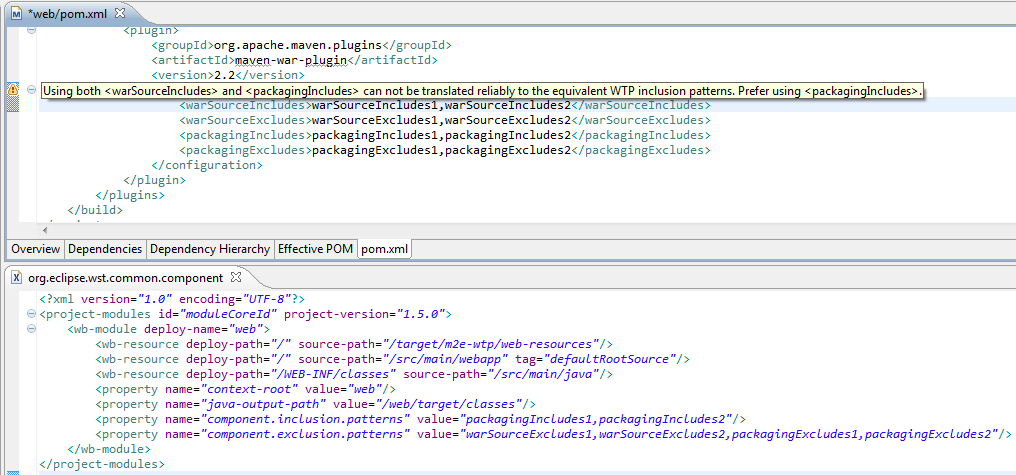
Now all m2e-wtp 0.15.0 does is map the maven patterns to their equivalent component metadata. This gives :
https://community.jboss.org/servlet/JiveServlet/showImage/38-4510-17915/c... https://community.jboss.org/servlet/JiveServlet/downloadImage/38-4510-179...
In the example above, a warning is displayed as both <warSourceIncludes> and <packagingIncludes> are defined. Since both patterns could overlap, it might lead to some weird behavior where WTP would actually deploy more files than a maven CLI build. In order to minimize (we can not totally solve) that potential discrepancy we only keep the packaging patterns in the component files and recommend using <packagingIncludes> only.
Currently, this feature only works in combination with the JBoss AS Tools from JBoss Tools 3.3.0.Beta1 (nightly builds available from http://download.jboss.org/jbosstools/updates/nightly/trunk/ http://download.jboss.org/jbosstools/updates/nightly/trunk/), but we'll try to make other WTP Server adapter vendors support it in the future (as part of WTP core API).
h3. Warnings added when unsupported dependency types are detected
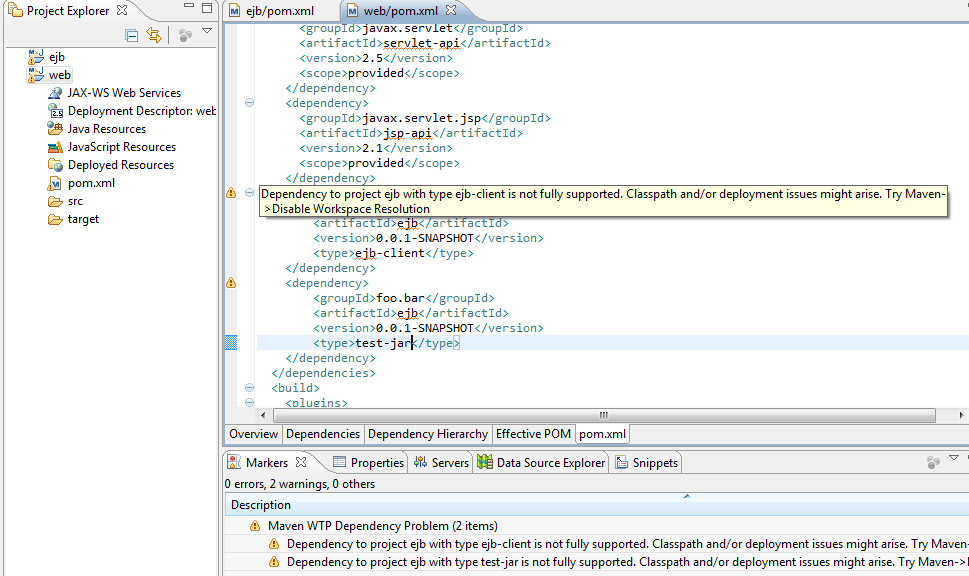
As of today, if a project depends on another workspace project of type ejb-client or test-jar, that specific dependency will not be packaged properly by WTP, as Maven would do in command line. Moreover, you'll experience some class leakage on the compilation and test classpaths in Eclipse (ex: non client classes being visible). The only known workarounds to this issue are to disable workspace resolution, or close the dependent project and rely on the dependencies from the local maven repository.
Ideally, in order to make the deployment part work, we would need to introduce new WTP components, but the current WTP API https://bugs.eclipse.org/bugs/show_bug.cgi?id=330894 doesn't support it, yet. So, until this is fixed, warning markers are added whenever a project depends on such "unsupported" types. That should hopefully give users an idea of the problem and how to circumvent it.
https://community.jboss.org/servlet/JiveServlet/showImage/38-4510-17913/u... https://community.jboss.org/servlet/JiveServlet/downloadImage/38-4510-179...
h3. Better handling of dependencies in war projects
Previous m2e-wtp versions had, in some use cases, some outstanding issues with regard to dependency management of war projects. In particular,
* when 2 dependencies of the same artifact, but having a different classifier were added to a web project, only one would show up on the classpath. This has been properly fixed.
* in some cases, the timestamped version of a SNAPSHOT dependencies from the local repository, would be copied under the target/ folder, causing some jar locking issues in windows. The rationale behind this behavior is, maven-war-plugin packages snapshot dependencies using the timestamp identifier. Since the name of file in the maven classpath library needs to match the one deployed by WTP, a copy was performed. To fix this problem, the default file pattern matching used for dependency deployment has been changed to @{artifactId}@-@{baseVersion}@@{dashClassifier?}@.(a){extension}@. This means that, by default in m2e-wtp, SNAPSHOT dependencies are now deployed using the SNAPSHOT suffix instead of the timestamp. If you need to force the use of timestamped artifacts, then you need to explicitely decalre the following in your pom.xml :
<plugin>
<groupId>org.apache.maven.plugins</groupId>
<artifactId>maven-war-plugin</artifactId>
<version>2.2</version>
<configuration>
<outputFileNameMapping>@{artifactId}@-@{version}@@{dashClassifier?}@.(a){extension}@</outputFileNameMapping>
</configuration>
</plugin>
h3. Removal of conflicting facets on packaging change
If you had a java utility project, that you wanted to upgrade to an EJB project for example, a constraint violation would be raised upon project configuration update (EJB and Utility facets can't be both installed).
This has been fixed by removing all conflicting facets when you change the packaging of a Java EE project, making that conversion completely transparent.
h3. What's next?
m2e 1.1 introduces a new Eclipse to Maven project https://bugs.eclipse.org/bugs/show_bug.cgi?id=359340 conversion API. It means that, in m2e-wtp.next, we will be able to automatically convert existing WTP project configuration to maven's. Dependencies will still need to be set/translated manually but that's a pretty good start IMHO.
h3.
Finally ...
I would like to thank the m2e-wtp community at large for their support and contributions, that's what make this project move forward and make it http://marketplace.eclipse.org/metrics/installs/last30days one of the most popular projects on the eclipse marketplace.
Contributions can take the form of :
* patches/pull requests (source is available on https://github.com/sonatype/m2eclipse-wtp/ https://github.com/sonatype/m2eclipse-wtp/), as Laszlo Varadi did to https://issues.sonatype.org/browse/MECLIPSEWTP-201 fix some overlay issue in windows,
* bug reports (at https://issues.sonatype.org/browse/MECLIPSEWTP https://issues.sonatype.org/browse/MECLIPSEWTP)
* help on the documentation in the https://github.com/sonatype/m2eclipse-wtp/wiki wiki.
* answering questions on the https://dev.eclipse.org/mailman/listinfo/m2e-users m2e mailing list
Keep it up.
Fred.
https://twitter.com/#!/fbricon https://twitter.com/#!/fbricon
--------------------------------------------------------------
Comment by going to Community
[https://community.jboss.org/community/tools/blog/2012/02/03/m2eclipse-wtp...]
14 years, 4 months
[jBPM] - Configuration JBPM 5.2
by philippe Serenne
philippe Serenne [https://community.jboss.org/people/serenne] created the discussion
"Configuration JBPM 5.2"
To view the discussion, visit: https://community.jboss.org/message/714644#714644
--------------------------------------------------------------
reference guide chapter 3 talks about JbpmConfiguration and JbpmContext
re to be different from those in the default configuration file.
The JBPM configuration is represented by the org.jbpm.JbpmConfiguration class. To obtain it, use the singleton instance method (JbpmConfiguration.getInstance().)
h2. Note
To load a configuration from another source, use the JbpmConfiguration.parseXxxx methods.
static JbpmConfinguration jbpmConfiguration = JbpmConfinguration.parseResource("my.jbpm.cfg.xml");
The JbpmConfiguration is "thread safe" and, hence, can be kept in a +static member+.
Every thread can use a JbpmConfiguration as a +factory+ for JbpmContext objects. A JbpmContext will usually represent one transaction. They make services available inside +context blocks+ which looks like this:
JbpmContext jbpmContext = jbpmConfiguration.createJbpmContext(); try { // This is what we call a context block. // Here you can perform workflow operations } finally { jbpmContext.close(); }
The JbpmContext makes both a set of services and the configuration settings available to the JBPM.
But these classes cannot be found in bin or src distrib (nor the org/jbpm/default.jbpm.cfg.xml default configuration file)
Dos anybody has an idea about how to manage configuration in Jbmp5.2 ?
--------------------------------------------------------------
Reply to this message by going to Community
[https://community.jboss.org/message/714644#714644]
Start a new discussion in jBPM at Community
[https://community.jboss.org/choose-container!input.jspa?contentType=1&con...]
14 years, 4 months
[JBoss Tools] - Debugging and Browsing OpenShift Applications in Eclipse
by Max Rydahl Andersen
Max Rydahl Andersen [https://community.jboss.org/people/maxandersen] modified the blog post:
"Debugging and Browsing OpenShift Applications in Eclipse"
To view the blog post, visit: https://community.jboss.org/community/tools/blog/2012/02/08/debugging-and...
--------------------------------------------------------------
Latest OpenShift enabled port-forwarding for your OpenShift applications.
This enables you to use a debugger for your JBoss application and it allows you to connect to the database directly and use tools like Eclipse Database Browser instead of only using phpsqlmyadmin.
Of course once you have these things setup in your Eclipse you can use things like reverse engineering and even run your local app against the remote database.
It all works by setting up an ssh tunnel that exposes the internal remote ports running on OpenShift servers on your local machine - this does require some manual steps which i'm outlining in this blog
together with how to configure the database setup in Eclipse and how to remote debug JBoss running on OpenShift.
In future releases of JBoss Tools we'll be looking at simplifying these steps, but for now here are the fully manual steps.
h1. Setting up port forward
The simplest way to do this is to use the rhc command line tools.
Make sure you got the latest version - how to install/update these for various platforms is documented https://openshift.redhat.com/app/express#quickstart here.
Once you have those run rhc-port-forward -a <appname>.
I have an app called ‘fonk’ of type ‘jboss-as7’ and with ‘mysql’ cartridge enabled. For such a setup you should see something like this:
rhc-port-forward -a fonk
Password:
Checking available ports...
Binding httpd -> 127.1.255.130:8080...
Binding java -> 127.1.255.129:8080...
Binding mysqld -> 127.1.255.129:3306...
Use ctl + c to stop
h1. OSX gotcha
In case you get an error print out similar to this:
bind: Can't assign requested address
channel_setup_fwd_listener: cannot listen to port: 3306
bind: Can't assign requested address
channel_setup_fwd_listener: cannot listen to port: 8080
bind: Can't assign requested address
channel_setup_fwd_listener: cannot listen to port: 8080
Could not request local forwarding.
You are most likely running OS X which unfortunately(?) does not automatically allow you to have all 127.x.x.x IP’s setup with a so called loopback alias.
To fix this you need to add such alias manually for each IP you want to connect to.
In my case that is 127.1.255.130 and 127.1.255.129 as seen in the first attempt of using rhc-port-forward. These IP’s will be different for each of your app, thus for `fonk’ app I enable loopback aliases by running the following:
sudo ifconfig lo0 alias 127.1.255.130
sudo ifconfig lo0 alias 127.1.255.129
Now when you run rhc-port-forward you should not be seeing any bind: Can't assign requested address. error messages.
Note: these alias’es does not survive reboots - if anyone know how to setup global loopback alias or make these persistent between reboots then I would love to hear about that in the comments :)
h1. Use OpenShift database locally
When port forwarding is enabled you can start using these, for example to setup and connect to MySql database via Eclipse DTP Tools.
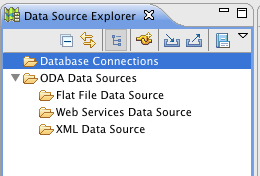
To do this open the Data Source Explorer:
https://community.jboss.org/servlet/JiveServlet/showImage/38-4525-17933/d... https://community.jboss.org/servlet/JiveServlet/downloadImage/38-4525-179...
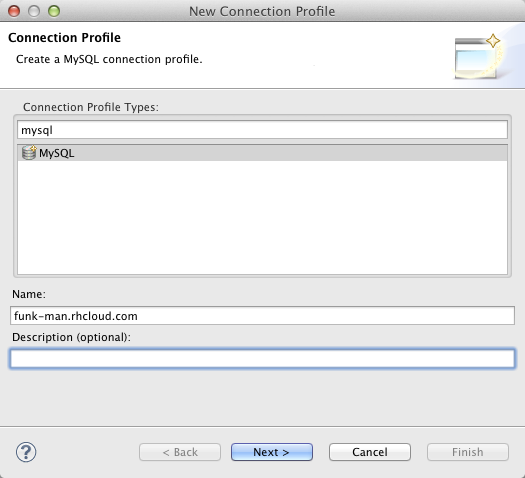
Click on the “New Connection Profile” and choose MySql and give it a name.
https://community.jboss.org/servlet/JiveServlet/showImage/38-4525-17934/n... https://community.jboss.org/servlet/JiveServlet/downloadImage/38-4525-179...
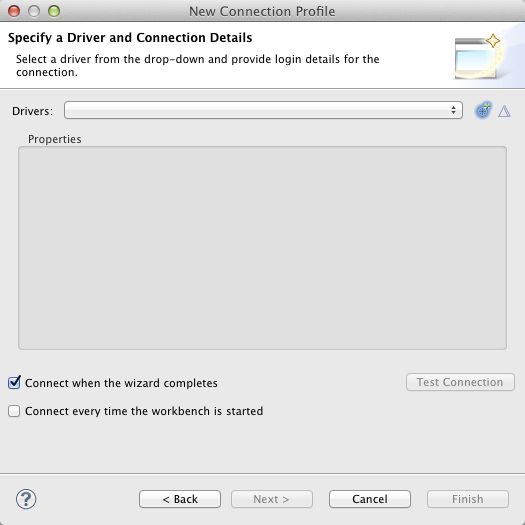
Click Next and if you do not have an existing driver for MySQL configured you will see an empty list:
https://community.jboss.org/servlet/JiveServlet/showImage/38-4525-17935/e... https://community.jboss.org/servlet/JiveServlet/downloadImage/38-4525-179...
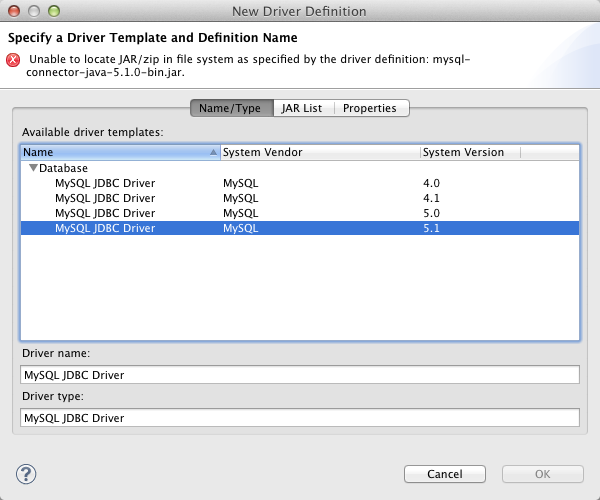
To add a driver click the + icon and setup a driver:
https://community.jboss.org/servlet/JiveServlet/showImage/38-4525-17936/m... https://community.jboss.org/servlet/JiveServlet/downloadImage/38-4525-179...
For OpenShift MySQL the 5.1 option is best, and it just needs to be told where the driver is under the “Jar List” tab. Here you click the “Edit JAR/Zip” and point it to your downloaded mysql-connectoer-java-5.1.jar.
https://community.jboss.org/servlet/JiveServlet/showImage/38-4525-17937/e... https://community.jboss.org/servlet/JiveServlet/downloadImage/38-4525-179...
Once that is done you just need to fill in the right connection details:
https://community.jboss.org/servlet/JiveServlet/showImage/38-4525-17938/c... https://community.jboss.org/servlet/JiveServlet/downloadImage/38-4525-179...
The important part for the connection details is that you set URL to match the pattern:
jdbc:mysql://<forwarded-ip>:3306/<appname>
For my fonk application that would be:
jdbc:mysql://127.1.255.129.3306/fonk
And then set “User Name” to admin and type in your MySql password.
You can use the “Test Connection” button to verify you can connect.
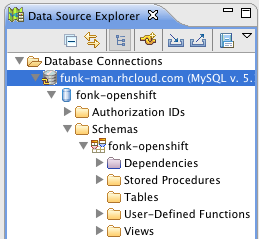
When you press Finish you should be able to browse your remote mysql database hosted on OpenShift:
https://community.jboss.org/servlet/JiveServlet/showImage/38-4525-17940/d... https://community.jboss.org/servlet/JiveServlet/downloadImage/38-4525-179...
>From here on out you can now use this Eclipse dataconnection with any plugin that supports such connections. i.e. Hibernate Tools reverse engineering features.
h1. Debug JBoss AS
To enable debug with JBoss we need to add a enable_jpda marker file to .openshift/markers.
This is done by simply executing the following:
cd git/fonk
touch .openshift/markers/enable_jpda
git add .openshit/markers/enable_jpda
git commit -a -m "enable jpda"
[master 6f7197c] enable jpda
0 files changed, 0 insertions(+), 0 deletions(-)
create mode 100644 .openshift/markers/enable_jpda
git push
<openshift remote build output>
Note: you can of course also do this all from within Eclipse via EGit integration if you prefer that.
When this have been enabled you need to start/restart port-forwarding to get it to pick up the java jpda port.
rhc-port-forward -a fonk
Password:
Checking available ports...
Binding httpd -> 127.1.255.130:8080...
Binding java -> 127.1.255.129:8080...
Binding java -> 127.1.255.129:8787...
Binding mysqld -> 127.1.255.129:3306...
Use ctl + c to stop
Notice the Binding java -> 127.1.255.129:8787.... line, that is the jpda ip and port you are going to use.
Now to set this up in Eclipse JDT debugger you need to create a ‘Remote Java Application’ under “Debug Configurations”
https://community.jboss.org/servlet/JiveServlet/showImage/38-4525-17941/d... https://community.jboss.org/servlet/JiveServlet/downloadImage/38-4525-179...
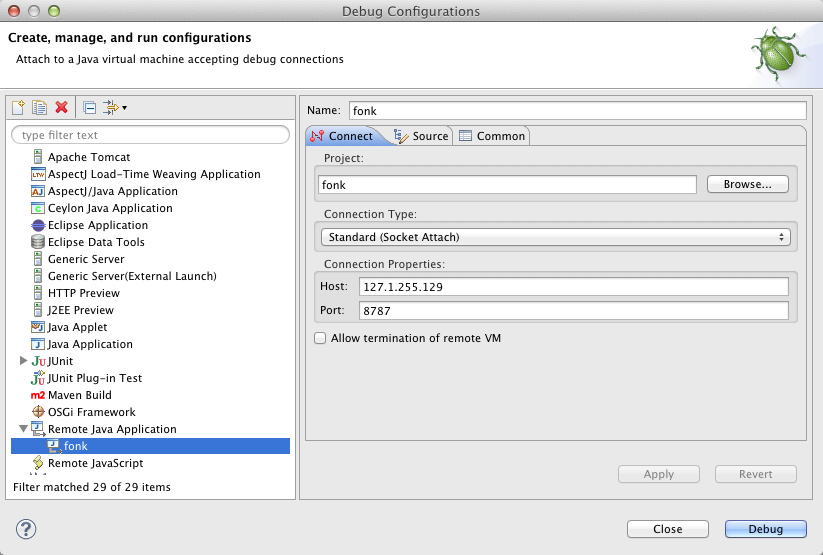
And here you select ‘Remote Java Application’ and fill in the connection details:
https://community.jboss.org/servlet/JiveServlet/showImage/38-4525-17944/s... https://community.jboss.org/servlet/JiveServlet/downloadImage/38-4525-179...
The important pieces here are to set Host: to the ip number (in my case 127.1.255.129) and the port wich for JBoss AS on OpenShift is 8787 by default.
The Project part is optional, but its useful to point it to the matching Eclipse project which will allow it to find the proper source and let you place breakpoints.
Once you press “Debug” it should go and connect to the running server. It might take a while, it is after all going into the Cloud :)
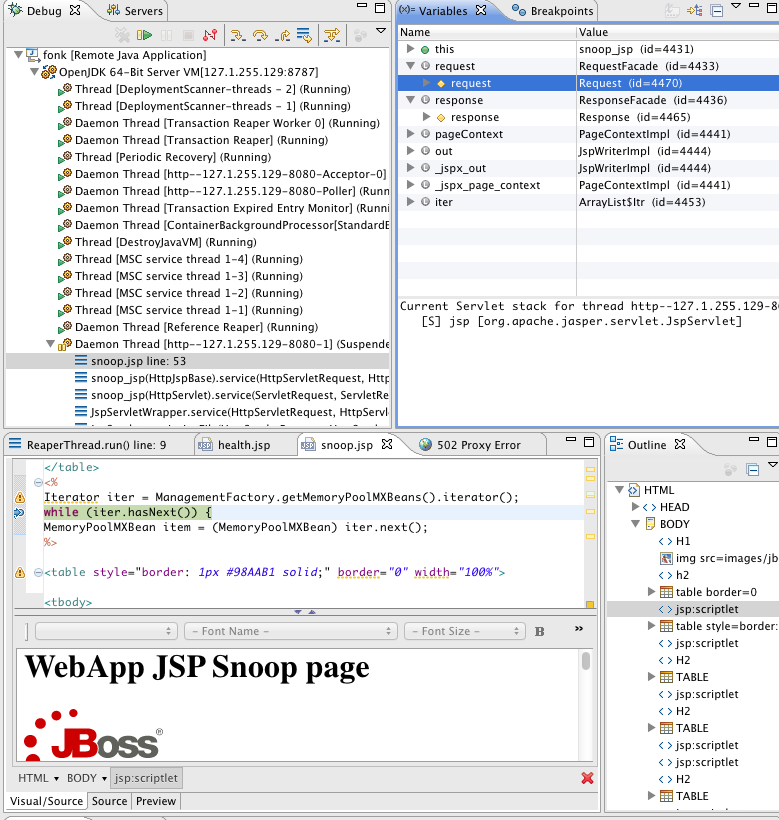
And if you now set breakpoints and use a browser to trigger them you get something like this:
https://community.jboss.org/servlet/JiveServlet/showImage/38-4525-17943/d... https://community.jboss.org/servlet/JiveServlet/downloadImage/38-4525-179...
This showing the remote debugger hitting the breapoint in a jsp page named snoop.jsp.
h1. Conclusion
I hope I showed you how powerful OpenShift’s latest release with port-forwarding is and how (fairly) easy it is to setup once you get the port-forwarding working.
Being able to connect directly to the remote database and debug you JBoss server makes for a whole new world of possibilities and productivity boost with OpenShift.
Hope you like it and continues to have fun exploring OpenShift and JBoss Tools.
/max
--------------------------------------------------------------
Comment by going to Community
[https://community.jboss.org/community/tools/blog/2012/02/08/debugging-and...]
14 years, 4 months