[JBoss Tools] - Test archetypes in JBoss Central
by Fred Bricon
Fred Bricon [https://community.jboss.org/people/fbricon] created the document:
"Test archetypes in JBoss Central"
To view the document, visit: https://community.jboss.org/docs/DOC-18203
--------------------------------------------------------------
One solution to test your archetypes in JBoss Central is to define a https://community.jboss.org/docs/DOC-14955 Project Example User site.
First, grab a copy of the last version of http://anonsvn.jboss.org/repos/jbosstools/trunk/download.jboss.org/jbosst... project-examples-shared-XXXX.xml and save it locally.
Then, you need to edit it : remove all unwanted projects and keep the one you're interested in. You will have to change :
* the <name> so it doesn't collide with existing names in JBT
* The archetype coordinates : * <archetypeGroupId>
* <archetypeArtifactd>
* <archetypeVersion>
* Add/change <archetypeRepository> to point to the location of the repository (local or remote) containing the archetype under test
* The <tag> value must be set to *central*
* You may change the rest of the example properties according to your needs.
* Save your project example descriptor locally.
You will end up with something like :
<projects>
<project>
<category>Open Archetypes</category>
<name>multi-helloworld</name>
<included-projects>multi</included-projects>
<shortDescription>Multi Module</shortDescription>
<priority>1</priority>
<description>This is an overly complex Hello world</description>
<size>8192</size>
<url/>
<fixes>
<fix type="wtpruntime">
<property name="allowed-types">org.jboss.ide.eclipse.as.runtime.70, org.jboss.ide.eclipse.as.runtime.71, org.jboss.ide.eclipse.as.runtime.eap.60</property>
<property name="description">This project example requires JBoss AS 7.0/7.1 or EAP 6 </property>
<property name="downloadId">org.jboss.tools.runtime.core.as.710</property>
</fix>
<fix type="plugin">
<property name="id">org.eclipse.m2e.core</property>
<property name="versions">[1.0.0,1.2.0)</property>
<property name="description">This project example requires m2e >= 1.0.</property>
<property name="connectorIds">org.eclipse.m2e.feature</property>
</fix>
<fix type="plugin">
<property name="id">org.maven.ide.eclipse.wtp</property>
<property name="versions">[0.13.1,0.17)</property>
<property name="description">This project example requires m2eclipse-wtp >= 0.13.1.</property>
<property name="connectorIds">org.maven.ide.eclipse.wtp</property>
</fix>
<fix type="plugin">
<property name="id">org.jboss.tools.maven.core</property>
<property name="versions">[1.3.0,1.4.0)</property>
<property name="description">This project example requires JBoss Maven Tools.</property>
<property name="connectorIds">org.jboss.tools.maven.feature,org.jboss.tools.maven.cdi.feature,org.jboss.tools.maven.hibernate.feature,org.jboss.tools.maven.jaxrs.feature,org.jboss.tools.maven.portlet.feature,org.jboss.tools.maven.seam.feature</property>
</fix>
</fixes>
<importType>mavenArchetype</importType>
<importTypeDescription>The project example requires the m2e, m2eclipse-wtp and JBoss Maven Integration features.</importTypeDescription>
<defaultMavenProfiles>arq-jbossas-remote</defaultMavenProfiles>
<mavenArchetype>
<!-- Archetype coordinates-->
<archetypeGroupId>org.openarchetypes</archetypeGroupId>
<archetypeArtifactId>multi-javaee6-archetype</archetypeArtifactId>
<archetypeVersion>0.0.1-SNAPSHOT</archetypeVersion>
<!-- You can remove the <archetypeRepository> if the archetype is available from Maven Central -->
<archetypeRepository>http://open-archetypes.github.com/maven-repo/snapshots/</archetypeRepository>
<!-- if you need to test with your local build
<archetypeRepository>file:/path/to/your/local/mavenrepo/</archetypeRepository>
-->
<!-- Pre-populate the project wizard input texts-->
<groupId>foo.bar</groupId>
<artifactId>multi</artifactId>
<version>0.0.1-SNAPSHOT</version>
<javaPackage>foo.bar.multi</javaPackage>
<!-- Override default archetype properties -->
<properties>
<property name="name" value="Java EE 6 webapp project"/>
</properties>
</mavenArchetype>
<!-- use the tag 'central' to make this example appear in JBoss Central - Project Examples section -->
<tags>central</tags>
<!-- Icon to use in JBoss Central-->
<icon path="icons/newwebprj_wiz.gif" />
<!-- Readme / Cheatsheet to open automatically when the project is generated -->
<welcome type="editor" url="/${project[0]}/readme.md"/>
</project>
</projects>
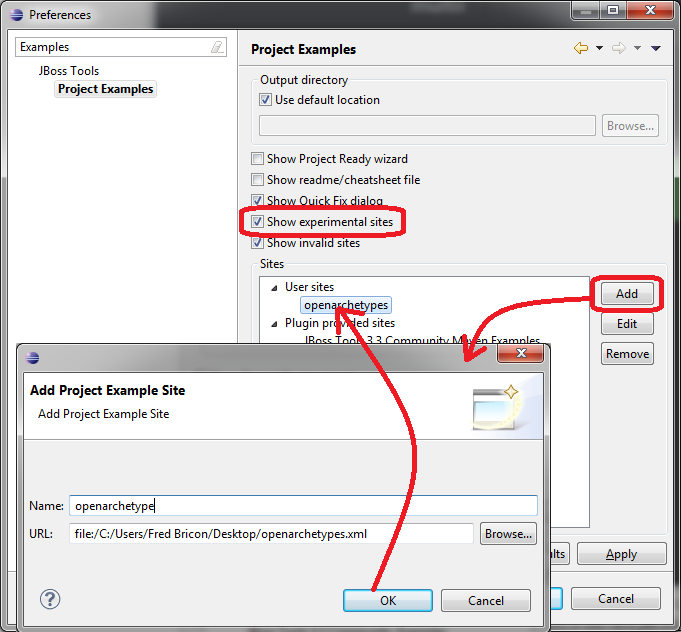
Now you need to open Eclipse's preferences and got to JBoss Tools > Project Examples.
* Check 'Show experimental sites'
* Click on the 'Add' button to add your customized project example descriptor as a User Site
https://community.jboss.org/servlet/JiveServlet/showImage/102-18203-1-185... https://community.jboss.org/servlet/JiveServlet/downloadImage/102-18203-1...
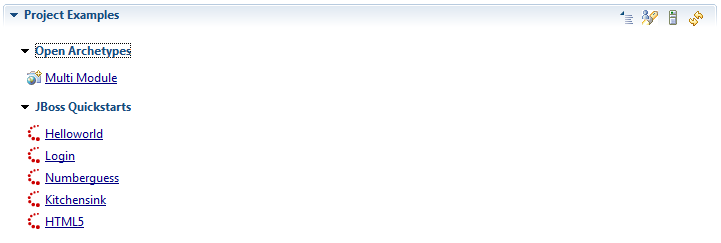
Back to JBoss Central, in the Project Examples section, click on the refresh button and see your archetype appear in the list :
https://community.jboss.org/servlet/JiveServlet/showImage/102-18203-1-185... https://community.jboss.org/servlet/JiveServlet/downloadImage/102-18203-1...
You can now test your custom archetype exactly as if it was a built-in project wizard from JBoss Central
--------------------------------------------------------------
Comment by going to Community
[https://community.jboss.org/docs/DOC-18203]
Create a new document in JBoss Tools at Community
[https://community.jboss.org/choose-container!input.jspa?contentType=102&c...]
13 years, 11 months
[jBPM] - jBPM 5.2 set process instance variable from java - NullPointerException
by Salvatore Loria
Salvatore Loria [https://community.jboss.org/people/slash17] created the discussion
"jBPM 5.2 set process instance variable from java - NullPointerException"
To view the discussion, visit: https://community.jboss.org/message/733540#733540
--------------------------------------------------------------
Hi to all.
I'm using jBPM for two projects that need a workflow engine.
In particular I'm just using the jBPM runtime, embedded in our jBoss AS 5.1 web applications.
Thanks to you all I solved the several problems I found in this month (deploy a jBPM based web app in AS 5.1 instead of AS 7, make persistence work with an external oracle DB etc..maybe I will make a discussion with my experience if this can help someone)
But now I face a real strange (and big) problem I can't solve.
I need to access and modify process instance variables from my java code, using the API.
Here is a code snippet (just for example):
WorkflowProcessInstance p = (WorkflowProcessInstance) jBPMSession.getProcessInstance(procId);
System.out.println("before set: " + p.getVariable("user"));
p.setVariable("user", "krisv");
System.out.println("after set: " + p.getVariable("user"));
I can get the variable value using this code p.getVariable("user")
but this p.setVariable("user", "krisv"); throws a NullPointerException, cause kruntime is null (:
[....]
11:20:53,095 INFO [STDOUT] before set: john
11:20:53,095 ERROR [[ExampleServlet]] Servlet.service() for servlet ExampleServlet threw exception
java.lang.NullPointerException
at org.jbpm.process.instance.impl.ProcessInstanceImpl.getProcess(ProcessInstanceImpl.java:67)
at org.jbpm.process.instance.impl.ProcessInstanceImpl.getContextInstance(ProcessInstanceImpl.java:127)
at org.jbpm.workflow.instance.impl.WorkflowProcessInstanceImpl.setVariable(WorkflowProcessInstanceImpl.java:238)
at com.valueteam.jbpm.main.JBPMUtil.setVariable(JBPMUtil.java:188)
at com.valueteam.example.ExampleServlet.doGet(ExampleServlet.java:81)
at javax.servlet.http.HttpServlet.service(HttpServlet.java:617)
at javax.servlet.http.HttpServlet.service(HttpServlet.java:717)
at org.apache.catalina.core.ApplicationFilterChain.internalDoFilter(ApplicationFilterChain.java:290)
at org.apache.catalina.core.ApplicationFilterChain.doFilter(ApplicationFilterChain.java:206)
at org.jboss.web.tomcat.filters.ReplyHeaderFilter.doFilter(ReplyHeaderFilter.java:96)
at org.apache.catalina.core.ApplicationFilterChain.internalDoFilter(ApplicationFilterChain.java:235)
at org.apache.catalina.core.ApplicationFilterChain.doFilter(ApplicationFilterChain.java:206)
at org.apache.catalina.core.StandardWrapperValve.invoke(StandardWrapperValve.java:235)
at org.apache.catalina.core.StandardContextValve.invoke(StandardContextValve.java:191)
at org.jboss.web.tomcat.security.SecurityAssociationValve.invoke(SecurityAssociationValve.java:190)
at org.jboss.web.tomcat.security.JaccContextValve.invoke(JaccContextValve.java:92)
at org.jboss.web.tomcat.security.SecurityContextEstablishmentValve.process(SecurityContextEstablishmentValve.java:126)
at org.jboss.web.tomcat.security.SecurityContextEstablishmentValve.invoke(SecurityContextEstablishmentValve.java:70)
at org.apache.catalina.core.StandardHostValve.invoke(StandardHostValve.java:127)
at org.apache.catalina.valves.ErrorReportValve.invoke(ErrorReportValve.java:102)
at org.jboss.web.tomcat.service.jca.CachedConnectionValve.invoke(CachedConnectionValve.java:158)
at org.apache.catalina.core.StandardEngineValve.invoke(StandardEngineValve.java:109)
at org.apache.catalina.connector.CoyoteAdapter.service(CoyoteAdapter.java:330)
at org.apache.coyote.http11.Http11Processor.process(Http11Processor.java:829)
at org.apache.coyote.http11.Http11Protocol$Http11ConnectionHandler.process(Http11Protocol.java:598)
at org.apache.tomcat.util.net.JIoEndpoint$Worker.run(JIoEndpoint.java:447)
at java.lang.Thread.run(Thread.java:662)
What is the cause and how can I solve this?
Thanks in advance.
--------------------------------------------------------------
Reply to this message by going to Community
[https://community.jboss.org/message/733540#733540]
Start a new discussion in jBPM at Community
[https://community.jboss.org/choose-container!input.jspa?contentType=1&con...]
13 years, 11 months
[jBPM] - Humantask process started by java code, want to be managed by gwt console, some difficult problem
by Jimmy dong
Jimmy dong [https://community.jboss.org/people/jimmy.dongjia] created the discussion
"Humantask process started by java code,want to be managed by gwt console,some difficult problem"
To view the discussion, visit: https://community.jboss.org/message/733517#733517
--------------------------------------------------------------
1.The java code and the gwt console both start human task server or can share one human task server?
2.Now I start a process instance by java code ,and I can see it in gwt console(they use the same database),but I can't see personal task on gwt console,but there are task data in table Task,NodeInstanceLog,ProcessInstanceLog and so on. I really don't know why I can't retriev personal task on gwt console?
help me,thanks !!
--------------------------------------------------------------
Reply to this message by going to Community
[https://community.jboss.org/message/733517#733517]
Start a new discussion in jBPM at Community
[https://community.jboss.org/choose-container!input.jspa?contentType=1&con...]
13 years, 11 months