2:16 p.m.
Fred Bricon [http://community.jboss.org/people/fbricon] modified the blog post:
"m2e(clipse)-wtp 0.12.0 : New & Noteworthy"
To view the blog post, visit:
http://community.jboss.org/community/tools/blog/2011/05/03/m2eclipse-wtp-...
--------------------------------------------------------------
So, thanks to Igor Fedorenko's last efforts, m2eclipse-wtp 0.12.0 is finally out,
(update site available at http://m2eclipse.sonatype.org/sites/m2e-extras
http://m2eclipse.sonatype.org/sites/m2e-extras), bringing the WTP integration with Maven
to a whole new level. The complete release notes are available here
(https://issues.sonatype.org/secure/ReleaseNote.jspa?projectId=10310&v...).
However, I wanted to highlight some of the most notable features in this new version, so
let’s take a quick tour :
h3. On-the-fly web resource filtering
Maven has this interesting concept of web resource filtering
(http://(http://maven.apache.org/plugins/maven-war-plugin/examples/adding-filtering-webresources.html)
: basically you can add resources existing in non standard directories, into your final
web application. Moreover, you can filter these resources to apply, for instance, specific
application configuration depending on a maven profile : you can activate some debug
options in your web.xml, define development specific parameters in your spring
configuration files, use a different css color scheme when you work locally and so forth.
Supported maven web resource filtering features are :
* inclusion/exclusion of resources
* filtering (not activated by default)
* target path (root of the web application by default)
* possibility to use specific properties file filters
Here is a sample of maven-war-plugin configuration filtering any xml files under
src/main/webapp, using an external filter file :
<plugin>
<groupId>org.apache.maven.plugins</groupId>
<artifactId>maven-war-plugin</artifactId>
<version>2.1.1</version>
<configuration>
<webResources>
<filters>
<filter>src/main/filters/dev.properties</filter>
</filters>
<resource>
<directory>src/main/webapp</directory>
<filtering>true</filtering>
<includes>
<include>**/*.xml</include>
</includes>
</resource>
</webResources>
</configuration>
</plugin>
Note that after adding the webResource configuration to your pom.xml, you need to update
the Maven project configuration.
m2eclipse-wtp 0.12.0 not only supports these features from maven, but goes one step
further and brings you on-the-fly filtering : as soon as you save a file included in the
*<webResources>* configuration from the maven-war-plugin, filtering is triggered
automatically. Couple that with WTP’s hot redeployment capabilities, and you can see your
changes by just reloading the affected pages in your browser.
OK, to be fair, that depends on the changed files, actually. If you change the content of
your web.xml, or some spring config files, chances are you’ll have to restart your
application or the server for the changes to be taken in consideration.
The filtered resources are copied to the project build directory, under
*m2e-wtp/web-resources*. You can view the content of this folder directly from the Project
Explorer view in eclipse, under the *Web Resources* Node. You can open and compare side by
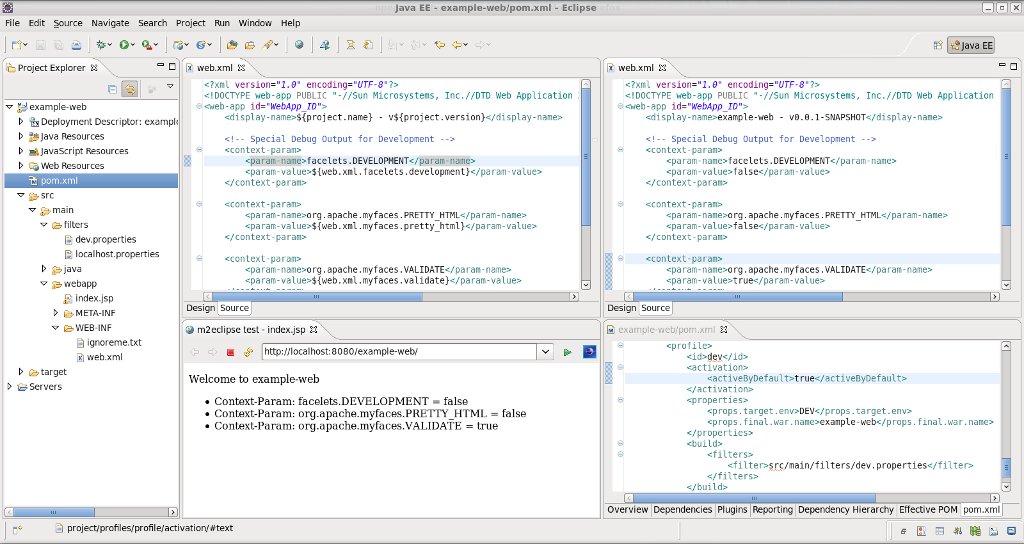
side a raw file and its filtered version, as shown in the following screenshot.
http://community.jboss.org/servlet/JiveServlet/showImage/38-3769-16241/we...
http://community.jboss.org/servlet/JiveServlet/downloadImage/38-3769-1624...
In the previous example, the dev profile, activated by default (see lower right panel)
determines which filter file must be used during filtering. In this case, we want to
active some debugging options. The index.jsp page, shown in the browser in the lower left
panel, displays the computed values of the different context-params from web.xml.
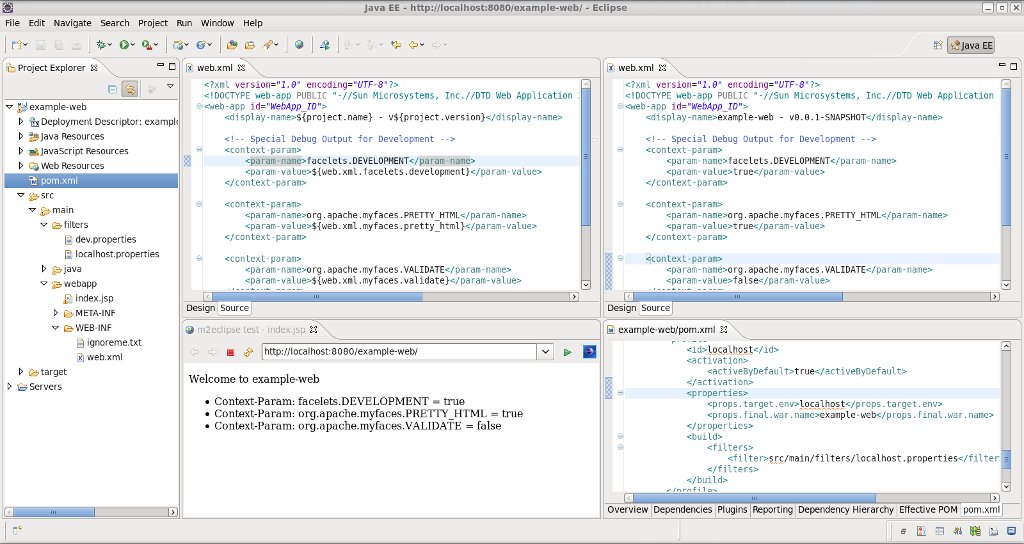
Now after changing the active profile (due to a bug in m2e-core 0.12.0, the pom.xml needs
to be saved twice for the change to be detected, but this has been
https://bugs.eclipse.org/bugs/show_bug.cgi?id=340159 fixed in m2e-core 0.13.0) and after
restarting tomcat (it doesn't restart the application upon web.xml changes),
you'll notice the web.xml values are updated, values are taken from another properties
file.
http://community.jboss.org/servlet/JiveServlet/showImage/38-3769-16242/we...
http://community.jboss.org/servlet/JiveServlet/downloadImage/38-3769-1624...
h3. Context root customization
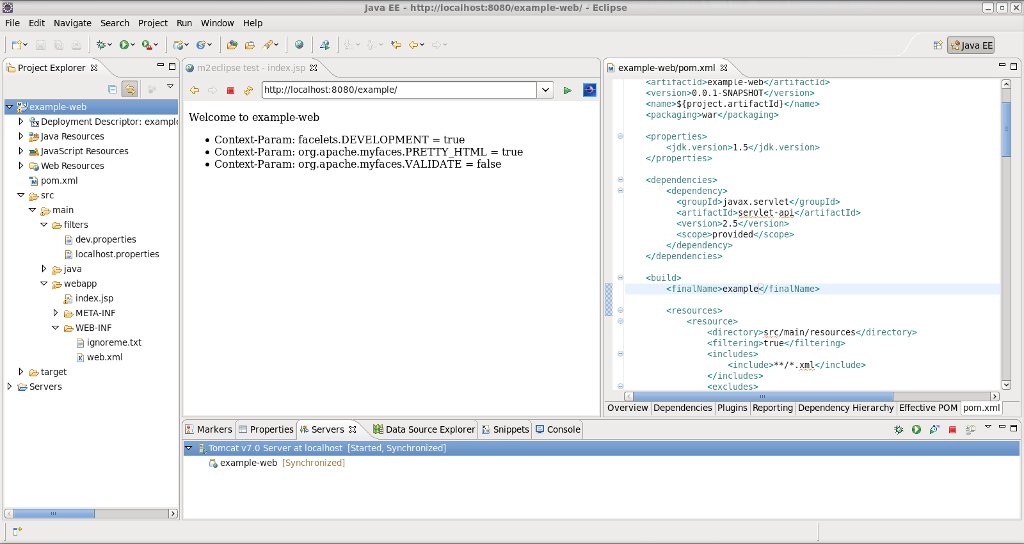
By default, the web project's context root is resolved from the *<finalName>*
value resolved from the pom.xml. In the following example, the example-web project will be
accessible at http://localhost:8080/ http://localhost:8080/example/, according to the
finalName value :
http://community.jboss.org/servlet/JiveServlet/showImage/38-3769-16243/m2...
http://community.jboss.org/servlet/JiveServlet/downloadImage/38-3769-1624...
However, you can customize the context root used in WTP by setting a custom property in
your pom.xml, for instance, if you need to use "/" as your context root, just
add *<m2eclipse.wtp.contextRoot>* in your properties and update your maven project
configuration :
<properties>
...
<m2eclipse.wtp.contextRoot>/<m2eclipse.wtp.contextRoot>
...
</properties>
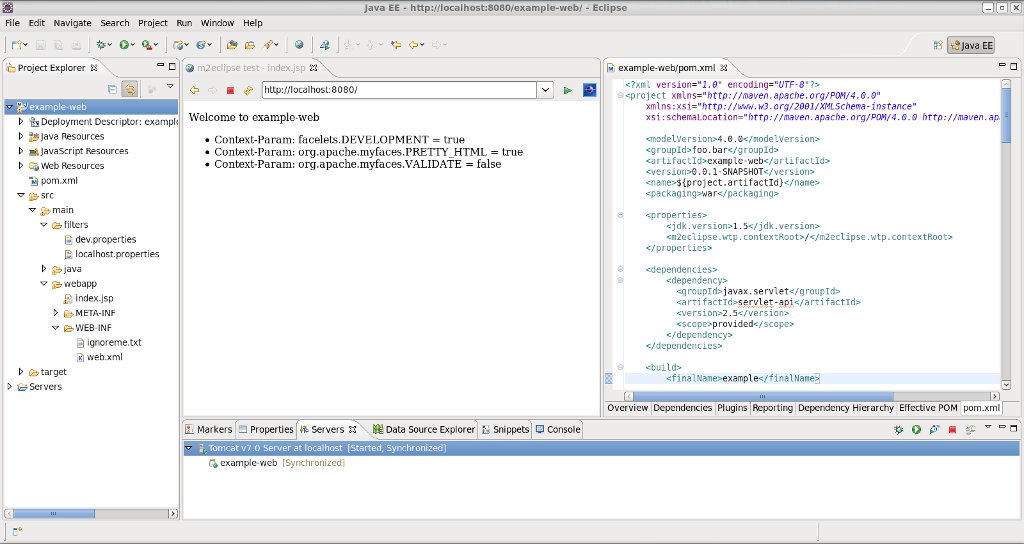
When restarting tomcat, the context root change will be detected and tomcat will ask to
update its configuration. Now the same application is accessible at
http://localhost:8080/ http://localhost:8080/
http://community.jboss.org/servlet/JiveServlet/showImage/38-3769-16244/m2...
http://community.jboss.org/servlet/JiveServlet/downloadImage/38-3769-1624...
h3. Java nature no longer added to EAR projects
The java nature was wrongly added to EAR projects. This is no longer the case. Moreover,
existing Java nature will be automatically removed from existing EAR projects upon update
project configuration.
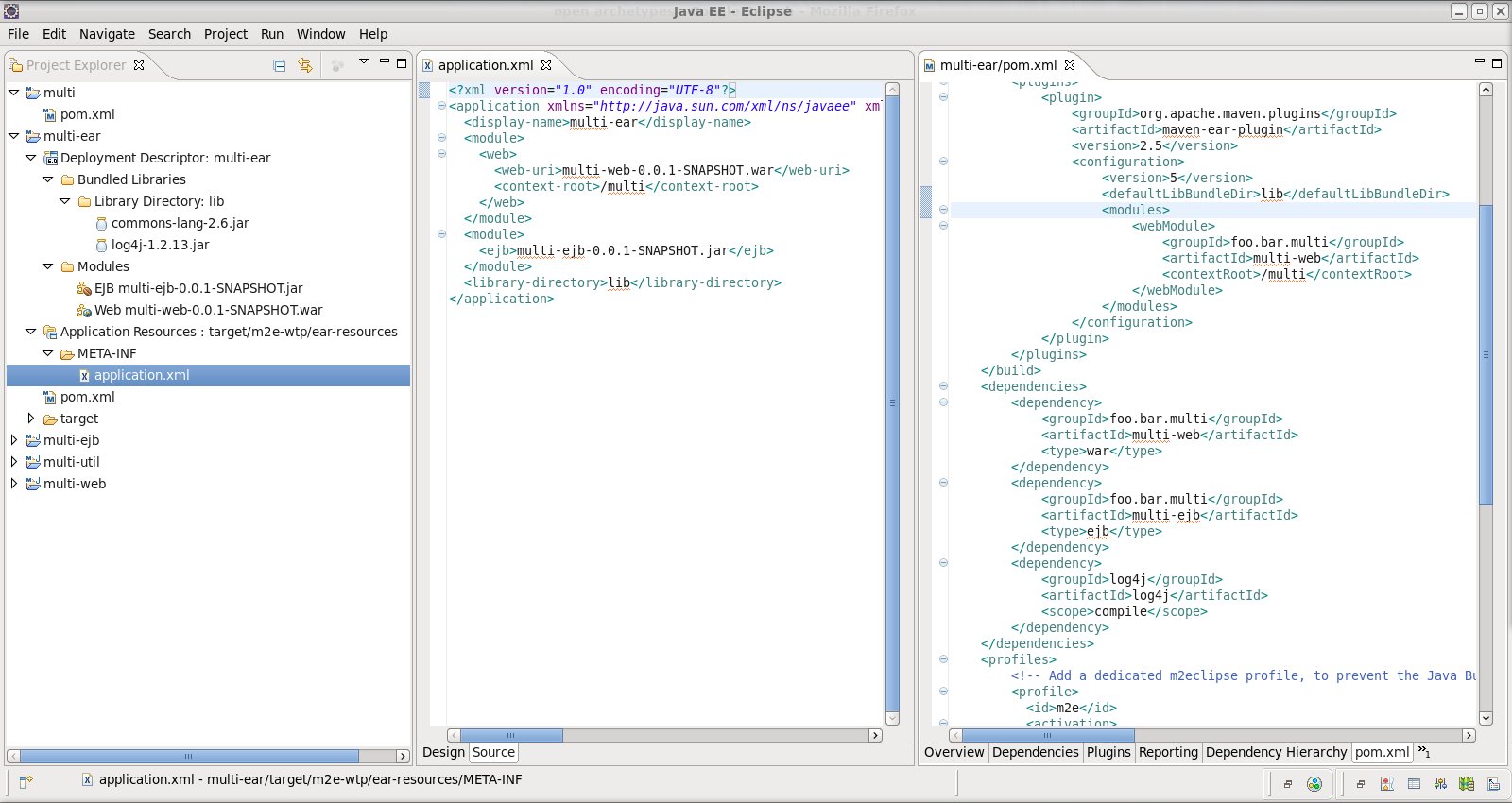
h3. Generation of application.xml outside the source folders
Since m2eclipse added support for EAR projects in 0.9.8, many users complained the
deployment descriptor was generated under the source folder, under version control. Since
application.xml (and jboss-app.xml) can be generated by maven automatically, there is no
need to pollute the source folder right? Starting from m2eclipse-wtp 0.12.0, the
deployment descriptors are now generated under *<build
directory>/m2e-wtp/ear-resources*. Similarly to the web projects, a new *Application
Ressources* node is now displayed in the Project Explorer view, showing you which EAR
resources will be deployed/exported.
http://community.jboss.org/servlet/JiveServlet/showImage/38-3769-16237/ea...
http://community.jboss.org/servlet/JiveServlet/downloadImage/38-3769-1623...
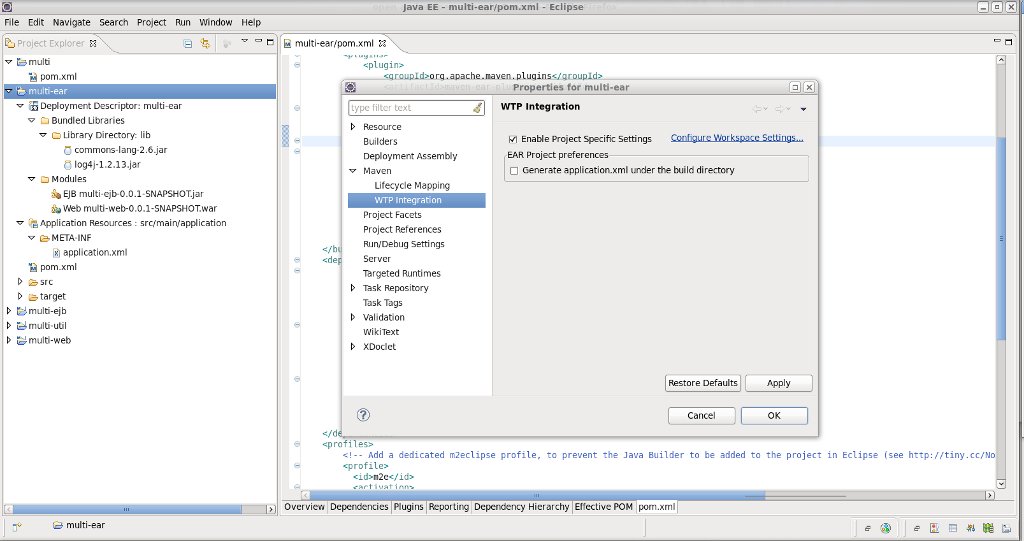
If, for some reason, one would still want to generate the deployment descriptors under the
source folder (src/main/application by default), then you could right click on the
project, open the project Properties and go to the *Maven > WTP integration* page.
There, after enabling specific project configuration, you can choose to NOT use the build
folder to generate application.xml.
http://community.jboss.org/servlet/JiveServlet/showImage/38-3769-16240/m2...
http://community.jboss.org/servlet/JiveServlet/downloadImage/38-3769-1624...
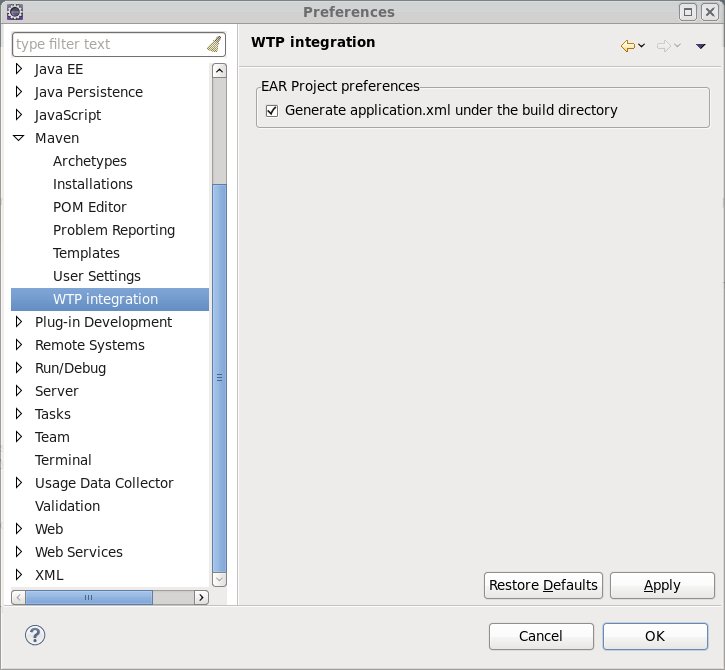
The same setting can be enabled globally for all EAR projects in the workspace by opening
the *Preferences > Maven > WTP Integration*
http://community.jboss.org/servlet/JiveServlet/showImage/38-3769-16239/m2...
http://community.jboss.org/servlet/JiveServlet/downloadImage/38-3769-1623...
After validating your choice, all EAR projects in the workspace will update their
configuration, if you choose so.
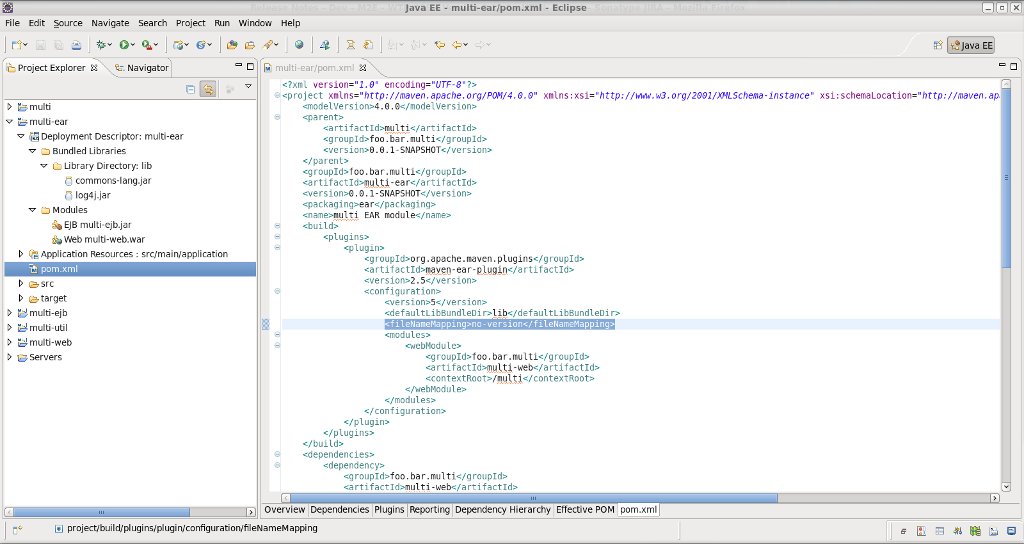
h3. Support for the no-version file name mapping in maven-ear-plugin
maven-ear-plugin 2.5 introduced a new file name mapping strategy
(http://maven.apache.org/plugins/maven-ear-plugin/examples/customize-file-...),
namely *no-version*, that remove the version suffix from all EAR deployed dependencies.
All you need to do is add the following configuration to your maven-ear-plugin
configuration :
<plugin>
<groupId>org.apache.maven.plugins</groupId>
<artifactId>maven-ear-plugin</artifactId>
<version>2.5</version>
<configuration>
...
<fileNameMapping>no-version</fileNameMapping>
...
</configuration>
</plugin>
Then you can check in the Project Explorer view, under the Deployment Descriptor node, all
dependencies' names under the Bundle Libraries and Modules are updated :
http://community.jboss.org/servlet/JiveServlet/showImage/38-3769-16238/ea...
http://community.jboss.org/servlet/JiveServlet/downloadImage/38-3769-1623...
h3. Increased stability
Many users, over the years, experienced random crashes during project import or
configuration update, or saw test resources being deployed with their applications. All
these issues could be
https://issues.sonatype.org/secure/IssueNavigator.jspa?reset=true&jql...
linked to one root cause : some WTP projects were missing a crucial element : the
*org.eclipse.wst.common.modulecore.ModuleCoreNature* nature in their .project. The root
cause of this "corruption" is still unclear, this is probably caused by some
race condition, but unfortunately, this has proved impossible to reproduce with test
projects.
m2eclipse-wtp 0.12.0 actually workarounds this issue : if the ModuleCoreNature is missing
from WTP projects, it's automagically added to fix the projects, under the hood.
Hopefully, this should fix most of the crashes users occasionally experience.
h3. Now, what next?
m2eclipse-wtp 0.12.0 is the last version supporting Eclipse 3.5 (Galileo) based platforms.
Next 0.13.0 version will be aligned with the new, revamped m2e-core 0.13.0 (= future 1.0)
and will be released at about the same time frame as Eclipse 3.7 Indigo (late june). The
next big thing is the added support for war overlays, the single
https://issues.sonatype.org/browse/MECLIPSEWTP-2 most requested feature in m2eclipse-wtp.
If you like to live on the bleeding edge, you can already try the latest development
builds, available under
https://repository.sonatype.org//content/sites/forge-sites/m2eclipse-wtp/...
https://repository.sonatype.org//content/sites/forge-sites/m2eclipse-wtp/... (use
the latest directory as your update site).
One last thing : all this sweetness would not have been possible if I wasn't working
full time on m2eclipse-wtp. Fortunately, Max R. Andersen got me a job in his JBoss Tools
and Developer Studio team, and allows me to spend a considerable amount of time playing
with my favorite toy of the moment :-) Thanks a bunch Max!!! Also big thanks to Eugene
Kuleshov, Igor Fedorenko and Jason Van Zyl who gave me the chance to get involved in
m2e(clipse).
Enjoy,
Fred.
--------------------------------------------------------------
Comment by going to Community
[http://community.jboss.org/community/tools/blog/2011/05/03/m2eclipse-wtp-...]