
12:37 p.m.
Max Rydahl Andersen [http://community.jboss.org/people/maxandersen] modified the blog
post:
"Chasing a White Rabbit with JBoss Tools 3.3 M2"
To view the blog post, visit:
http://community.jboss.org/community/tools/blog/2011/06/28/fast-faster-jb...
--------------------------------------------------------------
http://community.jboss.org/servlet/JiveServlet/showImage/38-3929-16603/jb...
http://community.jboss.org/servlet/JiveServlet/downloadImage/38-3929-1660...
h4. 3.3 M2 (Rabbit Chaser)
[ http://www.jboss.org/tools/download Download] [
http://download.jboss.org/jbosstools/updates/stable/helios/ Update Site] [
http://marketplace.eclipse.org/content/jboss-tools-1 Market Place] [
http://docs.jboss.org/tools/whatsnew What's New] [
http://docs.jboss.org/tools/3.2.0.Beta1/ Documentation] [
http://www.jboss.com/index.html?module=bb&op=viewforum&f=201 Forums] [
http://jira.jboss.com/jira/browse/JBIDE JIRA] [ http://twitter.com/jbosstools Twitter]
We've worked around the speedbumps I talked about last time, and can now announce the
release of JBoss Tools 3.3 M2, the first milestone that will work with Eclipse 3.7
"Indigo" and the just released JBoss "White Rabbit" AS 7 CR 1.
JBoss Tools is a set of plugins for Eclipse that complements, enhances and goes beyond the
support that exist for JBoss and related technologies in the default Eclipse distribution,
in this release we are especially moving the AS 7 and CDI/Solder integration forward.
h2. Installation
First off, go download & Install
http://www.eclipse.org/downloads/packages/eclipse-ide-java-ee-developers/... Eclipse
3.7 (Indigo) JEE bundle - you can use some of the other bundles too, but with the JEE
bundle you save bandwidth and you'll have less problems getting the right
dependencies.
Once you have installed Eclipse, you use our updatesite directly.
The updatesite URL to use from Help > Install New Software... is:
http://download.jboss.org/jbosstools/updates/development/indigo/
Note: We will make it available in Eclipse Marketplace soon.
h4. Where are my SOA Tools ?
We are working on splitting out the SOA functionality (Teiid, Modeshape, Drools and jbpm)
from the core distribution since the SOA tooling historically are not following the same
release cycle of the core and thus at times it is beneficial that they can release their
final version a bit delayed from the core. That means that for this milestone the main
updatesite does not contain SOA tools but will for now be on a separate updatesite.
JBoss Tools - SOA Tooling updatesite:
http://download.jboss.org/jbosstools/updates/development/indigo/soa-tooling/
http://download.jboss.org/jbosstools/updates/development/indigo/soa-tooling/
The final layout and distribution mechanisms might change as we collect feedback, but for
now SOA is separate from the core.
h3. JBoss Application Server 7
This morning JBoss AS 7 CR1 was released and JBoss Tools are ready to support it. The best
way I can imagine showing what this means is by giving you this very short screencast
showing how easy and fast AS 7 is and how easy it is to use when using from JBoss Tools.
Another additional new feature for this release is the option named "Do not exectue
startup or shutdown commands".
http://community.jboss.org/servlet/JiveServlet/showImage/38-3929-16606/do...
http://community.jboss.org/servlet/JiveServlet/downloadImage/38-3929-1660...
This option allows you to start and stop your server outside of Eclipse but still be able
to use the deployment, debugger and Run As.. features.
Ideal for when you want to run your own custom startup scripts and maybe even more
interesting for remote servers where the server might be started/stopped by service
scripts instad.
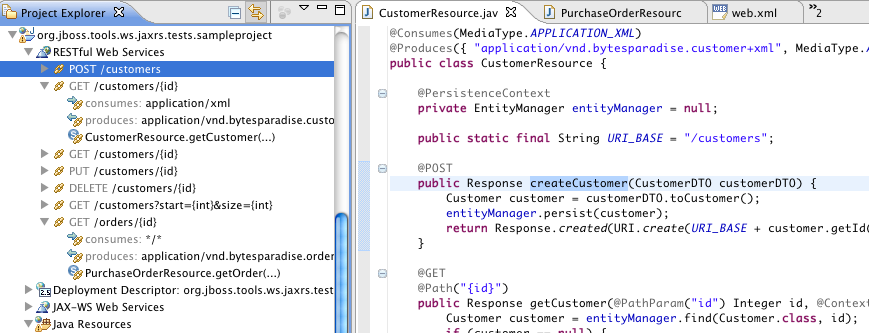
h2. JAX-RS
http://community.jboss.org/people/xcoulon Xavier Coulon contributed JAX-RS standard
tooling to JBoss Tools shortly after M1 and I'm now very proud to include it in this
milestone.
Xavier will be blogging about this shortly but in short it provides a explorer to navigate
your JAX-RS resources and it comes with basic validation and code completion related to
JAX-RS.
http://community.jboss.org/servlet/JiveServlet/showImage/38-3929-16608/ja...
http://community.jboss.org/servlet/JiveServlet/downloadImage/38-3929-1660...
The tooling will evolve more over the upcoming milestones/betas; if you have
input/questions we are very interested in hearing about it.
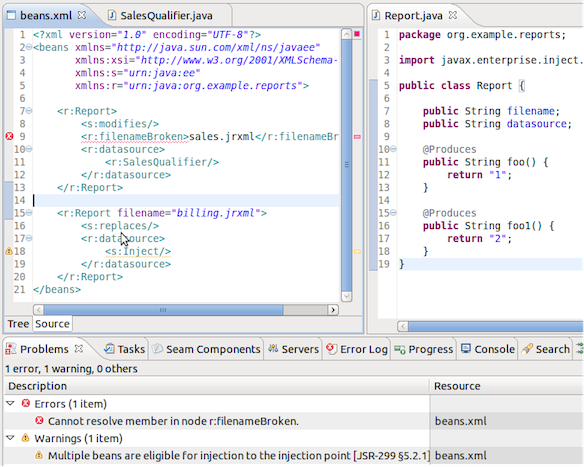
h2. Context & Dependency Injection (CDI)
For this release the Seam Solder support is more complete by adding support for @Generic
beans which is used by most Seam 3 and many CDI extensions out there to customize their
framework CDI integration. This allows JBoss Tools to be more precise in its validation
but also to provide better and improved content assist and navigation for CDI components.
Other extensions like Seam Config also got improvements and we now provide better
validation of the Java backed schemas in the XML file format for CDI.
http://community.jboss.org/servlet/JiveServlet/showImage/38-3929-16607/se...
http://community.jboss.org/servlet/JiveServlet/downloadImage/38-3929-1660...
h2. Maven & AS 7 Quick Starts
With the release of m2e/WTP a few days back Maven works even better now together with
Eclipse WTP projects.
Especially the fixes concerning having manifest and other descriptors generated by Maven
according to pom.xml and the much better handling of classpath makes it a huge
improvements over previous versions.
On top of these enhancements we've added further automatic configuration of your
projects based on your pom.xml and its dependencies making it supereasy to import existing
Maven projects using technologies like JSF, CDI and Hibernate.
This all is coming together with the AS 7 CR 1 release which comes with a set of
http://in.relation.to/Bloggers/WantToLearnAboutJBossAS7 Quickstarts and archetypes.
Both the quickstarts and archetypes will automatically get configured when you import them
to have all the JBoss Tools enhancements ready for you to use.
Give them a try.
h2. And more...
There are a bunch of other improvements in this release and you can see descriptions and
screenshots in http://docs.jboss.org/tools/whatsnew What's New
Over the next few days/weeks we will be blogging more about the new features and usecases
this release of JBoss Tools and AS 7 enables.
h2. Feedback
As always we crave for any feedback you can give, especially if you have a project that
causes performance issues or wrong validations. We've done alot of work testing but we
are sure we haven't covered all possible combinations - if you find something we
missed let us know!
Thanks, and now go chase that http://www.jboss.org/jbossas/downloads.html White Rabbit!
with JBoss Tools!
Have fun!
--------------------------------------------------------------
Comment by going to Community
[http://community.jboss.org/community/tools/blog/2011/06/28/fast-faster-jb...]






5401
days inactive
5401
days old
0 comments
1 participants
participants (1)
-
 Max Rydahl Andersen