
10:08 a.m.
Administrator Administrator [http://community.jboss.org/people/admin] modified the
document:
"jBPM3 on Tomcat"
To view the document, visit: http://community.jboss.org/docs/DOC-16106
--------------------------------------------------------------
This article is a guide to deploying jBPM 3.2 to Tomcat 5.5 and 6.0.
**
#Tomcat_60 Tomcat 6.0
***
#Downloads Downloads
***
#Dependencies Dependencies
***
#Configuration Configuration
***
#Launch Launch
**
#Tomcat_55 Tomcat 5.5
***
#Downloads_362741 Downloads
***
#Dependencies_445215 Dependencies
**
#Other_Databases Other Databases
***
#Dependencies_211271 Dependencies
***
#Configuration_738970 Configuration
***
#Launch_849888 Launch
h2. Tomcat 6.0
The basic procedure gets the jBPM console to work against an HSQL in-process database. It
is advisable to attempt this procedure against a clean Tomcat 6.0 installation before
going for Tomcat 5.5 or other databases.
h3. Downloads
0. Download the
http://sourceforge.net/projects/jbpm/files/jBPM%203/jbpm-jpdl-3.2.7/jbpm-...
jBPM installer installer. Launch the installer with the following command. Select the
+jBPM3 Standalone+ component only.
$ java -jar jbpm-installer-3.2.x.jar
1. Download the latest snapshot of
https://repository.jboss.org/nexus/content/repositories/snapshots/org/jbp...
jsf-console-tomcat.war, the web console based on JSF. Extract the contents to the
tomcat-<version>/webapps/jbpm-console/ directory.
2. Download the latest snapshot of
https://repository.jboss.org/nexus/content/repositories/snapshots/org/jbp...
jbpm-tomcat.jar, the Tomcat integration bits, to tomcat-6.0.x/lib/
3. Download
https://repository.jboss.org/nexus/content/groups/public/javax/transactio...
jta.jar to jbpm-console/WEB-INF/lib/
h3. Dependencies
4. Copy all files from jbpm-3.2.x/lib/ +except+ hsqldb.jar, jbpm-console.war, junit.jar
and log4j.jar to jbpm-console/WEB-INF/lib/
5. Copy hsqldb.jar from jbpm-3.2.x/lib/ to tomcat-6.0.x/lib/
h3. Configuration
6. Copy jbpm.cfg.xml and hibernate.cfg.xml from jbpm-3.2.x/config/ to
jbpm-console/WEB-INF/classes.
7. Examine the data source preconfigured in jbpm-console/META-INF/context.xml. Open
hibernate.cfg.xml and switch from JDBC connections to the data source as follows.
a) Uncomment the DataSource properties section.
<!-- DataSource properties (begin) -->
<property
name="hibernate.connection.datasource">java:comp/env/jdbc/JbpmDataSource</property>
<!-- DataSource properties (end) -->
b) Comment out the JDBC connection properties section.
<!-- JDBC connection properties (begin) ===
<property
name="hibernate.connection.driver_class">org.hsqldb.jdbcDriver</property>
<property
name="hibernate.connection.url">jdbc:hsqldb:mem:jbpm</property>
<property name="hibernate.connection.username">sa</property>
<property name="hibernate.connection.password"></property>
==== JDBC connection properties (end) -->
c) Comment out the automatic schema creation property.
<!-- Automatic schema creation (begin) ===
<property name="hibernate.hbm2ddl.auto">create</property>
==== Automatic schema creation (end) -->
8. The configuration is correct and complete at this point. However, no user will be able
to authenticate because the database is empty. To provide seed data, download the HSQLDB
data files
http://anonsvn.jboss.org/repos/jbpm/jbpm3/branches/jbpm-3.2-soa/distribut...
jbpmDB.script and
http://anonsvn.jboss.org/repos/jbpm/jbpm3/branches/jbpm-3.2-soa/distribut...
jbpmDB.properties to tomcat-<version>/work/Catalina/localhost/jbpm-console/. Create
the directory if necessary.
h3. Launch
All set! Go ahead and start Tomcat. Point your browser to the
http://localhost:8080/jbpm-console jBPM web console. The login page should appear.
http://community.jboss.org/servlet/JiveServlet/showImage/10625/jbpm-conso...
http://community.jboss.org/servlet/JiveServlet/downloadImage/10625/jbpm-c...
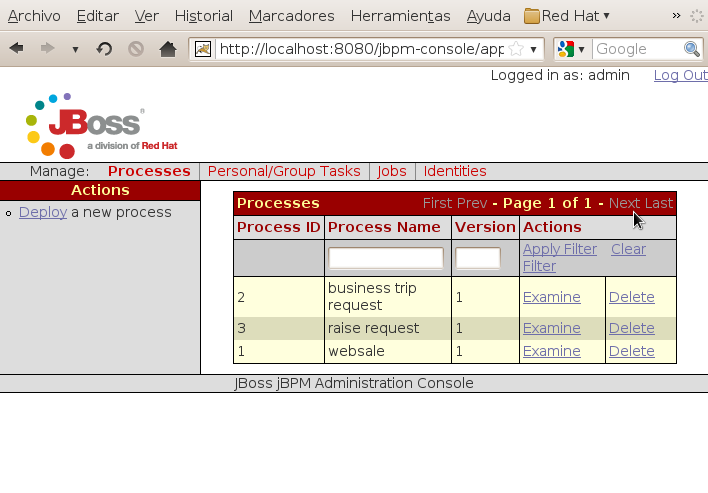
After logging in as one of the example users, the sample processes will be displayed. To
deploy a new process definition, log in as a user in the +admin+ group and click the
Deploy link in the Actions panel on the left side.
http://community.jboss.org/servlet/JiveServlet/showImage/10627/jbpm-conso...
http://community.jboss.org/servlet/JiveServlet/downloadImage/10627/jbpm-c...
h2. Tomcat 5.5
Since the procedure is very similar to Tomcat 6.0, only the differences will be noted.
h3. Downloads
2. Download the latest snapshot of
https://repository.jboss.org/nexus/content/repositories/snapshots/org/jbp...
jbpm-tomcat.jar, the Tomcat integration bits, to tomcat-5.5.x/server/lib/
3. Download
https://repository.jboss.org/nexus/content/groups/public/javax/transactio...
jta.jar,
https://repository.jboss.org/nexus/content/groups/public/javax/el/el-api/...
el-api.jar and
https://repository.jboss.org/nexus/content/groups/public/com/sun/el/el-ri...
el-ri.jar to jbpm-console/WEB-INF/lib/
h3. Dependencies
4. Copy hsqldb.jar from jbpm-3.2.x/lib/ to tomcat-5.5.x/common/lib/
h2. Other Databases
Follow the base procedure for the selected Tomcat version, with the following changes
depending on the target database.
h3. Dependencies
4. Copy the JDBC driver file to tomcat-6.0.x/lib or tomcat-5.5.x/common/lib depending on
the target Tomcat version.
h3. Configuration
6. Copy jbpm.cfg.xml and hibernate.cfg.<database>.xml from jbpm-3.2.x/config/ to
jbpm-console/WEB-INF/classes/
7. Edit the data source preconfigured in jbpm-console/META-INF/context.xml. Set the
appropriate driverClassName, url, username and password attributes for the target
database.
8. Create the database schema and load seed data as follows.
a) Execute the jbpm-3.2.x/database/jbpm.jpdl.<database>.sql script to create the
required tables, indexes and constraints.
b) Run the following SQL statements to fill in the example users.
INSERT INTO JBPM_ID_USER
VALUES(1,'U','user','user(a)sample.domain','user');
INSERT INTO JBPM_ID_USER
VALUES(2,'U','manager','manager(a)sample.domain','manager');
INSERT INTO JBPM_ID_USER
VALUES(3,'U','admin','admin(a)sample.domain','admin');
INSERT INTO JBPM_ID_USER
VALUES(4,'U','shipper','shipper(a)sample.domain','shipper');
INSERT INTO JBPM_ID_GROUP
VALUES(1,'G','sales','organisation',NULL);
INSERT INTO JBPM_ID_GROUP
VALUES(2,'G','admin','security-role',NULL);
INSERT INTO JBPM_ID_GROUP VALUES(3,'G','hr','organisation',NULL);
INSERT INTO JBPM_ID_GROUP
VALUES(4,'G','user','security-role',NULL);
INSERT INTO JBPM_ID_GROUP
VALUES(5,'G','manager','security-role',NULL);
INSERT INTO JBPM_ID_MEMBERSHIP VALUES(1,'M',NULL,NULL,2,4);
INSERT INTO JBPM_ID_MEMBERSHIP VALUES(2,'M',NULL,NULL,3,4);
INSERT INTO JBPM_ID_MEMBERSHIP VALUES(3,'M',NULL,NULL,1,4);
INSERT INTO JBPM_ID_MEMBERSHIP VALUES(4,'M',NULL,NULL,4,4);
INSERT INTO JBPM_ID_MEMBERSHIP VALUES(5,'M',NULL,NULL,4,3);
INSERT INTO JBPM_ID_MEMBERSHIP VALUES(6,'M',NULL,NULL,2,3);
INSERT INTO JBPM_ID_MEMBERSHIP VALUES(7,'M',NULL,NULL,3,3);
INSERT INTO JBPM_ID_MEMBERSHIP VALUES(8,'M',NULL,NULL,3,2);
INSERT INTO JBPM_ID_MEMBERSHIP VALUES(9,'M',NULL,NULL,2,2);
INSERT INTO JBPM_ID_MEMBERSHIP VALUES(10,'M',NULL,NULL,2,5);
INSERT INTO JBPM_ID_MEMBERSHIP VALUES(11,'M',NULL,'boss',2,1);
INSERT INTO JBPM_ID_MEMBERSHIP VALUES(12,'M',NULL,NULL,1,1);
h3. Launch
Logins as example users will work, although no sample processes will be immediately
available. You will have to deploy processes through the web console as indicated above.
--------------------------------------------------------------
Comment by going to Community
[http://community.jboss.org/docs/DOC-16106]
Create a new document in jBPM at Community
[http://community.jboss.org/choose-container!input.jspa?contentType=102&am...]



5564
days inactive
5564
days old
0 comments
1 participants
participants (1)
-
 Administrator Administrator