
5:35 a.m.
Max Rydahl Andersen [https://community.jboss.org/people/maxandersen] modified the blog
post:
"JBoss Tools 3.3 and Developer Studio 5.0 Final Release!"
To view the blog post, visit:
https://community.jboss.org/community/tools/blog/2012/06/21/jboss-tools-3...
--------------------------------------------------------------
I'm extremely proud to be able to announce that both JBoss Tools 3.3 and Developer
Studio 5.0 final releases are now available.
https://community.jboss.org/servlet/JiveServlet/showImage/38-4854-18193/j...
https://community.jboss.org/servlet/JiveServlet/downloadImage/38-4854-181...
h4. Final GA
Developer Studio: [ http://devstudio.jboss.com/earlyaccess Download] | Tools: [
http://www.jboss.org/tools/download/stable/3_3_Final Download] [
http://download.jboss.org/jbosstools/updates/stable/indigo/ Update Site] | [
http://docs.jboss.org/tools/whatsnew What's New] [
http://www.jboss.com/index.html?module=bb&op=viewforum&f=201 Forums] [
http://jira.jboss.com/jira/browse/JBIDE JIRA] [ http://twitter.com/jbosstools Twitter]
JBoss Tools is a set of plugins for Eclipse that complements, enhances and goes beyond the
support that exists for JBoss and related technologies in the default Eclipse
distribution.
JBoss Developer Studio is a fully bundled Eclipse distribution which not only includes the
majority of JBoss Tools but also all its needed dependencies and 3rd party plugins
allowing for an easy one-click and no-fuss installation.
If you are into doing your own bleeding edge eclipse plugin assembly, JBoss Tools is for
you; if you are more into having something that "Just Works" then JBoss
Developer Studio is the way to go.
h2. Installation
+JBoss Developer Studio+ comes with everything pre-bundled in its installer. Simply
http://devstudio.jboss.com download it and run it like this:
java -jar jbdevstudio-<installername>.jar
*Note:* if you are on Windows or Mac OSX 64-bit we recommend you ensure to select the
32-bit option in the multi-platform installer to get Visual Page editor working and use
much less memory.
+JBoss Tools+ requires a bit more:
This release requires at least Eclipse 3.7.2 but we recommend using the
http://www.eclipse.org/downloads/packages/eclipse-ide-java-ee-developers/... Eclipse
3.7.2 JEE Bundle since then you get most of the dependencies preinstalled.
Once you have installed Eclipse, you either find us on
http://marketplace.eclipse.org/content/jboss-tools-indigo Eclipse Marketplace under
"JBoss Tools (Indigo)" or use our update site directly.
The update site URL to use from Help > Install New Software... is:
http://download.jboss.org/jbosstools/updates/stable/indigo/
http://download.jboss.org/jbosstools/updates/stable/indigo/
Please note that the URL above is for the stable releases, if you use the development
update site (http://download.jboss.org/jbosstools/updates/development/indigo/) that will
work too. Only difference is that the development site will contain beta/CR releases too.
Note: SOA tooling for BPEL, Drools, Guvnor, jBPM, ESB, Modeshape, pi4soa, Savara,
SwitchYard & Teiid are no longer included in the JBoss Tools release. They will become
available separately later.
h1. A Year of Features
The amount of features and new improvements in this final is awesome - here is a little
overview:
h2. Slim & Fast Universal Installer
The installer for JBoss Developer Studio is now a multiplatform installer. Allows you to
just download one installer no matter what OS you are running. And the installer is
smaller and faster to download and run than previous versions.
h2. JBoss Central
We wanted to make it easy for new users to get started with JBoss technology and for
existing users have a place to get more information and keep uptodate on what is happening
in the JBoss Community. That place is called JBoss Central.
https://dl.dropbox.com/u/558690/devstudio5releaseimages/jbosscentral.png
https://dl.dropbox.com/u/558690/devstudio5releaseimages/jbosscentral.png
Central shows up at startup (you can disable it if you want) but is also available with a
quick click in the toolbar. Besides having blogs, news and documentation links it also
serves as a way to start one of the six project wizards
which help you get started with JBoss technology such as CDI, Richfaces, Errai/GWT, Spring
on AS etc.
Central also has a second tab called "Software/Update" where you can easily
install tested and verified plugins to work with JBoss Tools and within Developer Studio.
https://dl.dropbox.com/u/558690/devstudio5releaseimages/softwareupdate.png
https://dl.dropbox.com/u/558690/devstudio5releaseimages/softwareupdate.png
h2. New Server Adapters
We've extended our support for JBoss servers to include JBoss Enterprise Platform 6,
JBoss AS 7.
We continue to also work with the previous versions of application servers making it
possible to develop, run and debug both new and older applications.
https://dl.dropbox.com/u/558690/devstudio5releaseimages/serveradapters.png
https://dl.dropbox.com/u/558690/devstudio5releaseimages/serveradapters.png
There is also an OpenShift server adapter to integrate with Red Hat OpenShift PaaS, more
on that later.
We also continue to have the Deploy Only server which allows you to use our incremental
and flexible server adapter features together with any server that supports hot
deployment.
Furthermore all of these server adapters support remote deployment via any filesystem
protocols supported by Eclipse Remote System deployment such as SSH or FTP.
One of the new features in this area is that servers now no longer need to be started by
the tools, if a server is already detected as running or you have enable "Server is
externally managed" then
JBoss Tools server adapters will just connect to it and do its deployments as configured -
allowing you to work with the tools in many different environments.
h2.
h2. Maven
One of the big new additions is the full support and integration of m2e for users of Maven
projects. We did not just include m2e, we went ahead and improved on it and added better
support for the frameworks and features of Maven we found to be useful.
We have a lot of Maven improvements.
* Maven Profile Selection - dialog to quickly enable/disable profiles on your Maven
projects ( especially useful to switch between Arquillian server profiles )
* Endorsed Libraries Classpath Container - if your Maven project uses endorsed libraries
we setup a matching classpath that gets priority over the JDK classpath.
* Tons of framework configurators - we enable the matching tooling in eclipse if your
Maven project uses one of the following frameworks:* Hibernate/JPA
* JSF
* CDI
* JAX-RS
* Seam
* Portlets.
* Configure repositories in settings.xml - "Configure Maven Repositories" allows
you to easily add and remove repositories from your Maven settings.xml; available as a
quickfix on missing dependencies error markers.
* Materialize Library - Allows you to copy all the jars found in a Maven classpath
container into a directory. Great if you have a Maven example but would rather use it with
pure Eclipse or some other build system.
* Automatic Source Lookup for Server runtimes based on Maven metadata - point Source
lookup to your server directory with jars and it will locate the matching source based on
maven metadata; can be enable to be automatically done for JBoss runtimes.
And then of course m2e-wtp, the feature that configures Eclipse Web Tools based of your
pom.xml had a lot of features improved and added. The m2e-wtp also is
http://www.eclipse.org/m2e-wtp/ moving to eclipse.org to be part of future Eclipse release
trains.
Furthermore we've released m2e configurators to m2e marketplace to improve
configuration of Annotation Processing, wro4j - javascript optimization and finally
supporting projects that configure eclipse JDT as their compiler.
All in all, if you want to use Maven with Eclipse, JBoss Tools makes your life easier!
h2. OpenShift
OpenShift also came around during the last year. OpenShift is a PaaS with a free offering
that includes support for running applications written in Java, Ruby, Node.js, Python,
PHP, Perl and more.
The great thing about OpenShift is that you can easily get up and running with just a
webbrowser, git and SSH while using command line tools - very simple and powerful.
We wanted to bring this simplicity and power to the users of Eclipse and that is what our
OpenShift Tooling does.
When you have an account at OpenShift you can easily browse, create and manipulate your
OpenShift applications and cartridges. OpenShift supports PHP, Perl, Python, Node.js, Java
and if that is not enough you can use the Do-It-Yourself cartridge. You can easily open a
webbrowser showing your application, monitor remote log files, inspect environment setup
and start Port Forwarding allowing for remote debugging and remote browsing of databases
and Jenkins instances.
https://dl.dropbox.com/u/558690/devstudio5releaseimages/openshift.png
https://dl.dropbox.com/u/558690/devstudio5releaseimages/openshift.png
The OpenShift tools is all compatible with the command line tooling but also completely
independent of it allowing you to start with the tools that fit your needs first and then
mix and match as you see fit.
For the release we've create a https://vimeo.com/groups/jbosstools/videos/44246666
"Getting started with OpenShift" video:
h2. Forge
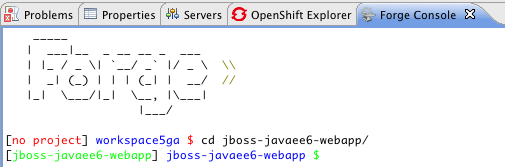
If you like Forge you will like JBoss Tools for its Forge Console which let you to use
Forge in context of Eclipse and have them coexist and interact. The console will open and
show the files/projects you edit/create in Forge and the console can also let Forge track
the selection you have in Eclipse.
https://community.jboss.org/servlet/JiveServlet/showImage/38-4970-18797/f...
https://community.jboss.org/servlet/JiveServlet/downloadImage/38-4970-187...
h2. Browser Simulator
BrowserSim can be started with one-click from the IDE, showing instantly the selected file
or URL in a mobile browser simulator. The simulator has skins and layout dimensions for a
range of pouplar mobile and tablet devices. You can rotate the device to see how your
application looks and how it is reacting to such size and layout changes.
https://dl.dropbox.com/u/558690/devstudio5releaseimages/browsersim.png
https://dl.dropbox.com/u/558690/devstudio5releaseimages/browsersim.png
h2. Hibernate
Hibernate Tools now supports multiple versions of Hibernate - you can now use it together
with Hibernate 3.3-3.5, 3.6 and 4.0/4.1.
https://dl.dropbox.com/u/558690/devstudio5releaseimages/hibernatemultiy.png
https://dl.dropbox.com/u/558690/devstudio5releaseimages/hibernatemultiy.png
h2. JAX-RS
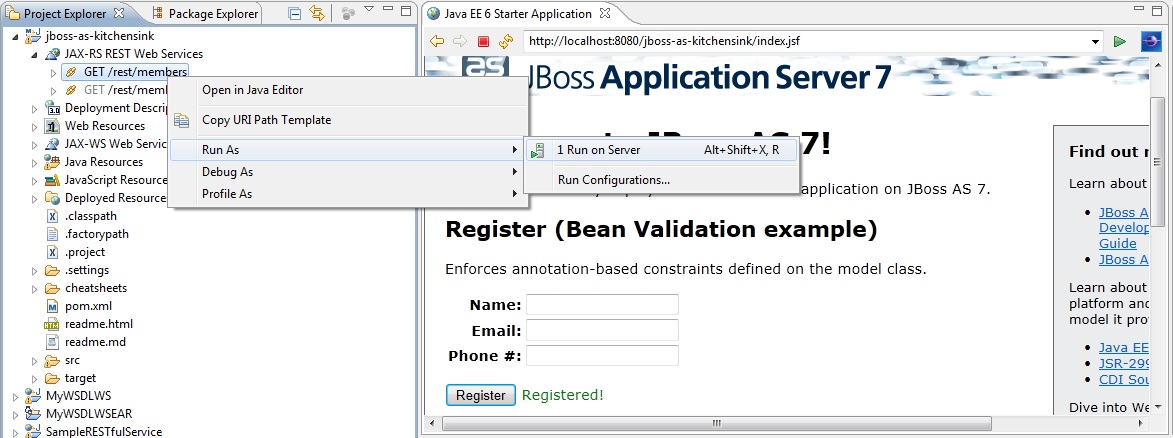
If your application uses JAX-RS annotations there is now a node in the project explorer
that allows you to easily navigate to your various Rest endpoints. The JAX-RS tooling will
also validate your annotations (mismatched names etc.) and provides code completion.
http://docs.jboss.org/tools/whatsnew/ws/images/JAX-RS-WS-Tester_Run_As.jpg
http://docs.jboss.org/tools/whatsnew/ws/images/JAX-RS-WS-Tester_Run_As.jpg
The JAX-RS integration allow to easily "run" your endpoints by making sure the
server is running and then opening the URL in the Webservice Tester for further
investigation/testing.
h2. And More...
Seam 2.3.x support, CDI tooling have great improvements, incl. support for DeltaSpike, the
visual page editor is faster than ever, bugfixes, overall awesomeness and the list goes
on.
You can see the full list of new and noteworthy on the
http://docs.jboss.org/tools/whatsnew/ New and Noteworthy page
h1. Does it Juno ?
Since the first version of Eclipse Juno is arriving soon it is worth mentioning that JBoss
Tools from its updatesite can be installed on top of Juno.
It is though not guaranteed everything works, we know that especially Hibernate Dali/JPT
integration have issues since here the API has changed greatly.
But if you are a Juno early-adopter then do please try run JBoss Tools on it and if you
find issues let us know in the forum or on jira.
Then we will use the input for the next revision of JBoss Tools which will start shortly.
Hope you like it, and remember:
Have fun,
Max
--------------------------------------------------------------
Comment by going to Community
[https://community.jboss.org/community/tools/blog/2012/06/21/jboss-tools-3...]




5043
days inactive
5043
days old
0 comments
1 participants
participants (1)
-
 Max Rydahl Andersen