
11:55 a.m.
Fred Bricon [https://community.jboss.org/people/fbricon] modified the blog post:
"m2e(clipse)-wtp 0.15.0 : New & Noteworthy"
To view the blog post, visit:
https://community.jboss.org/community/tools/blog/2012/02/03/m2eclipse-wtp...
--------------------------------------------------------------
Maven Integration for Eclipse WTP 0.15.0, a.k.a m2eclipse-wtp, a.k.a m2e-wtp is
available.
This release contains mostly bug fixes, but a few improvements managed to slip in. The
complete release notes are available
https://issues.sonatype.org/secure/ReleaseNote.jspa?projectId=10310&v...
here.
m2e-wtp 0.15.0 is compatible with the JavaEE distributions of Eclipse Helios and Indigo,
requires at least m2e 1.0 (works with 1.1) and mavenarchiver plugin >= 0.14.0 (0.15.0
should be automatically installed).
As usual, m2e-wtp can be installed from :
* the Maven Discovery mechanism, for new installations : Window > Preferences >
Maven > Discovery > Open catalog
* the http://marketplace.eclipse.org/content/maven-integration-eclipse-wtp Eclipse
Marketplace : Help > Eclipse Marketplace
* the update site : *http://download.jboss.org/jbosstools/updates/m2eclipse-wtp/
http://download.jboss.org/jbosstools/updates/m2eclipse-wtp/*
So let's see what are the highlights of this new release :
h3. Packaging inclusion/exclusion support improvements
For war project, previous m2e-wtp versions used to use <packagingIncludes> and
<packagingExcludes> attributes from the maven-war-plugin config to enable (or not)
the deployment of project dependencies to WTP servers. In 0.15.0, the same level of
support has been added to EAR projects using maven-ear-plugin 2.7+. However, the problem
with this approach is, other resources (web pages, classes ...) are not properly excluded
(using the <*SourceInclude> and <*SourceExclude> attributes).
In order to address this problem, https://community.jboss.org/people/rob.stryker Rob
Stryker, committer on WTP and lead of JBoss AS tooling in JBoss Tools, provided an
implementation for JBoss AS servers that might be generalized to other WTP server adapters
(if they decide to do so). Basically, some new metadata is added to the project's
.settings/org.eclipse.wst.common.component like :
<?xml version="1.0" encoding="UTF-8"?>
<project-modules id="moduleCoreId" project-version="1.5.0">
<wb-module deploy-name="webOrEar">
...
<property name="component.inclusion.patterns"
value="pattern1,pattern2"/>
<property name="component.exclusion.patterns"
value="pattern3,pattern4"/>
</wb-module>
</project-modules>
The patterns are separated with a comma and exclusions take precedence over inclusions :
resources matching one of the exclusion patterns are not deployed, even if they match one
of the inclusion patterns. That solution is not maven-bound so any other kind of project
can benefit from it.
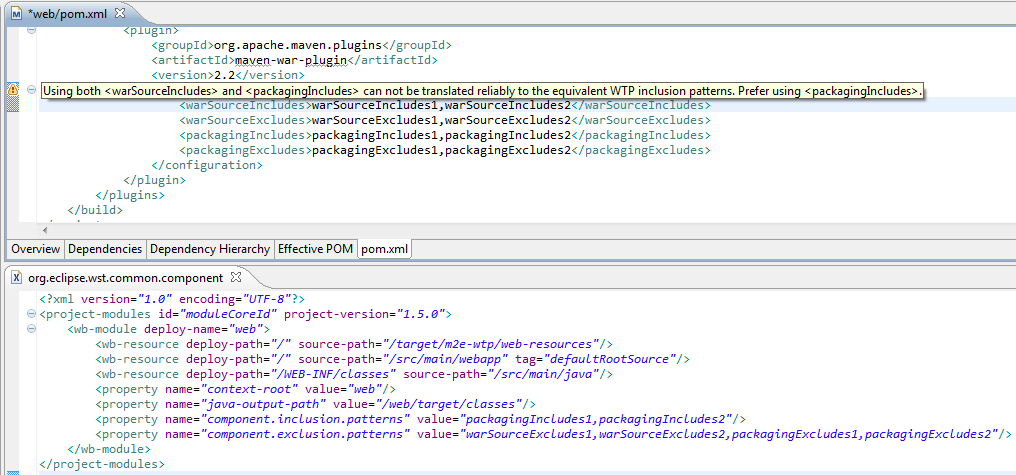
Now all m2e-wtp 0.15.0 does is map the maven patterns to their equivalent component
metadata. This gives :
https://community.jboss.org/servlet/JiveServlet/showImage/38-4510-17915/c...
https://community.jboss.org/servlet/JiveServlet/downloadImage/38-4510-179...
In the example above, a warning is displayed as both <warSourceIncludes> and
<packagingIncludes> are defined. Since both patterns could overlap, it might lead to
some weird behavior where WTP would actually deploy more files than a maven CLI build. In
order to minimize (we can not totally solve) that potential discrepancy we only keep the
packaging patterns in the component files and recommend using <packagingIncludes>
only.
Currently, this feature only works in combination with the JBoss AS Tools from JBoss Tools
3.3.0.Beta1 (nightly builds available from
http://download.jboss.org/jbosstools/updates/nightly/trunk/
http://download.jboss.org/jbosstools/updates/nightly/trunk/), but we'll try to make
other WTP Server adapter vendors support it in the future (as part of WTP core API).
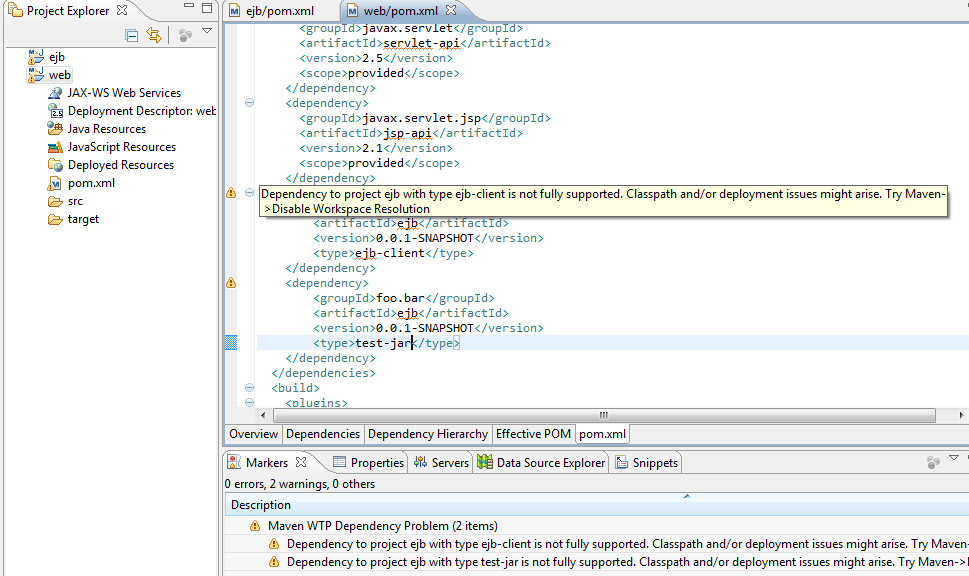
h3. Warnings added when unsupported dependency types are detected
As of today, if a project depends on another workspace project of type ejb-client or
test-jar, that specific dependency will not be packaged properly by WTP, as Maven would
do in command line. Moreover, you'll experience some class leakage on the compilation
and test classpaths in Eclipse (ex: non client classes being visible). The only known
workarounds to this issue are to disable workspace resolution, or close the dependent
project and rely on the dependencies from the local maven repository.
Ideally, in order to make the deployment part work, we would need to introduce new WTP
components, but the current WTP API https://bugs.eclipse.org/bugs/show_bug.cgi?id=330894
doesn't support it, yet. So, until this is fixed, warning markers are added whenever a
project depends on such "unsupported" types. That should hopefully give users an
idea of the problem and how to circumvent it.
https://community.jboss.org/servlet/JiveServlet/showImage/38-4510-17913/u...
https://community.jboss.org/servlet/JiveServlet/downloadImage/38-4510-179...
h3. Better handling of dependencies in war projects
Previous m2e-wtp versions had, in some use cases, some outstanding issues with regard to
dependency management of war projects. In particular,
* when 2 dependencies of the same artifact, but having a different classifier were added
to a web project, only one would show up on the classpath. This has been properly fixed.
* in some cases, the timestamped version of a SNAPSHOT dependencies from the local
repository, would be copied under the target/ folder, causing some jar locking issues in
windows. The rationale behind this behavior is, maven-war-plugin packages snapshot
dependencies using the timestamp identifier. Since the name of file in the maven classpath
library needs to match the one deployed by WTP, a copy was performed. To fix this problem,
the default file pattern matching used for dependency deployment has been changed to
@{artifactId}@-@{baseVersion}@@{dashClassifier?}@.(a){extension}@. This means that, by
default in m2e-wtp, SNAPSHOT dependencies are now deployed using the SNAPSHOT suffix
instead of the timestamp. If you need to force the use of timestamped artifacts, then you
need to explicitely decalre the following in your pom.xml :
<plugin>
<groupId>org.apache.maven.plugins</groupId>
<artifactId>maven-war-plugin</artifactId>
<version>2.2</version>
<configuration>
<outputFileNameMapping>@{artifactId}@-@{version}@@{dashClassifier?}@.@{extension}(a)</outputFileNameMapping>
</configuration>
</plugin>
h3. Removal of conflicting facets on packaging change
If you had a java utility project, that you wanted to upgrade to an EJB project for
example, a constraint violation would be raised upon project configuration update (EJB and
Utility facets can't be both installed).
This has been fixed by removing all conflicting facets when you change the packaging of a
Java EE project, making that conversion completely transparent.
h3. What's next?
m2e 1.1 introduces a new Eclipse to Maven project
https://bugs.eclipse.org/bugs/show_bug.cgi?id=359340 conversion API. It means that, in
m2e-wtp.next, we will be able to automatically convert existing WTP project configuration
to maven's. Dependencies will still need to be set/translated manually but that's
a pretty good start IMHO.
h3.
Finally ...
I would like to thank the m2e-wtp community at large for their support and contributions,
that's what make this project move forward and make it
http://marketplace.eclipse.org/metrics/installs/last30days one of the most popular project
on the eclipse marketplace.
Contributions can take the form of :
* patches/pull requests (source is available on
https://github.com/sonatype/m2eclipse-wtp/ https://github.com/sonatype/m2eclipse-wtp/), as
Laszlo Varadi did to https://issues.sonatype.org/browse/MECLIPSEWTP-201 fix some overlay
issue in windows,
* bug reports (at https://issues.sonatype.org/browse/MECLIPSEWTP
https://issues.sonatype.org/browse/MECLIPSEWTP)
* help on the documentation in the https://github.com/sonatype/m2eclipse-wtp/wiki wiki.
* answering questions on the https://dev.eclipse.org/mailman/listinfo/m2e-users m2e
mailing list
Keep it up.
Fred.
https://twitter.com/#!/fbricon https://twitter.com/#!/fbricon
--------------------------------------------------------------
Comment by going to Community
[https://community.jboss.org/community/tools/blog/2012/02/03/m2eclipse-wtp...]


5192
days inactive
5192
days old
0 comments
1 participants
participants (1)
-
 Fred Bricon