
8:02 a.m.
u j [http://community.jboss.org/people/bcn] created the discussion
"Visual Editor: Template file is not found"
To view the discussion, visit: http://community.jboss.org/message/598498#598498
--------------------------------------------------------------
I created a Richfaces 4 web application with Maven and open the sample index.xhtml file
with the visual editor.
The part <ui:composition template="/templates/template.xhtml">
is marked red with "Template file is not found", although the file exists and
the path is correct (the folder templates is in the same directory as index.xhtml).
Thanks,
Ulrich
--------------------------------------------------------------
Reply to this message by going to Community
[http://community.jboss.org/message/598498#598498]
Start a new discussion in JBoss Tools at Community
[http://community.jboss.org/choose-container!input.jspa?contentType=1&...]
9:37 a.m.
New subject: [JBoss Tools] - Re: Visual Editor: Template file is not found
u j [http://community.jboss.org/people/bcn] created the discussion
"Re: Visual Editor: Template file is not found"
To view the discussion, visit: http://community.jboss.org/message/598869#598869
--------------------------------------------------------------
If I remove the leading slash, i.e. templates/template.xhtml, the error disappears.
But this is not as it should be, so I assume that is a bug in jboss tools.
--------------------------------------------------------------
Reply to this message by going to Community
[http://community.jboss.org/message/598869#598869]
Start a new discussion in JBoss Tools at Community
[http://community.jboss.org/choose-container!input.jspa?contentType=1&...]
3:36 p.m.
New subject: [JBoss Tools] - Re: Visual Editor: Template file is not found
Max Rydahl Andersen [http://community.jboss.org/people/maxandersen] created the
discussion
"Re: Visual Editor: Template file is not found"
To view the discussion, visit: http://community.jboss.org/message/599061#599061
--------------------------------------------------------------
VPE resolves the relative path templates/template.xhtml without any problems since it is
relative to the current file.
/templates/template.xhtml is on the other hand absolute and thus it needs to know the root
of your webapp to resolve it.
A couple of ways to do that:
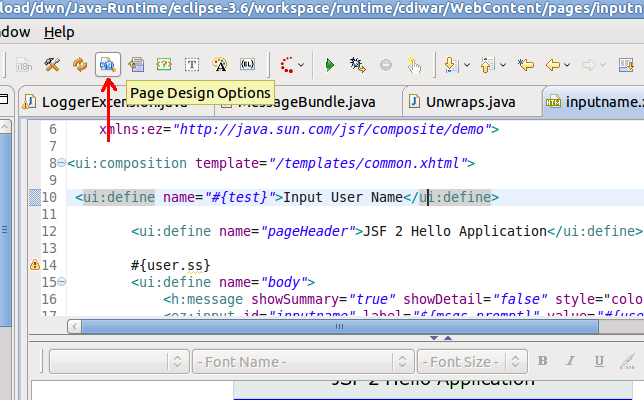
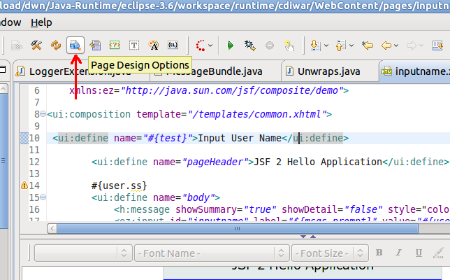
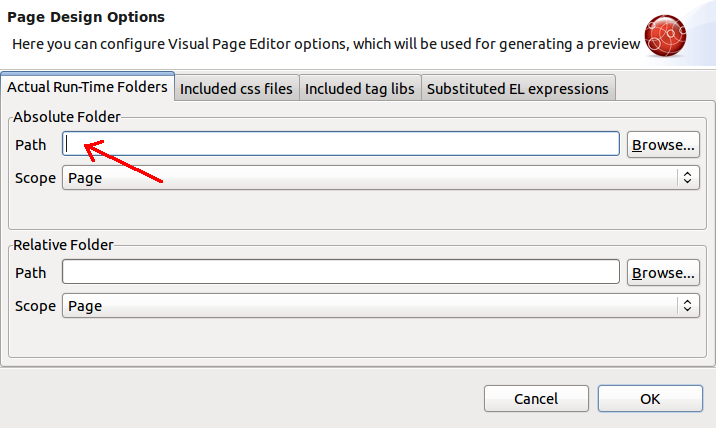
1) Edit VPE page settings for the xhtml to set the root webcontent.
or
2) Right click project and click Configure > Enable JSF which will setup WTP on the
project
or
3) install Jboss tools maven integration and Maven > Update Project Configuration and
it shuold be enabled on its own.
#3 is probably your best option here since you are using Maven.
--------------------------------------------------------------
Reply to this message by going to Community
[http://community.jboss.org/message/599061#599061]
Start a new discussion in JBoss Tools at Community
[http://community.jboss.org/choose-container!input.jspa?contentType=1&...]
4:52 a.m.
New subject: [JBoss Tools] - Re: Visual Editor: Template file is not found
u j [http://community.jboss.org/people/bcn] created the discussion
"Re: Visual Editor: Template file is not found"
To view the discussion, visit: http://community.jboss.org/message/599152#599152
--------------------------------------------------------------
Thanks for the reply.
I had JSF Capabilities already enabled and JBoss Maven integration installed, but the
problem persists.
Could you please explain your point 1 a bit more detailed? Where do I edit the page
settings?
Thanks,
Ulrich
--------------------------------------------------------------
Reply to this message by going to Community
[http://community.jboss.org/message/599152#599152]
Start a new discussion in JBoss Tools at Community
[http://community.jboss.org/choose-container!input.jspa?contentType=1&...]
6:53 p.m.
New subject: [JBoss Tools] - Re: Visual Editor: Template file is not found
Alexey Kazakov [http://community.jboss.org/people/akazakov] created the discussion
"Re: Visual Editor: Template file is not found"
To view the discussion, visit: http://community.jboss.org/message/599389#599389
--------------------------------------------------------------
http://community.jboss.org/servlet/JiveServlet/showImage/2-599389-16126/s...
http://community.jboss.org/servlet/JiveServlet/downloadImage/2-599389-161...
http://community.jboss.org/servlet/JiveServlet/showImage/2-599389-16127/s...
http://community.jboss.org/servlet/JiveServlet/downloadImage/2-599389-161...
--------------------------------------------------------------
Reply to this message by going to Community
[http://community.jboss.org/message/599389#599389]
Start a new discussion in JBoss Tools at Community
[http://community.jboss.org/choose-container!input.jspa?contentType=1&...]

7:51 p.m.
New subject: [JBoss Tools] - Re: Visual Editor: Template file is not found
Denis Golovin [http://community.jboss.org/people/dgolovin] created the discussion
"Re: Visual Editor: Template file is not found"
To view the discussion, visit: http://community.jboss.org/message/599395#599395
--------------------------------------------------------------
Could you check what you have in .settings/org.eclipse.wst.common.component file? I'm
curious what is in wb-resource element with deploy-path="/" attribute?
--------------------------------------------------------------
Reply to this message by going to Community
[http://community.jboss.org/message/599395#599395]
Start a new discussion in JBoss Tools at Community
[http://community.jboss.org/choose-container!input.jspa?contentType=1&...]
3:10 a.m.
New subject: [JBoss Tools] - Re: Visual Editor: Template file is not found
u j [http://community.jboss.org/people/bcn] created the discussion
"Re: Visual Editor: Template file is not found"
To view the discussion, visit: http://community.jboss.org/message/599436#599436
--------------------------------------------------------------
Alexej, your third option worked. And after restarting Eclipse, now it works even without
setting the absolute folder!
Denis, the file content is:
<?xml version="1.0" encoding="UTF-8"?>
<project-modules id="moduleCoreId" project-version="1.5.0">
<wb-module deploy-name="smsurbano">
<wb-resource deploy-path="/WEB-INF/classes"
source-path="/src/main/java"/>
<wb-resource deploy-path="/"
source-path="/src/main/webapp"/>
<property name="context-root" value="smsurbano"/>
<property name="java-output-path"
value="/smsurbano/target/classes"/>
</wb-module>
</project-modules>
Before, I had another line in the file (see thread
http://community.jboss.org/thread/162518?tstart=0
http://community.jboss.org/thread/162518?tstart=0) which was always recreated when I
right-clicked on the project and chose Maven>Update Project Configuration. Now I
deleted it again and this time it was not recreated (due to the restart of Eclipse?).
Maybe this was the reason that the path was not resolved correctly.
Thanks,
Ulrich
--------------------------------------------------------------
Reply to this message by going to Community
[http://community.jboss.org/message/599436#599436]
Start a new discussion in JBoss Tools at Community
[http://community.jboss.org/choose-container!input.jspa?contentType=1&...]
5488
days inactive
5493
days old
6 comments
4 participants
participants (4)
-
 Alexey Kazakov
 -
Denis Golovin
-
Max Rydahl Andersen
-
u j