
4:54 a.m.
Max Rydahl Andersen [https://community.jboss.org/people/maxandersen] modified the blog
post:
"Excited about JBoss AS 7.1 Part I: Deployable Datasources"
To view the blog post, visit:
https://community.jboss.org/community/tools/blog/2012/02/28/excited-about...
--------------------------------------------------------------
I’m posting about three features which I have had a personal interest in making it into AS
7.1 and the upcoming JBoss Enterprise Application Platform (EAP) 6.
Today the topic is Deployable datasources.
h1. Deployable datasources
Deployable file based datasources (named -ds.xml) have been a feature of JBoss for ages
but in the redesign and release of AS 7.0 they did not make it in. Making it an
unfortunate requirement for users to have their server running and use either the raw
management API or the Admin Console to setup even the simplest datasource. You could do
tricks like use @DatasourceDefinition annotations but it is not nice having to compile
Java code to just wire up a datasource.
AS 7.1 finally fixes this issue and brings back -ds.xml and even include support for
deploying
https://github.com/jbossas/jboss-as/blob/master/testsuite/integration/bas...
JMS destinations via a -jms.xml file too, but that will be for another blog.
How does such a -ds.xml look like then ? Here is a simple one for a hsqldb running on
localhost:
<?xml version="1.0" encoding="UTF-8"?>
<datasources xmlns="http://www.jboss.org/ironjacamar/schema">
<datasource
jndi-name="java:jboss/datasources/employeedb"
enabled="true"
use-java-context="true" pool-name="employeedb">
<connection-url>jdbc:hsqldb:hsql://localhost:1701</connection-url>
<driver>hsqldb.jar</driver>
<pool></pool>
<security>
<user-name>sa</user-name>
<password></password>
</security>
</datasource>
</datasources>
The XML tags does what you think it does - configure a datasource with the proper JDBC
connection url, username, password and so forth.
If you want to know all the details about this file format you can see the
http://docs.jboss.org/ironjacamar/userguide/1.0/en-US/html/deployment.htm...
IronJacamar documentation for all the options available such as pool sizes.
Armed with this -ds.xml + a matching driver jar, which in this case is named hsqldb.jar
you can copy the two files to the deployments folder of AS 7.1 and from then on the
datasource named java:jboss/datasources/employeedb can be used by any application running
on the server.
h2. Creating -ds.xml with JBoss Tools
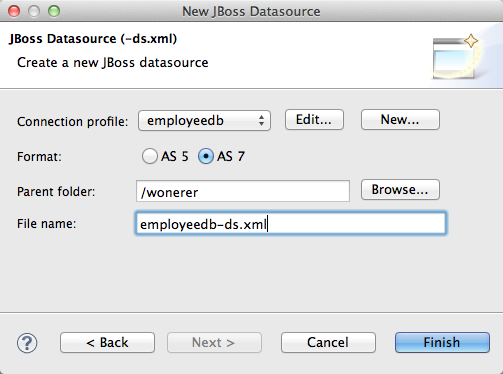
I actually did not manually type up that -ds.xml file for my local running hsqldb
database, nor did I manually deploy the driver.jar. I used a new wizard that are coming in
JBoss Tools 3.3 Beta1 which takes the connection information I already have setup in
Eclipse, create the right files for me and if I update the files it will also update the
deployments.
https://community.jboss.org/servlet/JiveServlet/showImage/38-4662-18048/j...
https://community.jboss.org/servlet/JiveServlet/downloadImage/38-4662-180...
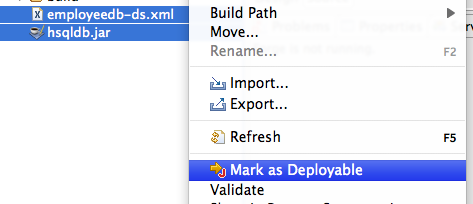
Once this wizard have run I simply right click the -ds.xml + driver.jar and select ‘Mark
as Deployable’ on them. This deploys them to my server and if I make changes to the
-ds.xml the changes gets copied over directly and AS will pick up the changes shortly
after.
https://community.jboss.org/servlet/JiveServlet/showImage/38-4662-18049/d...
https://community.jboss.org/servlet/JiveServlet/downloadImage/38-4662-180...
I find it exciting that we now not only have a file format for defining datasources, but
also that they are separate deployable resources together with a driver jar which both can
be easily shared on a team.
h2. The fine print
A few caveats/tricks for this approach are:
* I prefer deploying datasources independent of my application, but you can put the
-ds.xml inside your application META-INF or WEB-INF directory and it will be deployed
together with the application.
* The JDBC driver needs to be JDBC 4 compatible to be deployable out of the deployment
directory. In the rare case your driver is not JDBC 4 compatible then you will need to
deploy it as a module in AS 7.
* The datasource can not be modified/managed via the Admin Console since it is a deployed
resource and not part of the managed API of AS 7 - if you wish full admin control you will
have to configure the datasource via the management API or admin console. As I understand
it over time the admin console is set to include support for at least a read-only view of
these file based datasources.
* If you wanted to connect to a h2 database you would not need to copy the driver jar, but
simply refer to <driver>h2</driver> instead and you it pickup the default
embedded h2 database driver in AS 7.
h2. Tomorrow
Tomorrow the topic is on how AS 7.1 is secured by default but are still developer
friendly.
--------------------------------------------------------------
Comment by going to Community
[https://community.jboss.org/community/tools/blog/2012/02/28/excited-about...]


5152
days inactive
5152
days old
0 comments
1 participants
participants (1)
-
 Max Rydahl Andersen