[JBoss Web Services] New message: "Out of memory occured on servlet.service()"
by Doochul KIM
User development,
A new message was posted in the thread "Out of memory occured on servlet.service()":
http://community.jboss.org/message/527645#527645
Author : Doochul KIM
Profile : http://community.jboss.org/people/headiron
Message:
--------------------------------------------------------------
Hi.
Our company use jboss-4.0.2, and implement web service using jboss web service.
Some times web service is hang up after OutOfMemberError.
According to stacktrace message, OOM is occured during generate SOAP Response message.
We want to find a solution prevent this issue.
Is there any possible solution for it?
( We are using JAVA 5 VM 64.
It is difficult to upgrade jboss because there is other service on it .
But it is possible to upgrade jboss web service if it could prevent OOM )
I also want to know how can I get a source of jboss web service executed on jboss4.0.2.
Below is stack trace of OOM.
02/22/2010 10:37:58,889 ERROR [[OaxApiBean]] Servlet.service() for servlet OaxApiBean threw exception
java.lang.OutOfMemoryError: Java heap space
at org.jboss.axis.message.SAX2EventRecorder$objArrayVector.add(SAX2EventRecorder.java:366)
at org.jboss.axis.message.SAX2EventRecorder.startEntity(SAX2EventRecorder.java:180)
at org.jboss.axis.encoding.DeserializationContextImpl.startEntity(DeserializationContextImpl.java:1349)
at org.apache.xerces.parsers.AbstractSAXParser.startParameterEntity(Unknown Source)
at org.apache.xerces.parsers.AbstractSAXParser.startGeneralEntity(Unknown Source)
at org.apache.xerces.impl.XMLDocumentFragmentScannerImpl.handleCharacter(Unknown Source)
at org.apache.xerces.impl.XMLDocumentFragmentScannerImpl.scanEntityReference(Unknown Source)
at org.apache.xerces.impl.XMLDocumentFragmentScannerImpl$FragmentContentDispatcher.dispatch(Unknown Source)
at org.apache.xerces.impl.XMLDocumentFragmentScannerImpl.scanDocument(Unknown Source)
at org.apache.xerces.parsers.XML11Configuration.parse(Unknown Source)
at org.apache.xerces.parsers.XML11Configuration.parse(Unknown Source)
at org.apache.xerces.parsers.XMLParser.parse(Unknown Source)
at org.apache.xerces.parsers.AbstractSAXParser.parse(Unknown Source)
at javax.xml.parsers.SAXParser.parse(Unknown Source)
at org.jboss.axis.encoding.DeserializationContextImpl.parse(DeserializationContextImpl.java:257)
at org.jboss.axis.MessagePart.getAsSOAPEnvelope(MessagePart.java:684)
at org.jboss.axis.Message.getSOAPEnvelope(Message.java:428)
at org.jboss.axis.Message.getContentType(Message.java:494)
at org.jboss.axis.transport.http.AxisServlet.doPost(AxisServlet.java:971)
at javax.servlet.http.HttpServlet.service(HttpServlet.java:717)
at org.jboss.axis.transport.http.AxisServletBase.service(AxisServletBase.java:370)
at javax.servlet.http.HttpServlet.service(HttpServlet.java:810)
at org.apache.catalina.core.ApplicationFilterChain.internalDoFilter(ApplicationFilterChain.java:252)
at org.apache.catalina.core.ApplicationFilterChain.doFilter(ApplicationFilterChain.java:173)
at org.jboss.web.tomcat.filters.ReplyHeaderFilter.doFilter(ReplyHeaderFilter.java:81)
at org.apache.catalina.core.ApplicationFilterChain.internalDoFilter(ApplicationFilterChain.java:202)
at org.apache.catalina.core.ApplicationFilterChain.doFilter(ApplicationFilterChain.java:173)
at org.apache.catalina.core.StandardWrapperValve.invoke(StandardWrapperValve.java:213)
at org.apache.catalina.core.StandardContextValve.invoke(StandardContextValve.java:178)
at org.jboss.web.tomcat.security.CustomPrincipalValve.invoke(CustomPrincipalValve.java:39)
at org.jboss.web.tomcat.security.SecurityAssociationValve.invoke(SecurityAssociationValve.java:153)
at org.apache.catalina.authenticator.AuthenticatorBase.invoke(AuthenticatorBase.java:482)
--------------------------------------------------------------
To reply to this message visit the message page: http://community.jboss.org/message/527645#527645
16 years, 4 months
[JBoss Cache] Document updated/added: "WhatShouldWeExpectOfThePojoCachePerformance"
by Manik Surtani
User development,
The document "WhatShouldWeExpectOfThePojoCachePerformance", was updated Feb 22, 2010
by Manik Surtani.
To view the document, visit:
http://community.jboss.org/docs/DOC-12696#cf
Document:
--------------------------------------------------------------
h2. Performance we should expect from PojoCache
Ben Wang, 05-2006
-
----
h3. Introduction
PojoCache (formerly called TreeCacheAop) is a key component in JBoss Cache. It is an in-memory, replicated, and persistence cache system that operates directly on POJOs (Plain Old Java Objects) in a distributed environment. That is, it is object-oriented such that it can preserve object relationship during replication (or persistence). In addition, it performs fine-grained replication transparently, meaning once a POJO is attached to the cache system, any further POJO field update will trigger a corresponding replication automatically.
PojoCache also supports Java annotation as well. In the upcoming 1.4 release, for example, there are two additional field-level annotations: @Transient and @Serializable to provide options to skip field replication, or to treat a sub-object as Serializable (but still maintain the external object relationship).
Users that are interested to know more details should refer the JBoss Cache online documentation. There are examples that you can run in the JBoss Cache release distribution as well. To see an interesting example of the usage, you can also refer to this http://www.onjava.com/pub/a/onjava/2005/11/09/jboss-pojo-cache.html article.
In this article, we will compare the performance of PojoCache fine-grained replication against TreeCache (a default plain cache component of JBoss Cache). As mentioned, with automatic field-level replication, not only will PojoCache ease up the burden of and simplify development (no more additional cache.put() at the end of modifications), it can also potentially increase throughput as well, depending on the POJO size. Our objective here then is to give the user a clear picture of the PojoCache performance characteristics (by comparing to the TreeCache).
h3. Performance tester
We have created a performance tester to benchmark JBoss Cache. For those interested, the script can be checked out from JBossCache cvs under tests/scripts/benchmark.sh. Basically, a user can configure the number of nodes in the cluster, clients on each node, and payload size (through a list size, explained below). In addition, there is a switch to use either TreeCache (default to JBoss Cache) or PojoCache. If it is PojoCache, then there is another option to specify the frequency of whole POJO updates (e.g., in PojoCache parlance, how often is a new POJO will be attached to the cache).
As for the load pattern, basically, the tester resides in the same VM as the cache instance, and each client will update a distinct fully qualified name (Fqn) repeatedly non-stop and such that there won't be any write contention between the clients. This is similar to the pattern of http session replication using sticky sessions. To minimize the impact of CPU sharing by the loader client, we have pre-constructed the POJO before the run.
h3. Test load pattern
The test POJOs are listed in the Appendix section. It consists of a Student class (inherited from Person class) with an Address class and a list of Courses. To vary the the request message size, we have chosen to parameterize the list size of courses.
For TreeCache test, we would simply perform the following code snippet for each client loop:
cache.put(fqn, key, pojo);
where key is a thread id String, and pojo is a pre-constructed Student instance.
For PojoCache tests, depending on the update frequency, we do one of the following within each client iteration:
1.
pojocache.putObject(fqn, pojo);
2.
pojo.getCourses().get(0).setInstructor("Ben Wang");
The first one maps a *new* POJO each time to the cache system. As a result, it will be more expensive. Note that we are emphasizing a *new* pojo for every subsequent putObject because if it is still the same POJO, PojoCache will simply recongize that and return the instance right away. While this would be fast operation, it is not our test ojbective here.
The second one, as mentioned, will simply trigger a field replication autmatically. For example, when going through the underlying replication, the field replication is doing an equivalent of:
pojocache.put(fqn, key, "Ben Wang");
of which should be fairly efficient (about 125 bytes over the wire)!
h3. Replication message size
To give an idea of the actual message size used, here is a table of list size that we employed compared to the actual message size during replication for TreeCache test.
| List size | Replicated message size (bytes) |
| 10 | 1224 |
| 100 | 8415 |
| 200 | 16341 |
Table 1. List size vs. replicated message size
As we can see, the size ranges from 1K bytes to 16K bytes. In addition, PojoCache when doing a whole object update would have twice as much of the size because of extra metadata and overhead involved. We have plan to reduce this size further in the future relase.
h3. Test Environment
We ran the tests using a 4-node cluster. The machines are connected with a Gigabit switch. Here are more detailed info.
| Machine | Intel dual 3.0Ghz CPU with 4G RAM |
| OS | Linux |
| JBossCache | 1.4Beta |
Table 2. Testing environment
h3. Result
Typically, we expect the POJO would have a long lifetime residing in the POJO cache system, since it is expected that the longer the POJO lifetime, the better the overall throughput will be (becuase of more field updates). To illustrate the impact of the POJO lifetime on the overall performance, we have chosen to vary the POJO update frequency here.
In addition, we have studied the effects of replication message size against the cache performance. We have chosen to vary the Course list size in the Student object. We have run cases with list size of: 10, 100, and 200, respectively (see Table 1 for the actual replicated size again).
We have compared the overall throughput and cpu utilization for 4 different cases:
* TreeCache. This is the plain cache with put of the POJO every time.
* PojoCache 100-0. PojoCache with a different POJO attachment every time. That is, there is no fine-grained replication. This is 100% POJO update.
* PojoCache 10-90. PojoCache with 1 POJO atachment and 9 field updates. This is 10% POJO update and 90% field replication.
* PojoCache 5-95. PojoCache with 1 POJO attachement and 19 field updates. This is 5% POJO update and 95% field replication.
Figure 1 shows the overall throughput for the 4 different cases. From the figure, we can see that TreeCache is about 4 times faster than PojoCache 100-0. While we expect every PojoCache POJO update will be slower (becuase it needs to actively map the fields into the cache system), further optimization is possible in the future release.
With PojoCache 10-90 case, however, the overall throughput is about 2 times faster than the TreeCache ones. That is, when the POJO update frequency is 10%, at list size of 100, PojoCache is about as twice as fast as the TreeCache one. When the POJO update frequency is only 5% (case PojoCache 5-95), it becomes about 3 times faster (fastest one is 3.5 times for list size of 200) than the TreeCache ones. Obviously, the longer the POJO lifetime, the better performance for PojoCache as discussed.
In addition, we are seeing that the bigger the list size, the bigger the advantage that PojoCache has. This is expected since TreeCache would have to serialize a bigger message payload over the wire.
h3. Note that some people have been mislead by some of the above statistics. All of the tests are performing 100% writes. The 10-90 and 5-95 you see pertain to the ratio of attaching pojos to modifying pojo fields, NOT a ratio of writes to reads.
!http://www.jboss.com/cluster/PojoCacheThroughput.png!.
Figure 1. Overall througput
Figure 2 shows the corresponding cpu utilization for the 4 different cases. As we can see, the CPU utilization are somewhat similar for all test cases except PojoCache 100-0 where every POJO update probably demands more CPU power.
!http://www.jboss.com/cluster/PojoCacheCPU.png!.
Figure 2. CPU utilization
Finally, the above tests all have been run using ASYNCHRONOUS replication mode. To validate the results with SYNCHRONOUS replication, we have also shown the resulting throughput using the list size of 100 in Table 3.
| Case | Asynchronous throughput (req/sec) | Synchronous throughput (req/sec) |
| TreeCache | 972 | 520 |
| PojoCache 100-0 | 230 | 130 |
| PojoCache 10-90 | 1815 | 1060 |
| PojoCache 5-95 | 2897 | 1600 |
Table 3. Throughput comparison for different cache modes with list size of 100.
As we can see, except the overall throughput for synchronous replication is slower than the asynchronous one, the trend is about the same. E.g., PojoCache 5-95 is about 3 times as fast as the TreeCache one.
h3. Conclusion
In this article, we have compared the performance of PojoCache against the plain TreeCache (both components available in JBoss Cache). It is expected that without fine-grained field-level replication, PojoCache is slower than TreeCache. However, with field replication, PojoCache can be 3 times faster than the TreeCache counterpart with cases shown here. Of course, besides the performance factor, PojoCache also comes with automic POJO field replication and capability of handling POJO object relationships (during replication).
For additional feedback, please go to this http://www.jboss.com/index.html?module=bb&op=viewtopic&p=3943469#3943469 under JBoss Cache Forum.
h3. Apendix
h4. Test POJO
/**
* Person class with PojoCache declaration.
*/
@org.jboss.cache.aop.annotation.InstanceOfPojoCacheable
// Note that for PojoCache it is actually not necessary to implement Serialziable. It is
// needed for TreeCache
public class Person implements java.io.Serializable
{
protected String name;
protected Address address;
}
/**
* Student class. No need to declare annotation since it inherits Student.
*/
public class Student extends Person
{
protected String school;
// We will vary this list size to run different replication message sizes.
protected List courses = new ArrayList();
}
/**
* Address class with PojoCache declaration.
*/
@org.jboss.cache.aop.annotation.PojoCacheable
public class Address implements java.io.Serializable {
protected String city;
protected int zip;
protected String street;
}
/**
* Course class with PojoCache declaration.
*/
@org.jboss.cache.aop.annotation.PojoCacheable
public class Course implements java.io.Serializable {
protected String title;
protected String instructor;
protected String room;
}
Note that the POJOs are declared with JDK5.0 annotations. Before we run the PojoCache tests, we have to run the aopc ant target to prepare the POJOs once. Then during runtime, there is no special class loader needed.
*Referenced by:*
--------------------------------------------------------------
16 years, 4 months
[JBoss Cache] Document updated/added: "JBossCacheMBeansWithBeaWeblogic"
by Manik Surtani
User development,
The document "JBossCacheMBeansWithBeaWeblogic", was updated Feb 22, 2010
by Manik Surtani.
To view the document, visit:
http://community.jboss.org/docs/DOC-10271#cf
Document:
--------------------------------------------------------------
h3. Using JBoss Cache MBean with Bea Weblogic
Here is an example of how to integrate the JBoss Cache MBean into the BEA WebLogic MBeanServer.
You can add this to code to the example startup Class in JBossCacheAndWebLogic so that the JBoss Cache instance is registered in the MBean server upon startup.
// Create the TreeCache Object.
TreeCache _cache = new TreeCache();
// ... initialise the TreeCache with your configuration
// Get the InitialContext.
Context ctx = new InitialContext();
MBeanServer server = null;
// Retrieve a reference to the MBeanServer
server = (MBeanServer) ctx.lookup(" weblogic.management.server");
// Alternative BEA WebLogic-specific call of the MBean server
// MBeanHome localHome = (MBeanHome) Helper.getAdminMBeanHome("username", "password", "url"); // e.g. url="t3://localhost:7001"
//server = localHome.getMBeanServer();
// Create an ObjectName, change 'myserver' to your server name.
ObjectName name = new ObjectName("mydomain:Name=org.jboss.cache,Type=TreeCache,Location=myserver");
// Register the TreeCache Object in the MBeanServer
server.registerMBean(_cache, name);
WebLogic 8.1:
You can view the JBoss Cache MBean an JMX-Client like http://www.jmanage.org/
WebLogic 9.x:
Should be able to view the MBean directly in the WebLogic console.
--------------------------------------------------------------
16 years, 4 months
[JBoss Cache] Document updated/added: "JBossCacheListenerAPIProposal"
by Manik Surtani
User development,
The document "JBossCacheListenerAPIProposal", was updated Feb 22, 2010
by Manik Surtani.
To view the document, visit:
http://community.jboss.org/docs/DOC-10269#cf
Document:
--------------------------------------------------------------
h2. Proposed Annotation Based Core Cache Listener API
This is the rough draft for the recommended API changes to the notification system in core cache.
Please post feedback to http://www.jboss.com/index.html?module=bb&op=viewtopic&t=111094
h3. Recommended Changes
* Use annotations and remove interface requirements
* Put notification data in a class instead of parameters
* Use a common notification base class
h3. Advantages over existing API
* Easy to use - Very few lines of code required
* Not Object Model Invasive - no interface or inheritance requirements
* Very Flexible - Can be used in a variety of ways
* Very Extensible - New notifications can be introduced by just adding a new annotation and a new object. The old interface approach would require a new interface to be introduced every time we enhance the API since adding methods would break backwards compatibility. Also additional data can easily be added to a notification unlike the previous approach which relied on a specific method signature.
h3. Reasons to change
* We already need 2 new notifications types for our own internal reasons (POJO Cache & Session Replication)
* We also need additional data to be added to some notifications
* Customers will be able to take advantage of the added benefits in the 2.0.0.GA release
* It is likely we will have to switch to a better API in the future anyway
h2. Examples
The following are example cases using the proposed API
h3. Simple Case
We only want modify events. Therefore we can use the expected subclass:
@CacheListener
public class MyCacheListener
{
...
@NodeModified
public void myMethod(NodeModifyEvent e)
{
log.info("FQN: " + e.getFqn());
log.info("Modification type: " + e.getModificationType());
log.info("Data: " + e.getData());
}
}
h3. Dynamic Case
We want several notifications on one method, so we use the base Notification class:
@CacheListener
public class MyCacheListener
{
...
@NodeModified
@NodeVisited
@NodeCreated
@NodeRemoved
@ViewChanged
@TransactionRegistered
@TransactionCompleted
public void myMethod(Event e)
{
log.info("Event type: " + e.getType());
if (e.getType() == Event.Type.VIEW_CHANGED)
{
View newView = ((ViewChangedEvent) e).getNewView();
}
}
}
h3. Mixed Case
We use multiple methods to receive the same notification, one receives another notification as well:
@CacheListener
public class MyCacheListener
{
...
@NodeModified
public void logModify(NodeModifiedEvent e)
{
log.info("FQN: " + e.getFqn());
log.info("Modification type: " + e.getModificationType());
log.info("New Data: " + e.getData());
}
@NodeModified
@NodeVisited
public void sendJMSMessage(Event e)
{
ObjectMessage message = session.createObjectMessage();
message.setOjbect(e);
}
}
--------------------------------------------------------------
16 years, 4 months
[JBoss Cache] Document updated/added: "Jbc210vsJbc220Performance"
by Manik Surtani
User development,
The document "Jbc210vsJbc220Performance", was updated Feb 22, 2010
by Manik Surtani.
To view the document, visit:
http://community.jboss.org/docs/DOC-11066#cf
Document:
--------------------------------------------------------------
h3. Purpose of the benchmark
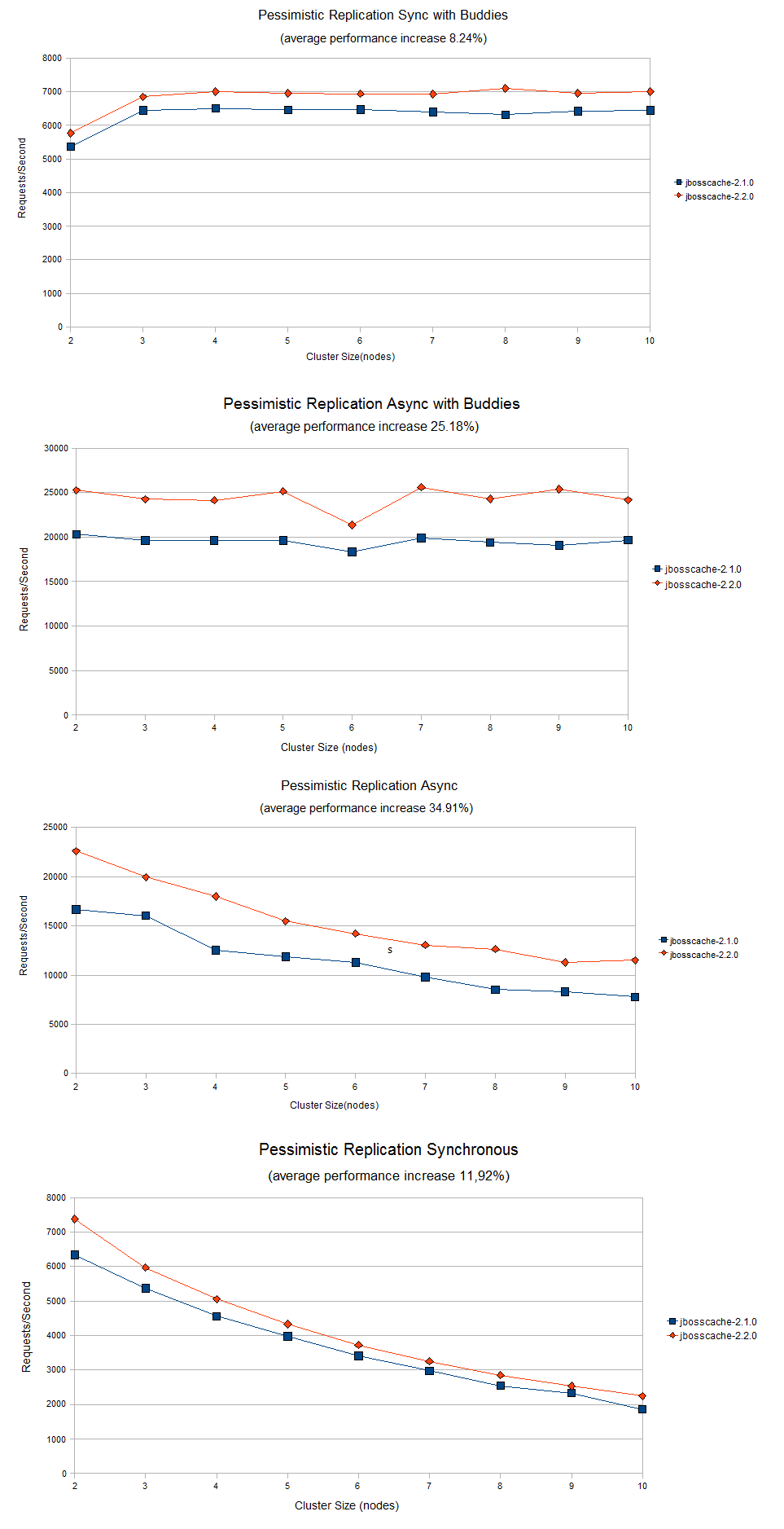
JBoss Cache 2.2.0 +Poblano+ comes with some changes in the product's architecture, through significant refactoring (see http://jbosscache.blogspot.com/2008/05/220-poblano-and-evolution-of-jboss... on the subject for details). As the major driver behind these changes was code quality (unit testability, readability, etc.) and not performance, we wanted to analyze how performance was affected by such refactoring to ensure there were no regressions in performance, and hence this benchmark. We were very pleasantly surprised.
h3. How the benchmarked was done
For benchmarking we used the CacheBenchmarkFramework. We run the http://anonsvn.jboss.org/repos/jbosscache/benchmarks/benchmark-fwk/trunk/...
with the following configuration:
* write percentage 20%
* read percentage 80%
* size of an attribute: 1000 bytes
* no of attributes in session: 100
* number of requests: 100,000
Following JBossCache configuration files were used for both versions tested (*2.2.0.BETA1 +Poblano+* and *2.1.0.GA +Alegrias+*)
* http://anonsvn.jboss.org/repos/jbosscache/benchmarks/benchmark-fwk/trunk/...
* http://anonsvn.jboss.org/repos/jbosscache/benchmarks/benchmark-fwk/trunk/...
* http://anonsvn.jboss.org/repos/jbosscache/benchmarks/benchmark-fwk/trunk/...
* http://anonsvn.jboss.org/repos/jbosscache/benchmarks/benchmark-fwk/trunk/...
Each configuration was run on a cluster varying from 2 to 10 nodes. Each node configuration was:
* OS: RHEL4
* Processor: Quad CPU, Intel(R) Xeon(TM) CPU 3.00GHz, cache 2048 KB
* Memory: total 4037392 kB
* Java: Java HotSpot(TM) Server VM (build 1.5.0_11-b03, mixed mode)
Test date: 1st May, 2008
h3. Benchmark results
The results of the comparisons are in the attached graph. +Poblano+ outdoes +Alegrias+ in performance with following average increases (percents)
* Pessimistic replication sync (buddy repl) - avg *+8.24% increase+*
* Pessimistic replication sync (total repl) - avg *+11.92% increase+*
* Pessimistic replication async (buddy repl) - avg *+25.18% increase+*
* Pessimistic replication async (total repl) - avg *+34.91% increase+*
http://community.jboss.org/servlet/JiveServlet/download/11066-16-5185/jbc...
--------------------------------------------------------------
16 years, 4 months
[JBoss Cache] Document updated/added: "JBossCacheAndWebLogic"
by Manik Surtani
User development,
The document "JBossCacheAndWebLogic", was updated Feb 22, 2010
by Manik Surtani.
To view the document, visit:
http://community.jboss.org/docs/DOC-10252#cf
Document:
--------------------------------------------------------------
h2. JBossCacheAndWebLogic
This page acts as a landing page for configuring WebLogic to start up an instance of JBossCache and bind it to local JNDI so it is accessible to applications deployed within WebLogic.
To demonstrate a working cache, I've created a web app, which contains a JSP that allows you to add elements to the cache under a specified node. Another servlet allows you to view the contents of the cache, and manipulate contents. In addition to the web app, I've created a j2ee services class, which handles the startup and shutdown of the JBossCache within WebLogic.
h3. The environment
This code has been tested with JBossCache 1.1.x, 1.2.x and 1.3beta, and has been run with Sun JDK 1.4.2 and 1.5.0, as well as BEA JRockit 1.4.2 and 1.5.0. All tested on a RHEL 3.0 server running on dual x86 CPUs.
h3. Building the sample code
Download the sample code JBossCacheAndWebLogic-src.zip. Pls ignore the attachments at the bottom of this page (including binaries - these will be removed shortly). Pls always use the srcs and build these against the JBossCache and WebLogic distros you use).
The sample code requires http://ant.apache.org, most versions should do. Simply unzip the sample code, edit the build.properties file to point to your JBossCache distro and the weblogic.jar file from your WebLogic installation, and run +ant+. The build file will generate a jar file containing the startup and shutdown classes, and a war file containing a sample application that uses this.
h3. Your classpath
The jar file containing the startup and shutdown class (see the section above on building the startup and shutdown classes), as well as the path to the JBossCache configuration, should both be in your WebLogic classpath before starting the WebLogic servers. In addition, the lib jars (that come with your JBossCache distro) should be in your WebLogic classpath.
** commons-logging.jar
** concurrent.jar
** javassist.jar
** jboss-aop.jar (optional, only if you use AOP)
** jboss-cache.jar
** jboss-common.jar
** jboss-jmx.jar
** jboss-system.jar
** jgroups.jar
** log4j.jar
** trove.jar (optional, only if you use AOP)
You will need a path to a jboss-cache compliant XML configuration file (please read the http://docs.jboss.org/jbcache/TreeCache.html#d0e607 for this). The binary above looks for +etc/jbosscache-config.xml+ in your classpath. It is also a good idea to have your log4j configuration file in the classpath!!
You are now ready to start up your WebLogic instances.
h3. Configuring your WebLogic
* http://community.jboss.org/docs/DOC-9369
* http://community.jboss.org/docs/DOC-9370
h3. Sample Servlet
For the sake of example, I use plain, ordinary servlets in the sample webapp. I have an abstract servlet class, CacheServlet, which has a protected getCache() method. This servlet also maintains a static reference to the TreeCache object bound in JNDI by my startup class. This saves on JNDI lookups every time the TreeCache is needed.
The other servlet classes simply subclass CacheServlet, and can access the TreeCache in JNDI by using CacheServlet.getCache(). By using this method to access the TreeCache, the demo servlets have full access to the JBossCache service.
Simply deploy the WAR file above to your WebLogic cluster (that has been started up with the j2ee service configured as a startup/shutdown class), and browse to http://your-server/JBossCacheServlet/.
You will be allowed to add values to your cache, and to display the contents of the cache.
Now try accessing this same webapp on another server in your cluster. You should be able to make changes to the cache there as well, and have the changes replicated to all servers in the cluster.
Experiment and play around
h3. Using this code in your projects
This code has been written purely as an example. I would recommend several improvements/enhancements to it before you attempt to use this in a real, live environment:
** The JBossCacheManager class should refer to a config file (even just a simple properties file) for details on how to connect to the JNDI tree.
** It should also get the JNDI name it binds the TreeCache to from it's configuration.
** The JNDI initial context lookup code is very WebLogic-specific and probably ought to be genericised (i.e., don't use weblogic.jndi.Environment)
** The above comment holds true for the CacheServlet as well.
** Write a singleton helper class (not dissimmilar in function to CacheServlet) if you want other classes to have access to the distributed cache.
That's it!
h3. Registering JBoss Cache as an MBean in WebLogic
If you want use JBoss Cache as an MBean in WebLogic, have a look here: JBossCacheMBeansWithBeaWeblogic
h3. Startup and Shutdown classes
* See http://edocs.bea.com/wls/docs81/ConsoleHelp/startup_shutdown.html on registering startup and shutdown classes.
* See http://edocs.bea.com/wls/docs90/programming/lifecycle.html on how to write a startup and shutdown class.
* Your startup class should:
Create a cache using a configuration file.
Start the cache.
Bind the cache to JNDI
* Your shutdown class should:
Retrieve the cache from JNDI.
Un-bind the cache from JNDI.
Stop the cache.
* Create a helper JBossCacheManager class with a static getCache() method, which gets the cache from JNDI.
--------------------------------------------------------------
16 years, 4 months