[JBoss Web Services] - @SchemaValidation craziness
by Steve Cohen
Steve Cohen [http://community.jboss.org/people/stevecoh4] created the discussion
"@SchemaValidation craziness"
To view the discussion, visit: http://community.jboss.org/message/630664#630664
--------------------------------------------------------------
I am trying to use SchemaValidation with JBoss 5.1 and getting nowhere.
I create a simple WSDL which imports a schema and build a WS from it, deploy to my server. It all works, but I want my WS to validate input against the schema.
I add the "@SchemaValidation" annotation to my endpoint.
Using SOAP-UI I create a project, built upon my wsdl at http://localhost:8080/myapp?wsdl http://localhost:8080/myapp?wsdl
In this SOAP-UI project I fill my request object with invalid data. The SOAP-UI validator tells me the data is invalid. I then send it to my app and it is accepted. In the JBoss Logs, I see
11:53:58,064 INFO [SOAPBodyElementDoc] Validating: XML_VALID
11:53:58,064 WARN [SchemaExtractor] Cannot find element: { http://schemas.xmlsoap.org/wsdl/ http://schemas.xmlsoap.org/wsdl/}types
11:53:58,064 INFO [SOAPBodyElementDoc] Validating: XML_VALID
11:53:58,064 WARN [SchemaExtractor] Cannot find element: { http://schemas.xmlsoap.org/wsdl/ http://schemas.xmlsoap.org/wsdl/}types
What's going on here?
If instead, I try to specify a schema location in the @SchemaValidation annotation, nothing I provide works. I get only errors. It can't find my schema. I have tried many forms of specifying the location, none of them work. Given that my wsdl is here: http://localhost:8080/myapp?wsdl http://localhost:8080/myapp?wsdl and that my schema import is called MessageSchema.xsd located in the same directory as the WSDL , can someone tell me the proper way to reference this in the @SchemaValidation?
I've found several articles on this subject, none of which get me to a solution.
First, there is this http://community.jboss.org/docs/DOC-14076 Validation Demo
But this is for an earlier version, has several dead links, and mentions a sample Eclipse project I can get from the author by email. Before I go down this road, can someone tell me if it's still operative? It seems rather convoluted. I must apparently modify my wsdl and schema. Why is all this required?
There is or was apparently information on this referenced in several links from this http:// JIRA issue. But the links it references are dead.
I simply want to deploy my app with a WSDL, which evidently is correct since SOAP UI can read and parse the WSDL and tell me correctly whether or not input is valid, and have the same validation perfomed on the server.
What I suspect is going on is that JBoss is taking my WSDL and regenerating it an equivalent form that SoapUI and other clients can parse, but making useless any references to my original schema.
<?xml version="1.0" encoding="UTF-8" ?>
- <definitions name="MyService" targetNamespace="http://anyone.com/MyService"
xmlns="http://schemas.xmlsoap.org/wsdl/"
xmlns:ns1="http://anyone.com/MyService"
xmlns:soap="http://schemas.xmlsoap.org/wsdl/soap/"
xmlns:tns="http://anyone.com/MyService"
xmlns:xsd="http://www.w3.org/2001/XMLSchema">
<import location="http://localhost:8080/myws?wsdl&resource=MyServicePort_PortType7607580749..."
namespace="http://anyone.com/MyService" />
- <service name="MyService">
- <port binding="ns1:MyServicePortBinding" name="MyServiceSOAP">
<soap:address location="http://localhost:8080/myws" />
</port>
</service>
</definitions>
The JBoss deployer is restructuring my WSDL for some reason and putting most of it into an inport with a strange name.
Perhaps I could solve this if I could forceJBoss to just deploy my WSDLs and XSDs as written without transforming them first. Is this possible?
--------------------------------------------------------------
Reply to this message by going to Community
[http://community.jboss.org/message/630664#630664]
Start a new discussion in JBoss Web Services at Community
[http://community.jboss.org/choose-container!input.jspa?contentType=1&cont...]
14 years, 10 months
[jBPM] - Re: Need help with JBPM Process coding
by Mauricio Salatino
Mauricio Salatino [http://community.jboss.org/people/salaboy21] created the discussion
"Re: Need help with JBPM Process coding"
To view the discussion, visit: http://community.jboss.org/message/630676#630676
--------------------------------------------------------------
Hi Raul,
sorry for not answering you quickly.Your questions are a little bit generic, but are ok.
1) no, you don't need to learn drools to use jBPM, you need to clearly define what you need to do and make your that your requirements are clear. If you are thinking to use rules inside of your processes then you need to learn Drools.
2) You need to learn drools and jbpm if you want to do that. Using Ruleflow Groups is one option of many. It really depends what are you trying to solve. Did you check the documentation in drools.org and jbpm.org?
3) You can create your web application and then use the jBPM apis to interact with the engine. You will also need to use the human task component apis to retrieve the human tasks. jBPM is like every other framework that you want to use, so you will need to know how to use it first and then how to embed it inside your application. It is a common requirement.
4) writing java code inside XML files is usually a bad practice, I recommend you to not do that. Inside jBPM5 you have the concept of WorkItem that will allow you to hook classes to the process flow very easy and don't write code inside the XML file.
Based on your described scenario I didn't understand the business process that you need to model, it looks like a couple of rules inside some decision nodes, but I can't figured out what happens in the middle. I strongly recommend you to define a clear business process and then we can help you to write rules to check different conditions if you really need that. If you have purely decisions based on some values, sometime expressions are enough.
Cheers
--------------------------------------------------------------
Reply to this message by going to Community
[http://community.jboss.org/message/630676#630676]
Start a new discussion in jBPM at Community
[http://community.jboss.org/choose-container!input.jspa?contentType=1&cont...]
14 years, 10 months
[jBPM] - How to get active processes via ksession.getProcessInstances()
by Ryan Peterson
Ryan Peterson [http://community.jboss.org/people/rrpeterson] created the discussion
"How to get active processes via ksession.getProcessInstances()"
To view the discussion, visit: http://community.jboss.org/message/630659#630659
--------------------------------------------------------------
Hey guys,
I'm using a single StatefulKnowledgeSession to manage my processes. Each processInstance is mapped to a userId, which is stored in the params map as a process variable upon the start of the process:
ksession.startProcess(processId, params)
Later I'd like to check if a specific userId exists in the workflow engine, which I was hoping to check all the active processInstances and search for the userId within their processVariables.
Unfortunately when I use ksession.getProcessInstances() I get 0 results. Is there a way to do a "deep" search to find the active processes? I am persisting the processes and StatefulKnowledgeSession, but I have not called .dispose() and am still in the same jvm instance (haven't restored the ksession from the database).
Is there a better way to find if a user is already in a workflow based on process variables?
Thanks for any help!
--------------------------------------------------------------
Reply to this message by going to Community
[http://community.jboss.org/message/630659#630659]
Start a new discussion in jBPM at Community
[http://community.jboss.org/choose-container!input.jspa?contentType=1&cont...]
14 years, 10 months
[JBoss Tools] - Project archive view no war option
by batwishper
batwishper [http://community.jboss.org/people/batwishper] created the discussion
"Project archive view no war option"
To view the discussion, visit: http://community.jboss.org/message/629110#629110
--------------------------------------------------------------
I'm currently developing an gwt application using EJBs. My EJBs works fine on JBoss, no problem.
However, I'm now arrived to a point where I need gwt to be run on jboss as well in order to call the ejbs.
I found this : http://community.jboss.org/docs/DOC-15593 http://community.jboss.org/wiki/UseJBossToolsWithGoogleGWTPlugin
I installed it, no problem at all. The problem came with the "create a war" part.
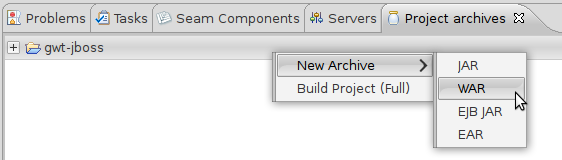
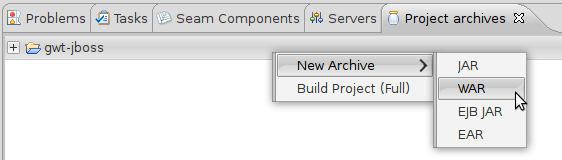
I have installed JBoss Tool, and get the "Project archives" view, but no matter what, i don't have the war option in "new archive".
The only thing I get is "jar" ...
I look on the internet, but I haven't be able to find a solution.
I found this : http://docs.redhat.com/docs/en-US/JBoss_Developer_Studio/3.0/html/JBoss_S... http://docs.redhat.com/docs/en-US/JBoss_Developer_Studio/3.0/html/JBoss_S...
and the note :
If you see only JAR from the list of available archive types, you should verify whether AS Tools plugins/features are in place. EAR, EJB JAR and WAR options are contributed by the AS Tools independently from webtools and the virtual project model. Thus, without them only JAR will show up.
And i simply don't understand what I need to do.
Can anyone explain it please ?
Thanks !
Configuration :
Ubuntu Linux 10.10
Eclipse JEE 3.6 (Helios)
JBoss 6
SDK GWT 2.4
--------------------------------------------------------------
Reply to this message by going to Community
[http://community.jboss.org/message/629110#629110]
Start a new discussion in JBoss Tools at Community
[http://community.jboss.org/choose-container!input.jspa?contentType=1&cont...]
14 years, 10 months
[JBoss Tools] - Use JBoss Tools with Google GWT Plugin
by Max Rydahl Andersen
Max Rydahl Andersen [http://community.jboss.org/people/maxandersen] modified the document:
"Use JBoss Tools with Google GWT Plugin"
To view the document, visit: http://community.jboss.org/docs/DOC-15593
--------------------------------------------------------------
h1. A few simple steps
If you develop web applications with GWT you most likely end up using Eclipse and the Google Plugins for Eclipse. These Plugins offer to run your application on a jetty instance. If you want to use JBoss instead, JBoss Tools allows you to define a war project archive and make sure it gets published to the JBoss instance of your choice. This allows you to use Google GWT plugins proprietary project layout and Eclipse integration together with JBoss servers.
Note: we recommend you use the Eclipse WTP approach described at http://community.jboss.org/docs/DOC-15794 http://community.jboss.org/wiki/CreateGWTProjectsWithJBossToolsAndEclipseWTP instead. That article shows how to create an Eclipse WTP enabled project instead which will be usable with any Eclipse Server adapter instead of just JBoss Tools server adapter. The below text is still relevant if you do not want to use Eclipse WTP for some reason.
h2. *Premise*
The google web toolkit, GWT is a nice framework to develop web applications. Google even delivers a plugin for Eclipse so that developing with GWT is a very pleasant experience. The GWT plugin uses an embedded jetty to run the application that you develop. Google unfortunately did not use standard Eclipse project structure for web projects. So if you want to use JBoss instead of jetty, the approach to take is not as intuitive as it could be. This article shows you what steps to take so that you can develop your GWT application seamlessly with JBoss Tools while running on JBoss.
h1. Solution
This How-To shows all the steps to install the plugins and how to configure it with Project Archives.
h2. Install Google Plugin for Eclipse
Install the Google plugin for Eclipse in your Eclipse or JBoss Developer Studio (3.x) by adding the following update site:
> http://dl.google.com/eclipse/plugin/3.5 http://dl.google.com/eclipse/plugin/3.5
You can use the Google GWT plugin i http://code.google.com/eclipse/docs/getting_started.html#installing nstallation guide to see the exact instructions.
h2. Create a Web Application Project
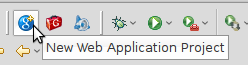
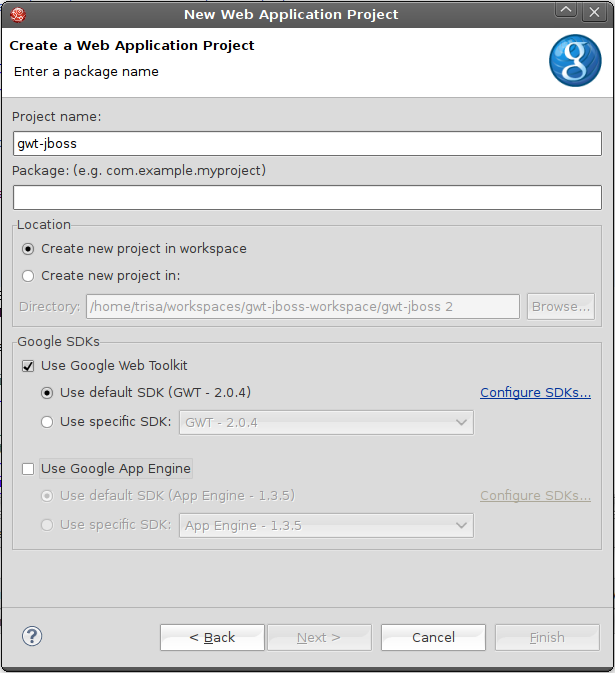
In order to get the support you need for GWT projects, you'll need to create a new *Web Application Project*. You may do so with the toolbar or with entries in the file menu.
http://community.jboss.org/servlet/JiveServlet/showImage/4286/create-web-... http://community.jboss.org/servlet/JiveServlet/downloadImage/4286/create-...
http://community.jboss.org/servlet/JiveServlet/showImage/102-15593-5-4320... http://community.jboss.org/servlet/JiveServlet/downloadImage/102-15593-5-...
Notice that here we deselect "Use Google App Engine" since that is not needed for this example.
h2. Create a new WAR with Project Archives
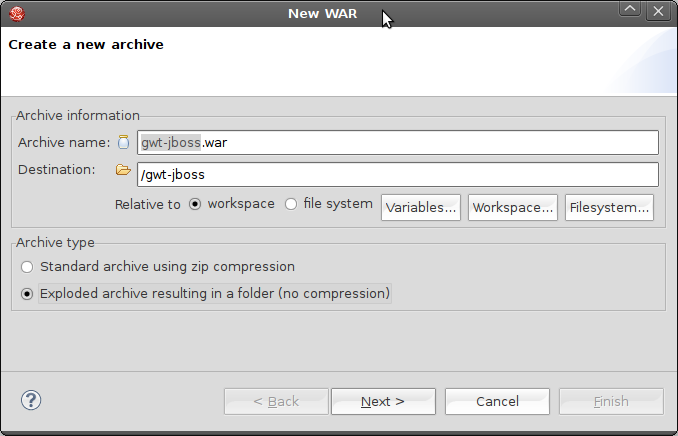
We'll work with a JBoss application server instead of the embedded jetty that's provided with the Google plugins. We therefore need to provide JBoss with a *War Archive* that bundles your project resources. The *Project archives* view allows you to do so. Select your GWT project and go to the *Project archives* view. You can now define a new war archive by right clicking on the project name.
http://community.jboss.org/servlet/JiveServlet/showImage/4289/create-new-... http://community.jboss.org/servlet/JiveServlet/downloadImage/4289/create-...
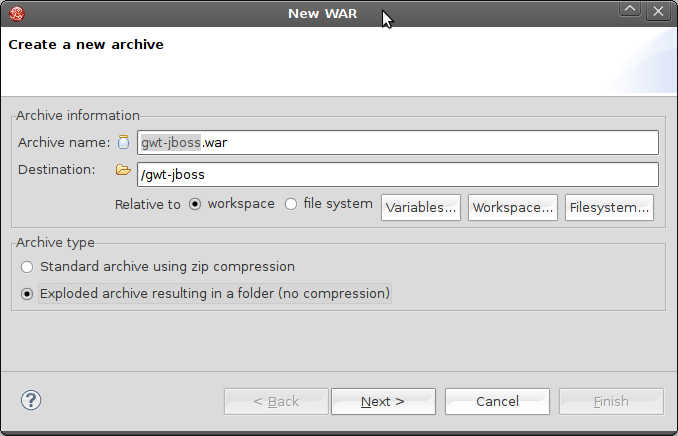
The wizard that pops up allows you pick an archive name, the path at which it'll be created and the type (packed or unpacked). Choose the settings that fit your needs.
http://community.jboss.org/servlet/JiveServlet/showImage/4290/create-new-... http://community.jboss.org/servlet/JiveServlet/downloadImage/4290/create-...
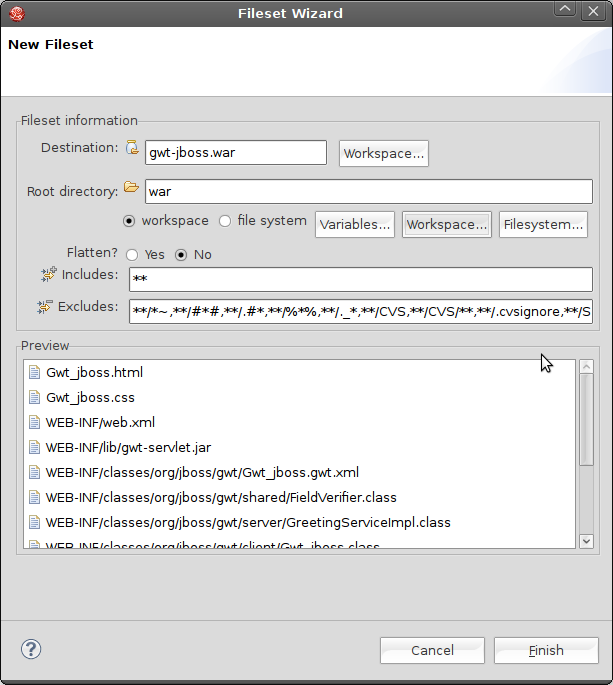
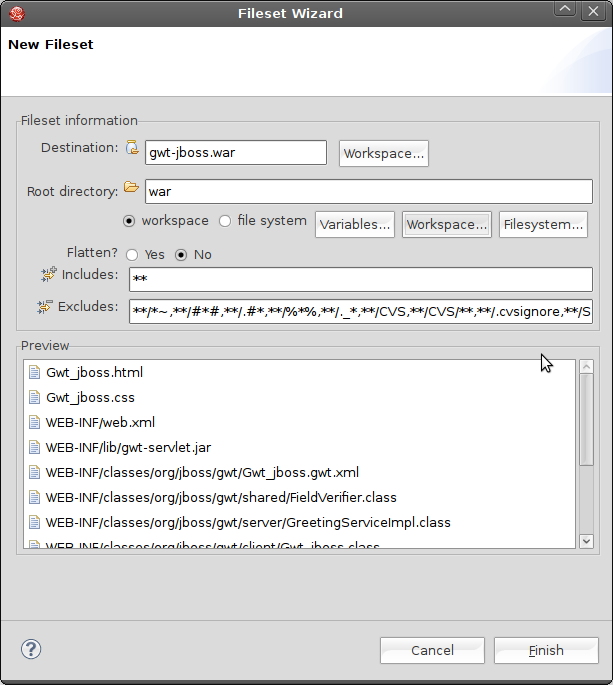
The wizard created a default fileset, that determines what project files shall be included in the war. We'll replace it by a fileset that includes all files within the *war* directory. This is the location the google plugins compile and package the code to.
http://community.jboss.org/servlet/JiveServlet/showImage/4291/create-new-... http://community.jboss.org/servlet/JiveServlet/downloadImage/4291/create-...
Your war archive shows up in the *Project archives* as soon you hit *finish*.
http://community.jboss.org/servlet/JiveServlet/showImage/4292/create-new-... http://community.jboss.org/servlet/JiveServlet/downloadImage/4292/create-...
h1. Build and publish your war
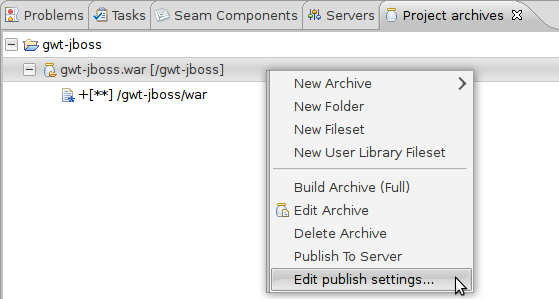
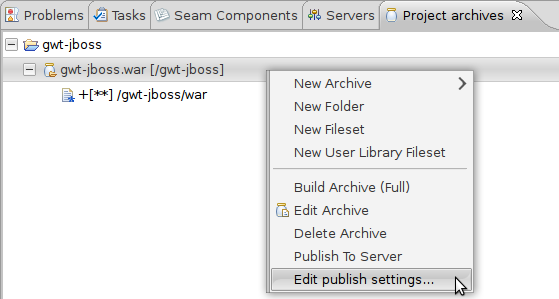
We now need to publish the War to the JBoss instance. Choose the appropriate entry in the context-menu of your war-archive and hit *Edit publish settings*.
http://community.jboss.org/servlet/JiveServlet/showImage/4293/adjust-war-... http://community.jboss.org/servlet/JiveServlet/downloadImage/4293/adjust-...
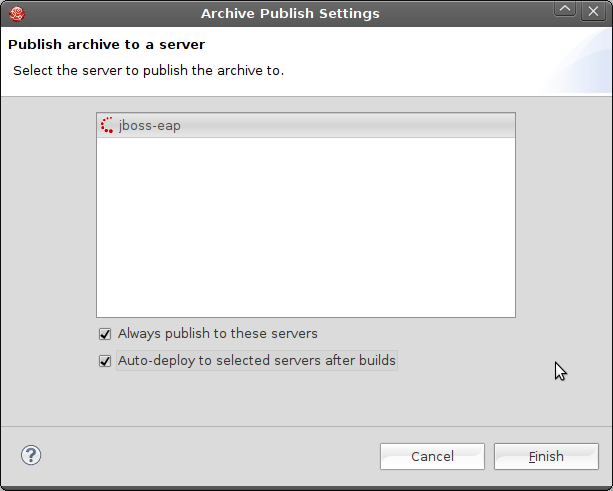
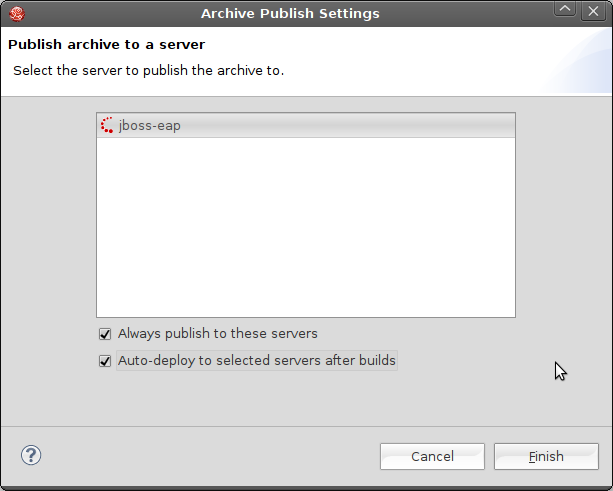
JBoss Developer Studio comes with a preconfigured server named jboss-eap. You therefore already get that server in the list of the available servers.
If you use plain JBoss Tools you would need to setup the server manually.
Select the server and choose to publish to it in the way that fits your needs:
http://community.jboss.org/servlet/JiveServlet/showImage/4294/adjust-war-... http://community.jboss.org/servlet/JiveServlet/downloadImage/4294/adjust-...
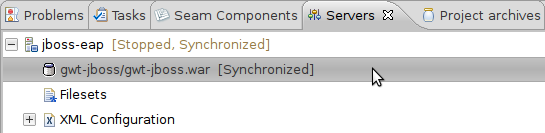
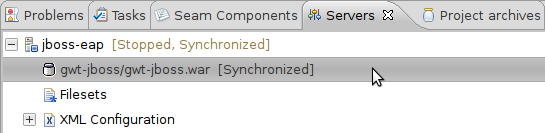
Your war now's assiociated to your server and will be published to it if your GWT project's been built. The *Servers* view show you the state of the publishing:
http://community.jboss.org/servlet/JiveServlet/showImage/4295/war-on-serv... http://community.jboss.org/servlet/JiveServlet/downloadImage/4295/war-on-...
h2. Cross compile
GWT allows you to write your client code in (almost) plain java instead of funky javascript. GWT ships a cross compiler that generates javascript out of your java classes. You need to start that cross compiler so that the client codes gets into your war. (We show later how you can use the hosted mode too with JBoss)
http://community.jboss.org/servlet/JiveServlet/showImage/4319/cross-compi... http://community.jboss.org/servlet/JiveServlet/downloadImage/4319/cross-c...
The Google cross compiler will inform you in the console view whether's he succeeded in his job. Check the output and wait until it terminated its compilation task.
h2. *Launch your Browser*
The project archive we created was deployed to the base url *gwt-jboss*. The jBoss server that's included in the JBoss developer studio is configured (by default) to run on port *8080*. Your application's therefore accessible at the url:
**
> http://127.0.0.1:8080/gwt-jboss/Gwt_jboss.html http://127.0.0.1:8080/gwt-jboss/Gwt_jboss.html
*http://community.jboss.org/servlet/JiveServlet/showImage/4317/browser.png http://community.jboss.org/servlet/JiveServlet/downloadImage/4317/browser...
h2. Speed up my development cycle!
The approach we've choosen so far uses an extra cross compile step to deploy the application after each change. That's very reliable but it gets tedious at development time. Google delivers a so called hosted mode. Its major benefit is that your java classes dont get cross-compiled but interpreted to javascript at runtime. Changing, testing, changing, testing etc. gets much faster and pleasant, the cross-compilation step's not needed any more. You need a browser plugin, a slightly different url for your application and a google runtime to achieve that.
h2.
h2. Launch Google
If you start this launch configuration you wont have to cross compile your java client classes to javascript. It will get interpreted by the google browser plugin. On the other hand the browser plugin needs access to your java classes. The google runtime you just launched allows it to get your java code. The url parameter you add when you access your application tells the plugin at what host and port the hosted mode runs.
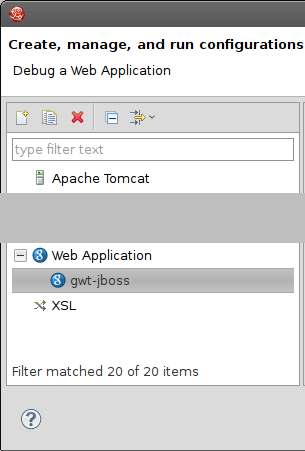
Create a *Web Application* launch configuration for that matter.
http://community.jboss.org/servlet/JiveServlet/showImage/102-15593-5-4321... http://community.jboss.org/servlet/JiveServlet/downloadImage/102-15593-5-...
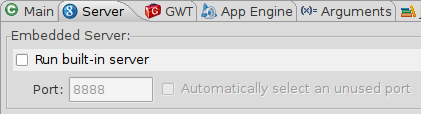
We want to use our JBoss instance, we therefore disable the embedded jetty that's provided by the GWT plugins.
http://community.jboss.org/servlet/JiveServlet/showImage/4297/new-run-con... http://community.jboss.org/servlet/JiveServlet/downloadImage/4297/new-run...
Now that we want not to cross-compile on each change, we'll need to tell the google browser-plugin where to fetch the code from. We do that by adding an url parameter:
**
> http://127.0.0.1:8080/gwt-jboss/Gwt_jboss.html http://127.0.0.1:8080/gwt-jboss/Gwt_jboss.html*?gwt.codesvr=127.0.0.1:9997*
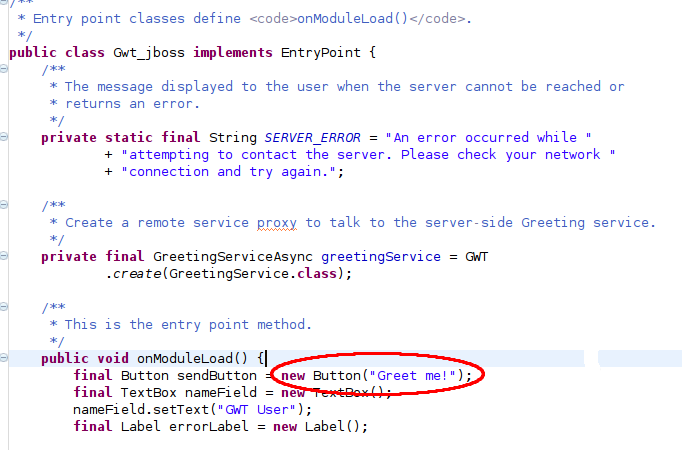
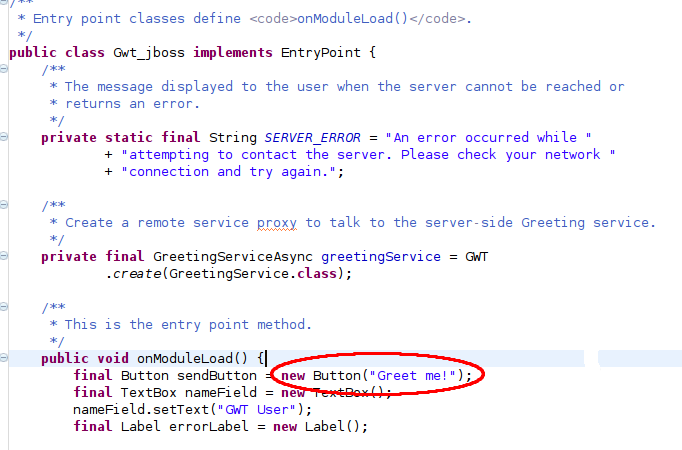
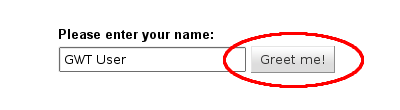
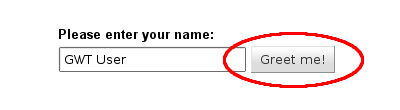
To convince yourself that there's no cross compilation needed any more, go to the client-package and change any java class that's in there. You may for instance change the label of a button and reload your browser (without launching the google cross-compiler).
http://community.jboss.org/servlet/JiveServlet/showImage/4311/button-labe... http://community.jboss.org/servlet/JiveServlet/downloadImage/4311/button-...
http://community.jboss.org/servlet/JiveServlet/showImage/4312/button-labe... http://community.jboss.org/servlet/JiveServlet/downloadImage/4312/button-...
h1. Conclusion
There you go, now you can use JBoss Tools and JBoss Developer Studio together with Google GWT plugin to do full deployment (with Cross Compile) or development mode via the hosted mode option.
All enabled by utilizing the Project Archives view.
--------------------------------------------------------------
Comment by going to Community
[http://community.jboss.org/docs/DOC-15593]
Create a new document in JBoss Tools at Community
[http://community.jboss.org/choose-container!input.jspa?contentType=102&co...]
14 years, 10 months