[JBoss Tools] - JBoss Source Lookup
by Snjezana Peco
Snjezana Peco [https://community.jboss.org/people/snjeza] modified the blog post:
"JBoss Source Lookup"
To view the blog post, visit: https://community.jboss.org/community/tools/blog/2012/01/24/jboss-source-...
--------------------------------------------------------------
The JBoss Tools Source Lookup plugin automatically adds a source attachment when debugging JBoss AS servers.
The plugin has been tested with JBoss AS 7.x and JBoss AS 6.1.
h4. Installing the JBoss Source Lookup plugin
* install JBoss Tools 3.3 as described in https://community.jboss.org/community/tools/blog/2011/12/18/learn-java-ee... Learn Java EE 6 quickly using JBoss Central
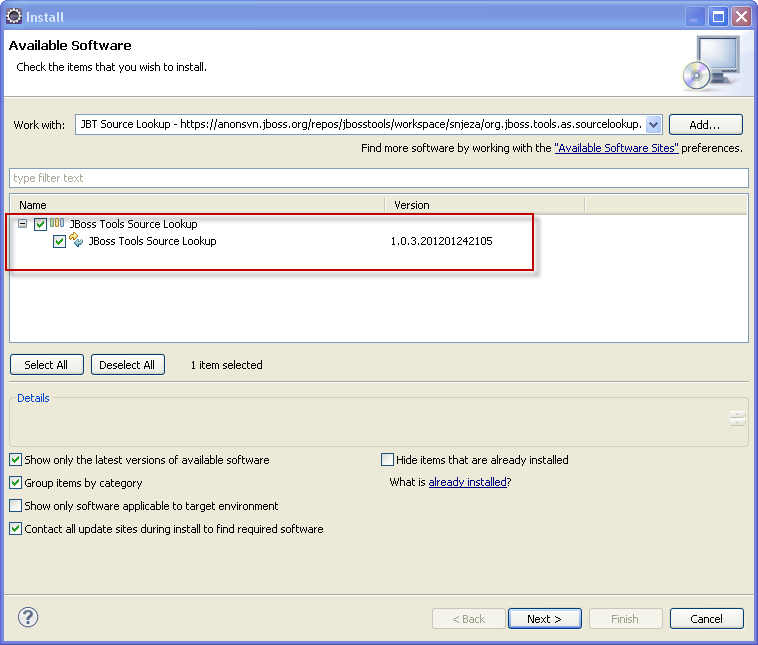
* call Help>Install New Software..., click the Add button and enter the following update site:
https://anonsvn.jboss.org/repos/jbosstools/workspace/snjeza/org.jboss.too... https://anonsvn.jboss.org/repos/jbosstools/workspace/snjeza/org.jboss.too...
https://community.jboss.org/servlet/JiveServlet/showImage/38-4482-17822/l... https://community.jboss.org/servlet/JiveServlet/downloadImage/38-4482-178...
Install the JBoss Tools Source Lookup category and restart Eclipse.
h4. Using the JBoss Source Lookup plugin
* set up the central JBoss Maven repository as explained in: https://community.jboss.org/docs/DOC-15169 Maven Getting Started - Users
* create the jboss-as-helloworld project by following the instructions in https://community.jboss.org/community/tools/blog/2011/12/18/learn-java-ee... Learn Java EE 6 quickly using JBoss Central
* wait for Maven to refresh indexes
The use and debugging of this plugin is demonstrated in the following screencast: http://screencast.com/t/i6k9hzkjViOs Debugging JBoss AS server.
The JBoss Source Lookup plugin enhances source attachment in the following way:
* archive file doesn't have to be in the maven classpath
* archive file doesn't have to be included in the classpath (jbossweb-*.jar, for instance). The JBoss Source Lookup plugin will find a class within a JBoss AS distribution and, if it is a Maven artifact, the plugin will attach the corresponding source.
* archive file doesn't have to be in the m2e index (jbossjts-4.16.0.Final.jar, for instance)
You don't have to add any JBoss AS Runtime to the classpath. I have added it in order to ensure the classes within the runtime are included in the Java Search and in order to be easier to add a breakpoint.
h4. Debugging Apache Tomcat and Glassfish servers
The JBoss Source plugin can serve to debug other servers.
If a server includes mavenized archives, the JBoss Source container will find, download, and show source files.
I have tested the Apache Tomcat 7.0.25 and Glassfish 3.1.1.
If you want to debug Apache Tomcat and/or Glassfish, you have to do the following:
* create some Apache Tomcat/Glassfish server https://community.jboss.org/servlet/JiveServlet/showImage/38-4482-17852/l... https://community.jboss.org/servlet/JiveServlet/downloadImage/38-4482-178...
* open the server editor https://community.jboss.org/servlet/JiveServlet/showImage/38-4482-17854/l... https://community.jboss.org/servlet/JiveServlet/downloadImage/38-4482-178...
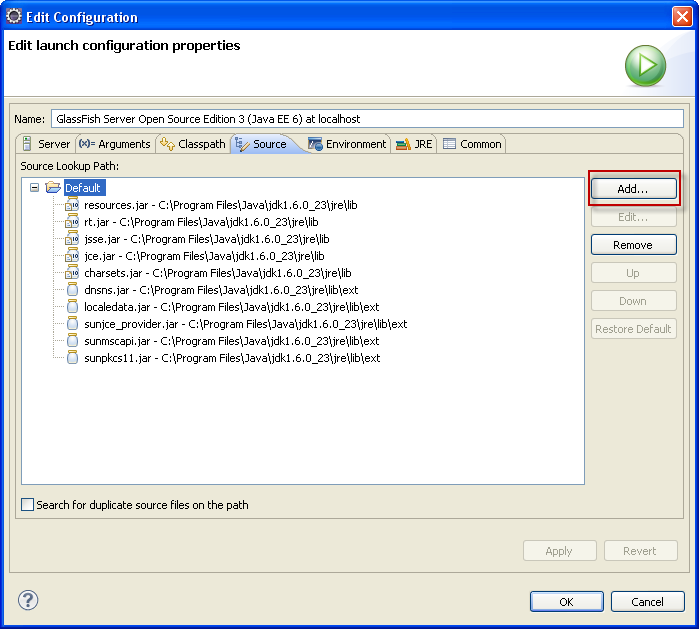
* click *Open launch configuration* and select the *Source* tab https://community.jboss.org/servlet/JiveServlet/showImage/38-4482-17855/l... https://community.jboss.org/servlet/JiveServlet/downloadImage/38-4482-178...
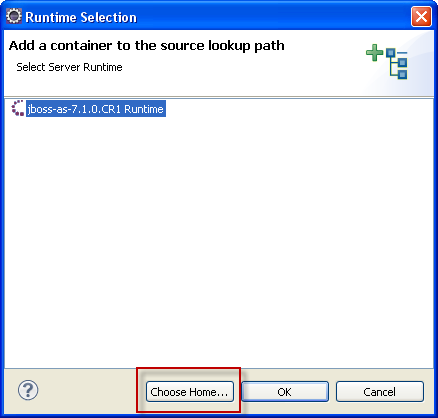
* click the *Add* button and select the *JBoss AS Source Container* https://community.jboss.org/servlet/JiveServlet/showImage/38-4482-17857/l... https://community.jboss.org/servlet/JiveServlet/downloadImage/38-4482-178...
* JBoss AS servers will be automatically recognized and you can choose them by clicking a server
As to other servers, you need to click the *Choose Home* button, select all the directories in which the server's archives are placed.
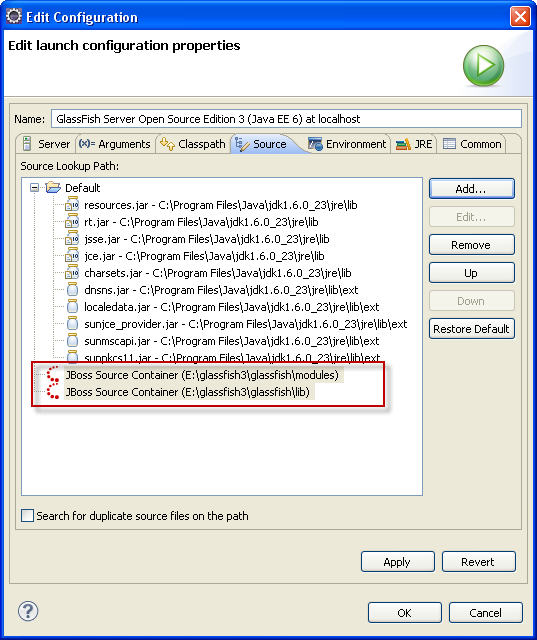
If you debug Tomcat, you can choose $TOMCAT_HOME/lib. When debugging Glassfish, you can choose $GLASSFISH_HOME/lib and $GLASSFISH_HOME/modules.
You can add as many JBoss AS Source containers as you want.
https://community.jboss.org/servlet/JiveServlet/showImage/38-4482-17858/l... https://community.jboss.org/servlet/JiveServlet/downloadImage/38-4482-178...
* move a JBoss Source container(s) to the end (optional) https://community.jboss.org/servlet/JiveServlet/showImage/38-4482-17859/l... https://community.jboss.org/servlet/JiveServlet/downloadImage/38-4482-178...
* you can add a Server Runtime container to the project's classpath (optional) https://community.jboss.org/servlet/JiveServlet/showImage/38-4482-17860/l... https://community.jboss.org/servlet/JiveServlet/downloadImage/38-4482-178...
* start the server in the debug mode https://community.jboss.org/servlet/JiveServlet/showImage/38-4482-17861/l... https://community.jboss.org/servlet/JiveServlet/downloadImage/38-4482-178...
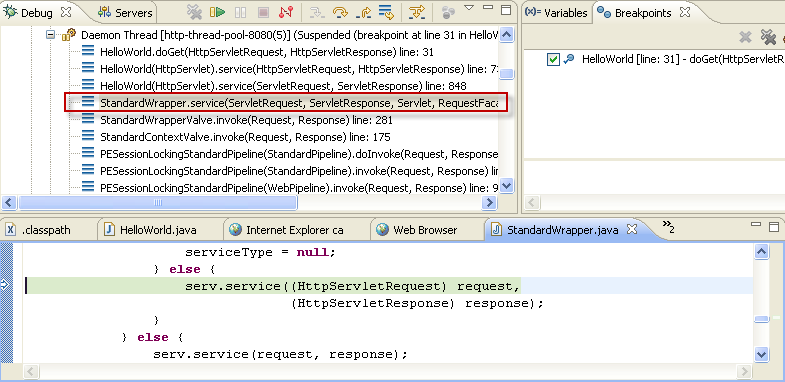
*StandardWrapper.java* is placed in the glassfish's *web-core.jar*.
The Source Lookup plugin finds this archive's source and shows it in the editor.
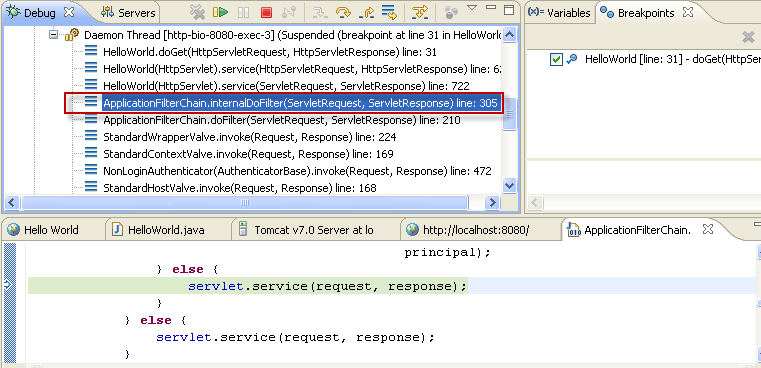
In a similar way you can debug Apache Tomcat server.
https://community.jboss.org/servlet/JiveServlet/showImage/38-4482-17862/l... https://community.jboss.org/servlet/JiveServlet/downloadImage/38-4482-178...
The *ApplicationFilterChain.java* is placed in the Tomcat's *catalina.jar* archive.
The Source Lookup plugin finds source for a mavenized archive as follows:
* using the m2e API
* using the archive's metadata (META-INF/maven)
* using nexus repositories that can be defined using the Source Lookup preferences page https://community.jboss.org/servlet/JiveServlet/showImage/38-4482-17863/l... https://community.jboss.org/servlet/JiveServlet/downloadImage/38-4482-178...
The Source Lookup preferences page enables you to add/remove, enable/disable and/or change ordering of Nexus repositories.
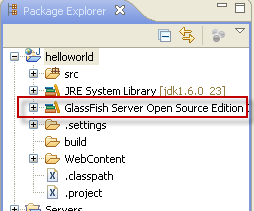
You can see that the *helloworld* project I have used in this blog, *is not a maven project* (it doesn't contain the maven icon).
JBoss Source Lookup plugin can be used to debug any Java project.
The plugin doesn't have to be used for debugging only.
It will find, download and open a source file for a mavenized archive included in the classpath when double-clicking a class file in the *Package Explorer* view, opening it using *Navigate>Open Type* or some other way.
The JBoss Source Lookup plugin can be used for any Java project and any launch configuration.
*Note*: When starting debugging the first time, it could take some time until m2e updates indexes and the JBoss Source lookup plugin scans the container's directory.
--------------------------------------------------------------
Comment by going to Community
[https://community.jboss.org/community/tools/blog/2012/01/24/jboss-source-...]
14 years, 7 months
[JBoss Tools] - JBoss Source Lookup
by Snjezana Peco
Snjezana Peco [https://community.jboss.org/people/snjeza] modified the blog post:
"JBoss Source Lookup"
To view the blog post, visit: https://community.jboss.org/community/tools/blog/2012/01/24/jboss-source-...
--------------------------------------------------------------
The JBoss Tools Source Lookup plugin automatically adds a source attachment when debugging JBoss AS servers.
The plugin has been tested with JBoss AS 7.x and JBoss AS 6.1.
h4. Installing the JBoss Source Lookup plugin
* install JBoss Tools 3.3 as described in https://community.jboss.org/community/tools/blog/2011/12/18/learn-java-ee... Learn Java EE 6 quickly using JBoss Central
* call Help>Install New Software..., click the Add button and enter the following update site:
https://anonsvn.jboss.org/repos/jbosstools/workspace/snjeza/org.jboss.too... https://anonsvn.jboss.org/repos/jbosstools/workspace/snjeza/org.jboss.too...
https://community.jboss.org/servlet/JiveServlet/showImage/38-4482-17822/l... https://community.jboss.org/servlet/JiveServlet/downloadImage/38-4482-178...
Install the JBoss Tools Source Lookup category and restart Eclipse.
h4. Using the JBoss Source Lookup plugin
* set up the central JBoss Maven repository as explained in: https://community.jboss.org/docs/DOC-15169 Maven Getting Started - Users
* create the jboss-as-helloworld project by following the instructions in https://community.jboss.org/community/tools/blog/2011/12/18/learn-java-ee... Learn Java EE 6 quickly using JBoss Central
* wait for Maven to refresh indexes
The use and debugging of this plugin is demonstrated in the following screencast: http://screencast.com/t/i6k9hzkjViOs Debugging JBoss AS server.
The JBoss Source Lookup plugin enhances source attachment in the following way:
* archive file doesn't have to be in the maven classpath
* archive file doesn't have to be included in the classpath (jbossweb-*.jar, for instance). The JBoss Source Lookup plugin will find a class within a JBoss AS distribution and, if it is a Maven artifact, the plugin will attach the corresponding source.
* archive file doesn't have to be in the m2e index (jbossjts-4.16.0.Final.jar, for instance)
You don't have to add any JBoss AS Runtime to the classpath. I have added it in order to ensure the classes within the runtime are included in the Java Search and in order to be easier to add a breakpoint.
h4. Debugging Apache Tomcat and Glassfish servers
The JBoss Source plugin can serve to debug other servers.
If a server includes mavenized archives, the JBoss Source container will find, download, and show source files.
I have tested the Apache Tomcat 7.0.25 and Glassfish 3.1.1.
If you want to debug Apache Tomcat and/or Glassfish, you have to do the following:
* create some Apache Tomcat/Glassfish server https://community.jboss.org/servlet/JiveServlet/showImage/38-4482-17852/l... https://community.jboss.org/servlet/JiveServlet/downloadImage/38-4482-178...
* open the server editor https://community.jboss.org/servlet/JiveServlet/showImage/38-4482-17854/l... https://community.jboss.org/servlet/JiveServlet/downloadImage/38-4482-178...
* click *Open launch configuration* and select the *Source* tab https://community.jboss.org/servlet/JiveServlet/showImage/38-4482-17855/l... https://community.jboss.org/servlet/JiveServlet/downloadImage/38-4482-178...
* click the *Add* button and select the *JBoss AS Source Container* https://community.jboss.org/servlet/JiveServlet/showImage/38-4482-17857/l... https://community.jboss.org/servlet/JiveServlet/downloadImage/38-4482-178...
* JBoss AS servers will be automatically recognized and you can choose them by clicking a server
As to other servers, you need to click the *Choose Home* button, select all the directories in which the server's archives are placed.
If you debug Tomcat, you can choose $TOMCAT_HOME/lib. When debugging Glassfish, you can choose $GLASSFISH_HOME/lib and $GLASSFISH_HOME/modules.
You can add as many JBoss AS Source containers as you want. https://community.jboss.org/servlet/JiveServlet/showImage/38-4482-17858/l... https://community.jboss.org/servlet/JiveServlet/downloadImage/38-4482-178...
* move a JBoss Source container(s) to the end (optional) https://community.jboss.org/servlet/JiveServlet/showImage/38-4482-17859/l... https://community.jboss.org/servlet/JiveServlet/downloadImage/38-4482-178...
* you can add a Server Runtime container to the project's classpath (optional) https://community.jboss.org/servlet/JiveServlet/showImage/38-4482-17860/l... https://community.jboss.org/servlet/JiveServlet/downloadImage/38-4482-178...
* start the server in the debug mode https://community.jboss.org/servlet/JiveServlet/showImage/38-4482-17861/l... https://community.jboss.org/servlet/JiveServlet/downloadImage/38-4482-178...
*StandardWrapper.java* is placed in the glassfish's *web-core.jar*.
The Source Lookup plugin finds this archive's source and shows it in the editor.
In a similar way you can debug Apache Tomcat server.
https://community.jboss.org/servlet/JiveServlet/showImage/38-4482-17862/l... https://community.jboss.org/servlet/JiveServlet/downloadImage/38-4482-178...
The *ApplicationFilterChain.java* is placed in the Tomcat's *catalina.jar* archive.
The Source Lookup plugin finds source for a mavenized archive as follows:
* using the m2e API
* using the archive's metadata (META-INF/maven)
* using nexus repositories that can be defined using the Source Lookup preferences page https://community.jboss.org/servlet/JiveServlet/showImage/38-4482-17863/l... https://community.jboss.org/servlet/JiveServlet/downloadImage/38-4482-178...
The Source Lookup preferences page enables you to add/remove, enable/disable and/or change ordering of Nexus repositories.
You can see that the *helloworld* project I have used in this blog, *is not a maven project* (it doesn't contain the maven icon).
JBoss Source Lookup plugin can be used to debug any Java project.
The plugin doesn't have to be used for debugging only.
It will find, download and open a source file for a mavenized archive included in the classpath when double-clicking a class file in the *Package Explorer* view, opening it using *Navigate>Open Type* or some other way.
The JBoss Source Lookup plugin can be used for any Java project and any launch configuration.
*Note*: When starting debugging the first time, it could take some time until m2e updates indexes and the JBoss Source lookup plugin scans the container's directory.
--------------------------------------------------------------
Comment by going to Community
[https://community.jboss.org/community/tools/blog/2012/01/24/jboss-source-...]
14 years, 7 months
[EJB3] - how to call oracle stored procedure?
by Joseph Hwang
Joseph Hwang [https://community.jboss.org/people/aupres] created the discussion
"how to call oracle stored procedure?"
To view the discussion, visit: https://community.jboss.org/message/649396#649396
--------------------------------------------------------------
I try to call oracle stored procedure from hibernate in JBoss as 7. My IDE is eclipse Indigo.
This is oracle stored procedure.
CREATE PROCEDURE SP_SELECT_ORA (
ID_INPUT IN VARCHAR2,
ID_OUTPUT OUT VARCHAR2,
PASSWD_OUTPUT OUT VARCHAR2,
NAME_OUTPUT OUT VARCHAR2) IS
BEGIN
SELECT EMP_ID, EMP_Passwd, EMP_Name
INTO ID_OUTPUT, PASSWD_OUTPUT, NAME_OUTPUT
FROM family
WHERE EMP_ID = ID_INPUT;
END;
And I call the SP in NamedNativeQuery like below
*Members.java*
@NamedNativeQueries({
@NamedNativeQuery(name = "callSelectSP", query = "CALL SP_SELECT_ORA(?,?,?,?)", resultClass = Members.class)
})
@Entity
@Table(name="family")
public class Members implements Serializable {
@Id
@Column(name = "EMP_ID")
private String ID;
@Column(name = "EMP_Passwd")
private String Passwd;
@Column(name = "EMP_Name")
private String Name;
*CallStoredProcedureBean.java*
@Stateless
public class CallStoredProcedureBean implements ICallStoredProcedurePort {
@PersistenceContext(unitName="MyFamily")
EntityManager em;
@Override
public Object callSP(String type, String ID) {
// TODO Auto-generated method stub
Query query = null;
Members member = null;
query = em.createNamedQuery("callSelectSP");
query.setParameter(1, ID);
////////////////////
// *I don't know how to call stored procedure....*
///////////////////
query.executeUpdate();
member = (Members)query.getSingleResult();
System.out.println("Flash !!");
return member;
}
I don't know how to handle out parameters in oracle SP.
Pls, advise me. Thanks in advanced !
--------------------------------------------------------------
Reply to this message by going to Community
[https://community.jboss.org/message/649396#649396]
Start a new discussion in EJB3 at Community
[https://community.jboss.org/choose-container!input.jspa?contentType=1&con...]
14 years, 7 months
[jBPM] - User Task Assignment and Assignment Restrictions
by Charlie B
Charlie B [https://community.jboss.org/people/charliebarjel] created the discussion
"User Task Assignment and Assignment Restrictions"
To view the discussion, visit: https://community.jboss.org/message/646585#646585
--------------------------------------------------------------
Hi,
I have just started using JBPM5, and have a few questions concerning user task assignments and restrictions.
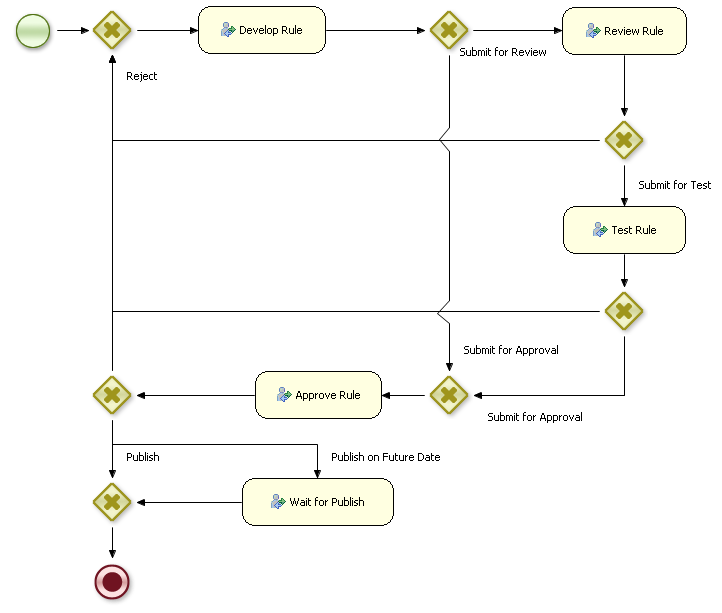
I have built my process using various User Tasks. Each time I complete a Task, I pass in specific parameters which a gateway uses to determine the next possible course of action (which task to execute next) and who to assign the next task to. For instance, when completing the 'Develop' task, I pass in 'assignTo=johnsmith' and 'result=SubmitForReview'.
This is working quite fine, but if there is a better way to do this, please do tell. I am open to suggestions.
https://community.jboss.org/servlet/JiveServlet/showImage/2-646585-17767/... https://community.jboss.org/servlet/JiveServlet/downloadImage/2-646585-17...
What I am trying to figure out, if there is someway (progromatically through the API) to determine:
1. What are the next possible courses of action? (From Development it can be 'Review' or 'Approve')
2. Who can perform each one of these tasks?
The only way I can figure to achieve somethiing like this, is provide the information in each tasks 'Content' property. If this is the way to do it, how do I access the 'Content' of each task through the API?
While I can determine all these things quite easily in my application logic, it would be a great benefit if I can keep all this logic in JBPM and seperate my business rules from the workflow logic.
I know from my knowledge of JBPM*3*, that you can achieve somethinig like this quite simply. Is it possible in JBPM5?
Thanks
Charlie B
--------------------------------------------------------------
Reply to this message by going to Community
[https://community.jboss.org/message/646585#646585]
Start a new discussion in jBPM at Community
[https://community.jboss.org/choose-container!input.jspa?contentType=1&con...]
14 years, 7 months