[Snowdrop] - Speeding up Spring, coupled to JBoss
by Tejas Mehta
Tejas Mehta [https://community.jboss.org/people/tmehta] created the discussion
"Speeding up Spring, coupled to JBoss"
To view the discussion, visit: https://community.jboss.org/message/827646#827646
--------------------------------------------------------------
Hello all,
We, the Snowdrop Dev team, have been trying to speed up Spring's Component Scanning.
Typically, Spring Applications make use of the context namespace to add beans to the Spring Container, example: <context:component-scan base-package="foo.bar"/>. In order to identify the beans it needs to initialize, Spring looks through the package and scans for @Component and its extensions. For packages with large number of Components, this process is fairly slow.
The specific steps are as follows:
After bootstrapping, the set of application components and service that need to be created are identified. AbstractbeanDefinitionReader will read resource definitions. DefaultListableBeanFactorywill be used as default bean factory based on bean definition objects.XmlBeanDefinitionReader.loadBeanDefinitions() load bean definitions from the specified XML file in which the BeanDefinitionParser will identify the context namespaces and parses the applicationContext xml. The resources are identified by the implementation of ResourcePatternResolver:, ie PathMatchingResourcePatternResolver in which the location patterns are found like an ant-style. Internally it uses ClassLoader.getResources(String name) method which returns an Enumeration containing URLs representing classpath resources. Then the ComponentScanBeanDefinitionParser will parse through the context definition nodes.
It is this last step that we want to speed up and to do so we are attempting to leverage JBoss' Jandex module.
At the start of deployment in JBoss, the Jandex module scans the classes and creates an Annotation Index. We would like to be able to utilize this Index to skip the scanning step and just initialize the pre-identified components.
Potential Solution:
Component-Scan within snowdrop's jboss namespace - https://github.com/snowdrop/snowdrop/tree/CustomBeanScanner: https://github.com/snowdrop/snowdrop/tree/CustomBeanScanner:
One option is to add our custom component scanner to snowdrop's namespace. So instead of <context:component-scan base-package="foo.bar"/>, the user would use: <jboss:component-scan base-package="foo.bar"/>.
While this has the downside that the user has to change their application to make use of the feature, it forces the user to make a conscious decision.
What do you think of this feature and of how it couples a Spring app with JBoss? Is the intentional coupling worth the speed increase?
Thanks in advance for the feedback,
Tejas M. on behalf of the Snowdrop Team
--------------------------------------------------------------
Reply to this message by going to Community
[https://community.jboss.org/message/827646#827646]
Start a new discussion in Snowdrop at Community
[https://community.jboss.org/choose-container!input.jspa?contentType=1&con...]
12 years, 11 months
[jBPM] - JBPM 5.4 - send signal event to reusable subprocess
by Zeca9 ...
Zeca9 ... [https://community.jboss.org/people/zeca9] created the discussion
"JBPM 5.4 - send signal event to reusable subprocess"
To view the discussion, visit: https://community.jboss.org/message/827714#827714
--------------------------------------------------------------
Hi,
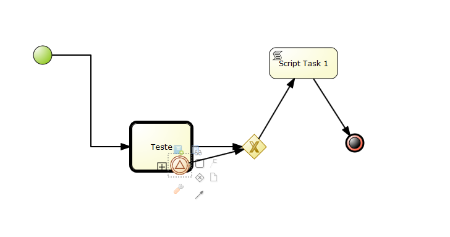
I've a main process with a reusable subprocess:
https://community.jboss.org/servlet/JiveServlet/showImage/2-827714-21131/... https://community.jboss.org/servlet/JiveServlet/downloadImage/2-827714-21...
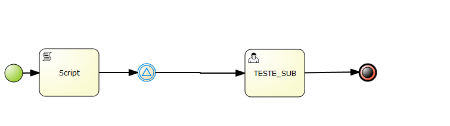
The reusable subprocess calls a process that has a catch signal event.
https://community.jboss.org/servlet/JiveServlet/showImage/2-827714-21132/... https://community.jboss.org/servlet/JiveServlet/downloadImage/2-827714-21...
When I launch the Main, I save the process instance id (idMain) in my own DB. But I don´t know anything about the id of the subprocess. That's the problem.
Because I'm using the same session to start all the main process, when I want to signal the event whitin the subprocess for one single instance, i can't just do:
+ksession.signalEvent(event, params);+
because that will trigger all the instances and not just one.
I tried to pass the id of the main (parent process) using the command:
+ksession.signalEvent(event, params, idMain);+
but nothings happens.
I also found that this works
+ksession.signalEvent(event, params, idSubprocess);+
but like I said, I don't have the idSubprocess.
Another way i tried was trying to transform the signalRef attribute unique using a variable (id_main) in the invocation of the subprocess, that will be used in the parameter signalRef=event.#{id_main}. Didn't work beacuse the value wasn't replaced.
Can anyone point me to the right direction?
Is any way to get the idSubProcess knowing only the IdMain?
Or is a way to use a script task before the signal event just to update the signalEvent parameter?
Thanks
--------------------------------------------------------------
Reply to this message by going to Community
[https://community.jboss.org/message/827714#827714]
Start a new discussion in jBPM at Community
[https://community.jboss.org/choose-container!input.jspa?contentType=1&con...]
12 years, 11 months
[JBoss Tools] - Building JBoss Tools Documentation
by Nick Boldt
Nick Boldt [https://community.jboss.org/people/nickboldt] modified the document:
"Building JBoss Tools Documentation"
To view the document, visit: https://community.jboss.org/docs/DOC-13341
--------------------------------------------------------------
*This document is out of date. See https://github.com/jbosstools/jbosstools-devdoc/blob/master/building/buil... https://github.com/jbosstools/jbosstools-devdoc/blob/master/building/buil...
You can download a folder with a plug-in either from a Anonymous SVN (http://anonsvn.jboss.org/repos/jbosstools) or a Committer SVN (https://svn.jboss.org/repos/jbosstools) ( if you have commiter rights) repositories . In the plug-in's folder you will find a directory with documentation.This instruction explains how you can build the documentation.
h3. Prerequisites:
Ensure you have the Maven building tool
Ensure the Nexus repository and profile as defined here: https://community.jboss.org/docs/DOC-15170 http://community.jboss.org/wiki/MavenGettingStarted-Developers are in your *+settings.xml+* file, located in your *%M2_HOME%/conf/* or *%USER_HOME%/.m2/* folder. These settings are required in order to obtain the necessary jDocbook plug-ins that are required to build the JBoss Tools documentation
h3. Building Steps
So, you checked out the plug-in for which you want to build documentation and the documentation folder. And now you can proceed to building the documentation.
1.Find the +*pom.xml*+ file, that is responsible for building the documentation, in the plug-in folder you downloaded. Normally it’s located in “/docs/reference”.
2.Run *mvn clean install* command in the folder with *+pom.xml+* to start building the documentation. (nightly build docs are build by default)
Example:
user@user-desktop:/home/user/trunk/seam/docs/reference$ mvn clean install
3.If everything is configured correctly you will see a “BUILD SUCCESSFUL” message. You will also see a generated *+target+* folder that contains the built documentation.
Example:
To open the HTML version of the “Seam Dev Tools Reference Guide” guide you need to proceed to
user@user-desktop:/home/user/trunk/seam/docs/seam/docs/reference/target/docbook/publish/en-US/html_single
and open index.html file.
h3. Documentation Profiles
There are 3 profiles that you can build documentation with:
*release* builds release documentation with “new” or “updated” markers next to the corresponding chapters and sections titles
*releaseJBDS* builds release documentation with Jboss.com styles for commercial products
> Remember to redeploy "jbosstools-jdocbook-style" and "jbosstools-docbook-xslt" if it have been changed.
> In order to redeploy you should run 'mvn deploy' from the corresponding directory. You should also have the apropriate credentials to deploy to the http://snapshots.jboss.org/maven2
*diffmk* builds documentation with markers highlighting changes comparing to the previous release version and sets “new” or “updated” markers next to the corresponding chapters and sections titles.*Note:* Please make sure that you have the master_output.xml file (normally the file can be found in \pluginName\docs\reference\en\) as a new guide may not have such file since there's nothing to compare with.
This command launches building documentation with a profile.
mvn install -Pprofile_name
By default, with no profile specified, Nightly Build docs are generated.
In order to build all the guide from one place you need to have JBoss Tools trunk checked out then cd to JBoss_tools_trunk/documentation/jbds-docs/ to build JBDS guides with jboss.com styles or to JBoss_tools_trunk/documentation/jboss-tools-docs to build JBoss Tools guides.
and run
mvn assembly:assembly
You can optionally use a profile in this command.
mvn assembly:assembly -Pprofile_name
--------------------------------------------------------------
Comment by going to Community
[https://community.jboss.org/docs/DOC-13341]
Create a new document in JBoss Tools at Community
[https://community.jboss.org/choose-container!input.jspa?contentType=102&c...]
12 years, 11 months