[jBPM] - Process Runtime Proposed UIs
- First Post
- Replies
- Stats
-
Go to
- ----- 2026 -----
- September
- August
- July
- June
- May
- April
- March
- February
- January
- ----- 2025 -----
- December
- November
- October
- September
- August
- July
- June
- May
- April
- March
- February
- January
- ----- 2024 -----
- December
- November
- October
- September
- August
- July
- June
- May
- April
- March
- February
- January
- ----- 2023 -----
- December
- November
- October
- September
- August
- July
- June
- May
- April
- March
- February
- January
- ----- 2022 -----
- December
- November
- October
- September
- August
- July
- June
- May
- April
- March
- February
- January
- ----- 2021 -----
- December
- November
- October
- September
- August
- July
- June
- May
- April
- March
- February
- January
- ----- 2020 -----
- December
- November
- October
- September
- August
- July
- June
- May
- April
- March
- February
- January
- ----- 2019 -----
- December
- November
- October
- September
- August
- July
- June
- May
- April
- March
- February
- January
- ----- 2018 -----
- December
- November
- October
- September
- August
- July
- June
- May
- April
- March
- February
- January
- ----- 2017 -----
- December
- November
- October
- September
- August
- July
- June
- May
- April
- March
- February
- January
- ----- 2016 -----
- December
- November
- October
- September
- August
- July
- June
- May
- April
- March
- February
- January
- ----- 2015 -----
- December
- November
- October
- September
- August
- July
- June
- May
- April
- March
- February
- January
- ----- 2014 -----
- December
- November
- October
- September
- August
- July
- June
- May
- April
- March
- February
- January
- ----- 2013 -----
- December
- November
- October
- September
- August
- July
- June
- May
- April
- March
- February
- January
- ----- 2012 -----
- December
- November
- October
- September
- August
- July
- June
- May
- April
- March
- February
- January
- ----- 2011 -----
- December
- November
- October
- September
- August
- July
- June
- May
- April
- March
- February
- January
- ----- 2010 -----
- December
- November
- October
- September
- August
- July
- June
- May
- April
- March
- February
- January
- ----- 2009 -----
- December
- November
- October
- September
- August
- July
- June
- May
- April
- March
- February
- January
- ----- 2008 -----
- December
- November
- October
- September
- August
- July
- June
- May
- April
- March
- February
- January
- ----- 2007 -----
- December
- November
- October
- September
- August
- July
- June
- May
- April
- March
- February
- January
- ----- 2006 -----
- December
- November
- October
- September
- August
- July

Mauricio Salatino [https://community.jboss.org/people/salaboy21] modified the document:
"Process Runtime Proposed UIs"
To view the document, visit: https://community.jboss.org/docs/DOC-47609
--------------------------------------------------------------
h1. Introduction
The following document describe the proposed Process Runtime Panels to be developed on top
of the UF framework.
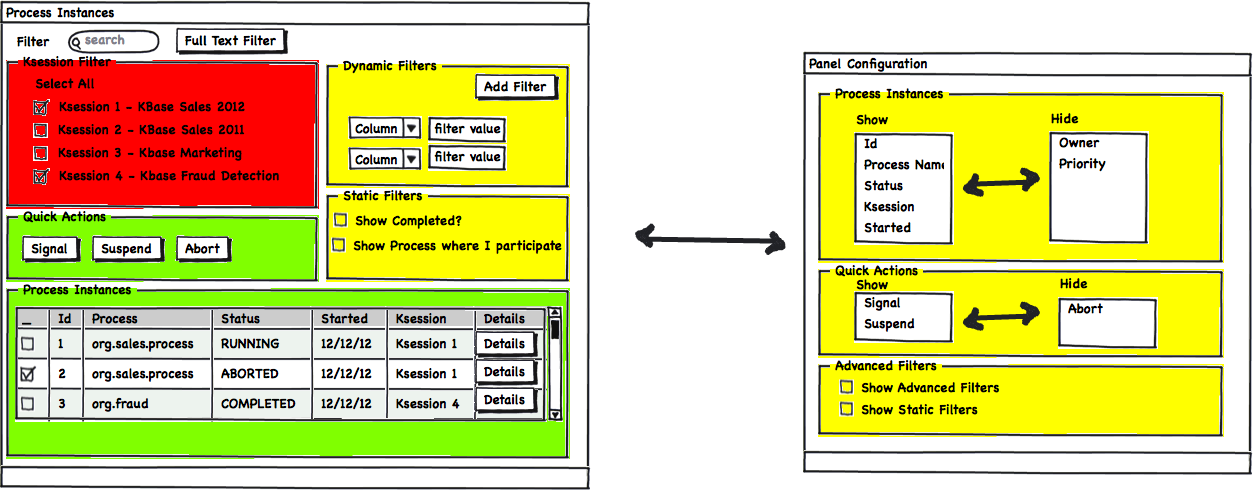
Green means: Phase 1
Yellow means: Phase 2
Red means: Phase 3/Future
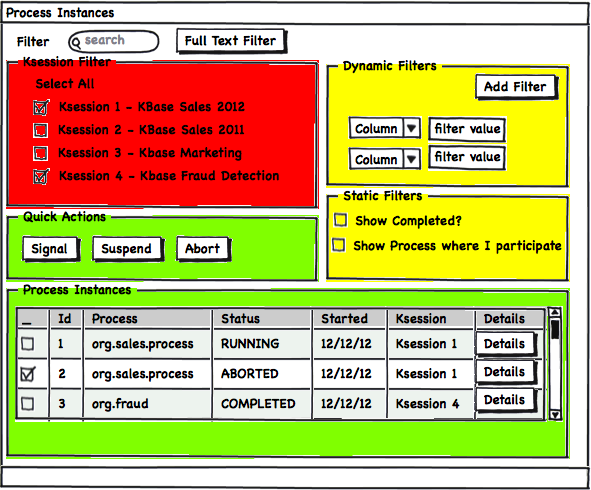
h1. Process Instances List
Features:
* Data Grid Containing the Running and History Log Process Instances that were executed in
the current/selected runtime
* Filters* Runtime (Ksession Filter): This is an advanced filter, probably to not be
displayed for regular business users, but for administration purposes and advanced users
this will be very helpful
* Dynamic Filters on top of the Data Grid Colums. A way to define different criterions
based on the visible colums.
* Static Filters: this section will show common static filters to do well defined queries
that will be used to filter the data displayed in the data grid
* Quick Actions for Process Instances:* A set of quick actions will be displayed. Based on
the selected rows inside the data grid, this quick actions can be executed on a set or a
single process instance.
https://community.jboss.org/servlet/JiveServlet/showImage/102-47609-4-196...
https://community.jboss.org/servlet/JiveServlet/downloadImage/102-47609-4...
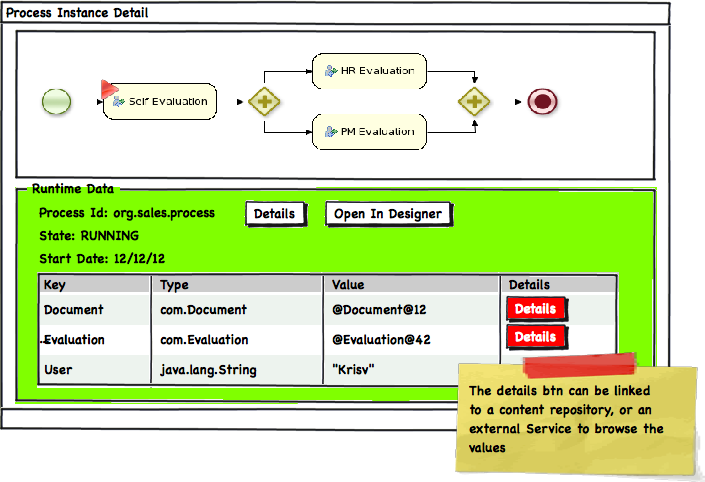
h1. Process Instance Details
Features:
* Status Widget: This widget will allows us to display the current status of the process
graphically and in more advanced phases we can provide a Replay Button to show the
previously executed steps
* Runtime Data Details* This will include a quick access to the process model linking to
the Process Designer
* Basic data about the process state, current nodes, etc
* It will provide also access to the map of Process Variables and a way to inspect Complex
Objects
https://community.jboss.org/servlet/JiveServlet/showImage/102-47609-4-196...
https://community.jboss.org/servlet/JiveServlet/downloadImage/102-47609-4...
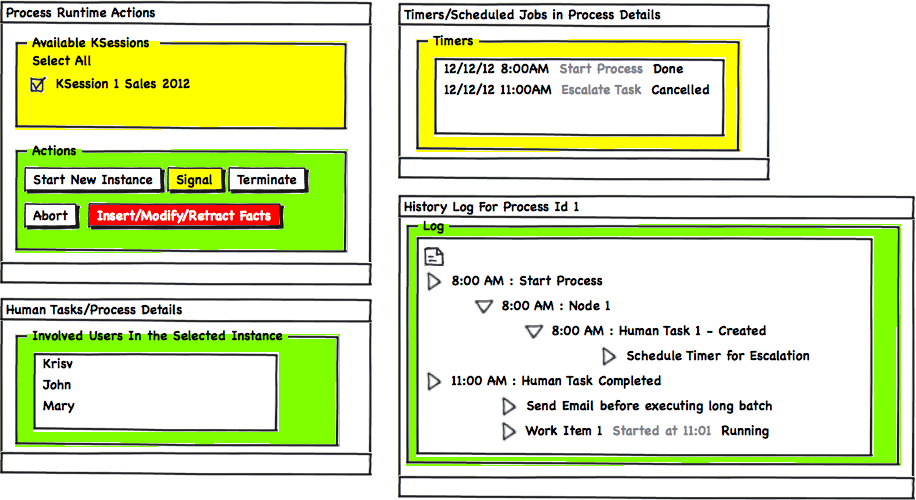
h1. Process Instance Advanced Details Panels
These are a set of panels that gives us more details about the selected process instance.
These panels can be arranged into different perspectives depending on the Users
preferences.
Features:
* Process Runtime Actions
* Timers/Scheduled Jobs
* Human Task Assignment
* History Logs
https://community.jboss.org/servlet/JiveServlet/showImage/102-47609-4-196...
https://community.jboss.org/servlet/JiveServlet/downloadImage/102-47609-4...
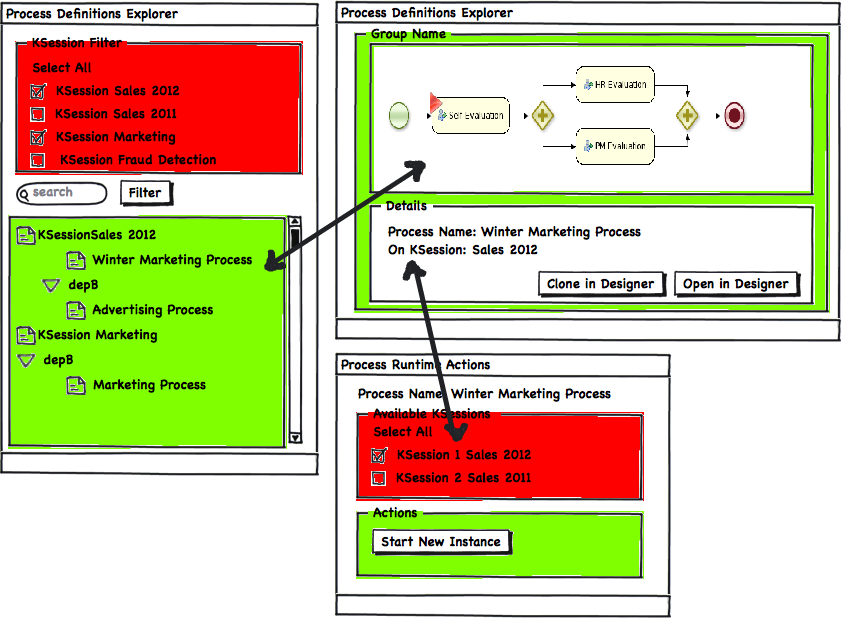
h1. Process Definition Explorer
Features:
* A set of panels to explore the available Process Definitions distributed in different
Runtimes
* The first phase will include a simple view without filters, more advanced features will
be added like runtime filters later on
* The ability to link the process definition inside a runtime environment with the Process
Designer is vital
* The possibility to get information from the process meta data can be added in a second
phase
https://community.jboss.org/servlet/JiveServlet/showImage/102-47609-4-196...
https://community.jboss.org/servlet/JiveServlet/downloadImage/102-47609-4...
h1. Panels Configurations
Features:
* Every panel inside the infrastructure should have a way to configure itself based on
per-user settings
* A separate panel associated with the panel that we are configuring will be provided to
customize the information displayed in the main panel
* This example shows how the colums of the data grid can be filtered, ordered, etc.
https://community.jboss.org/servlet/JiveServlet/showImage/102-47609-4-196...
https://community.jboss.org/servlet/JiveServlet/downloadImage/102-47609-4...
--------------------------------------------------------------
Comment by going to Community
[https://community.jboss.org/docs/DOC-47609]
Create a new document in jBPM at Community
[https://community.jboss.org/choose-container!input.jspa?contentType=102&a...]





Attachments:
- attachment.html (text/html — 7.2 KB)
5080
days inactive
5080
days old
0 comments
1 participants
tags (0)
participants (1)
-
 Mauricio Salatino