[JBoss Tools] Document updated/added: "Use SOA-P with JBoss Tools and Developer Studio"
- First Post
- Replies
- Stats
-
Go to
- ----- 2026 -----
- September
- August
- July
- June
- May
- April
- March
- February
- January
- ----- 2025 -----
- December
- November
- October
- September
- August
- July
- June
- May
- April
- March
- February
- January
- ----- 2024 -----
- December
- November
- October
- September
- August
- July
- June
- May
- April
- March
- February
- January
- ----- 2023 -----
- December
- November
- October
- September
- August
- July
- June
- May
- April
- March
- February
- January
- ----- 2022 -----
- December
- November
- October
- September
- August
- July
- June
- May
- April
- March
- February
- January
- ----- 2021 -----
- December
- November
- October
- September
- August
- July
- June
- May
- April
- March
- February
- January
- ----- 2020 -----
- December
- November
- October
- September
- August
- July
- June
- May
- April
- March
- February
- January
- ----- 2019 -----
- December
- November
- October
- September
- August
- July
- June
- May
- April
- March
- February
- January
- ----- 2018 -----
- December
- November
- October
- September
- August
- July
- June
- May
- April
- March
- February
- January
- ----- 2017 -----
- December
- November
- October
- September
- August
- July
- June
- May
- April
- March
- February
- January
- ----- 2016 -----
- December
- November
- October
- September
- August
- July
- June
- May
- April
- March
- February
- January
- ----- 2015 -----
- December
- November
- October
- September
- August
- July
- June
- May
- April
- March
- February
- January
- ----- 2014 -----
- December
- November
- October
- September
- August
- July
- June
- May
- April
- March
- February
- January
- ----- 2013 -----
- December
- November
- October
- September
- August
- July
- June
- May
- April
- March
- February
- January
- ----- 2012 -----
- December
- November
- October
- September
- August
- July
- June
- May
- April
- March
- February
- January
- ----- 2011 -----
- December
- November
- October
- September
- August
- July
- June
- May
- April
- March
- February
- January
- ----- 2010 -----
- December
- November
- October
- September
- August
- July
- June
- May
- April
- March
- February
- January
- ----- 2009 -----
- December
- November
- October
- September
- August
- July
- June
- May
- April
- March
- February
- January
- ----- 2008 -----
- December
- November
- October
- September
- August
- July
- June
- May
- April
- March
- February
- January
- ----- 2007 -----
- December
- November
- October
- September
- August
- July
- June
- May
- April
- March
- February
- January
- ----- 2006 -----
- December
- November
- October
- September
- August
- July

User development,
The document "Use SOA-P with JBoss Tools and Developer Studio", was updated Jan
20, 2010
by Max Andersen.
To view the document, visit:
http://community.jboss.org/docs/DOC-12921#cf
Document:
--------------------------------------------------------------
If you use JBoss Tools 3 beta or JBDS 2 beta SOA-P can be used side-by-side with any
existing AS or EAP.
For now there is no automatic configuration of SOA-P out-of-the-box, but that will come in
later versions.
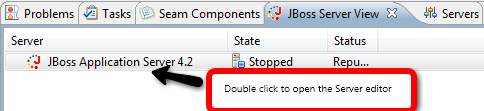
For now the easiest thing to do is to install SOA-P and then in JBDS find the preinstalled
EAP server
in the JBoss Server View and double click it to open the server view editor.
http://community.jboss.org/servlet/JiveServlet/showImage/102-12921-2-1040...
Once in the server editor update the two fields for Deploy Directory and Temporary Deploy
direcotry; it
is sufficient to change the prefix used for the SOA-P install since the EAP directory
structure resembles
SOA-P.
http://community.jboss.org/servlet/JiveServlet/showImage/102-12921-2-1041...
It is also important to double click the Runtime Environment and set the SOA-P directory
here too.
After this when you start and stop the server you will be using SOA-P instead of EAP.
N.B. This will be simpler and more automatic in the GA release !
h2. *Using SOA-P*
When you have the SOA-P server in place you can start working .esb projects very easily.
I've created a small http://screencast.com/t/VfW13GNPwm that shows how it works.
In the screencast I do the following:
1. New Project Example Wizard
2. Selects the Hello World ESB example
3. Waits a few seconds for the download
4. Deploys the .esb
5. Put a breakpoint in the message handler
6. Runs the testclient
7. Sees that the breakpoint gets hit and is debugging away.
See the screencast http://screencast.com/t/VfW13GNPwm
--------------------------------------------------------------

6076
days inactive
6076
days old
0 comments
1 participants
tags (0)
participants (1)
-
 Max Andersen