[JBoss Tools] - Bring Up Forge in JBoss Tools
- First Post
- Replies
- Stats
-
Go to
- ----- 2026 -----
- September
- August
- July
- June
- May
- April
- March
- February
- January
- ----- 2025 -----
- December
- November
- October
- September
- August
- July
- June
- May
- April
- March
- February
- January
- ----- 2024 -----
- December
- November
- October
- September
- August
- July
- June
- May
- April
- March
- February
- January
- ----- 2023 -----
- December
- November
- October
- September
- August
- July
- June
- May
- April
- March
- February
- January
- ----- 2022 -----
- December
- November
- October
- September
- August
- July
- June
- May
- April
- March
- February
- January
- ----- 2021 -----
- December
- November
- October
- September
- August
- July
- June
- May
- April
- March
- February
- January
- ----- 2020 -----
- December
- November
- October
- September
- August
- July
- June
- May
- April
- March
- February
- January
- ----- 2019 -----
- December
- November
- October
- September
- August
- July
- June
- May
- April
- March
- February
- January
- ----- 2018 -----
- December
- November
- October
- September
- August
- July
- June
- May
- April
- March
- February
- January
- ----- 2017 -----
- December
- November
- October
- September
- August
- July
- June
- May
- April
- March
- February
- January
- ----- 2016 -----
- December
- November
- October
- September
- August
- July
- June
- May
- April
- March
- February
- January
- ----- 2015 -----
- December
- November
- October
- September
- August
- July
- June
- May
- April
- March
- February
- January
- ----- 2014 -----
- December
- November
- October
- September
- August
- July
- June
- May
- April
- March
- February
- January
- ----- 2013 -----
- December
- November
- October
- September
- August
- July
- June
- May
- April
- March
- February
- January
- ----- 2012 -----
- December
- November
- October
- September
- August
- July
- June
- May
- April
- March
- February
- January
- ----- 2011 -----
- December
- November
- October
- September
- August
- July
- June
- May
- April
- March
- February
- January
- ----- 2010 -----
- December
- November
- October
- September
- August
- July
- June
- May
- April
- March
- February
- January
- ----- 2009 -----
- December
- November
- October
- September
- August
- July
- June
- May
- April
- March
- February
- January
- ----- 2008 -----
- December
- November
- October
- September
- August
- July
- June
- May
- April
- March
- February
- January
- ----- 2007 -----
- December
- November
- October
- September
- August
- July
- June
- May
- April
- March
- February
- January
- ----- 2006 -----
- December
- November
- October
- September
- August
- July

Koen Aers [http://community.jboss.org/people/koen.aers] modified the blog post:
"Bring Up Forge in JBoss Tools"
To view the blog post, visit:
http://community.jboss.org/community/tools/blog/2011/10/20/bring-up-forge...
--------------------------------------------------------------
A couple of days ago somebody asked me how to use Forge after having installed the JBoss
Tools nighty build. This is a valid question and indeed not so obvious at the moment. We
don't want to overload the top level Eclipse menubar and toolbar so it is somewhat
hidden until we find a good spot for the shortcuts. Suggestions are of course always
welcome.
h1. The Long and Winding Road
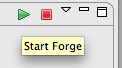
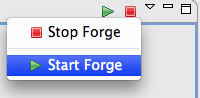
The normal way to start Forge is to start it by pressing the start toolbar button or
choosing the start menu entry of the Forge Console View.
http://community.jboss.org/servlet/JiveServlet/showImage/38-4236-17197/st...
http://community.jboss.org/servlet/JiveServlet/downloadImage/38-4236-1719...
http://community.jboss.org/servlet/JiveServlet/showImage/38-4236-17198/st...
http://community.jboss.org/servlet/JiveServlet/downloadImage/38-4236-1719...
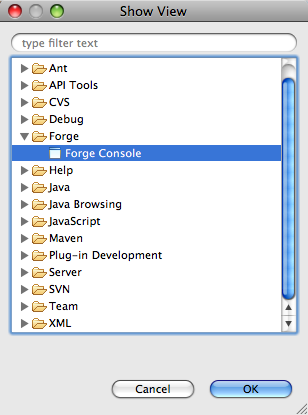
Now the question of course is how you can open this Forge Console View. This can be done
by selecting the 'Forge->Forge Console' entry in the Eclipse 'Show
View' dialog.
http://community.jboss.org/servlet/JiveServlet/showImage/38-4236-17199/Sh...
http://community.jboss.org/servlet/JiveServlet/downloadImage/38-4236-1719...
Now the question of course is how you can open this fancy 'Show View' dialog. The
long and winding road to do this would be to use the Eclipse menu bar and select
'Window->Show View->Other...'. Luckily there is a quicker alternative to do
this last step only using your keyboard:
* Windows and Linux: press Alt+Shift+Q and then another Q
* Mac: press Option+Cmd+Q and then another Q
h1. The Fast Lane
Even with this last keyboard trick this is a very long process and it would be good if
there was a faster way to do it. The good news is that there actually is a shortcut.
http://community.jboss.org/en/tools/blog/2011/08/05/forge-commands-on-the... Earlier, we
posted how to bring up a popup containing all the Forge commands applicable in the current
context
* Windows and Linux: Ctrl+4
* Mac: press Cmd+4
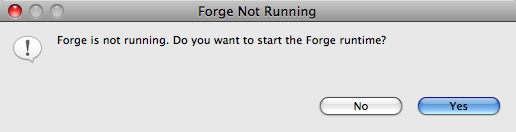
Now if only we extended the functionality of this combination to startup Forge if it is
not running? That is exactly what we did. Pressing the above key combination brings up a
dialog if Forge is not running yet and asks you if you want to start it.
http://community.jboss.org/servlet/JiveServlet/showImage/38-4236-17201/fo...
http://community.jboss.org/servlet/JiveServlet/downloadImage/38-4236-1720...
Pressing 'Yes' on this menu will start Forge, open the Forge Console View and
bring this last view into focus. If the above combination does not work on your machine
(because of a different keyboard layout) or if you would like to hook up this
functionality to a different keystroke combo, you can do so by bringing up the Eclipse
Preferences dialog:
* Windows and Linux: choose 'Window->Preferences'
* Mac: choose 'Eclipse->Preferences...' or press Cmd+, (that is Cmd and the
comma).
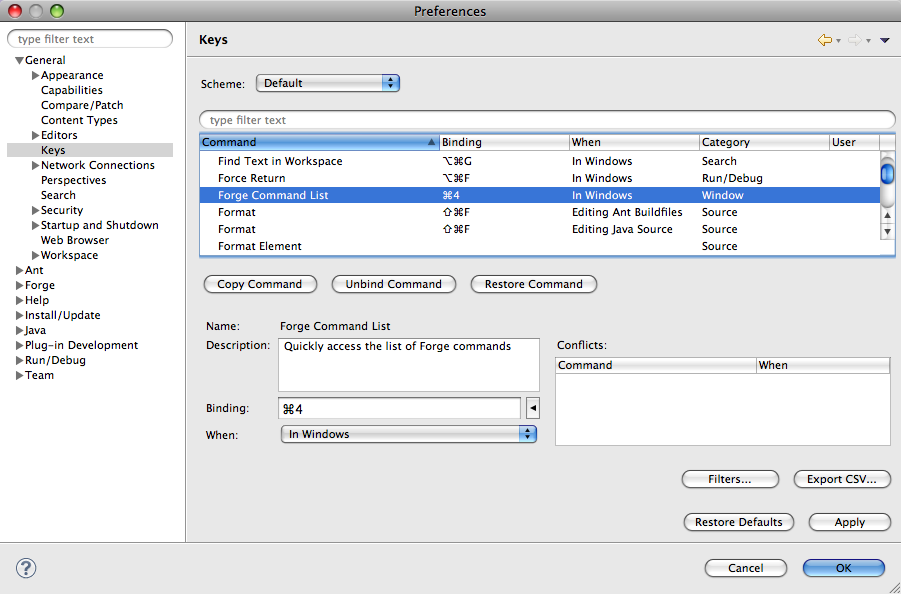
http://community.jboss.org/servlet/JiveServlet/showImage/38-4236-17202/pr...
http://community.jboss.org/servlet/JiveServlet/downloadImage/38-4236-1720...
As you can see in the above screenshot, you can change the binding by selecting the
'General->Keys' entry and then look for the 'Forge Command List'
command. Go into the 'Binding' field and choose your favourite keyboard
combination.
h1. The Result
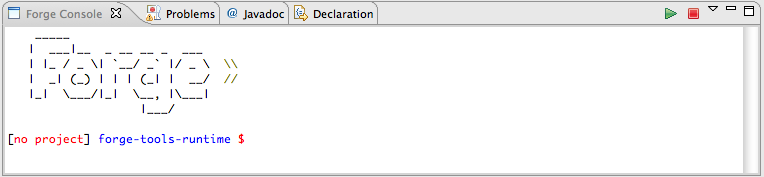
Whether you take the long and winding road or the fast lane, the result should in both
cases that you are seeing the Forge welcome banner and a prompt inviting you to enter your
command of choice.
http://community.jboss.org/servlet/JiveServlet/showImage/38-4236-17208/co...
http://community.jboss.org/servlet/JiveServlet/downloadImage/38-4236-1720...
This is a work in progress. If you have any suggestions to make a better binding, or ideas
about a proper perspective or menu that could be a home for this functionality, be my
guest!
Cheers,
Koen
--------------------------------------------------------------
Comment by going to Community
[http://community.jboss.org/community/tools/blog/2011/10/20/bring-up-forge...]






Attachments:
- attachment.html (text/html — 7.2 KB)
5432
days inactive
5432
days old
0 comments
1 participants
tags (0)
participants (1)
-
 Koen Aers