
1:21 p.m.
Max Rydahl Andersen [https://community.jboss.org/people/maxandersen] modified the blog
post:
"JBoss Tools Reloaded"
To view the blog post, visit:
https://community.jboss.org/community/tools/blog/2013/04/29/jboss-tools-r...
--------------------------------------------------------------
Today it is time for Alpha 2 of JBoss Tools 4.1 with a great set of new improvements which
I'll cover after the jump...
h3. JBoss Tools 4.1 Alpha 2
+Reloaded+
Developer Studio: [ http://devstudio.jboss.com/earlyaccess Download] | Tools: [
http://www.jboss.org/tools/download Download] [
http://download.jboss.org/jbosstools/updates/development/kepler/ Update Site] | [
http://docs.jboss.org/tools/whatsnew What's New] [
http://www.jboss.com/index.html?module=bb&op=viewforum&f=201 Forums] [
http://jira.jboss.com/jira/browse/JBIDE JIRA] [ http://twitter.com/jbosstools Twitter]
JBoss Tools is a set of plugins for Eclipse that complements, enhances and goes beyond the
support that exists for JBoss and related technologies in the default Eclipse
distribution.
JBoss Developer Studio is a fully bundled Eclipse distribution which not only includes the
majority of JBoss Tools but also all its needed dependencies and 3rd party plugins,
allowing for an easy one-click and no-fuss installation.
If you are into doing your own bleeding edge eclipse plugin assembly, JBoss Tools is for
you; if you are more into having something that "Just Works" then JBoss
Developer Studio is the way to go.
h1. Installation
This release is still an alpha and is built against
http://www.eclipse.org/downloads/index-developer.php Kepler M6 (Eclipse 4.3M6), and as
such things can and will still change before the final Kepler release.
Use the http://download.jboss.org/jbosstools/updates/development/kepler/ Update Site from
within Kepler M6 or http://devstudio.jboss.com/earlyaccess Download Developer Studio and
be sure to have the exact correct Eclipse base (note: in Alpha2 the live reload feature is
only in JBoss Tools, it will arrive in Developer Studio in the next release)
h1. Improvements
In this round our main highlight is the introduction of LiveReload support in Eclipse, but
a few other extra items are also to be found if you continue reading...
h2. Live reload in Eclipse
Our new Live reload feature allows you to have your browser automatically refresh when you
save your html, javascript and css files. No need to press refresh manually anymore - you
can just focus on content and functionallity and instantly see and use the changes in your
browser.
If it is hard to imagine how it works, Xavier Coulon made the following video showing how
to activate and use it:
It might not look at much, but when you first start to use it you get rather hooked at it
because of the nice instant feedback. Especially if this is the first time you tried using
something like live reload with your browser.
It is important to note that to use this you should install a livereload plugin/extension
into your browser as documented in our
http://docs.jboss.org/tools/whatsnew/livereload/livereload-news-1.0.0.Alp... What’s
New and Noteworthy.
In this first release of livereload support we focused on making resources loaded from the
local file system supereasy to do and use; we also focused on using the existing
http://feedback.livereload.com/knowledgebase/articles/86174-livereload-pr... defacto
protocol usd by LiveReload and related plugins meaning any browser, script and tool that
works with live reload today should work with our Eclipse implementation of it.
In upcoming release of JBoss Tools the live reload feature will also be part of Developer
Studio, require even less setup (today you need to “add the server”, next it will be setup
automatically and we’ll ask if you want to start it), we will support live reload of
content deployed via server adapters (localhost and remote servers and not just limited to
JBoss AS/EAP servers) and finally we will also provide a proxied server to allow you to do
easy testing on any browser, including mobile devices without installing any browser
plugins.
But for now, enjoy having automatic reload of file based URLs, super nice for HTML5/JS
based applications.
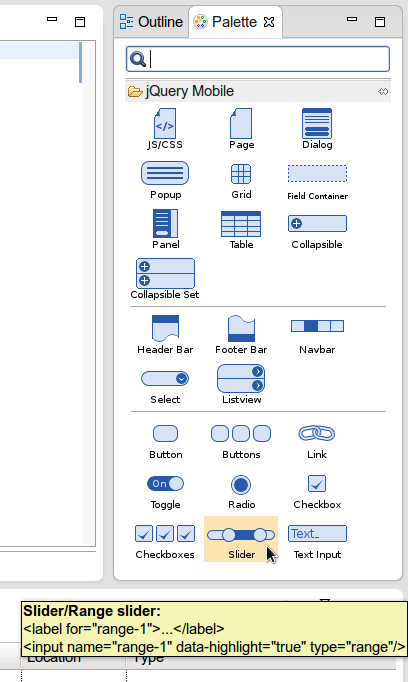
h2. JQuery Mobile Palette
To support HTML5 and mobile client development we’ve added a new HTML palette with initial
support for JQuery Mobile.
This palette will show up when you edit HTML5 files (files with <!DOCTYPE HTML> doc
type). If it does not show up, it is probably using HTML4 or XHTML content types.
The JQuery Mobile palette features a dialog preview when you click or drag one of the
buttons for a component, it lets you see and customize what will be inserted.
The palette looks like this:
http://docs.jboss.org/tools/whatsnew/jst/images/4.1.0.Alpha2/lf.png
http://docs.jboss.org/tools/whatsnew/jst/images/4.1.0.Alpha2/lf.png
and Alexey Kazakov r http://www.screenr.com/embed/7M57 ecorded a video to show it in
action.
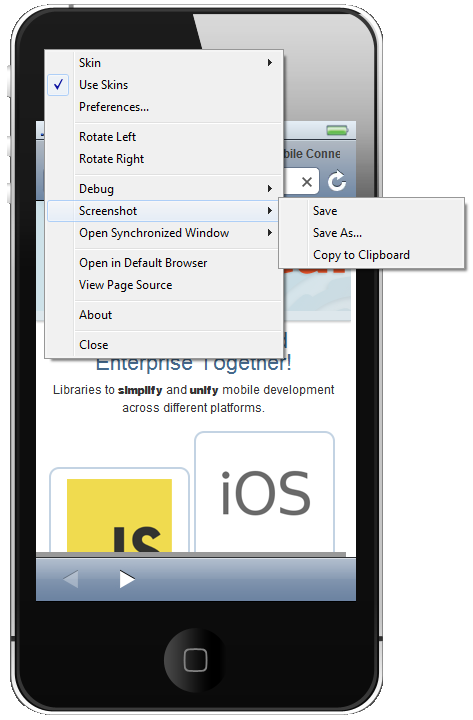
h2. BrowserSim Screenshot
The Browser Simulator now have easy screenshot facility to share your awesome design or
nasty bug you want someone to hunt down.
http://docs.jboss.org/tools/whatsnew/browsersim/images/4.1.0.Alpha2/scree...
http://docs.jboss.org/tools/whatsnew/browsersim/images/4.1.0.Alpha2/scree...
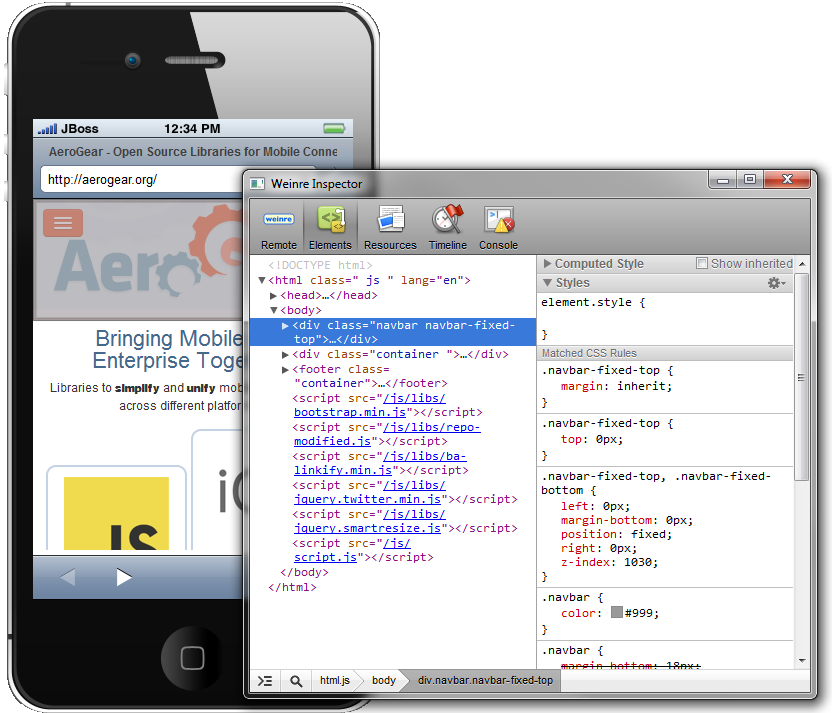
h2. BrowserSim "Remote" Debugging
In the previous release we added Firebug for easy local debugging but we've now also
added Weinre support, allowing you to use any Weinre compatible server to debug/inspect
the application running in BrowserSim.
http://docs.jboss.org/tools/whatsnew/browsersim/images/4.1.0.Alpha2/weinr...
http://docs.jboss.org/tools/whatsnew/browsersim/images/4.1.0.Alpha2/weinr...
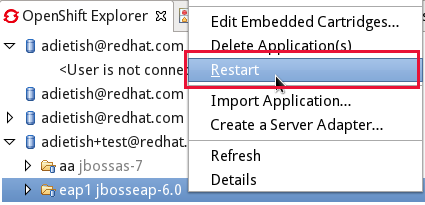
h2. OpenShift Restart
We've started adding more operations to OpenShift Tools to make you less dependent on
the OpenShift command line tools (note: the command line tools are great and we are 100%
compatible - we just prefer not to be 100% dependent on them).
In this release we've added "Restart" to the UI allowing you to trigger a
node restart for your application in case something bad has happened or you changed a
configuration that requires a full node restart.
http://docs.jboss.org/tools/whatsnew/openshift/images/restart-application...
http://docs.jboss.org/tools/whatsnew/openshift/images/restart-application...
h2. Where is WildFly ?
The JBoss AS project was recently renamed to http://www.wildfly.org WildFly. For now
JBoss Tools does not have specific support for WildFly since there have not yet been an
actual binary release.
In this release if you are building WildFly from source the JBoss AS 7.1 adapter should
work since WildFly still is compatible with AS 7.x.
We will support WildFly specific features/layout it in later releases.
h2. Giving Feedback
There are more news and screenshots in http://docs.jboss.org/tools/whatsnew What's
New, and if you got an idea to an improvement or found a bug do not hestiate to open an
issue in our https://jira.jboss.org/jira/browse/JBIDE issue tracker.
h2. What's Next ?
Next release is planned to be our first beta which will include the Cordova Mobile
tooling, improved live reload support, a few Javascript surprises and general
awesomeness.
Follow this blog for more or contact us on our
https://community.jboss.org/community/tools?view=discussions forum and irc if you are
interested in contributing!
Have fun reloading!
--------------------------------------------------------------
Comment by going to Community
[https://community.jboss.org/community/tools/blog/2013/04/29/jboss-tools-r...]
4870
days inactive
4870
days old
0 comments
1 participants
participants (1)
-
 Max Rydahl Andersen