[JBoss Cache] Document updated/added: "JBossCacheDistributedLockManagerDesign"
by Manik Surtani
User development,
The document "JBossCacheDistributedLockManagerDesign", was updated Feb 22, 2010
by Manik Surtani.
To view the document, visit:
http://community.jboss.org/docs/DOC-10260#cf
Document:
--------------------------------------------------------------
h2. Distributed Lock Manager
h3. Background
JBossCache locking is not distributed, but consists of a series of local locks. When locks are obtained on a cache to write some state, the lock is not cluster-wide, but local to the instance. When a transaction commits, the cache then attempts to lock all remote instances accordingly to apply the changes.
The purpose behind this approach is scalability and performance, since acquiring locks on all instances in a cluster and holding them for the entire duration of a transaction leads to poor concurrency, as well as poor scalability.
On the other hand, using local locks allows for the possibility of concurrent writes, causing transactions to fail at commit time if remote locks cannot be obtained. Also, these failures are only detected at commit time and not earlier, when the write takes place.
With recent developments such as http://community.jboss.org/docs/DOC-10272 and http://community.jboss.org/docs/DOC-10278, the drawbacks are mitigated since (1) reads are lock-free with MVCC and (2) state is owned on a limited subset of the cluster thanks to partitioning, reducing the impact of distributed locks on scalability.
Another recent refactoring, the creation of a http://fisheye.jboss.org/browse/JBossCache/core/branches/2.2.X/src/main/j... in JBossCache 2.2.0, makes it easy to implement alternate lock managers.
h3. Cooperative Distributed Lock Manager
This approach uses a LockCommand (that implements http://fisheye.jboss.org/browse/JBossCache/core/branches/2.2.X/src/main/j...) and is broadcast to the entire cluster (or just the partition or buddy group). This is performed by the CooperativeDistributedLockManager synchronously, and waits for all responses. The LockCommand's perform() method then obtains a local lock. Once all responses have been received, the CooperativeDistributedLockManager returns from it's lock method.
Similarly, unlock methods on CooperativeDistributedLockManager broadcast an UnlockCommand.
One drawback to this approach is that on rollback, UnlockCommands still need to be broadcast.
--------------------------------------------------------------
16 years, 4 months
[JBoss Cache] Document updated/added: "JBossCacheSearch"
by Manik Surtani
User development,
The document "JBossCacheSearch", was updated Feb 22, 2010
by Manik Surtani.
To view the document, visit:
http://community.jboss.org/docs/DOC-10285#cf
Document:
--------------------------------------------------------------
h2. jbosscache-searchable
This page is obsolete. Please visit JBossCacheSearchable for information on the SearchableCache sub-interface of Cache.
--------------------------------------------------------------
16 years, 4 months
[JBoss Cache] Document updated/added: "JBossCacheCustomInterceptors"
by Manik Surtani
User development,
The document "JBossCacheCustomInterceptors", was updated Feb 22, 2010
by Manik Surtani.
To view the document, visit:
http://community.jboss.org/docs/DOC-10258#cf
Document:
--------------------------------------------------------------
h2. This page details the designs for adding custom interceptors declaratively into JBossCache.
*UPDATED: See http://wiki.jboss.org/wiki/JBC3Config for details of all new config elements in JBoss Cache 3.x.*
h3. Configuration
The end goal is for users to be able to provide the following in their configurations:
<attribute name="CustomInterceptors">
<config>
<interceptor>
<class>com.myCompany.MyInterceptor</class>
<properties>
x=y
i=10
</properties>
<position first="true"></position>
<!-- could also be either of:
<position last="true"></position>
<position index="4"></position>
<position before="org.jboss.cache.interceptors.CallInterceptor"></position>
<position after="org.jboss.cache.interceptors.CallInterceptor"></position>
-->
</interceptor>
...
</config>
</attribute>
h3. Custom interceptor design
* Custom interceptors must extend org.jboss.cache.interceptors.CommandInterceptor.
* Custom interceptors must declare a public, empty constructor to enable construction.
* Custom interceptors will have any properties declared passed in as a Properties object, in CommandInterceptor's setProperties(Properties p) method.
* Custom interceptors will not be able to participate in any lifecycle or injection (at this time). Annotating methods as @Inject, @Start, @Stop or @Destroy will have no effect.
--------------------------------------------------------------
16 years, 4 months
[JBoss Cache] Document updated/added: "OptimisticNodeLocking"
by Manik Surtani
User development,
The document "OptimisticNodeLocking", was updated Feb 22, 2010
by Manik Surtani.
To view the document, visit:
http://community.jboss.org/docs/DOC-11544#cf
Document:
--------------------------------------------------------------
h2. Optimistic Locking in JBossCache
----
h2. Introduction
JBossCache currently locks data nodes (based on isolation level) in a http://www.agiledata.org/essays/concurrencyControl.html#PessimisticLocking, which essentially requires data nodes to be locked (either for reading or writing) for the entire duration of a transaction. While very reliable and easy to implement, this approach does have scalability issues.
This implementation of http://www.agiledata.org/essays/concurrencyControl.html#OptimisticLocking aims to solve this problem of locked nodes by versioning the data.
h2. Reasons for use
Typically the main reasons for using an optimistic locking scheme centre around performance and deadlock prevention.
h3. Performance
With optimistic locking, greater concurrecy can be achieved since data is locked (either read or write) only for a part of the commit phase of a transaction, rather than the entire duration of the transaction as is the case with pessimistic locks.
This is done while still maintaining a high level of data integrity (close to SERIALIZABLE in DB isolation level parlance) by maintaining copies and versioning the data.
In addition to improving throughput and scalability, further improvements are seen as when using a replicated cache, replication would only occur when transactions complete successfully (see section below re: transactions, as all requests are treated as transactional)
Also, see JBossCacheOptimisticLockingPerformance
h3. Deadlock prevention
Deadlocks may occur with pessimistic locks. Imagine the situation where User A performs a transaction, that involves reading data node X, and then writing to data node Y. User B performs a transaction where it reads data node Y and writes to data node X. If they run concurrently, and they both perform their first steps, data node X is read locked (by User A) and data node Y is read locked by (User B). Neither transaction can continue because they both require write locks on data nodes Y and X respectively, but neither tx can complete to release the read locks.
Because of the improved concurrency afforded by versioning the data, optimistic locking would prevent such deadlocks from occuring.
h2. Design
This implementation of optimistic locking uses some simple concepts to allow for adt nodes not to be locked throughout the duration of a transaction.
* Transactions
Even simple operations that are not performed within the context of a transaction are treated as transactional. An interceptor intercepts all calls to the cache at a very early stage and sets up a local transaction if necessary.
* Workspaces
A workspace is created, in which a snapshot of data in the cache is maintained. This workspace, attached to the transaction, serves up reads and writes to the cache rather than allowing such calls to access the cache directly.
* Versioning
Data nodes are versioned. Any time new data is written back to the cache, the node's version is updated.
* Verification
Upon completion of a transaction (during a commit) modified nodes in the workspace are checked for integrity by comparing their versions against the versions of their counterparts in the underlying cache. If the versions tally up, the commit is allowed to proceed and changes are written back to the cache. If not, an exception is thrown and the transaction fails. +Note that this is the only stage where locks are acquired on the cache+
h2. Configuration
The only change needed, to enable optimistic locking, is to use OPTIMISTIC as your node locking scheme:
<!--
Node locking scheme:
OPTIMISTIC
PESSIMISTIC (default)
-->
<attribute name="NodeLockingScheme">OPTIMISTIC</attribute>
Note that the IsolationLevel attribute is IGNORED if your NodeLockingScheme above is OPTIMISTIC.
Also, note that you *have* to set a transaction manager class to use optimistic locking.
h2. Current status
Optimistic locking is in the CVS HEAD of JBossCache, and the code will be available in JBossCache 1.2.4 although not formally released and/or supported. During this time optimistic locking will undergo performance benchmarks and tuning, with a plan to be formally released in JBossCache 1.3.
Please note that beta releases of 1.2.4 had a serious bug in the optimistic locking code http://jira.jboss.com/jira/browse/JBCACHE-329 - this is fixed in the final release of 1.2.4 and in CVS HEAD (to become 1.3)
h2. JIRA
... on this feature is over here: http://jira.jboss.com/jira/browse/JBCACHE-69
h2. Implementation Details
... are available here - http://community.jboss.org/docs/DOC-11545
--------------------------------------------------------------
16 years, 4 months
[JBoss Cache] Document updated/added: "JBossCache2.1.x_And_Beyond_QA"
by Manik Surtani
User development,
The document "JBossCache2.1.x_And_Beyond_QA", was updated Feb 22, 2010
by Manik Surtani.
To view the document, visit:
http://community.jboss.org/docs/DOC-10244#cf
Document:
--------------------------------------------------------------
h2. QA for JBoss Cache from version 2.1.0 and beyond.
Note that JBoss Cache has now been split into *core* and *pojo* modules, each with independent releases.
h3. JBoss Cache core
h4. General notes
* Should be built using Maven 2.0.6 or later
* Should be built using Sun JDK 5, unless otherwise stated.
h4. Building and testing the code
* Check out the module from subversion: svn co http://anonsvn.jboss.org/repos/jbosscache/core/tags/TAG_NAME
* Run a clean build and test suite: mvn clean package
** The tests should run clean. Any known failures would have their tests disabled before tagging.
* Now switch to Sun JDK 6 and rebuild: mvn clean package
** Again, the tests should run clean.
h4. Testing the documentation
* The above process should generate documentation in distribution/jbosscache-core-2.X.Y.Z-doc.zip
* Unzip this file and check visually that the documentation has been generated.
** There should be 4 'documents' here: a userguide, FAQ, tutorial and API docs.
h4. Testing the binary distribution
* The build process should also generate a binary distribution in distribution/jbosscache-core-2.X.Y.Z-bin.zip
* Check that this contains jbosscache-core.jar, READMEs and EULAs as well as dependent jars.
* Check that this contains etc and licenses directories containing cache configurations and third-party jar licenses respectively.
h4. Testing the all distribution
* The build process should also generate an 'all' distribution in distribution/jbosscache-core-2.X.Y.Z-all.zip
* Check that this contains jbosscache-core.jar, READMEs and EULAs as well as dependent jars.
* Check that this contains etc and licenses directories containing cache configurations and third-party jar licenses respectively.
* Check that this contains src and test directories
* Run the tests using JDK 5
** ant clean run.tests
** Should see the same results witnessed when building the distribution.
* Run the tests using JDK 6
** ant clean run.tests
** Should see the same results witnessed when building the distribution.
* Run the tests using JDK1.4
** ant clean run.tests
** Should see an error message stating that JDK 5 and above is needed.
* Run through the steps outlined in the tutorial (doc/tutorial_en/html_single/index.html) and ensure output is as expected in the tutorial.
h4. Testing integration with JBoss AS
* The JIRA issue in the QA project will identify any AS release(s) (or branch(es), if the release is meant to be integrated into an unreleased AS version) with which the release must be compatible. If no such release is listed, AS integration testing is not required.
* Compare the dependencies listed in the JBoss Cache pom.xml with those listed in the AS's build/build-thirdparty.xml file. If there are any inconsistencies, the releases are incompatible, disqualifying the release. (NOTE: for JBC 2.2.0 and later, a more sophisticated mechanism to identify versioning inconsistencies will be developed.)
* Check out and build the indicated AS release.
* Replace the /build/output/jboss-xxx/server/all/lib/jbosscache.jar with the jar from the new JBC release.
* Execute the tests-clustering-all-stacks target in the AS testsuite
* Check for regressions vs. the JBC release previously included with the release.
h4. Deploy the build
* Release binary ZIPs to Sourceforge.net and inform Manik Surtani when this has been done.
** Release notes are in JIRA under the project version number, no release note is provided in the distribution. Link to http://jira.jboss.com/jira/browse/JBCACHE in Sourceforge when entering release notes.
* Release to the JBoss AS repository on repository.jboss.org
* Release to Maven2 repository
** Use JDK 5
** Ensure you have https://svn.jboss.org/repos/repository.jboss.org/maven2 checked out somewhere. Even if not all subdirs are present, at least org/jboss/cache should be there.
** Ensure that you have the following in your ~/.m2/settings.xml
<settings>
...
<profiles>
...
<profile>
<id>jboss</id>
<properties>
<maven.repository.root>/path/to/svn-checkout/maven2</maven.repository.root>
</properties>
</profile>
</profiles>
<activeProfiles>
<activeProfile>jboss</activeProfile>
</activeProfiles>
...
</settings>
** And then run mvn -Dmaven.test.skip.exec=true deploy (do not use -Dmaven.test.skip=true since it will skip building test jars)
** Use svn add to add any new files and directories created in your maven2/org/jboss/cache/ checkout
** Use svn commit to commit maven2/org/jboss/cache/
** Verify that this has been deployed to the maven2 repo (after about 5 mins) by browsing to http://repository.jboss.org/maven2/org/jboss/cache
h3. Update Downloads and Documentation Page
* Check out or update the JBoss Cache Labs CMS documentation directory from SVN
** svn co https://cms.labs.jboss.com/prod/forge/portal-content/default/members/jbos...
* Put the new docs in there (follow an existing version as an example, e.g., 2.2.0.GA)
* Add and commit the new docs into SVN
** E.g., svn add 2.2.1.GA && svn commit 2.2.1.GA -m "2.2.1.GA docs"
* Update the Documentation wiki to point to the new docs
** http://www.jboss.org/community/docs/DOC-12843
** Test links on Documentation wiki
* Update the Downloads wiki with the download link on SourceForge
** http://www.jboss.org/community/docs/DOC-12844
** Test links on Download wiki
** Remove old links if not needed.
*** E.g., when releasing 2.2.1.GA, you can remove 2.2.0.GA as the "stable" link, as well as 2.2.1.CR2 as the "unstable" link.
* Update the public www.jbosscache.org website with details.
** The "current stable" and "current unstable" sections should reflect the new version numbers.
** This is in SVN as well:
*** https://cms.labs.jboss.com/prod/forge/portal-content/default/members/jbos...
h1. POJO Cache
h4. General notes
* Should be built using Maven 2.0.6 or later
* Should be built using Sun JDK 5, unless otherwise stated.
* Depends on core cache being released first
h4. Building and testing the code
* Check out the module from subversion: svn co http://anonsvn.jboss.org/repos/jbosscache/pojo/tags/TAG_NAME
* Run a clean build and test suite: mvn clean package
** The tests should run clean. Any known failures would have their tests disabled before tagging.
* Now switch to Sun JDK 6 and rebuild: mvn clean package
** Again, the tests should run clean.
h4. Testing the documentation
* The above process should generate documentation in distribution/jbosscache-pojo-2.X.Y.Z-doc.zip
* Unzip this file and check visually that the documentation has been generated.
** There should be 4 'documents' here: a userguide, FAQ, tutorial and API docs.
h4. Testing the binary distribution
* The build process should also generate a binary distribution in distribution/jbosscache-pojo-2.X.Y.Z-bin.zip
* Check that this contains jbosscache-pojo.jar, READMEs and EULAs as well as dependent jars.
* Check that this contains etc and licenses directories containing cache configurations and third-party jar licenses respectively.
h4. Testing the all distribution
* The build process should also generate an 'all' distribution in distribution/jbosscache-pojo-2.X.Y.Z-all.zip
* Check that this contains jbosscache-pojo.jar, READMEs and EULAs as well as dependent jars.
* Check that this contains etc and licenses directories containing cache configurations and third-party jar licenses respectively.
* Check that this contains src and test directories
* Run the tests using JDK 5
** ant clean run.tests
** Should see the same results witnessed when building the distribution.
* Run the tests using JDK 6
** ant clean run.tests
** Should see the same results witnessed when building the distribution.
* Run the tests using JDK1.4
** ant clean run.tests
** Should see an error message stating that JDK 5 and above is needed.
* Run through the steps outlined in the tutorial (doc/tutorial_en/html_single/index.html) and ensure output is as expected in the tutorial.
h4. Deploy the build
* Release binary ZIPs to Sourceforge.net and inform Jason Greene when this has been done.
** Release notes are in JIRA under the project version number, no release note is provided in the distribution. Link to http://jira.jboss.com/jira/browse/PCACHE in Sourceforge when entering release notes.
* Release to Maven2 repository
** Use JDK 5
** Ensure you have https://svn.jboss.org/repos/repository.jboss.org/maven2 checked out somewhere. Even if not all subdirs are present, at least org/jboss/cache should be there.
** Ensure that you have the following in your ~/.m2/settings.xml
<settings>
...
<profiles>
...
<profile>
<id>jboss</id>
<properties>
<maven.repository.root>/path/to/svn-checkout/maven2</maven.repository.root>
</properties>
</profile>
</profiles>
<activeProfiles>
<activeProfile>jboss</activeProfile>
</activeProfiles>
...
</settings>
** And then run mvn -Dmaven.test.skip.exec=true deploy
** Use svn add to add any new files and directories created in your maven2/org/jboss/cache/ checkout
** Use svn commit to commit maven2/org/jboss/cache/
** Verify that this has been deployed to the maven2 repo (after about 5 mins) by browsing to http://repository.jboss.org/maven2/org/jboss/cache
h2.
h3. Update Downloads and Documentation Page
* Check out or update the JBoss Cache Labs CMS documentation directory from SVN
** svn co https://cms.labs.jboss.com/prod/forge/portal-content/default/members/jbos...
* Put the new docs in there (follow an existing version as an example, e.g., 2.2.0.GA)
* Add and commit the new docs into SVN
** E.g., svn add 2.2.1.GA && svn commit 2.2.1.GA -m "2.2.1.GA docs"
* Update the Documentation wiki to point to the new docs
** http://www.jboss.org/community/docs/DOC-12843
** Test links on Documentation wiki
* Update the Downloads wiki with the download link on SourceForge
** http://www.jboss.org/community/docs/DOC-12844
** Test links on Download wiki
** Remove old links if not needed.
*** E.g., when releasing 2.2.1.GA, you can remove 2.2.0.GA as the "stable" link, as well as 2.2.1.CR2 as the "unstable" link.
* Update the public www.jbosscache.org website with details.
** The "current stable" and "current unstable" sections should reflect the new version numbers.
** This is in SVN as well:
*** https://cms.labs.jboss.com/prod/forge/portal-content/default/members/jbos...
--------------------------------------------------------------
16 years, 4 months
[JBoss Cache] Document updated/added: "JBossCacheHibernate"
by Manik Surtani
User development,
The document "JBossCacheHibernate", was updated Feb 22, 2010
by Manik Surtani.
To view the document, visit:
http://community.jboss.org/docs/DOC-10265#cf
Document:
--------------------------------------------------------------
h2. JBossCache with Hibernate
JBossCache can be used as a 2nd level cache provider for Hibernate, providing clustered, transactional caching.
This page discusses general best-practices and tips when using JBossCache with Hibernate. This is a live document and will continue to be updated.
h3. Versions
* JBossCache versions prior to 1.2.2 are not recommended for use with Hibernate, due to deadlock issues that may arise.
* Hibernate versions prior to 3.0.2 are not recommended for use with JBossCache, for the same deadlock issues mentioned above.
* Hibernate >= 3.2 is required if you plan to use Optimistic Locking.
* JBoss Cache >= 3.0.0 and Hibernate >= 3.3.0 is your optimal configuration, using MVCC as a locking scheme on JBoss Cache.
h3. Recommended JBossCache configuration options
* Do not use a cache loader. Redundant, and an unnecessary overhead.
* Use an eviction policy to prevent the cache getting too large.
* Use http://www.hibernate.org/42.html#A5 where possible. This will ensure Hibernate and JBoss Cache participate in transactions together, in the manner they've been designed to.
|| +CACHE MODE+ || OPTIMISTIC LOCKING || PESSIMISTIC LOCKING ||
| REPL_SYNC | + data correctness for all caches.
- performance and scalability | Does not provide as much concurrency as OPTIMISTIC |
| REPL_ASYNC | Recommended for Query and Collection caches. Query cache requires REPL to work. | Does not provide as much concurrency as OPTIMISTIC |
| INVALIDATION_SYNC | Recommended for Entity Caches. Will not work correctly with Query cache. | Does not provide as much concurrency as OPTIMISTIC |
| INVALIDATION_ASYNC | Better throughput and scalability than INVALIDATION_SYNC at the risk of data integrity when the network is stressed and in certain high-concurrency edge cases | Does not provide as much concurrency as OPTIMISTIC |
h4. Overall Recommendation:
* If you are only using a query cache or collection cache, use REPL_ASYNC.
* If you are only caching entities, use INVALIDATION_SYNC.
* If you are using a combination of query caching and entity caching, use REPL_SYNC.
* Always use Optimistic Locking as it improves concurrency. Use MVCC if you are using JBoss Cache >= 3.0.0.
* Hibernate 3.2 has special support for JBoss Cache optimistic locking through org.hibernate.cache.OptimisticTreeCache
* If you are using MVCC, use org.hibernate.cache.TreeCache as your provider and make sure your cache is configured to use MVCC.
h3. Looking up a TreeCache instance in Hibernate
* If using JBoss Cache 1.4.x and Hibernate 3.2.x, please use one of the http://community.jboss.org/docs/DOC-12948 targeted for these libraries.
* If using JBoss Cache 2.x or 3.x and Hibernate 3.3.x, please check the corresponding Hibernate JBoss Cache guide.
h3. Specify Level 2 Cache Provider or Disable It
* Bug in JBoss AS 4.0.4RC1: if you don't specify level 2 cache provider, Hibernate looks for ehcache-1.1.jar, even though the documentation indicates use_second_level_cache defaults to false.
* See http://jira.jboss.com/jira/browse/JBAS-2868?page=all
h3. Newer versions of JBoss Cache
With JBoss Cache 1.3.0 or newer, you have additional features that improve integration with Hibernate.
* Invalidation instead of replication. Allows for the cache to invalidate data on remote caches rather than broadcasting updated state. Improves efficiency and scalability, reduces network load, but make sure you use INVALIDATION_SYNC since INVALIDATION_ASYNC with Hibernate may introduce inconsistencies in edge cases (See http://jira.jboss.com/jira/browse/JBCACHE-806)
* http://community.jboss.org/docs/DOC-11544. Allows for greater concurrency and hence scalability.
* See http://anoncvs.forge.jboss.com/viewrep/JBoss/JBossCache/etc/META-INF/hibe... in /etc/META-INF on JBossCache's CVS tree for a sample config.
* A new TreeCacheProvider for Hibernate that makes use of the new http://community.jboss.org/docs/DOC-10277.
With JBoss Cache 3.0.0 or newer, you have http://community.jboss.org/docs/DOC-10272 locking which deprecates both Optimistic and Pessimistic locking and should be used as a default. It provides a very high degree of concurrency while providing all of the consistency guarantees of pessimistic locking.
h3. Troubleshooting
* Pessimistic locking - http://community.jboss.org/docs/DOC-12761
* Optimistic locking - http://community.jboss.org/docs/DOC-9505
h3. Related
* http://community.jboss.org/docs/DOC-10267
* http://community.jboss.org/docs/DOC-10394
* http://community.jboss.org/docs/DOC-10242
* http://docs.jboss.com/jbcache/
* http://www.hibernate.org/5.html
--------------------------------------------------------------
16 years, 4 months
[JBoss Cache] Document updated/added: "JBossCacheDocI18n"
by Manik Surtani
User development,
The document "JBossCacheDocI18n", was updated Feb 22, 2010
by Manik Surtani.
To view the document, visit:
http://community.jboss.org/docs/DOC-10261#cf
Document:
--------------------------------------------------------------
h2. Internationalising JBoss Cache documentation
JBoss Cache documentation is organised in a manner that can very easily be internationalised.
Please contact Manik Surtani (manik AT jboss DOT org) if you wish to contribute. We're currently looking for translations into:
* French
* German
* Spanish
* Italian
* Chinese
* Japanese
--------------------------------------------------------------
16 years, 4 months
[JBoss Cache] Document updated/added: "JBossCacheMVCC"
by Manik Surtani
User development,
The document "JBossCacheMVCC", was updated Feb 22, 2010
by Manik Surtani.
To view the document, visit:
http://community.jboss.org/docs/DOC-10272#cf
Document:
--------------------------------------------------------------
Design of replacing both pessimistic and optimistic locking in JBoss Cache with a Java memory based implementation of http://en.wikipedia.org/wiki/Multiversion_concurrency_control.
* JIRA - http://jira.jboss.com/jira/browse/JBCACHE-1151
* http://www.jboss.com/index.html?module=bb&op=viewtopic&p=4064626#4064626
h2. Background
This is about changing the current locking strategies with JBoss Cache. We currently support optimistic and pessimistic locking, but both these schemes have certain problems:
h3. Pessimistic locking
* Poor concurrency - writers block readers
* Increased potential for deadlocks (TimeoutException)
* Issues when readers upgrade to writers (http://jira.jboss.com/jira/browse/JBCACHE-97)
h3. Optimistic locking
* High memory overhead and low scalability since each reader and writer transaction copies data to a workspace.
* Expensive post-transaction comparison phase
* Can only implement 1 isolation mode
h3. Overall
* Too many configuration/tuning options makes things confusing
* Lots of unnecessary code complexity
h2. What is MVCC?
Multi-Version Concurrency Control is a generic term for versioning data to allow for non-blocking reads. RDMBSs often implement some
form of MVCC to achieve high concurrency. Our proposed implementation of MVCC takes advantage of Java memory semantics.
h3. About JBossCache MVCC
* Readers all read the node directly
* When writing, the node is copied and writes made to the copy.
** Exclusive lock obtained on copy.
** Only 1 writable copy is maintained per node
*** Readers aren't blocked during writes
*** Only 1 writer allowed
* (R-R only) When writing (before tx commits, even), the writer compares versions with the underlying node
** Either throws an exception (default) or overwrites the node anyway (accept-write-skew option)
h4. Repeatable-Read Example
1. Cache starts at N(1)
2. Tx1 reads: has a ref to N(1)
3. Tx2 reads: has a ref to N(1)
4. Tx2 writes: has a ref to N(1)'
5. Tx2 commits: cache is N(2)
6. Tx1 reads: still sees N(1)
h3. Benefits over optimistic locking
* Low memory footprint - only 1 copy per write!
* Allows for all isolation modes
* More flexible handling of version mismatches (overwrites can optionally be allowed)
* Fail-fast when version checking is enabled (failure occurs on write, not commit)
* Able to provide forceWriteLock (SELECT FOR UPDATE) semantics, which O/L does not do
h3. Benefits over pessimistic locking
* No upgrade exceptions
* Better concurrency
* Non-blocking reads
* No dirty read race in READ_COMMITTED
h3. Other benefits
* Much simpler code base to maintain, debug
** Single set of interceptors
** Locks much simpler, no upgrades
** Standard Java references and garbage collection to take care of thread/tx isolation (see implementation design below)
* Simpler configuration
** Isolation level : READ_UNCOMMITTED, READ_COMMITTED (default), REPEATABLE_READ, SERIALIZABLE
** Write-skew handling : Reject (default), Accept
** Locking scheme : striped (default), one-to-one
h3. Supported isolation levels
We're considering only supporting READ_COMMITTED, REPEATABLE_READ and SERIALIZABLE. We feel that lower isolation levels are pretty much academic and don't really have much real world use. We're also considering using READ_COMMITTED as a default - this is what most database implementation use to achieve high concurrency.
If lower isolation levels are specified, should we allow this, but substitute for a higher isolation level?
h2. Implementation Design
h3. Errata
The following points have been added to the design after review of the diagrams that follow. Note that some concepts represented in the diagrams may conflict with the errata that follow; the errata will take precedence.
1. Versioning, along with a write skew check, is not necessary in READ_COMMITTED since doing a write at any time means the exclusive writer would be expected to update the last committed version. As such, READ_COMMITTED would delegate to an UnversionedNode instead of a VersionedNode, and the write skew check would be skipped.
2. Locks should be acquired directly by querying a LockManager implementation (either StripedLockManager or PerNodeLockManager, or maybe even in future DistributedLockManager) rather than making lock() and unlock() calls on the node directly. While doing this on a node is cleaner in an "OO" purist view, it does bring up problems seen with the current pessimistic locking approach where, for example, attempting a delete on a node that does not exist entails creating the node just so the lock can be obtained and then deleting it again.
3. RepeatableReadNode doesn't need to hold a reference to the original node (repeatable read sequence diagram, step 26) since this can be peeked afresh.
4. For the sake of transactions, all "updated" node copies made (when attempting a write) should have their references placed in the TransactionEntry. Future reads in the same transaction (such as repeatable read sequence diagram step 6) should first consult the TransactionEntry in case a reference to the copy should be used before doing a peek.
h3. Overview
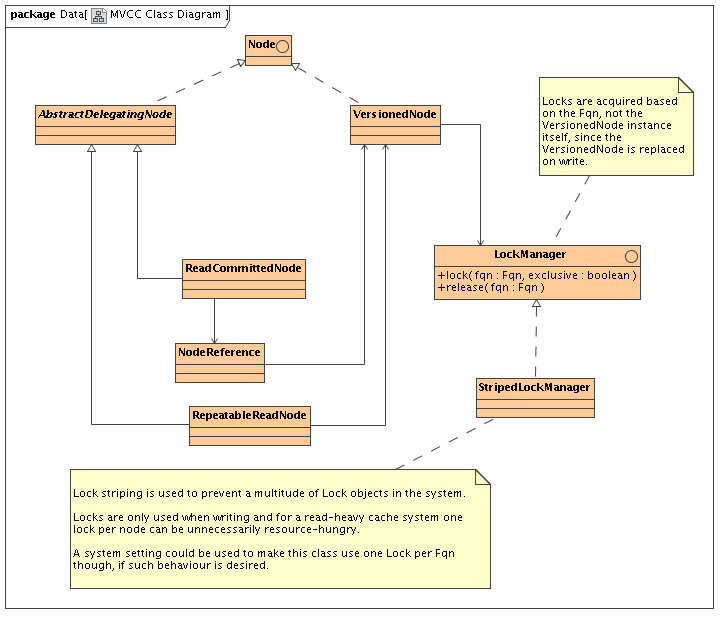
h4. Basic class diagram of relevant bits
http://community.jboss.org/servlet/JiveServlet/download/10272-50-4675/Cla...
h4. Description
* When a user gets a hold of a Node using Cache.getRoot().getChild() we will return a new instance of ReadCommittedNode or RepeatableReadNode every time.
** AbstractDelegatingNode subclasses are very lightweight objects that just hold a reference, and cheap to construct
*** RepeatableReadNode holds a reference to VersionedNode in the cache and delegates calls to it
*** ReadCommittedNode holds a reference to a NodeReference, which holds a *volatile* reference to a VersionedNode and delegates calls to it
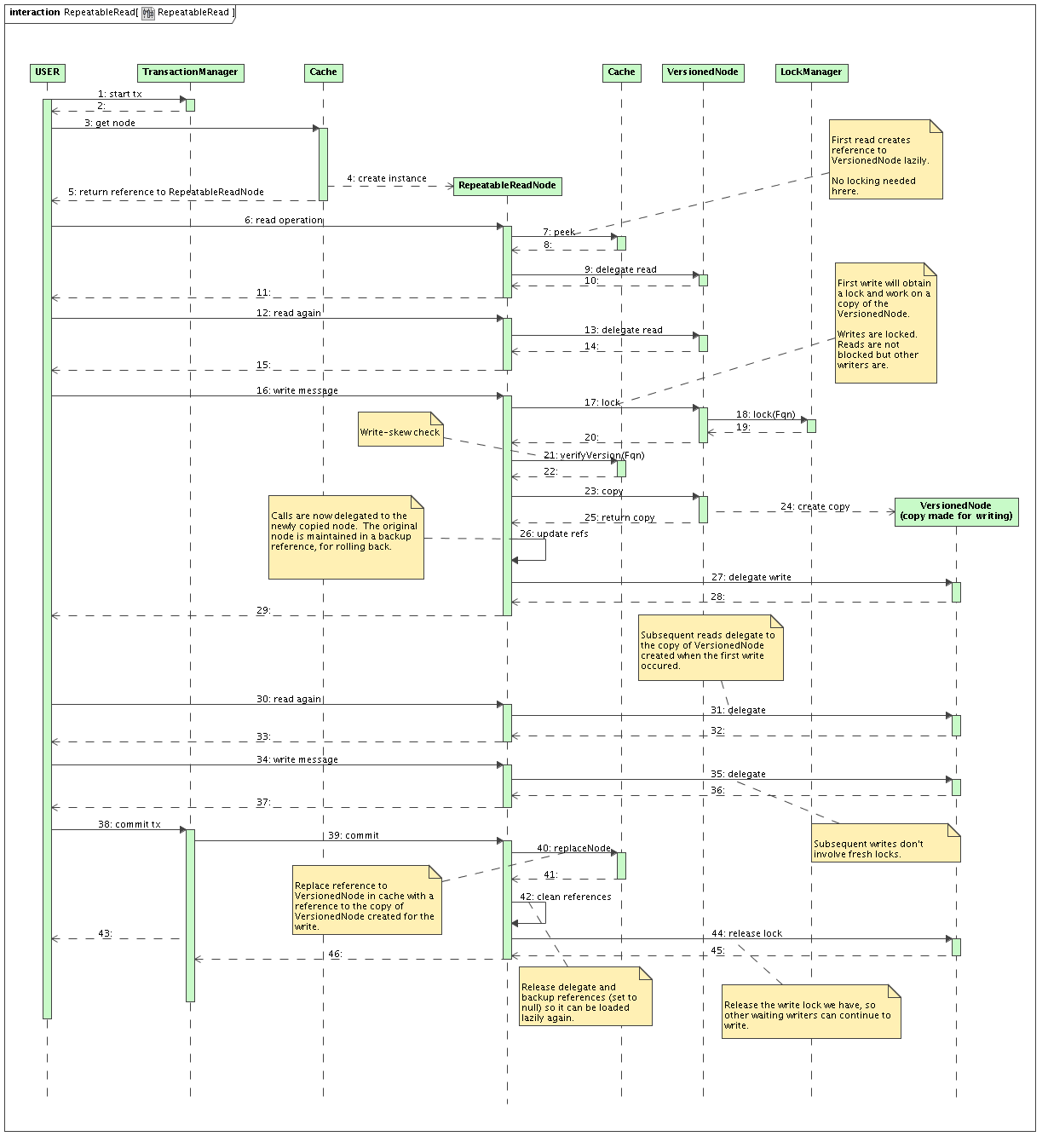
h3. REPEATABLE_READ
http://community.jboss.org/servlet/JiveServlet/download/10272-50-4678/Rep...
* Readers all end up delegating calls to the VersionedNode.
** Reference to VersionedNode created lazily on first invocation.
* When writing,
** Acquire exclusive Fqn lock (see section on locking below)
** The version of the reference held in RepeatableReadNode is checked against version in the cache (to detect write skew)
** copies the VersionedNode
*** since exclusive lock is held, only one write-copy per node will ever exist
** increments it's version
** backs up it's original VersionedNode reference
** and updates it's delegate reference to the newly copied VersionedNode
* When committing
** Replaces the original VersionedNode in the cache with the write copy
** Discards backup pointer
** Discards VersionedNode reference so this is fetched lazily when the next transaction starts, in case the RepeatableReadNode instance is reused.
h4. Repeatable read is achieved since:
* Readers all still point to their version of VersionedNode (reference still held by other RepeatableReadNode instances)
* Writer works with it's copy of VersionedNode
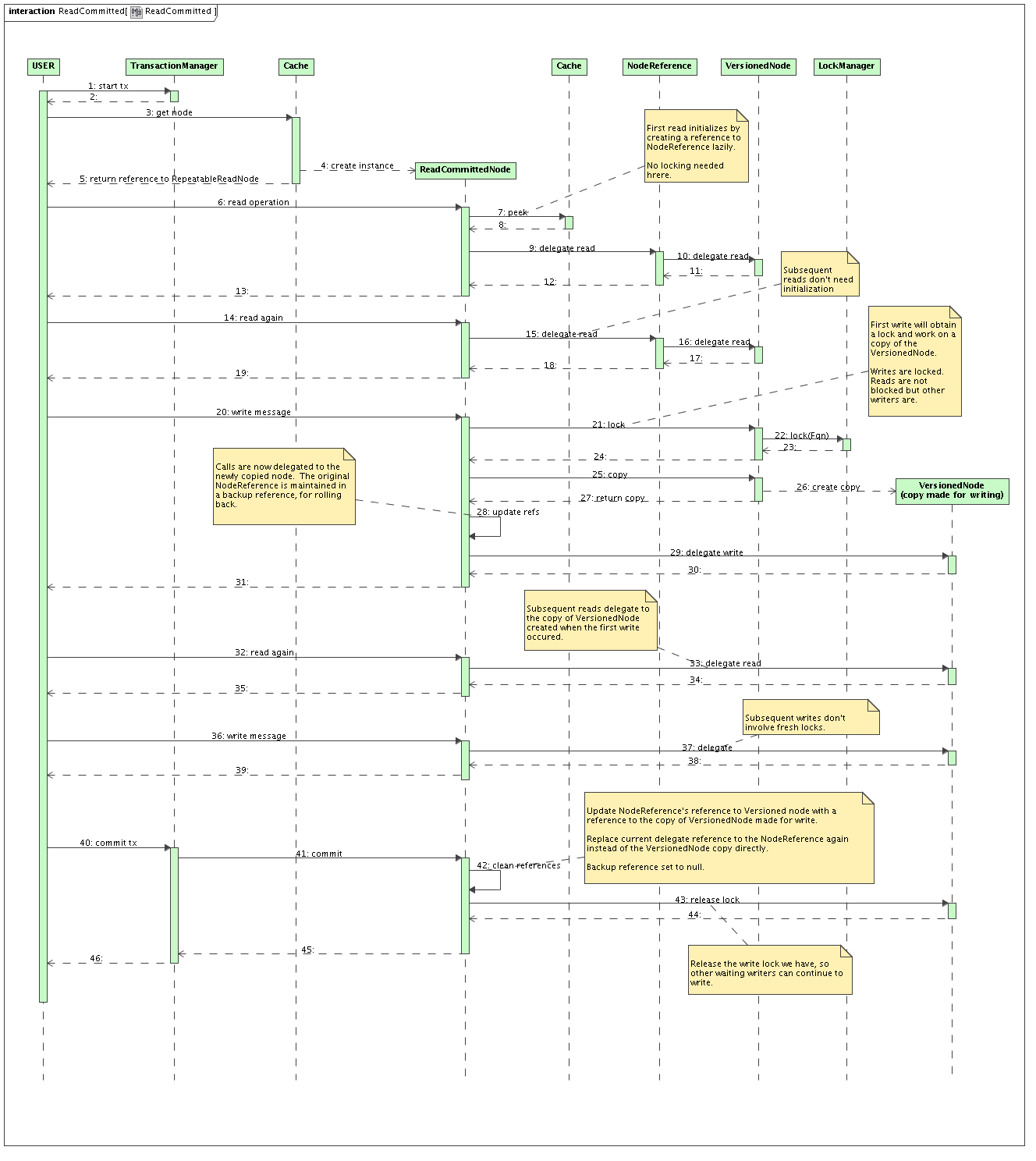
h3. READ_COMMITTED
http://community.jboss.org/servlet/JiveServlet/download/10272-50-4677/Rea...
Exactly the same as REPEATABLE_READ, except that:
* ReadCommittedNode has a reference to NodeReference rather than VersionedNode
* No version check is done when a write starts (write skew is not a problem with READ_COMMITTED)
* When committing
** ReadCommittedNode reinstates the reference to the NodeReference
** Updates the NodeReference to point to the copy of VersionedNode
h4. Read committed achieved by:
* Readers and writers working delegating to a VersionedNode via the NodeReference
* NodeReference updated when a writer commits - and everyone sees this commit
h3. Locking
* Locks still needed for the duration on a write (exclusive write)
** No locks needed when reading
* All locks should be on the Fqn, not the VersionedNode itself since this is replaced
* Implemented using lock striping to reduce the number of locks in the system if there are a large number of nodes.
** VersionedNode still exposes lock() and release() methods
** Delegates to LockManager.lock(Fqn) and release(Fqn)
** LockManager is an interface, configurable.
*** StripedLockManager uses something similar to http://labs.jboss.com/file-access/default/members/jbosscache/freezone/doc... (used by cache loader implementations at the moment)
h3. Implementation details
MVCC will be implemented using 3 interceptors: an MVCCLockingInterceptor, an MVCCNodeInterceptor, and an MVCCTransactionInterceptor, which would be responsible for acquiring the locks needed (in the case of a write), creating of a wrapper node for the invocation, and the switching of references at the end of a transaction respectively.
h3. Documentation
TODO: Illustrate MVCC behaviour visually, during concurrent writes, creates, deletes, create + delete.
h3. Tombstones
When a node is deleted, a tombstone will need to be maintained to ensure version numbers are maintained for a while.
h3. Drawbacks
* Creation of a RepeatableReadNode or ReadCommittedNode with every call to Cache.getRoot().getChild()
** Efficient if this is cached and reused all the time
* cache.put(Fqn, Key, Value) will probably call getRoot().getChild(Fqn).put(Key, Value)
** This may be less efficient since doing something like for (int i=0; i<100; i++) cache.put(fqn, key+i, value+i) will result in 100 AbstractDelegatingNode instances created.
** This can be minimised by optimisations such that a peek() for nodes happens only once per call, and put it in the InvocationContext. All interceptors look first in IC for the node - if null, peek() and set in IC. If transactional, IC mapped to TxCtx. (Necessary for calls directly to Cache.get(), Cache.put() in MVCC to maintain refs to the same RRNode/RCNode for the duration of a Tx)
* Always does a copy on write. Could be expensive.
** But caches are meant to be optimised for reading anyway.
h2. Timescales
The plan is for this to be in JBoss Cache 3.0.0. JBoss Cache 2.0.0 is close to release now, and the next major release will be JBoss Cache 2.1.0, which will make use of JBoss AOP and JBoss Microcontainer. The original plan was to create JBoss Cache 2.2.0 with http://community.jboss.org/docs/DOC-10278, but MVCC (and http://community.jboss.org/docs/DOC-10284) may be higher priority features that may warrant 3.0.0 to be elevated in importance and http://community.jboss.org/docs/DOC-10278 to be pushed to 3.1.0.
--------------------------------------------------------------
16 years, 4 months
[JBoss Cache] Document updated/added: "JBossCacheCacheLoaders"
by Manik Surtani
User development,
The document "JBossCacheCacheLoaders", was updated Feb 22, 2010
by Manik Surtani.
To view the document, visit:
http://community.jboss.org/docs/DOC-10257#cf
Document:
--------------------------------------------------------------
> +*NOTE:*+ This article refers to an old version of JBoss Cache. As of *JBoss Cache 3.x "+Naga+"* this information no longer applies. Please refer to the http://community.jboss.org/docs/DOC-12843 for information on configuring and setting up cache loaders.
h2.
h2. 1. Intro: Configuring cache loaders in JBossCache 1.3.0
This page details configuring cache loaders in *JBossCache 1.3.0 +"Wasabi"+*
h2. 2. Migrating from pre-1.3.0 cache loader configuration attributes
If you're used to using a pre-1.3.0 configuration file, you would be familiar with an XML block like such when setting up your cache loader:
<!-- Old 1.2.x cache loader config block -->
<attribute name="CacheLoaderClass">org.jboss.cache.loader.FileCacheLoader</attribute>
<attribute name="CacheLoaderConfig">
location=/opt/cacheloader
</attribute>
<attribute name="CacheLoaderShared">false</attribute>
<attribute name="CacheLoaderPreload">/</attribute>
<attribute name="CacheLoaderFetchTransientState">false</attribute>
<attribute name="CacheLoaderFetchPersistentState">true</attribute>
<attribute name="CacheLoaderPassivation">false</attribute>
While this format will still work with *JBossCache 1.3.0 +"Wasabi"+*, it is *+deprecated+*. We recommend migrating to the newer, more readable XML block structure detailed below and in the JBossCache 1.3.0 documentation.
h3. 2.1. Why did we change this?
We were busy adding new features into the cache loaders and needed a better way to configure this. One of the main changes is a redesign in the way cache loaders are created and used. See below for details on this redesign.
h2. 3. The new cache loader configuration XML block
This is what the same configuration defined above would look like using the new XML based configuration.
<!-- New 1.3.x cache loader config block -->
<attribute name="CacheLoaderConfiguration">
<config>
<!-- if passivation is true, only the first cache loader is used; the rest are ignored -->
<passivation>false</passivation>
<preload>/</preload>
<shared>false</shared>
<!-- we can now have multiple cache loaders, which get chained -->
<cacheloader>
<class>org.jboss.cache.loader.FileCacheLoader</class>
<!-- same as the old CacheLoaderConfig attribute -->
<properties>
location=/opt/cacheloader
</properties>
<!-- whether the cache loader writes are asynchronous -->
<async>false</async>
<!-- only one cache loader in the chain may set fetchPersistentState to true.
An exception is thrown if more than one cache loader sets this to true. -->
<fetchPersistentState>true</fetchPersistentState>
<!-- determines whether this cache loader ignores writes - defaults to false. -->
<ignoreModifications>false</ignoreModifications>
</cacheloader>
</config>
</attribute>
With more than one cache loader configured, it would look like:
<!-- New 1.3.x cache loader config block -->
<attribute name="CacheLoaderConfiguration">
<config>
<!-- if passivation is true, only the first cache loader is used; the rest are ignored -->
<passivation>false</passivation>
<preload>/</preload>
<shared>false</shared>
<!-- we can now have multiple cache loaders, which get chained -->
<cacheloader>
<class>org.jboss.cache.loader.FileCacheLoader</class>
<!-- same as the old CacheLoaderConfig attribute -->
<properties>
location=/opt/cacheloader
</properties>
<!-- whether the cache loader writes are asynchronous -->
<async>false</async>
<!-- only one cache loader in the chain may set fetchPersistentState to true.
An exception is thrown if more than one cache loader sets this to true. -->
<fetchPersistentState>true</fetchPersistentState>
<!-- determines whether this cache loader ignores writes - defaults to false. -->
<ignoreModifications>false</ignoreModifications>
</cacheloader>
<cacheloader>
<class>org.jboss.cache.loader.JDBCCacheLoader</class>
<properties>
cache.jdbc.driver=com.mysql.jdbc.Driver
cache.jdbc.url=jdbc:mysql://localhost:3306/jbossdb
cache.jdbc.user=root
cache.jdbc.password=
</properties>
<async>false</async>
<fetchPersistentState>true</fetchPersistentState>
<ignoreModifications>false</ignoreModifications>
</cacheloader>
</config>
</attribute>
h3. 3.1. New cache loader design
The way the cache loaders are now designed, if you define a single cache loader as in the XML configuration above, the TreeCache instantiates and uses the cache loader directly. If you were to define 2 or more cache loaders, the TreeCache creates an instance of *org.jboss.cache.loader.ChainingCacheLoader* - a delegate that also implements the *org.jboss.cache.loader.CacheLoader* interface - which maintains references to all configured cache loaders and propagates calls down to each one.
> Note
>
> NoteNoteNoteNote the order in which you configured a chain of cache loaders is the order in which calls are passed down so it makes sense to have the faster cache loaders further up the chain.
Write calls (*+put()+*, *+remove()+*) are passed to all cache loaders in the chain which have *ignoreModifications* set to false (see below). Read calls (*+get()+*, *+exists()+*) are passed down the chain and the result of first cache loader that returns a non-null result is used.
h4. 3.1.1. org.jboss.cache.loader.CacheLoader interface changes
One very important change has been made to the CacheLoader interface. It is not a programmatic one but it has to do with the expected behaviour of the *get(Fqn fqn)* method, that returns a Map of attributes for a given node.
>From the JBossCache 1.2.4 Javadocs:
/**
* Returns all keys and values from the persistent store, given a fully qualified name
* @param name
* @return Map<Object,Object> of keys and values for the given node. Returns null if the node
* was not found, or if the node has no attributes
* @throws Exception
*/
Map get(Fqn name) throws Exception;
This means that you would get a null when making this call, and you would not know if it was because the node did not exist or the node +did+ exist but just didn't have any attributes.
In JBossCache 1.3.0 this has been changed to:
/**
* Returns all keys and values from the persistent store, given a fully qualified name
* @param name
* @return Map<Object,Object> of keys and values for the given node. Returns null if the node is
* not found. If the node is found but has no attributes, this method returns an empty Map.
* @throws Exception
*/
Map get(Fqn name) throws Exception;
> How does this affect me?
>
> How does this affect me?How does this affect me?How does this affect me?How does this affect me? If you have implemented a custom cache loader of your own, you will need to make sure it complies with the expected functionality set out by the CacheLoader interface or you may risk indeterminate results.
h3. Elements that affect the entire cache loader chain
h4. preload
This is the same as the old CacheLoaderPreload attribute and specifies a region of nodes to be preloaded into memory when the cache starts.
h4. passivation
This is the same as the old CacheLoaderPassivation attribute and specifies whether you wish to use passivation. When using passivation, only the first configured cache loader is used and others are ignored. This defaults to *false*.
h4. shared
This is the same as the old CacheLoaderShared attribute and should be used to indicate that the cache loader configuration used shares the same data stores (files, JDBC databases) as other instances in a cluster. This will help optimise multiple nodes writing the same data repeatedly to the cache loader during replication. This defaults to *false*.
h3. Elements that affect individual cache loaders
h4. class
This is the same as the old CacheLoaderClass attribute and configures a fully qualified class name of the cache loader to use.
h4. properties
This is the same as the old CacheLoaderConfig attribute and specifies a list of properties to pass to the cache loader implementation.
h4. async
This is the same as the old CacheLoaderAsynchronous attribute and specifies whether to make calls to the cache loader asynchronous. This defaults to *false*.
h4. fetchPersistentState
This is the same as the old CacheLoaderFetchPersistentState attribute and specifies whether caches retrieve state from remote caches' cache loaders when starting up. This defaults to *false*.
h4. ignoreModifications
Specifies whether write operations are performed on this cache loader. This defaults to *false*.
--------------------------------------------------------------
16 years, 4 months
[JBoss Cache] Document updated/added: "JBossCacheProjects"
by Manik Surtani
User development,
The document "JBossCacheProjects", was updated Feb 22, 2010
by Manik Surtani.
To view the document, visit:
http://community.jboss.org/docs/DOC-10281#cf
Document:
--------------------------------------------------------------
h3. JBossCache projects for student contributors
h4. JBoss Cache as a clustered file directory system for Apache Lucene
* Will involve understanding Apache Lucene requirements, especially locking ones
* Benefit from the JBoss Cache passivation system to allow directory larger than memory
* Test the efficiency read / write ratio in such a distributed environment
h4. Server module for JBoss Cache
* A wrapper to open a socket, listen for client connections and "translate" these into in-VM JBoss Cache calls, and dispatch accordingly.
* The server module should be a standalone piece of code that starts up a JBoss Cache instance.
* The server module should be clusterable, e.g., have the potential to fire up several server module instances.
** The JBoss Cache instances in the server module VMs will discover themselves and form a cluster.
* Should be tested with memcached clients in Java, C, C#, Python, Perl, Ruby, etc.
* Should use the memcached text-over-HTTP protocol, as well as the new upcoming memcached binary protocol.
* Should also design and implement a JBC-specific binary (and text) protocol where cluster state and size could be shipped back to clients, piggybacking on response data. Could be an extension of the memcached protocol.
* Write a specific Java based client to use this JBC-specific protocol to use in-client load balancing and failover.
** If there is time, potential clients in other languages would be nice!
--------------------------------------------------------------
16 years, 4 months