[Performance Tuning] - Is there a way to solve this without cluster?
by Michal Glowacki
Michal Glowacki [http://community.jboss.org/people/mglowacki] created the discussion
"Is there a way to solve this without cluster?"
To view the discussion, visit: http://community.jboss.org/message/632711#632711
--------------------------------------------------------------
I have a very powerful machine, with 80 cores and 32GB RAM, but when there is a traffic peak, it goes down. It hosts Apacje/JBoss/Postgres with deployed Seam web applications and EJB 3 for app. logic.
In thread dumps I see a lot of:
Thread: ajp-0.0.0.0-8009-14 : priority:5, demon:true, threadId:115, threadState:BLOCKED -
waiting on 0x7406ce55 (a java.util.WeakHashMap) org.jboss.naming.ENCFactory.getObjectInstance(ENCFactory.java:114)
and
Thread: ajp-0.0.0.0-8009-2 : priority:5, demon:true, threadId:103, threadState:BLOCKED
- waiting on 0x672e12af (a java.util.HashMap) org.jboss.metadata.web.jboss.JBossWebMetaData.getRunAsIdentity(JBossWebMetaData.java:839)
and
Thread: ajp-0.0.0.0-8009-14 : priority:5, demon:true, threadId:115, threadState:BLOCKED
- waiting on 0x7406ce55 (a java.util.WeakHashMap) org.jboss.naming.ENCFactory.getObjectInstance(ENCFactory.java:114)
As I understand, there is too many invocations of methods trying to access naming service. In Tomcat, I have set maxthreads on 8009 connector to 1200, however the dumps shows the problems starts when it's over 600-700.
I believe that setting up cluster should help, as the traffic will be distributed to several jboss instances. However, as I afraid cluster like a fire - is there anything more I can do?
Regards,
Michal
--------------------------------------------------------------
Reply to this message by going to Community
[http://community.jboss.org/message/632711#632711]
Start a new discussion in Performance Tuning at Community
[http://community.jboss.org/choose-container!input.jspa?contentType=1&cont...]
14 years, 10 months
[JBoss Tools] - Bring Up Forge in JBoss Tools
by Koen Aers
Koen Aers [http://community.jboss.org/people/koen.aers] modified the blog post:
"Bring Up Forge in JBoss Tools"
To view the blog post, visit: http://community.jboss.org/community/tools/blog/2011/10/20/bring-up-forge...
--------------------------------------------------------------
A couple of days ago somebody asked me how to use Forge after having installed the JBoss Tools nighty build. This is a valid question and indeed not so obvious at the moment. We don't want to overload the top level Eclipse menubar and toolbar so it is somewhat hidden until we find a good spot for the shortcuts. Suggestions are of course always welcome.
h1. The Long and Winding Road
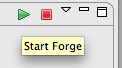
The normal way to start Forge is to start it by pressing the start toolbar button or choosing the start menu entry of the Forge Console View.
http://community.jboss.org/servlet/JiveServlet/showImage/38-4236-17197/st... http://community.jboss.org/servlet/JiveServlet/downloadImage/38-4236-1719... http://community.jboss.org/servlet/JiveServlet/showImage/38-4236-17198/st... http://community.jboss.org/servlet/JiveServlet/downloadImage/38-4236-1719...
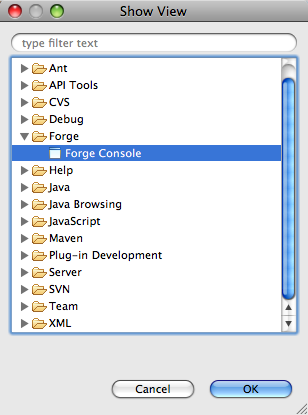
Now the question of course is how you can open this Forge Console View. This can be done by selecting the 'Forge->Forge Console' entry in the Eclipse 'Show View' dialog.
http://community.jboss.org/servlet/JiveServlet/showImage/38-4236-17199/Sh... http://community.jboss.org/servlet/JiveServlet/downloadImage/38-4236-1719...
Now the question of course is how you can open this fancy 'Show View' dialog. The long and winding road to do this would be to use the Eclipse menu bar and select 'Window->Show View->Other...'. Luckily there is a quicker alternative to do this last step only using your keyboard:
* Windows and Linux: press Alt+Shift+Q and then another Q
* Mac: press Option+Cmd+Q and then another Q
h1. The Fast Lane
Even with this last keyboard trick this is a very long process and it would be good if there was a faster way to do it. The good news is that there actually is a shortcut. http://community.jboss.org/en/tools/blog/2011/08/05/forge-commands-on-the... Earlier, we posted how to bring up a popup containing all the Forge commands applicable in the current context
* Windows and Linux: Ctrl+4
* Mac: press Cmd+4
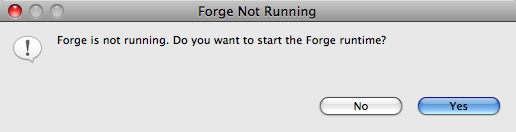
Now if only we extended the functionality of this combination to startup Forge if it is not running? That is exactly what we did. Pressing the above key combination brings up a dialog if Forge is not running yet and asks you if you want to start it.
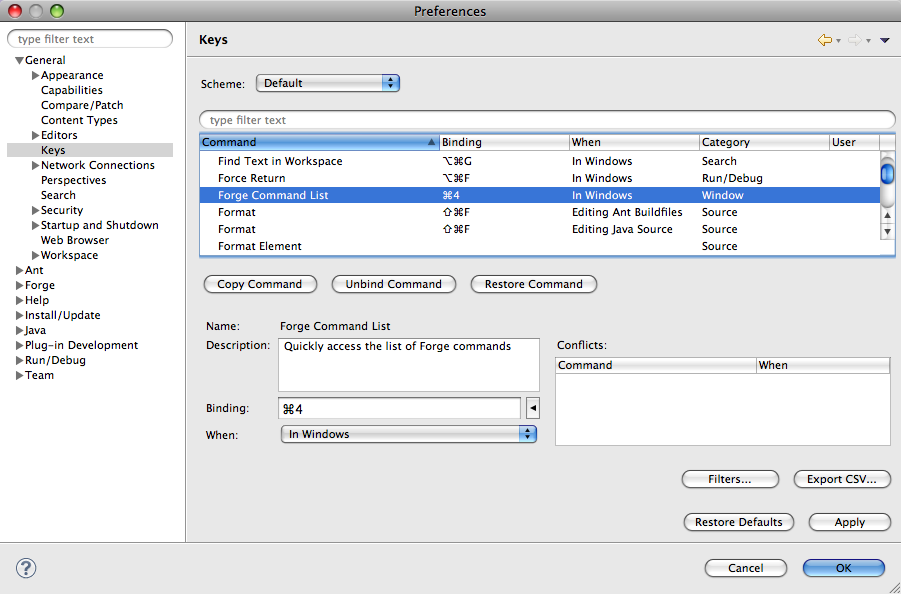
http://community.jboss.org/servlet/JiveServlet/showImage/38-4236-17201/fo... http://community.jboss.org/servlet/JiveServlet/downloadImage/38-4236-1720... Pressing 'Yes' on this menu will start Forge, open the Forge Console View and bring this last view into focus. If the above combination does not work on your machine (because of a different keyboard layout) or if you would like to hook up this functionality to a different keystroke combo, you can do so by bringing up the Eclipse Preferences dialog:
* Windows and Linux: choose 'Window->Preferences'
* Mac: choose 'Eclipse->Preferences...' or press Cmd+, (that is Cmd and the comma).
http://community.jboss.org/servlet/JiveServlet/showImage/38-4236-17202/pr... http://community.jboss.org/servlet/JiveServlet/downloadImage/38-4236-1720... As you can see in the above screenshot, you can change the binding by selecting the 'General->Keys' entry and then look for the 'Forge Command List' command. Go into the 'Binding' field and choose your favourite keyboard combination.
h1. The Result
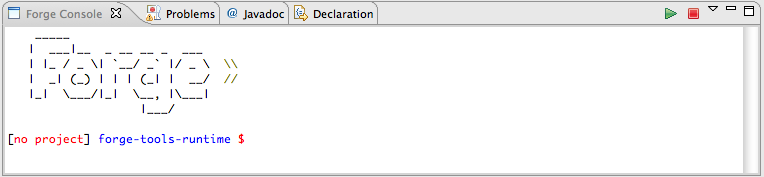
Whether you take the long and winding road or the fast lane, the result should in both cases that you are seeing the Forge welcome banner and a prompt inviting you to enter your command of choice.
http://community.jboss.org/servlet/JiveServlet/showImage/38-4236-17208/co... http://community.jboss.org/servlet/JiveServlet/downloadImage/38-4236-1720...
This is a work in progress. If you have any suggestions to make a better binding, or ideas about a proper perspective or menu that could be a home for this functionality, be my guest!
Cheers,
Koen
--------------------------------------------------------------
Comment by going to Community
[http://community.jboss.org/community/tools/blog/2011/10/20/bring-up-forge...]
14 years, 10 months
[jBPM] - Log tables not persisted
by Rajan Bansal
Rajan Bansal [http://community.jboss.org/people/rajan01] created the discussion
"Log tables not persisted"
To view the discussion, visit: http://community.jboss.org/message/632660#632660
--------------------------------------------------------------
Actually I successfully persisted the PROCESSINSTANCEINFO, WORKITEMINFO, SESSIONINFO, TASK in Oracle 10g by running jBPM5.1 in JBosss
My issue is the tables:- PROCESSINSTANCELOG, NODEINSTANCELOG, VARIABLEINSTANCELOG are not persisted or we can say no data is showing in these tables:
*Below are my "jbpm-bam-5.1.0.Final.jar" files:*
*AuditLoghbm.xml*
*
*
<?xml version="1.0"?>
<!DOCTYPE hibernate-mapping PUBLIC
"-//Hibernate/Hibernate Mapping DTD 3.0//EN"
" http://hibernate.sourceforge.net/hibernate-mapping-3.0.dtd http://hibernate.sourceforge.net/hibernate-mapping-3.0.dtd">
<hibernate-mapping>
<class name="org.jbpm.process.audit.ProcessInstanceLog" >
<id name="id">
<generator class="native"/>
</id>
<property name="processInstanceId"/>
<property name="processId"/>
<property name="start" type="timestamp" column="START_DATE"/>
<property name="end" type="timestamp" column="END_DATE"/>
</class>
<class name="org.jbpm.process.audit.NodeInstanceLog" >
<id name="id">
<generator class="native"/>
</id>
<property name="type"/>
<property name="nodeInstanceId"/>
<property name="nodeId"/>
<property name="processInstanceId"/>
<property name="processId"/>
<property name="date" type="timestamp" column="LOG_DATE"/>
</class>
</hibernate-mapping>
*hibernate.cfg.xml*
*
*
<?xml version='1.0' encoding='utf-8'?>
<!DOCTYPE hibernate-configuration PUBLIC
"-//Hibernate/Hibernate Configuration DTD 3.0//EN"
" http://hibernate.sourceforge.net/hibernate-configuration-3.0.dtd http://hibernate.sourceforge.net/hibernate-configuration-3.0.dtd">
<hibernate-configuration>
<session-factory>
<!-- Database connection settings -->
<property name="connection.driver_class">oracle.jdbc.driver.OracleDriver</property>
<property name="connection.url">jdbc:oracle:thin:@172.25.8.251:1521:lupin</property>
<!--property name="connection.url">jdbc:h2:file:/NotBackedUp/data/mydb</property-->
<property name="connection.username">jbpm5</property>
<property name="connection.password">lupin</property>
<!-- JDBC connection pool (use the built-in) -->
<property name="connection.pool_size">5</property>
<!-- SQL dialect -->
<property name="dialect">org.hibernate.dialect.Oracle10gDialect</property>
<!-- Enable Hibernate's automatic session context management -->
<property name="current_session_context_class">thread</property>
<!-- Disable the second-level cache -->
<property name="cache.provider_class">org.hibernate.cache.NoCacheProvider</property>
<!-- Echo all executed SQL to stdout -->
<property name="show_sql">true</property>
<!-- Drop and re-create the database schema on startup -->
<property name="hbm2ddl.auto">validate</property>
<mapping resource="AuditLog.hbm.xml"/>
</session-factory>
</hibernate-configuration>
an*d my Persistence.xml present in jbpm-persistence-jpa.jar is*
<?xml version="1.0" encoding="UTF-8" standalone="yes"?>
<persistence version="1.0"
xsi:schemaLocation=" http://java.sun.com/xml/ns/persistence http://java.sun.com/xml/ns/persistence
http://java.sun.com/xml/ns/persistence/persistence_1_0.xsd http://java.sun.com/xml/ns/persistence/persistence_1_0.xsd
http://java.sun.com/xml/ns/persistence/orm http://java.sun.com/xml/ns/persistence/orm http://java.sun.com/xml/ns/persistence/orm_1_0.xsd http://java.sun.com/xml/ns/persistence/orm_1_0.xsd"
xmlns:orm=" http://java.sun.com/xml/ns/persistence/orm http://java.sun.com/xml/ns/persistence/orm"
xmlns:xsi=" http://www.w3.org/2001/XMLSchema-instance http://www.w3.org/2001/XMLSchema-instance"
xmlns=" http://java.sun.com/xml/ns/persistence http://java.sun.com/xml/ns/persistence">
<persistence-unit name="org.jbpm.persistence.jpa" transaction-type="JTA">
<provider>org.hibernate.ejb.HibernatePersistence</provider>
<jta-data-source>java:/testDS1</jta-data-source>
<class>org.drools.persistence.info.SessionInfo</class>
<class>org.jbpm.persistence.processinstance.ProcessInstanceInfo</class>
<class>org.jbpm.persistence.processinstance.ProcessInstanceEventInfo</class>
<class>org.drools.persistence.info.WorkItemInfo</class>
<class>org.jbpm.process.audit.ProcessInstanceLog</class>
<class>org.jbpm.process.audit.NodeInstanceLog</class>
<class>org.jbpm.process.audit.VariableInstanceLog</class>
<class>org.jbpm.task.Task</class>
<class>org.jbpm.task.Comment</class>
<class>org.jbpm.task.Attachment</class>
<class>org.jbpm.task.I18NText</class>
<class>org.jbpm.task.SubTasksStrategy</class>
<class>org.jbpm.task.Deadline</class>
<class>org.jbpm.task.Escalation</class>
<class>org.jbpm.task.Reassignment</class>
<class>org.jbpm.task.Notification</class>
<class>org.jbpm.task.BooleanExpression</class>
<class>org.jbpm.task.User</class>
<class>org.jbpm.task.PeopleAssignments</class>
<properties>
<property name="hibernate.dialect" value="org.hibernate.dialect.Oracle10gDialect"/>
<property name="hibernate.connection.driver_class" value="oracle.jdbc.driver.OracleDriver"/>
<property name="hibernate.max_fetch_depth" value="3"/>
<property name="hibernate.transaction.manager_lookup_class" value="org.hibernate.transaction.JBossTransactionManagerLookup"/>
<property name="hibernate.hbm2ddl.auto" value="validate" />
<property name="hibernate.show_sql" value="true" />
</properties>
</persistence-unit>
</persistence>
Give your suggestions please...
--------------------------------------------------------------
Reply to this message by going to Community
[http://community.jboss.org/message/632660#632660]
Start a new discussion in jBPM at Community
[http://community.jboss.org/choose-container!input.jspa?contentType=1&cont...]
14 years, 10 months