[JBoss Tools] - JBoss Tools and Developer Studio Candidate Release
by Max Rydahl Andersen
Max Rydahl Andersen [https://community.jboss.org/people/maxandersen] modified the blog post:
"JBoss Tools and Developer Studio Candidate Release"
To view the blog post, visit: https://community.jboss.org/community/tools/blog/2012/06/12/jboss-tools-a...
--------------------------------------------------------------
The release candidate of JBoss Tools and Developer Studio is now available - mainly with bugfixes but also a few nice improvements for AS 7, OpenShift and Maven integration.
https://community.jboss.org/servlet/JiveServlet/showImage/38-4854-18193/j... https://community.jboss.org/servlet/JiveServlet/downloadImage/38-4854-181...
h4. CR1
Developer Studio: [ http://devstudio.jboss.com/earlyaccess Download] | Tools: [ http://www.jboss.org/tools/download/dev Download] [ http://download.jboss.org/jbosstools/updates/development/indigo/ Update Site] | [ http://docs.jboss.org/tools/whatsnew What's New] [ http://www.jboss.com/index.html?module=bb&op=viewforum&f=201 Forums] [ http://jira.jboss.com/jira/browse/JBIDE JIRA] [ http://twitter.com/jbosstools Twitter]
JBoss Tools is a set of plugins for Eclipse that complements, enhances and goes beyond the support that exist for JBoss and related technologies in the default Eclipse distribution.
JBoss Developer Studio is a fully bundled Eclipse distribution which not only includes majority of JBoss Tools but also all its needed dependencies and 3rd party plugins allowing for an easy one-click and no-fuzz installation.
If you are into doing your own bleeding edge eclipse plugin assembly, JBoss tools is for you, if you are more into having something that "Just Works" then JBoss Developer Studio is the way to go.
h2. Installation
+JBoss Developer Studio+ comes with everything pre-bundled in its installer. Simply http://devstudio.jboss.com/earlyaccess download it and run it like this:
java -jar jbdevstudio-<installername>.jar
Note, if you are on Mac OSX 64-bit we recommend you ensure to select the 32-bit option in the multi-platform installer to get Visual Page editor working and use much less memory.
Similar if you are on Windows 64-bit then use a 32-bit JDK to get 32-bit version running.
+JBoss Tools+ requires a bit more:
This release requires at least Eclipse 3.7.1 but we recommend using the http://www.eclipse.org/downloads/packages/eclipse-ide-java-ee-developers/... Eclipse 3.7.2 JEE Bundle since then you get most of the dependencies preinstalled.
Once you have installed Eclipse, you either find us on http://marketplace.eclipse.org/content/jboss-tools-indigo Eclipse Marketplace under "JBoss Tools (Indigo)" or use our update site directly.
The update site URL to use from Help > Install New Software... is:
http://download.jboss.org/jbosstools/updates/development/indigo/ http://download.jboss.org/jbosstools/updates/development/indigo/
Note: SOA tooling such as Drools, jbpm, ESB, Teeid etc. are not included in the JBoss Tools core releases at this time - they will be available separately.
h2. JBoss AS 7
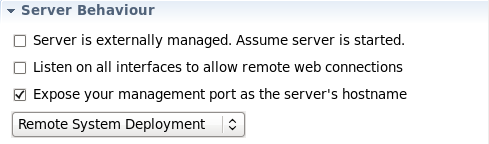
The server adapter for JBoss AS 7 had a series improvements done in its handling of remote management and JMX connections. One thing that is relevant is that because of AS 7.1 https://community.jboss.org/community/tools/blog/2012/02/29/excited-about... Secure by default approach when you launch remotely the management services are not autoatmically exposed. We keep that secure-by-default in the tools, but now also provides a simple checkbox to allow you to expose the management service when we launch it to actually remotely manage the server.
https://issues.jboss.org/secure/attachment/12354382/JBIDE-11921.png https://issues.jboss.org/secure/attachment/12354382/JBIDE-11921.png
Of course just exposing the port does not make it fully available before you have added a user to the server. You can read about how to do that in https://community.jboss.org/community/tools/blog/2012/02/29/excited-about... this blog.
And finally the server adapter now works with IPv6, allows deploying outside of the deployments folder and it does not choke on a space in the server part - Hurray!
h2. OpenShift, now faster and more patient
One of the most common bug report we got in the Beta's (thank you for the feedback!) was that when creating OpenShift applications our wizard would time out and you would have to manually import the project again. We now have extended the timeout period to three minutes to accomodate for overloads, network latency etc. but also given you the option to wait some more for the OpenShift provisioning to be fully done.
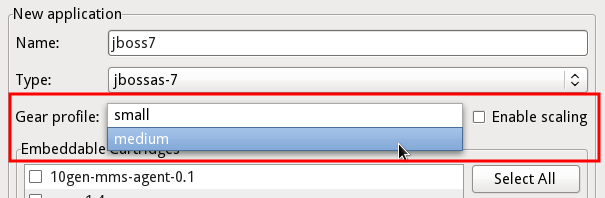
A new feature of the application creation wizard is also to be able to set the size of the Gear your application will run on and to enable scaling for your applications.
http://docs.jboss.org/tools/whatsnew/openshift/images/gears-and-scaling.png http://docs.jboss.org/tools/whatsnew/openshift/images/gears-and-scaling.png
Mind you that the list of possible gears depends on your users permissions.
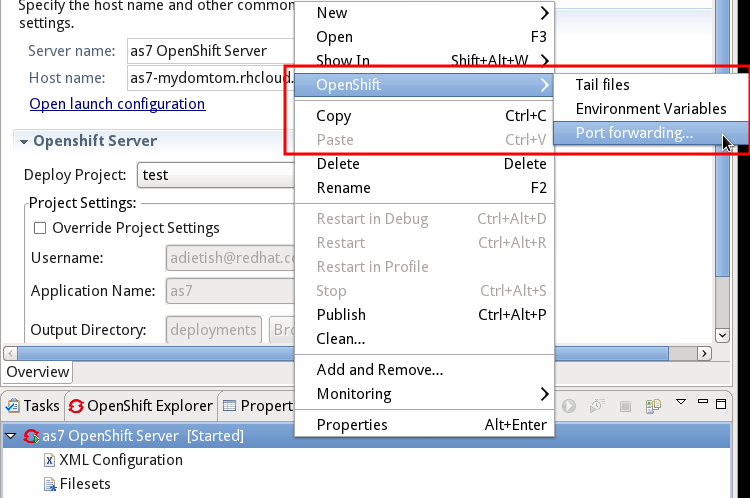
Various actions like Tail Files, Environment variables and Port Forwarding which previously were only available in OpenShift Explorer is now also available from the OpenShift server adapter.
http://docs.jboss.org/tools/whatsnew/openshift/images/server-adapter-acti... http://docs.jboss.org/tools/whatsnew/openshift/images/server-adapter-acti...
And for those users with large set of applications or slow networks we've made the loading of OpenShift metadata more incremental giving you faster feedback,especially on networks far away from the OpenShift servers.
h2. Maven and Endorsed Libraries
If you have ever had to fight with using JavaEE 6 Webservices on Java 6 with Maven and Eclipse at the same time you know what a pain having to use that combination can be because JavaEE 6 Webservices are actually using libraries that are not available before Java 7. Meaning you have to configure and setup endorsed libraries in Eclipse, which actually does not have such a feature exposed on projects, but only at the JVM level setup. Thus its "easy" for running applications but not when compiling.
In Maven there are various tricks to solve this and none of them are obeyed/understood by m2eclipse - but not anymore.
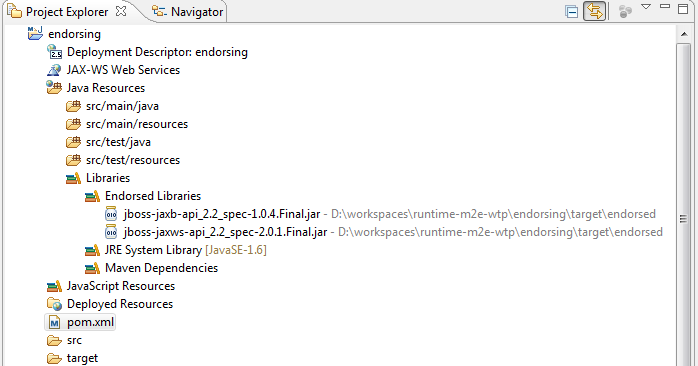
http://docs.jboss.org/tools/whatsnew/images/endorsed_libs.png http://docs.jboss.org/tools/whatsnew/images/endorsed_libs.png
We've added a Maven configurator which will look for the common tricks to set and configure endorsed libraries and when they are found inject an "Endorsed Library" classpath container with the approprate classpath entries.
Allowing you to not have to worry about this anymore when using Maven + Eclipse. Fred writes more in detail about how this works in http://docs.jboss.org/tools/whatsnew/maven/maven-news-3.3.0.CR1.html What's New
h2. Pixel Density
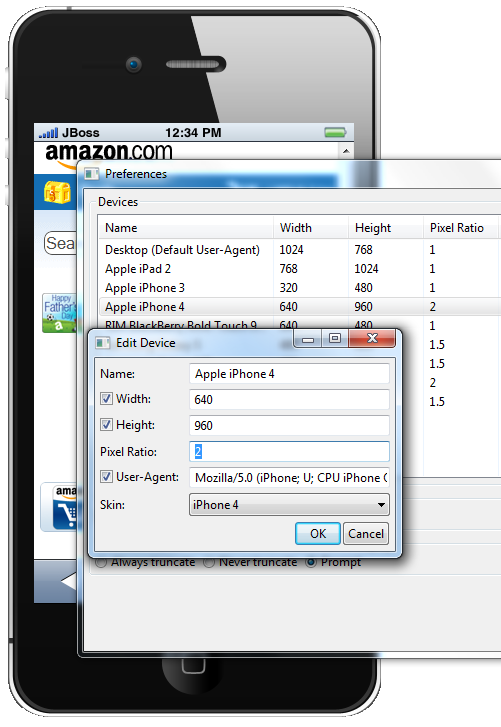
And an example of where the little details matters comes that BrowserSim now has controls for pixel density allowing you to get a better and closer representative layout of your mobile applications.
http://docs.jboss.org/tools/whatsnew/vpe/images/3.3.0.CR1/pixel-ratio.png http://docs.jboss.org/tools/whatsnew/vpe/images/3.3.0.CR1/pixel-ratio.png
h2. ...and more
As usual screenshots and more explanation of what is new are available from the http://docs.jboss.org/tools/whatsnew What's New site!
Let us know what you think and remember that http://www.jboss.org/events/JUDCon/2012/boston/agenda/day1track1 Xavier and http://www.jboss.org/events/JUDCon/2012/boston/agenda/day2track1 I will be showing a lot of these features at JUDCon and http://www.redhat.com/summit/ Red Hat Summit w/JBoss World end of this month with a GA release. See you there ?
Have fun,
Max
--------------------------------------------------------------
Comment by going to Community
[https://community.jboss.org/community/tools/blog/2012/06/12/jboss-tools-a...]
14 years, 2 months
[JNDI and Naming] - JBoss7.1 JNDI subcontext handling failure
by Martin Isheim
Martin Isheim [https://community.jboss.org/people/martinLuene] created the discussion
"JBoss7.1 JNDI subcontext handling failure"
To view the discussion, visit: https://community.jboss.org/message/741168#741168
--------------------------------------------------------------
Using JBoss7.1.2-NightlyBuild2012-04-30 - due to another fix - i observe strange behaviour within JNDI:
First destrying a subcontext seems not work, the subcontext is still available afterwards.
The second is, that after an unbind, the subcontext, which contained the object, is also gone.
Instead i expect the subcontext to be still available, although it is empty now.
Below are small test procedures for demonstration, at the indicated lines
the first throws the RuntimeException, the second a javax.naming.NameNotFoundException.
I execute these procedures within a SLSB on the application server.
Is there a specific way needed to set up a naming context on server side, i just use "new InitialContext()"?
Thanks,
Martin
public void testDestroySubcontext() throws NamingException {
// Preparation
Context ctx = new InitialContext();
ctx.createSubcontext("root");
Context sub1 = ctx.createSubcontext("root/sub1");
sub1.rebind("NAME", "VALUE");
assertEquals("Lookup object", "VALUE", ctx.lookup("root/sub1/NAME"));
assertEquals("Lookup subcontext", "VALUE", sub1.lookup("NAME"));
// test destroySubcontext
ctx.destroySubcontext("root/sub1");
try {
Context sub1Lookup = (Context) ctx.lookup("root/sub1");
>>>> throw new RuntimeException("Test failed, destroyed sub context still found: "
+ sub1Lookup.getNameInNamespace());
} catch (NameNotFoundException nnfe) {
// expected, but not thrown.
}
}
public void testUnbind() throws NamingException {
// Preparation
Context ctx = new InitialContext();
ctx.createSubcontext("root");
Context sub1 = ctx.createSubcontext("root/sub1");
sub1.rebind("NAME", "VALUE");
assertEquals("Lookup object", "VALUE", ctx.lookup("root/sub1/NAME"));
assertEquals("Lookup subcontext", "VALUE", sub1.lookup("NAME"));
Context lookupCtx = (Context) ctx.lookup("root/sub1");
assertEquals("Lookup before unbind", "root/sub1", lookupCtx.getNameInNamespace());
// test unbind
ctx.unbind("root/sub1/NAME");
try {
Object item = ctx.lookup("root/sub1/NAME");
throw new RuntimeException("Test failed, unbound object still found" + item);
} catch (NameNotFoundException nnfe) {
// expected, unbound object no longer available.
}
// sub context shall be still available, as stated in java doc for javax.naming.Context.unbind().
>>>> Context lookupAgainCtx = (Context) ctx.lookup("root/sub1");
assertEquals("Lookup after unbin", "root/sub1", lookupAgainCtx.getNameInNamespace());
}
Caused by: javax.naming.NameNotFoundException: root/sub1 -- service jboss.naming.context.java.root.sub1
at org.jboss.as.naming.ServiceBasedNamingStore.lookup(ServiceBasedNamingStore.java:97)
at org.jboss.as.naming.NamingContext.lookup(NamingContext.java:178)
at org.jboss.as.naming.InitialContext.lookup(InitialContext.java:119)
at org.jboss.as.naming.NamingContext.lookup(NamingContext.java:214)
at javax.naming.InitialContext.lookup(InitialContext.java:392)
at com.jcoffee.base.global.naming.test.TestJNDIUtilitiesImpl.testUnbind(TestJNDIUtilitiesImpl.java:235)
--------------------------------------------------------------
Reply to this message by going to Community
[https://community.jboss.org/message/741168#741168]
Start a new discussion in JNDI and Naming at Community
[https://community.jboss.org/choose-container!input.jspa?contentType=1&con...]
14 years, 2 months
[JBoss Web Services] - Disable chunked encoding (JBoss AS7)
by Amarkanth Ranganamayna
Amarkanth Ranganamayna [https://community.jboss.org/people/amarkanth84] created the discussion
"Disable chunked encoding (JBoss AS7)"
To view the discussion, visit: https://community.jboss.org/message/741101#741101
--------------------------------------------------------------
Hello,
I am getting the following error when i try to POST data to a webservice which doesn't support "CHUNKED" encoding.
Previously (i.e. in Jboss 4.3), i was able to turn off the CHUNKED encoding by setting the following configuration in "*jboss-as/server/default/deploy/jbossws.sar/META-INF/standard-jaxws-client-config.xml"*
<client-config>
<config-name>Standard Client</config-name>
<feature>http://org.jboss.ws/dispatch/validate</feature> (http://org.jboss.ws/dispatch/validate%3C/feature%3E)
<property>
<property-name>http://org.jboss.ws/http#chunksize</property-name> (http://org.jboss.ws/http#chunksize%3C/property-name%3E)
* <property-value>0</property-value>*
</property>
</client-config>
HOW CAN I DO THIS IN JBOSS-AS7.1 ?
I don't see "*jboss-as/server/default/deploy/jbossws.sar/META-INF/standard-jaxws-client-config.xml"* anymore in AS7. Any help is much appreciated!
The exact error that i'm running into is
==========================================================================================
22:43:30,391 WARNING [org.apache.cxf.phase.PhaseInterceptorChain] (scheduler_Worker-3) Interceptor for {http://services.xyz.com/}OrderServcice#{http://services.xyz.com/}processOrder (http://services.ordermgmt.webex.com/%7DOrderMgmtWebService#%7Bhttp://serv...) has thrown exception, unwinding now: org.apache.cxf.interceptor.Fault: Could not send Message.
at org.apache.cxf.interceptor.MessageSenderInterceptor$MessageSenderEndingInterceptor.handleMessage(MessageSenderInterceptor.java:64)
at org.apache.cxf.phase.PhaseInterceptorChain.doIntercept(PhaseInterceptorChain.java:263)
at org.apache.cxf.endpoint.ClientImpl.doInvoke(ClientImpl.java:531)
at org.apache.cxf.endpoint.ClientImpl.invoke(ClientImpl.java:461)
at org.apache.cxf.endpoint.ClientImpl.invoke(ClientImpl.java:364)
at org.apache.cxf.endpoint.ClientImpl.invoke(ClientImpl.java:317)
at org.apache.cxf.frontend.ClientProxy.invokeSync(ClientProxy.java:88)
at org.apache.cxf.jaxws.JaxWsClientProxy.invoke(JaxWsClientProxy.java:134)
.......
.......
Caused by: org.apache.cxf.transport.http.HTTPException: HTTP response '411: Length Required' when communicating with https://services.xyz.com/OrderService (https://global-apollosoauat.webex.com/OrderMgmtWebV2/OrderMgmtWebService)
at org.apache.cxf.transport.http.HTTPConduit$WrappedOutputStream.handleResponseInternal(HTTPConduit.java:1554)
at org.apache.cxf.transport.http.HTTPConduit$WrappedOutputStream.handleResponse(HTTPConduit.java:1493)
at org.apache.cxf.transport.http.HTTPConduit$WrappedOutputStream.close(HTTPConduit.java:1401)
at org.apache.cxf.transport.AbstractConduit.close(AbstractConduit.java:56)
at org.apache.cxf.transport.http.HTTPConduit.close(HTTPConduit.java:648)
at org.apache.cxf.interceptor.MessageSenderInterceptor$MessageSenderEndingInterceptor.handleMessage(MessageSenderInterceptor.java:62)
==========================================================================================
Thanks,
Amar
--------------------------------------------------------------
Reply to this message by going to Community
[https://community.jboss.org/message/741101#741101]
Start a new discussion in JBoss Web Services at Community
[https://community.jboss.org/choose-container!input.jspa?contentType=1&con...]
14 years, 2 months
Re: [jboss-user] [JBoss Web Services] - JBossWS - Installation
by Kuntal Mondal
Kuntal Mondal [https://community.jboss.org/people/jbossuser71] commented on the document
"JBossWS - Installation"
To view all comments on this document, visit: https://community.jboss.org/docs/DOC-13545#comment-10050
--------------------------------------------------
I am not following you much... is this your first project with Jboss?
You wanted to install "JBossWS with Apache CXF integration" or similar - correct?
If the answer is "yes" then download the appropriate binary distribution, and unzip it into any local folder.
Go to that folder using "Windows Explorer" or using a "command line DOS window" and you will see that all required files are extracted there.
That is the directory I am talking about.
Now rename or copy the existing *ant.properties.example*s file to *ant.properties* there and edit that file appropriately.
I believe there are only 2 fields to modify -
*jboss600.home*=<put the full path of your JBoss installation here>
*jbossws.integration.target*=jboss600
Now from the same directory, using a DOS window, execute teh following ant command
*ant deploy-jboss600*
Note: You have to have "ant" installed in the same machine - if you don't have ant, then download 'ant', install it and put the "ant\bin" directory in your SYSTEM path so that you can access "ant" utility from anywhere in your local file system.
--------------------------------------------------
14 years, 2 months
[JBoss Web Services] - Saving token for RestEasy web service
by Steve Jagels
Steve Jagels [https://community.jboss.org/people/sej] created the discussion
"Saving token for RestEasy web service"
To view the discussion, visit: https://community.jboss.org/message/741035#741035
--------------------------------------------------------------
Awhile back I created a jboss jax-ws web service and for security I had it save a token to the session. It has worked fine.
Now I have a Rest Easy web service and I need it to also save a token to the web service session. I have looked at doing it two ways, but neither one is working. The first way uses @Resource and the session gets a null pointer exception. The second way uses @Context and the session is not null, but any attribute saved to it (token) is null.
*First way* (same as is working for the jboss jax-ws web service):
@Resource *private* WebServiceContext ctx;
*public* String saveTokenToSession(@QueryParam("consumerName") String consumerName, @QueryParam("token") String token){
HttpSession session = getTheSession();
*if* (session == *null*) {
*throw* *new* WebServiceException("Error: could not get session for web service.");
}
*if* (!+checkLogin+(token)) {
System.+out+.println("Saving token to session - invalid token.");
*return* "N";
}
session.setAttribute("token", token);
*return* "Y";
}
*private* HttpSession getTheSession() {
javax.xml.ws.handler.MessageContext mc = ctx.getMessageContext(); //null pointer exception occurs here
HttpServletRequest request = (javax.servlet.http.HttpServletRequest) mc.get(javax.xml.ws.handler.MessageContext.+SERVLET_REQUEST+);
HttpSession session = request.getSession();
*return* session;
}
*Second way*:
*public* String saveTokenToSession(@QueryParam("consumerName") String consumerName, @QueryParam("token") String token, @Context HttpServletRequest inRequest){
HttpSession session = inRequest.getSession();
*if* (session == *null*) { //session is not null
*throw* *new* WebServiceException("Error: could not get session for web service.");
}
*if* (!+checkLogin+(token)) {
System.+out+.println("Saving token to session - invalid token.");
*return* "N";
}
session.setAttribute("token", token);
*return* "Y";
}
*public* String getPermissions(@QueryParam("consumerName") String consumerName, @QueryParam("strPermission") String strPermission, @Context HttpServletRequest inRequest) {
List<Permission> toBeReturned = *null*;
Permission permissionInput = *null*;
*try* {
String token;
HttpSession session = inRequest.getSession();
*if* (session == *null*) { //session is not null
*throw* *new* WebServiceException("Error: could not get session for web service.");
}
token = (String) session.getAttribute("token"); //null
*if* (*null* == token || token.equals("")){
*return* "";
}
...
...
*return* permissions;
}*catch*(Exception e){
e.printStackTrace();
}
*return* *null*;
}
Any idea why either of these does not work?
I'm using jboss 5.1.2 and jdk 1.6.0.
--------------------------------------------------------------
Reply to this message by going to Community
[https://community.jboss.org/message/741035#741035]
Start a new discussion in JBoss Web Services at Community
[https://community.jboss.org/choose-container!input.jspa?contentType=1&con...]
14 years, 2 months
[Beginner's Corner] - Migration from AS5 to AS7.1
by Aston Chan
Aston Chan [https://community.jboss.org/people/astonchan] created the discussion
"Migration from AS5 to AS7.1"
To view the discussion, visit: https://community.jboss.org/message/716922#716922
--------------------------------------------------------------
Hi,
I am getting this when deploying an existing war file to AS7.1:
14:24:54,061 ERROR [org.apache.catalina.core.ContainerBase.[jboss.web].[default-host].[/FindTemperature]] (MSC service thread 1-5) Error configuring application listener of class gmsjsp.rtvdisplay: java.lang.IllegalStateException: JBAS011048: Failed to construct component instance
at org.jboss.as.ee.component.BasicComponent.constructComponentInstance(BasicComponent.java:163) [jboss-as-ee-7.1.0.CR1b.jar:7.1.0.CR1b]
at org.jboss.as.ee.component.BasicComponent.createInstance(BasicComponent.java:85) [jboss-as-ee-7.1.0.CR1b.jar:7.1.0.CR1b]
at org.jboss.as.web.deployment.component.WebComponentInstantiator$1.<init>(WebComponentInstantiator.java:57) [jboss-as-web-7.1.0.CR1b.jar:7.1.0.CR1b]
at org.jboss.as.web.deployment.component.WebComponentInstantiator.getReference(WebComponentInstantiator.java:55) [jboss-as-web-7.1.0.CR1b.jar:7.1.0.CR1b]
at org.jboss.as.web.deployment.WebInjectionContainer.instantiate(WebInjectionContainer.java:99) [jboss-as-web-7.1.0.CR1b.jar:7.1.0.CR1b]
at org.jboss.as.web.deployment.WebInjectionContainer.newInstance(WebInjectionContainer.java:78) [jboss-as-web-7.1.0.CR1b.jar:7.1.0.CR1b]
at org.jboss.as.web.deployment.WebInjectionContainer.newInstance(WebInjectionContainer.java:72) [jboss-as-web-7.1.0.CR1b.jar:7.1.0.CR1b]
at org.apache.catalina.core.StandardContext.contextListenerStart(StandardContext.java:3342) [jbossweb-7.0.7.Final.jar:]
at org.apache.catalina.core.StandardContext.start(StandardContext.java:3850) [jbossweb-7.0.7.Final.jar:]
at org.jboss.as.web.deployment.WebDeploymentService.start(WebDeploymentService.java:77) [jboss-as-web-7.1.0.CR1b.jar:7.1.0.CR1b]
at org.jboss.msc.service.ServiceControllerImpl$StartTask.startService(ServiceControllerImpl.java:1824)
at org.jboss.msc.service.ServiceControllerImpl$StartTask.run(ServiceControllerImpl.java:1759)
at java.util.concurrent.ThreadPoolExecutor$Worker.runTask(ThreadPoolExecutor.java:886) [:1.6.0_27]
at java.util.concurrent.ThreadPoolExecutor$Worker.run(ThreadPoolExecutor.java:908) [:1.6.0_27]
at java.lang.Thread.run(Thread.java:662) [:1.6.0_27]
Caused by: java.lang.IllegalStateException: Failed to invoke constructor
at org.jboss.msc.value.ConstructedValue.getValue(ConstructedValue.java:65)
at org.jboss.as.naming.ValueManagedReferenceFactory$1.getInstance(ValueManagedReferenceFactory.java:63)
at org.jboss.as.ee.component.ManagedReferenceInterceptorFactory$ManagedReferenceInterceptor.processInvocation(ManagedReferenceInterceptorFactory.java:91) [jboss-as-ee-7.1.0.CR1b.jar:7.1.0.CR1b]
at org.jboss.invocation.InterceptorContext.proceed(InterceptorContext.java:288) [jboss-invocation-1.1.1.Final.jar:1.1.1.Final]
at org.jboss.invocation.WeavedInterceptor.processInvocation(WeavedInterceptor.java:53) [jboss-invocation-1.1.1.Final.jar:1.1.1.Final]
at org.jboss.invocation.InterceptorContext.proceed(InterceptorContext.java:288) [jboss-invocation-1.1.1.Final.jar:1.1.1.Final]
at org.jboss.as.ee.component.TCCLInterceptor.processInvocation(TCCLInterceptor.java:45) [jboss-as-ee-7.1.0.CR1b.jar:7.1.0.CR1b]
at org.jboss.invocation.InterceptorContext.proceed(InterceptorContext.java:288) [jboss-invocation-1.1.1.Final.jar:1.1.1.Final]
at org.jboss.invocation.ChainedInterceptor.processInvocation(ChainedInterceptor.java:61) [jboss-invocation-1.1.1.Final.jar:1.1.1.Final]
at org.jboss.as.ee.component.BasicComponent.constructComponentInstance(BasicComponent.java:161) [jboss-as-ee-7.1.0.CR1b.jar:7.1.0.CR1b]
... 14 more
Caused by: java.lang.reflect.InvocationTargetException
at sun.reflect.NativeConstructorAccessorImpl.newInstance0(Native Method) [:1.6.0_27]
at sun.reflect.NativeConstructorAccessorImpl.newInstance(NativeConstructorAccessorImpl.java:39) [:1.6.0_27]
at sun.reflect.DelegatingConstructorAccessorImpl.newInstance(DelegatingConstructorAccessorImpl.java:27) [:1.6.0_27]
at java.lang.reflect.Constructor.newInstance(Constructor.java:513) [:1.6.0_27]
at org.jboss.msc.value.ConstructedValue.getValue(ConstructedValue.java:61)
... 23 more
Caused by: java.lang.NoClassDefFoundError: com/sun/image/codec/jpeg/JPEGImageEncoder
at gmsjsp.rtvdisplay.<init>(SourceFile:40) [classes:]
... 28 more
Caused by: java.lang.ClassNotFoundException: com.sun.image.codec.jpeg.JPEGImageEncoder from [Module "deployment.FindTemperature.war:main" from Service Module Loader]
at org.jboss.modules.ModuleClassLoader.findClass(ModuleClassLoader.java:190)
at org.jboss.modules.ConcurrentClassLoader.performLoadClassUnchecked(ConcurrentClassLoader.java:468)
at org.jboss.modules.ConcurrentClassLoader.performLoadClassChecked(ConcurrentClassLoader.java:456)
at org.jboss.modules.ConcurrentClassLoader.performLoadClassChecked(ConcurrentClassLoader.java:423)
at org.jboss.modules.ConcurrentClassLoader.performLoadClass(ConcurrentClassLoader.java:398)
at org.jboss.modules.ConcurrentClassLoader.loadClass(ConcurrentClassLoader.java:120)
... 29 more
14:24:54,066 ERROR [org.apache.catalina.core.ContainerBase.[jboss.web].[default-host].[/FindTemperature]] (MSC service thread 1-5) Skipped installing application listeners due to previous error(s)
14:24:54,066 ERROR [org.apache.catalina.core.StandardContext] (MSC service thread 1-5) Error listenerStart
14:24:54,067 ERROR [org.apache.catalina.core.StandardContext] (MSC service thread 1-5) Context [/FindTemperature] startup failed due to previous errors
14:24:54,068 ERROR [org.jboss.msc.service.fail] (MSC service thread 1-5) MSC00001: Failed to start service jboss.web.deployment.default-host./FindTemperature: org.jboss.msc.service.StartException in service jboss.web.deployment.default-host
./FindTemperature: failed to start context
at org.jboss.as.web.deployment.WebDeploymentService.start(WebDeploymentService.java:82)
at org.jboss.msc.service.ServiceControllerImpl$StartTask.startService(ServiceControllerImpl.java:1824) [jboss-msc-1.0.1.GA.jar:1.0.1.GA]
at org.jboss.msc.service.ServiceControllerImpl$StartTask.run(ServiceControllerImpl.java:1759) [jboss-msc-1.0.1.GA.jar:1.0.1.GA]
at java.util.concurrent.ThreadPoolExecutor$Worker.runTask(ThreadPoolExecutor.java:886) [:1.6.0_27]
at java.util.concurrent.ThreadPoolExecutor$Worker.run(ThreadPoolExecutor.java:908) [:1.6.0_27]
at java.lang.Thread.run(Thread.java:662) [:1.6.0_27]
14:24:54,269 INFO [org.jboss.as.server] (DeploymentScanner-threads - 2) JBAS015856: Undeploy of deployment "FindTemperature.war" was rolled back with failure message {"JBAS014671: Failed services" => {"jboss.web.deployment.default-host./Fi
ndTemperature" => "org.jboss.msc.service.StartException in service jboss.web.deployment.default-host./FindTemperature: failed to start context"}}
14:24:54,337 INFO [org.jboss.as.server.deployment] (MSC service thread 1-10) Stopped deployment FindTemperature.war in 68ms
14:24:54,338 INFO [org.jboss.as.controller] (DeploymentScanner-threads - 2) JBAS014774: Service status report
JBAS014777: Services which failed to start: service jboss.web.deployment.default-host./FindTemperature: org.jboss.msc.service.StartException in service jboss.web.deployment.default-host./FindTemperature: failed to start context
14:24:54,339 ERROR [org.jboss.as.server.deployment.scanner] (DeploymentScanner-threads - 1) {"JBAS014653: Composite operation failed and was rolled back. Steps that failed:" => {"Operation step-2" => {"JBAS014671: Failed services" => {"jbos
s.web.deployment.default-host./FindTemperature" => "org.jboss.msc.service.StartException in service jboss.web.deployment.default-host./FindTemperature: failed to start context"}}}}
If I edit the modules\sun\jdk\main\module.xml by adding :
<path name="com/sun/image/codec/jpeg"/>
, then my war file will be deployed properly. I didn't want to modify the installed AS7.1 module.xm and hence tried to create my own jboss-deployment-structure.xml under the META-INF\ folder. The jboss-deployment-structure.xml looks like:
*<jboss-deployment-structure>*
*<deployment>*
* <dependencies>*
* <module name="sun.jdk">*
* <imports>*
* <include-set>*
* <path name="com/sun/image/codec/jpeg"/>*
* </include-set>*
* </imports>*
* </module>*
* </dependencies>*
*</deployment>*
*</jboss-deployment-structure>*
That didn't help.
Can you help me with this? The same war file deployed properly on AS5.x.
Thanks.
-Aston
--------------------------------------------------------------
Reply to this message by going to Community
[https://community.jboss.org/message/716922#716922]
Start a new discussion in Beginner's Corner at Community
[https://community.jboss.org/choose-container!input.jspa?contentType=1&con...]
14 years, 2 months