[JBoss Tools] Document updated/added: "Installing JBoss Tools"
by Max Andersen
User development,
The document "Installing JBoss Tools", was updated Jan 20, 2010
by Max Andersen.
To view the document, visit:
http://community.jboss.org/docs/DOC-10044#cf
Document:
--------------------------------------------------------------
+Note: This article has been replaced by http://www.jboss.org/tools/download/installation+
h2. How do I install JBoss Tools?
The easiest way to get started with JBoss Tools is to use JBoss Developer Studio, which includes an installer for JBoss Tools and all its requirements. Choose one of these versions:
* http://www.jboss.com/products/devstudio
* https://inquiries.redhat.com/go/redhat/JBDS2
If you already use Eclipse, you can install the JBoss Tools plugins into your existing http://fedoraproject.org/wiki/Features/Eclipse34, http://www.eclipse.org/downloads/, http://www.eclipse.org/downloads/packages/eclipse-ide-java-ee-developers/... (also http://download.eclipse.org/technology/epp/downloads/release/ganymede/SR2/), or http://www.eclipse.org/downloads/packages/eclipse-ide-java-and-report-dev... using these update sites.http://www.jboss.org/tools/download or http://download.jboss.org/jbosstools/updates/
In order to resolve all the requirements, you may need to add or enable the both of the following other update sites within Eclipse.
* http://download.eclipse.org/releases/ganymede/
That's it!
----
h2. Advanced Installation / More Information
If you want to try out the JBoss Tools plugins for Eclipse, there are several paths you can take to get them installed. You can either install the plugins from the JBoss Tools http://download.jboss.org/jbosstools/updates/stable using the Eclipse http://wiki.eclipse.org/FAQ_What_is_the_Update_Manager%3F or you can download an archive containing all the plugins and install them into Eclipse manually. If you decide to perform manual installation, you have a choice of either extracting the plugins directly into your Eclipse installation or extracting them elsewhere and linking them to Eclipse. We'll look at all three options.
Before getting our hands dirty, I first want to point one way to skip this entire page. If you simply start with JBoss Developer Studio, you don't have to do any installation at all. http://www.jboss.com/products/devstudio is a ready-made Eclipse package that has all the plugins you need to develop enterprise applications with standard Java EE frameworks (e.g., EJB, JSF, JPA) and JBoss frameworks and platforms (e.g., Seam, RichFaces, jBPM, JBoss AS). It also comes with full support. With that said, there is no proprietary software in JBoss Developer Studio and with a bit of diligence, you can build an equivalent environment consisting of JBoss Tools and other third-party plugins. The purpose of this page is to show you how to get the JBoss Tools part integrated.
h3. Prerequisites
JBoss Tools is actually an extension to an extension. At the very core you have Eclipse, which is a general purpose IDE. In order to use JBoss Tools, you need to have the Java EE or Java & Reporting version of Eclipse (which includes the Java Development Toolkit (JDT), the Web Tools Platform (WTP), the Data Tools Platform (DTP), among other plugins.
You will also require Java 5.0 or later. Supported versions include Sun, IBM, BEA, and OpenJDK. http://wiki.eclipse.org/IRC_FAQ#I_just_installed_Eclipse_on_Linux.2C_but_....
If you're unsure if you have all required plugins, you might want to look at the build page for the release you're downloading. For example, JBoss Tools 2.1.2.GA has a release page over http://download.jboss.org/jbosstools/builds/release/2.1.2.GA/. On the left side you can see all of the required drivers and their versions.
*NOTE*: If you use Eclipse Web Tools (WTP) 2.x then that version has issues with ejb deployments. We have http://repository.jboss.org/eclipse/webtools/patches/wtp-P-P2008050600312... some of this described in the http://in.relation.to/8932.lace
h3. Installing JBoss Tools from the Update Site
The easiest way to get JBoss Tools installed is to point the Eclipse Update Manager at the JBoss Tools Update Site.
| *JBoss Tools 3.0 for Eclipse 3.4 "Ganymede"
*
To use JBoss Tools with Eclipse 3.4, start Eclipse, then do the following:
1. *Help > Software Updates... > Available Software* +(tab)+ *> Manage Sites...* +(button)+
2. Add these URLs, or, if they're already listed, make sure they're enabled +(checked)+
** http://download.jboss.org/jbosstools/updates/nightly/trunk/
** http://download.eclipse.org/releases/ganymede/
** http://download.eclipse.org/birt/update-site/2.3/
1. Click *OK*.
2. Expand the *JBoss Tools Update Site* and select any or all of the available features listed thereunder.
3. Click *Install...* then *Next* and/or *Finish*. Restart when prompted. | http://community.jboss.org/servlet/JiveServlet/downloadImage/102-10044-53... |
| %1,2% *Troubleshooting*
If you get errors about invalid jars or missing dependencies such as this one, try again. You may have hit a faulty mirror.
!MESSAGE Unable to satisfy dependency from org.eclipse.birt.report.viewer 2.2.1.r22x_v20070920 to requiredCapability: osgi.bundle/org.eclipse.tomcat/[4.1.130,5.0.0).
[Fatal Error] :18432:325: Premature end of file. |
*JBoss Tools 2.1.2.GA for Eclipse 3.3.2 "Europa"
*
To use JBoss Tools with Eclipse 3.3, start Eclipse, then do the following:
1. *Help > Software Updates > Find and Install... > Search for new features to install* +(radio button)+ > *Next
*
2. *New Remote Site...* (button)
3. Enter this information:
*Name:* JBoss Tools Update Site
*URL:* http://download.jboss.org/jbosstools/updates/stable
4. Click *Finish*
5. When the search completes, check the option +JBoss Tools Stable Updates+ and advance through the rest of the wizard
6. Go get coffee while the plugins download
7. Click *Install All* when the download completes. Accept the licenses and restart Eclipse when prompted.
You should now be able to use all of the features offered by JBoss Tools. When new releases of JBoss Tools are available, you can upgrade to them using the same process. You can configure Automatic Updates in *Window > Preferences* if you want to be notified of new updates or have Eclipse automatically install the updates.
The downside to using the Update Manager is that it is difficult to script (if you have to perform lots of installs) and it fuses the plugins into your Eclipse installation and configuration, making it difficult to switch between different versions of the plugins (for testing and evaluation purposes). By performing a manual install you can work around these two shortcomings.
h3. Installing JBoss Tools manually
Instead of using the Update Manager, you can download the archive of the JBoss Tools plugins and incorporate them into your Eclipse installation manually. Before you do anything, you need to obtain a JBoss Tools release.
h4. Obtaining a JBoss Tools release
The latest release of JBoss Tools can be found on the http://www.jboss.org/tools/download/index.html. You are looking for either the stable or development version of the All Plugins download for your OS. Once the download completes, you need to decide what type of installation you are going to use before extracting it. You can either install it directly into your Eclipse installation or you can link the plugins to your Eclipse installation. Let's look at each option.
h4. Installing the plugins directly into your Eclipse installation
You can mimic the behavior of the Update Manager by installing the JBoss Tools plugins directly into your Eclipse installation. The directory structure inside the archive is as follows:
eclipse/
features/
plugins/
If you are using the commandline and your Eclipse installation directory is named "eclipse", navigate to the directory above your Eclipse installation and extract the archive using the unzip command.
unzip JBossTools-2.1.2.GA-ALL-linux-gtk.zip
If you prefer to extract using an archive manager or your Eclipse installation directory is not named "eclipse", extract the features and plugins folders in the archive into your Eclipse installation. The idea is to overlay the contents of the JBoss Tools archive onto your Eclipse installation.
h4. Linking the plugins to your Eclipse installation
If you prefer not to pollute your Eclipse installation with third party plugins, a better management option is to externalize these addons. Eclipse has long supported a feature known as "links" which allows you to associate any directory that follows the standard Eclipse structure, and which contains additional features and plugins, with your Eclipse installation. Eclipse effectively performs a runtime merge of the available features and plugins in these directories.
*NOTE:* The links feature just described became the dropins feature in Eclipse 3.4.
Here's how to "link" the JBoss Tools plugins to your Eclipse installation.
1. Extract the JBoss Tools release anywhere outside of your Eclipse installation. Be sure to preserve the directory structure of the archive (i.e. the extracted folder should be named "eclipse" and contain a "features" and "plugins" directory). It's convenient to put this eclipse folder inside of a directory with the name of the plugin (i.e., /home/max/eclipse-addons/jbosstools)
2. Create the file jbosstools.link in the links folder (Eclipse < 3.4) or dropins folder (Eclipse >= 3.4) of your Eclipse installation
3. The contents of jbosstools.link should consist of a single line that defines the path where you extracted the JBoss Tools plugins (i.e. the location of the "eclipse" directory)
path=/home/max/eclipse-addons/jbosstools
The links or dropins folder can contain any number of .link files that point to Eclipse extension directories.
h4. Refreshing the plugin cache
Unlike with the Update Manager, Eclipse doesn't know when you install a new set of plugins manually (regardless of whether you extracted them directly into your Eclipse plugin or used the links/dropins feature). Therefore, when you start Eclipse the next time, you need to instruct it to clean out its plugin cache so that it discovers the new plugins (and flushes plugins which have been removed).
eclipse -clean
The main shortcoming of the manual installation is that you have to download and extract the entire JBoss Tools release each time there is an update. The Update Manager, on the other hand, can just download the pieces of JBoss Tools that actually changed, not to mention the fact that the Update Manager can be set to perform updates automatically or simply notify you when they are ready. Decide for yourself which approach works best for you. However, I expect that developers are likely going to find the links/dropins feature most useful.
h3. JBoss Tools standalone plugins
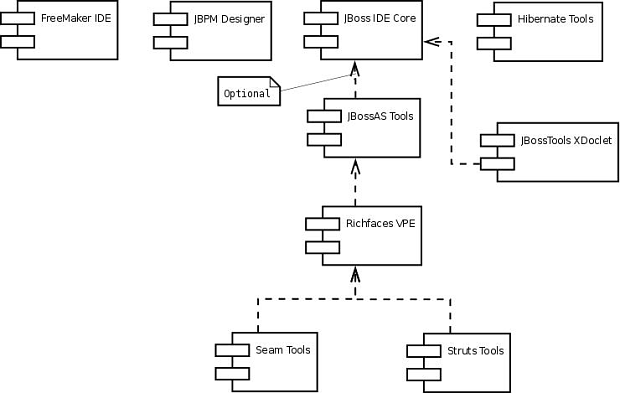
JBoss Tools is a suite of plugins for Eclipse. This diagram shows the plugins that comprise JBoss Tools and how they are related with one another (click to expand).
http://community.jboss.org/servlet/JiveServlet/showImage/102-10044-58-103...
It's possible to install the plugins in the JBoss Tools suite as standalone plugins. However, there are dependencies between plugins that you must satisify. These dependencies are shown in the diagram above. The archives for each standalone plugin are available on the JBoss Tools download page.
--------------------------------------------------------------
16 years, 5 months
[JBoss Tools] Document updated/added: "JBossToolsRoadmap"
by Max Andersen
User development,
The document "JBossToolsRoadmap", was updated Jan 20, 2010
by Max Andersen.
To view the document, visit:
http://community.jboss.org/docs/DOC-10800#cf
Document:
--------------------------------------------------------------
h2. JBoss Tools 3.x Road map
This page outlines the focus areas we will be working on for JBoss Tools 3.x.
This is a work in progress and if you think something is missing/incorrect then please raise it on our mailing list or forums or simply adjust the page if it is a minor correction.
Detailed road map with concrete issues and bug fixes is to be found in our http://jira.jboss.com/jira/browse/JBIDE?report=com.atlassian.jira.plugin....
For the moment this roadmap is split up in three sections, "General", "Web 2.0" and "SOA" to group the functionality according to their main target audience. Even though they are split up in different sections it does not mean they do not overlap, e.g. JBoss AS, Project Archives and Hibernate will all be relevant for SOA even though they are in Web 2.0 and the same goes for jBPM and Drools which are also relevant for Web 2.0 even though they are in SOA. The division is merely to group these according to the focus of the teams that are primarily working on these. Collaboration will be needed
JbdsRoadMap captures JBDS specific issues.
h3. General
h4. Installation
http://community.jboss.org/docs/DOC-11195 should be filled in with the user visible changes in configuration/installation.*[INCOMPLETE]*
h3. Web 2.0
Web 2.0 is focusing around Seam and related functionality. Note: This does not mean that the features depend on Seam, having a good experience in context of Seam is though the overall goal.
p.s. if anyone has a better name than Web 2.0 - please speak up
h4. JBoss AS
JbtHarSarEsbDepoymentSupport many users have been having problems with deploying HAR, SAR, ESB etc. archives in JBT. We should make that easier. Suggested solutions is to look into having a WTP module type for these and/or provide a way to control which suffix (.har,.sar,.esb vs. default .jar) will be used when deploying. *[INCOMPLETE]*
JbtJBossASDeploymentControl today all deployments via our JBoss adapter will be exploded. That is not always what you would like to happen. Having more control per module/project on how deployment should be would make sense. *[NOTDONE]*
JbtJBoss5Support JBoss 5 should be a first class citizen for us.*[DONE]*
h4. Project Archives
Input needed.
h4. Hibernate
JbtHibernateDaliSupport Dali is part of Ganymede and we should provide a Hibernate platform to Dali, enabling Hibernate specific features to be used easily in JPA projects.*[DONE]*
JbtDecouplingHibernateFromTools currently we use the bundled Hibernate jars to load the users classes and execute the queries and code generation. Tying us to a very specific version of Hibernate, we should investigate launching as many of these functionalities in an external process.*[NOTDONE]*
JbtHibernateConsoleValidation currently we have only several exceptions in case something is wrong during building of internal model. It should be done in Eclipse way with incremental builder and should post error markers with Quick Fixes available. *[NOTDONE]*
JbtForwardEngineering currently only Reverse Engineering is supported, so it takes a while make several classes persistent from scratch http://jira.jboss.com/jira/browse/JBIDE-2077 *[DONE]*
h4. Seam
JbtDecoupleSeamFacet have proper Seam facet and introduce our own "overall" project wizard.*[DONE]*
JbtSeamPagesXmlEditor the most voted for feature in JBT was graphical support for pages.xml editing. We will add that. *[DONE]*
JbtSeamELRefactoring *[INCOMPLETE]*
h4. Visual Page Editor
JbtXulRunner19 *[NOTDONE]*
Bring back caret for VPE *[DONE]*
Because: the visual editor is really hard to use without knowing where you are.
- Support relative path in non-web projects. *[DONE]*
- EL resolving *[DONE]*
- Support CDATA *[NOTDONE]*
- Recreate DnD feature. *[DONE]*
http://jira.jboss.org/jira/browse/JBIDE-1304 - Docbook XML editor (please, look at comments) *[NOTDONE]*
http://jira.jboss.org/jira/browse/JBIDE-1601 - XML Schema or DTD for VPE templates *[DONE]*
http://jira.jboss.org/jira/browse/JBIDE-1600 - Template Designer (we need at least documentation how to develop templates) *[NOTDONE*]
- Richfaces 3.2 components *[DONE]*
Bring an editing possibility to visual part of VPE. For example the slider has two values the min and the max. We should be able to edit this values in visual part. *[DONE]*
Because: it is the visual page editor.
To improve performance on large files *[DONE]*
Because: our editor must be convenient.
Various:
Add more templates of projects.*[?]*
Because: I think we should give more points to start to our users.
- Exclude .vpe.adf and vpe.tomahawk plugins because they are out of date. *[DONE]*
- Add unit tests with content checking for templates. *[DONE]*
- Add CSS editor dialog *[DONE]*
- Switch XulRunner in design mode *[DONE]*
- Support of DOCTYPE declaration *[DONE]*
- Process invisible tags.*[DONE]*
h4. JSF
JbtUnifyElCodeCompletion *[INCOMPLETE]*
JbtBeautifyElCodeCompletion *[INCOMPLETE]*
h4. Metawidget
http://community.jboss.org/docs/DOC-14240 *[INCOMPLETE]*
h4. Portal
JbtBasicPortalSupport *[DONE]*
h3. "SOA"
h4. ESB
JbtESBXmlEditor *[DONE]*
h4. WebServices
/JbtJBossWSWTPSupport *[DONE]*
h4. Drools
Input needed
h4. jBPM
Input needed
h4. Smooks
/JbtSmooksTransformationEditor *[INCOMPLETE]*
h3. Usability
Error messages, logging, defaults.
h3. Continuous build/Quality
unittests, pmd, coverage, publishing the results
Establish several related builds for JBossTools, JBossTools Tests, JBossTools Docs,JBDS, JBDS Tests(if we are going to have some, as example, we need test to check that JBoss EAP Server is created after JBDS first start), JBDS Docs.
Create JBossTools Update Site for Nightly builds for QA, to simplify installation.
Make it easy to identify what version, branch, build a given installation is running on (JBDS-288)
h3. Platforms
JBoss Tools does not have anything platform specific functionality besides the Visual Page Editor which uses XULRunner.
Thus if you do not use the Visual Page Editor any platform Eclipse runs on JBoss Tools will run on.
For VPE, the planned platforms are Windows XP/Vista, Linux 32-bit, Linux 64-bit and Mac OS X.
h3. Runtime support
EAP 4.x and SOA-P 4.x should be supported (different levels of support)
JBoss 5.0 and EAP 5.0 when they become available should be supported.
h3. Documentation
Context help for JBoss Tools - http://jira.jboss.org/jira/browse/JBDS-264, http://jira.jboss.org/jira/browse/JBIDE-1886
--------------------------------------------------------------
16 years, 5 months
[JBoss Tools] Document updated/added: "Manual installation of JBoss Tools 3.1.x on Eclipse 3.5 on GNU/Linux (64-bit)"
by Max Andersen
User development,
The document "Manual installation of JBoss Tools 3.1.x on Eclipse 3.5 on GNU/Linux (64-bit)", was updated Jan 20, 2010
by Max Andersen.
To view the document, visit:
http://community.jboss.org/docs/DOC-14081#cf
Document:
--------------------------------------------------------------
If you want to use http://www.jboss.org/tools on Eclipse 3.5 platform on 64-bit GNU/Linux distribution, you can find some obstacles comming from TPTP bugs like https://bugs.eclipse.org/bugs/show_bug.cgi?id=281721 and possibly some others which can interrupt your installation through http://wiki.eclipse.org/Equinox_p2_Getting_Started. This article is ment for GNU/Linux 64-bit system but in general it works on the rest OSs platforms like 32-bit Linux, Win32 and MacOSX.
These steps should bring you painless manual and flexible installation of full JBT 3.1.x running on Eclipse 3.5:
1. Download these prerequisites for JBT 3.1.Mx installation:* Eclipse 3.5 JEE* http://www.eclipse.org/downloads/download.php?file=/technology/epp/downlo...
* http://www.eclipse.org/downloads/download.php?file=/technology/epp/downlo...
* http://www.eclipse.org/downloads/download.php?file=/webtools/downloads/dr... Eclipse SDK 3.5 (already in Eclipse 3.5 JEE package)
* http://www.eclipse.org/downloads/download.php?file=/modeling/emf/emf/down...
* http://www.eclipse.org/downloads/download.php?file=/modeling/emf/emf/down...
* http://www.eclipse.org/downloads/download.php?file=/tools/gef/downloads/d...
* http://www.eclipse.org/downloads/download.php?file=/datatools/downloads/1...
* http://www.eclipse.org/downloads/download.php?file=/birt/downloads/drops/...
* http://www.eclipse.org/downloads/download.php?file=/birt/downloads/drops/...
* http://www.eclipse.org/downloads/download.php?file=/tptp/4.6.0/TPTP-4.6.0...
2. Assume you have installation structure like this
* /opt/ide - forlder for eclipse
* /opt/dropins - folder for other necessary bundles like (WTP,...)
3. Unzip Eclipse 3.5 EE into /opt/ide
* you should have structure this /opt/ide/eclipse/features, /opt/ide/eclipse/plugins
4. Unzip bundles into /opt/dropins
* you need to have structure like this:* /opt/dropins/wtp-sdk-3.1/eclipse/plugins
* /opt/dropins/emf-runtime-2.5/eclipse/plugins
* ...
5. Create links in you eclipse dropins directory (/opt/ide/eclipse/dropins) like this:
* ln -s /opt/dropins/wtp-sdk-3.1
* ln -s /opt/dropins/emf-runtime-2.5
* ...
6. Run Eclipse ( with "-clean" parameter)
7. http://www.jboss.org/tools/download.html (select way which suits you best)
* p2 repository (remote or local)
* dropins repository (same way as dependencies installation)
8. After JBT installation and restart you should have working Eclipse 3.5 with JBT. Check the eclipse log, there should be no complains.
Don't forget, p2 installation is recommended but dropins installation can be more flexible (almost if you want to try more versions at once) or if p2 installation simply doesn't work.
--------------------------------------------------------------
16 years, 5 months
[jBPM] New message: "Re: Problem Signaling a Waiting Execution"
by Santanu Saraswati
User development,
A new message was posted in the thread "Problem Signaling a Waiting Execution":
http://community.jboss.org/message/521001#521001
Author : Santanu Saraswati
Profile : http://community.jboss.org/people/saraswati.santanu
Message:
--------------------------------------------------------------
Well Andy,
I am not very sure how are you trying to do this. Let me explain what I think you should be doing.
But before that, your doubt about executionListener.findActiveActivityNames() method. This is "active" activity names. And you have only one active acitvity. I do not think there is any API to find all the activitiy names present in the JPDL.
Assuming you will need all of your node to be state nodes, you will need two sets of classes an external class which triggers the flow when required, and few event listener classes whcih will perform the business logic. Below is a sample of how both the classes should look like:
Class external to the flow that triggers the flow:
* private void signalWorkFlow(ProcessInstance processInstance) {*
* //signal flow to execute Activity1. The flow will stop at Activity2
*
* String stateName = "Activity1";
*
* Execution execution = processInstance.findActiveExecutionIn(stateName);*
* * *processInstance =* *executionService.signalExecutionById(execution.getId());*
*
*
* //signal flow to execute Activity2. The flow will stop at Activity3*
* String stateName = "Activity2";
*
* Execution execution = processInstance.findActiveExecutionIn(stateName);*
* * *processInstance =* *executionService.signalExecutionById(execution.getId());*
*
*
* ....*
* ....*
* .... till Activity8*
* }*
And the event listener will be something like:
* public void notify(EventListenerExecution execution) throws Exception {
//Execute business logic...*
* //Important to note that you do not call signalXXX here, neither from any other class which you call from here
*
* }*
Also please check if you really need so many state nodes or you need java node, task node etc. Every node has its own purpose. And you will be the best judge to see which node exactly fits your requirement.
--------------------------------------------------------------
To reply to this message visit the message page: http://community.jboss.org/message/521001#521001
16 years, 5 months