[JBoss Tools] Document updated/added: "JBossIDEReleaseProcess"
by Max Andersen
User development,
The document "JBossIDEReleaseProcess", was updated Jan 20, 2010
by Max Andersen.
To view the document, visit:
http://community.jboss.org/docs/DOC-10413#cf
Document:
--------------------------------------------------------------
h3. JBoss Eclipse IDE Release Process
-
----
Prereqs for using this build
1. Install infozip
2. Have write access to download.jboss.org/jbosside
3. ANT 1.6.5 is required. Set your ant home to the appropriate location.
4. This build requires SCP ability to download.jboss.com. All QA users have been setup, by default the build script uses the correct login. The private key which is accessed by the build must be in openssh format.
5. Ensure that the latest version of jsch.jar is installed in your ANT_HOME/lib directory
-
----
1. Each component's repository must be tagged for release. Generally, here are the current tag naming conventions we have for each component:
1.1. JBossIDE Core: IDE_CORE_RELEASENAME
1.2. JBossAOP Developer: IDE_AOP_DEVELOPER_RELEASENAME
1.3. EJB3 Tools: IDE_EJB3_TOOLS_RELEASENAME
1.4. Hibernate Tools: TOOLS_RELEASENAME
1.5. jBPM Designer: jbpm_gpd_releasename
3. After tagging is complete, an integration build is made on those tags.
4. Checkout the build system for JBossIDE
4.1. cvs co jbosside/releng/org.jboss.ide.eclipse.releng
6. From directory releng/org.jboss.ide.eclipse.releng execute the following:
6.1. ant -f customizeBuild.xml
8. This will launch a gui
8.1. Create temp dirs for the appropriate locations
8.2. You may need to execute 'ant -f customizeBuild.xml customize' to create a build.properties file.
10. Create a tags file, RELEASENAME.tag in the folder builders/product/versionTags
10.1. You can see an example tags file from the 1.5.1.GA release http://fisheye.jboss.com/viewrep/JBoss/jbosside/releng/org.jboss.ide.ecli...
10.2. You will need to know the sub version for each component.
10.3. The integration build is ran using this command in the builders directory of JBossIDE releng:
10.3.1. cd releng/org.jboss.ide.releng/builders
10.3.2. ./build-integration.sh product -tags tagsfile
10.3.3. See more info at the [JBossIDE Releng System
Docs|http://docs.jboss.com/jbosside/releng/user/build/en/html/index.html]
0.0.1. example: ./build-integration.sh product -tags product/versionTags/1.5.2.GA.tags
0.2. You will need to expand the eclipse-SDK which is downloaded into a an additional dir which you specify
0.3. Also, may need to modify global.properties updating as follows:
0.3.1. pdescriptdir=${clean.eclipse.home}/plugins/org.eclipse.pde.build_3.1.2/scripts
0.5. If the integration build breaks on compilation, the component lead responsible is notified and they re-tag their repository. We then re-initiate the integration build
2. Once the integration build is complete, each component lead is notified of the build and is responsible for doing any tests to their satisfaction on that build. (Note that this is usually outside the scope of unit tests).
2.1. If there are any fatal bugs / problems in the integration build, we give the responsible component leader time to fix those bugs, and re-start the process.
2.2. Once we receive the "thumbs-up" from all component leads, it's time to make a release build.
4. At this point, the tags file should be committed to Releng cvs.
5. If the release is "stable" (i.e. non beta/RC/etc) then you will run this command in the builders directory:
5.1. ./build-release.sh product stable RELEASENAME
7. Otherwise if the release is "development" (beta/RC/etc) then you will run this command:
7.1. ./build-release.sh product development RELEASENAME
9. The component leads are given a final chance to go over the release build before it will be published.
9.1. If there are any complaints, restart the process with the integration build
9.2. If all component leads give "thumbs-up", then it's time to upload and announce.
11. I first start by uploading all of the release files to sourceforge. Depending on the connection this can easily take a few hours. I have an ant script that automates this process for me that I've attached to this wiki. It's syntax is ./sf_upload.sh RELEASENAME (it probably needs to be changed to work on other systems)
12. While the files are uploading, I create the release in Sourceforge, and call it JBossIDE RELEASENAME.
13. I collect and enter the Changelog/ReleaseNotes from JIRA and various notes given to me from component leads.
14. After the files are done uploading, I add all of the appropriate files into the release, and describe them correctly using SF's interface (MD5 files get "Other", zips get ".zip", .tar.gz gets ".gz")
15. Now the only thing left to do is update the product download page and announce on the forums.
16. The "old" newest release is removed and replaced by the "new" newest release, including links to Sourceforge etc.
17. Release announcement is made on the JBossIDE http://jboss.com/index.html?module=bb&op=viewforum&f=201 and http://jboss.com/index.html?module=bb&op=viewforum&f=162. You can find an example announcement http://jboss.com/index.html?module=bb&op=viewtopic&t=78678
18. After the announcement is made, all of the people watching on Sourceforge are notified.
--------------------------------------------------------------
16 years, 5 months
[JBoss Tools] Document updated/added: "Doc JIRA"
by Max Andersen
User development,
The document "Doc JIRA", was updated Jan 20, 2010
by Max Andersen.
To view the document, visit:
http://community.jboss.org/docs/DOC-14254#cf
Document:
--------------------------------------------------------------
← back to ../../docs/DOC-14250
Here is JBDS JIRA - https://jira.jboss.org/jira/browse/jbds
On the Open Issues tab you can see the components, the docs ones have Doc- prefix. Usually when a new guide is created I asked Max to add a component for it, as it's very convenient to use guides names as components. New doc JIRA issue usually is created basing on developers' taks, to find the tasks that affects docs use filter with "affects documentation" check-box marked.
Most of the issues that affects docs can be found in JBoss Tools JIRA - https://jira.jboss.org/jira/browse/JBIDE. When a doc task is created basing on a dev task, the tasks are linked to each other with "is related to" link.
--------------------------------------------------------------
16 years, 5 months
[JBoss Tools Development] Document updated/added: "DevStudioReleaseProcess"
by Max Andersen
User development,
The document "DevStudioReleaseProcess", was updated Jan 20, 2010
by Max Andersen.
To view the document, visit:
http://community.jboss.org/docs/DOC-9570#cf
Document:
--------------------------------------------------------------
h3. JBoss Developer Studio and JBossTools Release Process
-
----
Prereqs for using this build
1. Install infozip
2. Have write access to download.jboss.org/jbosstools
3. Have file release permissions on sourceforge.net
-
----
1. Each component's repository must be tagged for release. Generally, we do a wide-sweeping tag for the entire jbosstools repository, while a few components (namely jBPM) have their own repositories and tags. You can easily tag a release by using the "make_tags.sh" script in releng's util directory.
TAG=jbosstools-2.1.2.GA BRANCH=branches/jbosstools-2.1.x ./make_tags.sh
0.1.
0.2. JBossIDE Core: IDE_CORE_RELEASENAME
0.3. JBossAOP Developer: IDE_AOP_DEVELOPER_RELEASENAME
0.4. EJB3 Tools: IDE_EJB3_TOOLS_RELEASENAME
0.5. Hibernate Tools: TOOLS_RELEASENAME
0.6. jBPM Designer: jbpm_gpd_releasename
2. After tagging is complete, an integration build is made on those tags.
3. Checkout the build system for JBossIDE
3.1. cvs co jbosside/releng/org.jboss.ide.eclipse.releng
5. From directory releng/org.jboss.ide.eclipse.releng execute the following:
5.1. ant -f customizeBuild.xml
7. This will launch a gui
7.1. Create temp dirs for the appropriate locations
7.2. You may need to execute 'ant -f customizeBuild.xml customize' to create a build.properties file.
9. Create a tags file, RELEASENAME.tag in the folder builders/product/versionTags
9.1. You can see an example tags file from the 1.5.1.GA release http://fisheye.jboss.com/viewrep/JBoss/jbosside/releng/org.jboss.ide.ecli...
9.2. You will need to know the sub version for each component.
9.3. The integration build is ran using this command in the builders directory of JBossIDE releng:
9.3.1. cd releng/org.jboss.ide.releng/builders
9.3.2. ./build-integration.sh product -tags tagsfile
9.3.3. See more info at the [JBossIDE Releng System
Docs|http://docs.jboss.com/jbosside/releng/user/build/en/html/index.html]
0.0.1. example: ./build-integration.sh product -tags product/versionTags/1.5.2.GA.tags
0.2. You will need to expand the eclipse-SDK which is downloaded into a an additional dir which you specify
0.3. Also, may need to modify global.properties updating as follows:
0.3.1. pdescriptdir=${clean.eclipse.home}/plugins/org.eclipse.pde.build_3.1.2/scripts
0.5. If the integration build breaks on compilation, the component lead responsible is notified and they re-tag their repository. We then re-initiate the integration build
2. Once the integration build is complete, each component lead is notified of the build and is responsible for doing any tests to their satisfaction on that build. (Note that this is usually outside the scope of unit tests).
2.1. If there are any fatal bugs / problems in the integration build, we give the responsible component leader time to fix those bugs, and re-start the process.
2.2. Once we receive the "thumbs-up" from all component leads, it's time to make a release build.
4. At this point, the tags file should be committed to Releng cvs.
5. If the release is "stable" (i.e. non beta/RC/etc) then you will run this command in the builders directory:
5.1. ./build-release.sh product stable RELEASENAME
7. Otherwise if the release is "development" (beta/RC/etc) then you will run this command:
7.1. ./build-release.sh product development RELEASENAME
9. The component leads are given a final chance to go over the release build before it will be published.
9.1. If there are any complaints, restart the process with the integration build
9.2. If all component leads give "thumbs-up", then it's time to upload and announce.
11. I first start by uploading all of the release files to sourceforge. Depending on the connection this can easily take a few hours. I have an ant script that automates this process for me that I've attached to this wiki. It's syntax is ./sf_upload.sh RELEASENAME (it probably needs to be changed to work on other systems)
12. While the files are uploading, I create the release in Sourceforge, and call it JBossIDE RELEASENAME.
13. I collect and enter the Changelog/ReleaseNotes from JIRA and various notes given to me from component leads.
14. After the files are done uploading, I add all of the appropriate files into the release, and describe them correctly using SF's interface (MD5 files get "Other", zips get ".zip", .tar.gz gets ".gz")
15. Now the only thing left to do is update the product download page and announce on the forums.
16. The "old" newest release is removed and replaced by the "new" newest release, including links to Sourceforge etc.
17. Release announcement is made on the JBossIDE http://jboss.com/index.html?module=bb&op=viewforum&f=201 and http://jboss.com/index.html?module=bb&op=viewforum&f=162. You can find an example announcement http://jboss.com/index.html?module=bb&op=viewtopic&t=78678
18. After the announcement is made, all of the people watching on Sourceforge are notified.
--------------------------------------------------------------
16 years, 5 months
[JBoss Tools] Document updated/added: "JSF 2 support in JBT"
by Max Andersen
User development,
The document "JSF 2 support in JBT", was updated Jan 20, 2010
by Max Andersen.
To view the document, visit:
http://community.jboss.org/docs/DOC-14145#cf
Document:
--------------------------------------------------------------
*1. 2.0 version to New JSF Project Wizard.*
*2. New project templates for New JSF Project Wizard.*
*3. New JSF 2 Facet?*
Just extend WTP JSF 1 facet and keep it in JBT until WTP implement their own one.
*4. Support of annotated managed beans and properties.*
JSF builder should recognize them.
See https://jira.jboss.org/jira/browse/JBIDE-5045
*5. Resource handling.*
- JSF builder should load all resource stores in src and jars (META-INF/resources/<resourceIdentifier>, <WebRoot>/resources/<resourceIdentifier>). This info should be avaliable in JSF Tools model. See https://jira.jboss.org/jira/browse/JBIDE-5046
- EL Support for #{resource['...']}
- Relocatable resources suport in CA, OpenOns in XHTML/JSP. E.g. +<h:outputScript name=”ajax.js” *library=”javax.faces”*+
* - Resource handling has been implemented in VPE https://jira.jboss.org/jira/browse/JBIDE-2550
*
*6. Composite component support.*
- JSF builder during loading resources (see Resource Handling section) should parse all composite components and create KB tag lib implementation (ITagLib) for every namespace and fill them with KB component implementations (IComponent). CA will work automaticly in XHTMLs for such components then.
- VPE supports composition components JSF2.0. See https://jira.jboss.org/jira/browse/JBIDE-5015
- VPE should use JSF Tools model to get composite components. See https://jira.jboss.org/jira/browse/JBIDE-5044
- EL support for #{cc.*} which is used in composite componet declarations.
*7. Support EL in *.java and *.xml files like we do it in Seam Tools.*
CA, OpenOns, …
*8. Move EL validation from Seam tools to JSF tools.*
It's matter of EL resolvers to provide specific information for plain JSF or Seam projects.
This feature is for both JSF 1 and JSF 2 versions.
See https://jira.jboss.org/jira/browse/JBIDE-4978
*9. Support of new faces-config.xml schema in Faces-config editor.*
*10. New VPE templates for JSF 2 UI components.*
*11. Custom Facelet Tag Support, facelts has been included into JSF 2.0*
Custom facelet tag support has been implemented in VPE, see following JIRAs(JBIDE-3197,JBIDE-3959,JBIDE-3247)
CA, OpenOns, VPE, ... for Custom facelet tag on pages. (See https://jira.jboss.org/jira/browse/JBIDE-4970)
*...*
--------------------------------------------------------------
16 years, 5 months
[JBoss Tools] Document updated/added: "JbtMetawidgetSupport "
by Max Andersen
User development,
The document "JbtMetawidgetSupport ", was updated Jan 20, 2010
by Max Andersen.
To view the document, visit:
http://community.jboss.org/docs/DOC-14240#cf
Document:
--------------------------------------------------------------
h1. JBoss Tools Metawidget Support
This page is an attempt to collect together ideas and proposals for what http://metawidget.org support may look like within JBoss Tools.
h2. metawidget.xml
Metawidget can (optionally) be configured with an external XML file, typically named metawidget.xml. For more details see http://metawidget.org/doc/reference/en/html/ch01.html#section-introductio....
*XML Schemas*
This XML format is similar to the Seam components.xml format, in that it uses XML namespaces to both identify Java packages and allow XML schema validation. The XML schemas for all Metawidget components are automatically generated at http://metawidget.org/xsd. For example http://metawidget.org/xsd/org.metawidget.jsp.tagext.html.layout-1.0.xsd.
JBoss Tools could help metawidget.xml construction by being aware of all XML schemas in http://metawidget.org/xsd.
*ConfigReader*
Metawidget processes metawidget.xml using a ConfigReader class. This is lightweight, and it may be possible to run it in addition to XML schema validation to detect such errors as, say, class or package name incorrectly specified.
ConfigReader also does some sanity checks of its own, such as checking whether certain classes implement .equals and .hashCode, and it may to nice to alert the user of these at development time rather than application startup time.
--------------------------------------------------------------
16 years, 5 months
[JBoss Tools] Document updated/added: "VPE message attributes processing process"
by Max Andersen
User development,
The document "VPE message attributes processing process", was updated Jan 20, 2010
by Max Andersen.
To view the document, visit:
http://community.jboss.org/docs/DOC-13828#cf
Document:
--------------------------------------------------------------
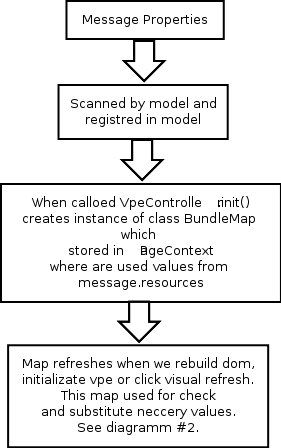
1) This diagram shows how message resources registred in VPE
http://community.jboss.org/servlet/JiveServlet/showImage/102-13828-2-1469...
Some class names which can be usefull:
* VpeController - visual page editor controler, see method init()
for followinf lines
bundle = new BundleMap();
bundle.init(sourceEditor);
* org.jboss.tools.vpe.editor.bundle.BundleMap class where stores message resources properties.
2) Diagram #2 how this bundles used when generates a visual nodes
http://community.jboss.org/servlet/JiveServlet/showImage/102-13828-2-1471...
Usefull classes and method
* org.jboss.tools.vpe.editor.VpeVisualDomBuilder method createNode(Node sourceNode,nsIDOMNode visualOldContainer) following code
if (ElService.getInstance().isELNode(getPageContext(),
sourceNode)) {
sourceNodeProxy = VpeProxyUtil.createProxyForELExpressionNode(getPageContext(),
sourceNode);
* org.jboss.tools.vpe.editor.util.ELService check is node have EL attributes and replce in proxy node calls neccery attributes and values
* package org.jboss.tools.vpe.editor.proxy here contained vpe proxys for source nodes
--------------------------------------------------------------
16 years, 5 months
[JBoss Tools] Document updated/added: "WtpEclipseJBossIDE"
by Max Andersen
User development,
The document "WtpEclipseJBossIDE", was updated Jan 20, 2010
by Max Andersen.
To view the document, visit:
http://community.jboss.org/docs/DOC-12766#cf
Document:
--------------------------------------------------------------
h2. Eclipse and JBoss IDE Application Server Integration
JBoss IDE 1.6 was based on the Eclipse 3.1 version and interacted with JBoss AS via a custom plug-in written by JBoss.
JBoss IDE 2.0 is based on Eclipse 3.2 and interacts with JBoss AS via a the more standard WTP (Web Tools Project) mechanism. Going forward, this will be the default and will replace the custom plug-in.
Although it should in theory be possible to continue to run the custom plug-in in version 3.2 JBoss encourage users to migrate to the WTP version which is far superior.
The new WTP plug-in is heavily based on new features introduced into Eclipse in version 3.2 and will not run in earlier versions.
--------------------------------------------------------------
16 years, 5 months
[JBoss Tools] Document updated/added: "JBosstoolsVisualEditorFAQ"
by Max Andersen
User development,
The document "JBosstoolsVisualEditorFAQ", was updated Jan 20, 2010
by Max Andersen.
To view the document, visit:
http://community.jboss.org/docs/DOC-10862#cf
Document:
--------------------------------------------------------------
*Q : Visual Editor does not start under Linux*
*A* : Linux users may need to do the following to get the visual editor to work correctly on their machines.
* The Visual Page Editor (before JBoss Tools 3.1.0.M4) requires the library libstdc++.so.5. This library is contained in the compat-libstdc++-33.i386 package.
** To install this package on Fedora Core or Red Hat Enterprise Linux run the following command:
** On any other rpm based distributions download libstdc++.so.5 and run the following command:
** On Debian and Debian based distributions (e.g. Ubuntu) run the following command:
* In case you have the library installed and you still have issue with starting the visual page editor then close all browser views/editors and leave one visual page editor open and restart eclipse. This should force a load of the right XULRunner viewer.
*Q: Visual Editor doesn't start at any platform and shows message* 'The VPE editor can't be run because your system environment needs to be changed slightly'
* check is you version of studia/tools is compatible with you version of eclipse, see compatible matrix http://community.jboss.org/docs/DOC-14297
--------------------------------------------------------------
16 years, 5 months